
1. Introducció
Thank you for choosing the HIKMICRO HEIMDAL H4D Digital Night Vision Monocular. This device is designed for observation in low light and complete darkness, featuring a high-resolution sensor and AMOLED display for clear imaging.
Característiques principals:
- 1.39" AMOLED display with 454 x 454 resolution
- High-resolution 2560 x 1440 sensor
- Integrated 850 nm infrared illuminator with smart IR function
- Day/Night/Auto/Defog modes
- Estabilització electrònica d’imatges (EIS)
- Detection range up to 200 meters
- Replaceable and rechargeable battery with over 4 hours of use
- Compact and portable design, waterproof and dustproof (IP67)
- Integrated 32 GB EMMC for storing recorded videos and photos
- Wireless connection via HIKMICRO Sight app, local album function
Contingut del paquet:
- HIKMICRO HEIMDAL H4D Digital Night Vision Monocular
- Bateria
- Drap de pols
- Bossa protectora
- Corretja de canell
- Cable USB-C
- Guia ràpida
2. Producte acabatview
Familiarize yourself with the components and controls of your HIKMICRO HEIMDAL H4D monocular.
Disseny del dispositiu
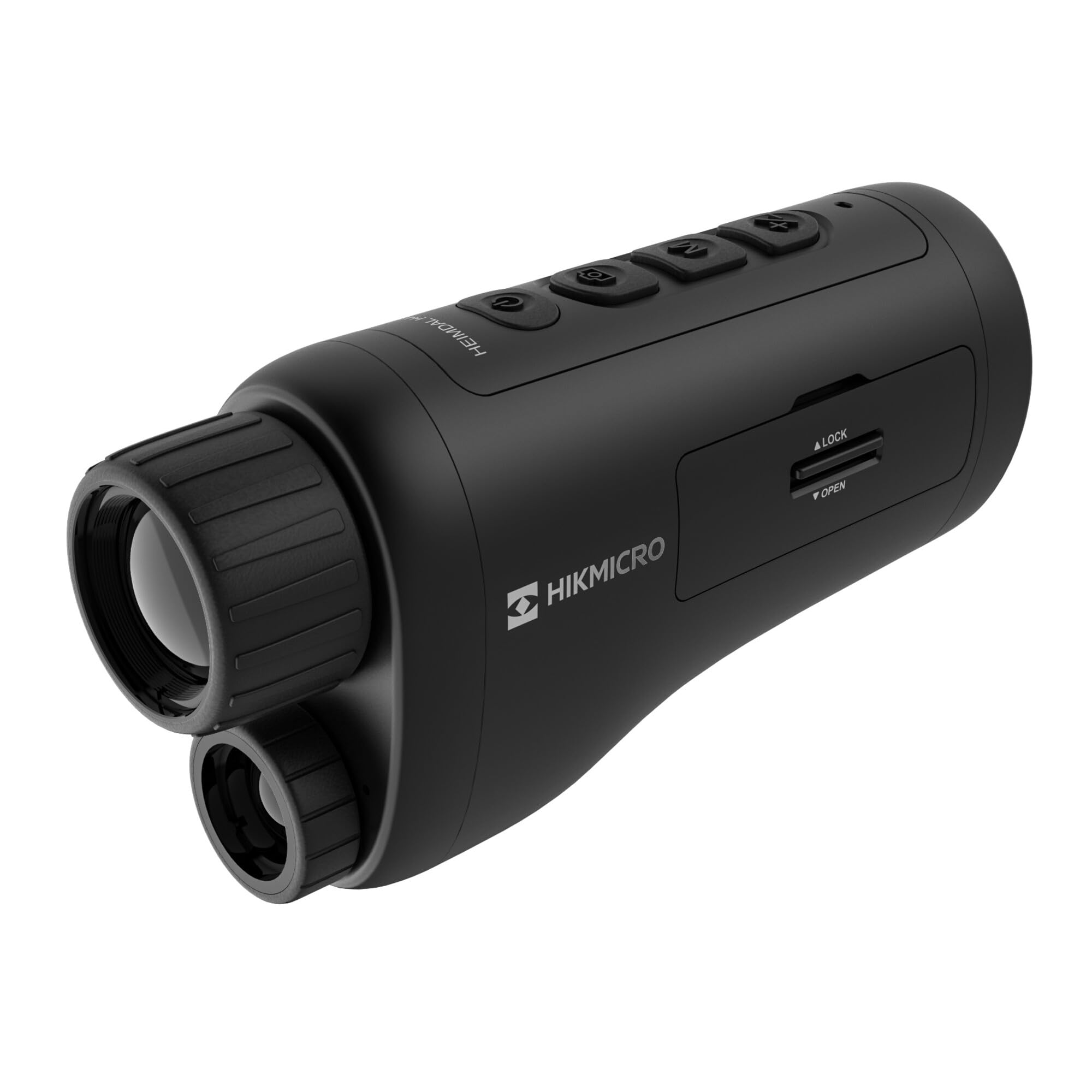
Un angle view of the HIKMICRO HEIMDAL H4D monocular, showing its compact, ergonomic design and the main lens.
Controls i botons

A dalt view of the monocular showing the power button, photo/video record button, mode button, and zoom/IR adjustment buttons.
Lenses and Focus

Davant view displaying the objective lens and the integrated infrared illuminator.
Compartiment de la bateria

lateral view showing the battery compartment with 'LOCK' and 'OPEN' indicators.
3. Configuració
Instal·lació de la bateria
- Locate the battery compartment on the side of the device.
- Slide the lock mechanism to the 'OPEN' position.
- Introduïu la bateria recarregable, assegurant-vos de la polaritat correcta.
- Close the compartment and slide the lock mechanism to the 'LOCK' position.
Carregant la bateria
Connect the device to a power source using the provided USB-C cable. The charging indicator will show the charging status.
Encès inicial
Premeu i manteniu premut el botó d'engegada (normalment marcat amb Ⓘ) until the HIKMICRO logo appears on the display.
4. Instruccions de funcionament
Encès/Apagat
- Encès: Manteniu premut el botó d'engegada durant aproximadament 3 segons.
- Apagar: Press and hold the power button for approximately 3 seconds until the device shuts down.
Ajust del focus
Rotate the focus ring on the objective lens to achieve a clear image of your target.
Selecció del mode
Press the 'M' (Mode) button to cycle through observation modes: Day, Night, Auto, and Defog.
Zoom and IR Adjustment
Use the '+' and '-' buttons to adjust the digital zoom level. These buttons also control the intensity of the infrared illuminator in night mode.
Photo and Video Recording
- Fes una foto: Press the photo/video button (usually marked with 📷) once to capture an image.
- Grava vídeo: Press and hold the photo/video button to start recording. Press again to stop.
Connecting to HIKMICRO Sight App
Download the HIKMICRO Sight app from your device's app store. Follow the in-app instructions to connect your monocular for live view, remote control, and media management.
5. Manteniment
Neteja
- Use the provided dust cloth or a soft, lint-free cloth to clean the lenses.
- For stubborn dirt, use a lens cleaning solution specifically designed for optics.
- Wipe the device body with a soft, damp tela. No utilitzeu netejadors abrasius ni dissolvents.
Emmagatzematge
- Store the monocular in its protective bag in a cool, dry place when not in use.
- Traieu la bateria si el dispositiu no s'utilitzarà durant un període prolongat.
Cura de la bateria
- Charge the battery regularly, even if not in frequent use, to maintain its lifespan.
- Eviteu temperatures extremes durant la càrrega i l'emmagatzematge.
6. Solució De Problemes
Problemes comuns i solucions
| Problema | Causa possible | Solució |
|---|---|---|
| El dispositiu no s'encén. | La bateria està esgotada o instal·lada incorrectament. | Carregueu la bateria. Assegureu-vos que la bateria estigui inserida amb la polaritat correcta. |
| La imatge és borrosa. | Focus is not adjusted. | Rotate the focus ring on the objective lens until the image is clear. |
| Poor image quality in darkness. | IR illuminator is off or set to low intensity. | Activate the IR illuminator or increase its intensity using the '+' button. Ensure you are in Night mode. |
| Cannot connect to HIKMICRO Sight app. | Bluetooth/Wi-Fi is off on device or phone, or app is not updated. | Ensure Bluetooth/Wi-Fi is enabled on both devices. Restart the app and monocular. Check for app updates. |
| El dispositiu es bloqueja o deixa de respondre. | Error temporal de programari. | Feu un restabliment suau mantenint premut el botó d'engegada fins que el dispositiu es reiniciï. Si el problema persisteix, contacteu amb l'assistència tècnica. |
7. Especificacions
| Característica | Detall |
|---|---|
| Resolució del sensor | 2560 x 1440 |
| Tipus de visualització | AMOLED |
| Resolució de visualització | 454 x 454 |
| Mida de la pantalla | 1.39 polzades (3.5 cm) |
| Il·luminador d'infrarojos | Integrated 850 nm |
| Interval de detecció | Fins a 200 metres |
| Emmagatzematge | 32 GB EMMC (internal) |
| Durada de la bateria | More than 4 hours (replaceable, rechargeable) |
| Classificació impermeable | IP67 |
| Dimensions | 153 mm x 50 mm x 80 mm (6.02" x 1.97" x 3.15") |
| Pes | 375 grams (0.83 lliures) |
| Material | Plàstic |
| Dispositius compatibles | Rifle, Compound Bow |
| Tipus de muntatge | Muntatge Picatinny |
| Sport Use | Camping, Senderisme |
| Color | Blanc |
8. Garantia i Suport
HIKMICRO products are covered by a limited warranty. For detailed warranty information, please refer to the official HIKMICRO weblloc o poseu-vos en contacte amb el vostre distribuïdor local.
For technical support, troubleshooting assistance, or service inquiries, please visit the official HIKMICRO support page or contact their customer service department.
Oficial Weblloc: www.hikmicrotech.com