
Introducció
The Chargeworx CX9985 is an advanced wireless car charger designed to provide convenient and safe smartphone mounting and charging in your vehicle. It features a built-in motion sensor for automatic grip operation, wireless charging capability, and a versatile mounting system.
This manual provides instructions for the proper setup, operation, maintenance, and troubleshooting of your Chargeworx CX9985 wireless charging car mount.
Instruccions de configuració
Follow these steps to properly install your Chargeworx CX9985 car mount:
- Trieu una ubicació de muntatge: The CX9985 can be mounted on your dashboard, windshield, or air vent. Select a location that does not obstruct your view de la carretera o interferir amb els controls del vehicle.
- Enganxeu el muntatge:
- For Dashboard/Windshield: Clean the surface thoroughly. Press the suction cup firmly onto the desired surface and engage the locking lever to secure it.
- For Air Vent: Attach the vent clip accessory to the main unit. Securely fasten the clip to a sturdy air vent slat.
- Ajusteu l'angle: Loosen the adjustment knobs on the mount to position the charging pad at an optimal viewing angle. Tighten the knobs once the desired angle is achieved.
- Connectar l'alimentació: Connect the provided USB Type-C cable to the charging port on the mount and plug the other end into a compatible USB car charger (not included). Ensure the car charger provides sufficient power for wireless charging (e.g., 9V output).
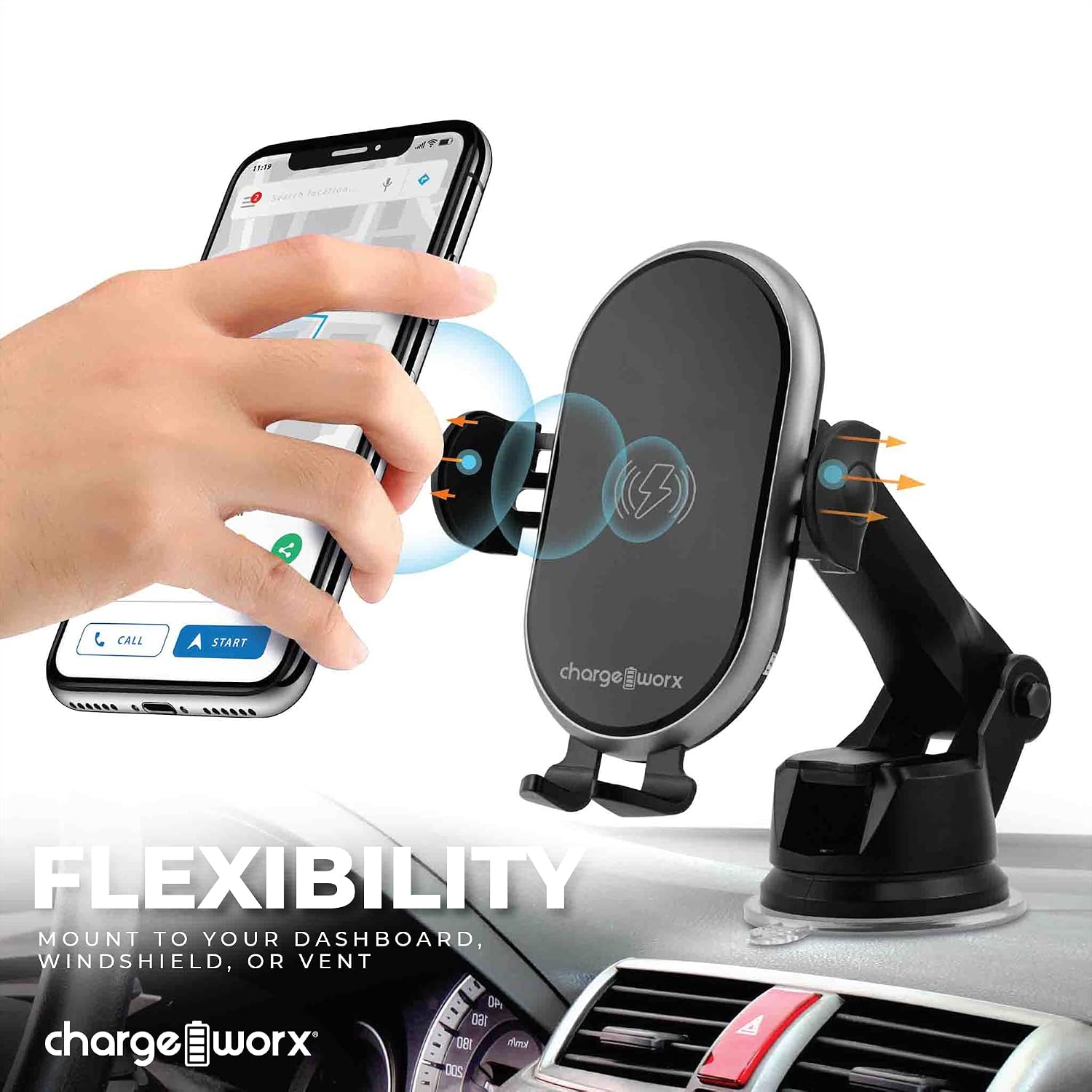
Image: The Chargeworx CX9985 mount attached to a dashboard, demonstrating its versatile mounting capabilities for dashboard, windshield, or vent.
Instruccions de funcionament
The Chargeworx CX9985 is designed for ease of use with its automatic features.
- Placing Your Smartphone: When the mount is powered, the built-in motion sensor will detect your phone's presence. The side grips will automatically open. Place your Qi-compatible smartphone onto the charging pad. The grips will then automatically close to secure your device.
- Càrrega sense fils: Once your phone is securely placed, wireless charging will begin automatically. The LED charging indicator on the mount will illuminate to confirm that charging is active.
- Removing Your Smartphone: To remove your phone, gently touch the sensor area on the side of the mount. The grips will automatically open, allowing you to retrieve your device. The grips will then close after a few seconds.
- Indicador LED de càrrega: The LED indicator provides real-time status:
- Blau/verd sòlid: Charging actively.
- Parpellejant: Error or foreign object detected. Remove the phone and check for obstructions.
- Apagat: Not charging or fully charged (depending on model behavior).

Image: A user demonstrating the one-handed operation of placing a smartphone into the Chargeworx CX9985 car mount.

Image: The Chargeworx CX9985 car mount with a smartphone, illustrating the LED charging indicator and the built-in motion sensor functionality.
Manteniment
To ensure the longevity and optimal performance of your Chargeworx CX9985, follow these maintenance guidelines:
- Neteja: Use a soft, dry cloth to wipe down the surface of the mount. Avoid using abrasive cleaners, solvents, or harsh chemicals, as these can damage the device.
- Cura de la ventosa: If using the suction cup mount, periodically clean the suction cup and the mounting surface to ensure a strong grip. If the suction cup loses adhesion, rinse it with warm water and let it air dry before reattaching.
- Condicions ambientals: Eviteu exposar el dispositiu a temperatures extremes, a la llum solar directa durant períodes prolongats o a una humitat elevada.
- Gestió de cables: Ensure the USB-C cable is not kinked or pinched, which can lead to damage.
Resolució de problemes
If you encounter issues with your Chargeworx CX9985, refer to the following common problems and solutions:
| Problema | Causa possible | Solució |
|---|---|---|
| El dispositiu no es carrega. |
|
|
| Grips not opening/closing automatically. |
|
|
| Mount not staying attached to surface. |
|
|
Especificacions del producte
| Marca | CHARGEWORX |
| Número de model | CX9985 |
| Tipus de connector | Sense fil |
| Dispositius compatibles | Smartphones (Qi-compatible) |
| Característica especial | Charging Indicator, Motion Sensor |
| Color | Negre |
| Entrada Voltage | 9 Volts |
| Vol. De sortidatage | 9 Volts |
| Tecnologia de connectivitat | Sense fil |
| Tipus de muntatge | Vent Mount, Dashboard, Windshield |
| Font d'alimentació | Vehicle Battery Powered (via USB-C) |
| Tipus de connector d'alimentació principal | USB tipus C |
| Especificació Met | Qi |
| Pes de l'article | 0.44 lliures |
| UPC | 643620028056 |
Informació de la garantia
The Chargeworx CX9985 Touch-Activated Wireless Charging Car Mount is covered by a Garantia del fabricant de 90 dies des de la data de compra. Aquesta garantia cobreix els defectes de materials i de mà d'obra en ús normal.
The warranty does not cover damage resulting from accident, misuse, abuse, improper installation, unauthorized repair or modification, or external causes such as drops or spills. Please retain your proof of purchase for warranty claims.
Atenció al client
For further assistance, technical support, or warranty inquiries, please contact Chargeworx customer service. You may also visit the official Chargeworx store for more product information and support resources.
Chargeworx Official Store: https://www.amazon.com/stores/Chargeworx/page/AB38787F-F422-41AA-BC71-4F58F23FD521