
ANYSECU UV K5
ANYSECU UV-K5 Dual Band Walkie Talkie User Manual
Model: UV K5
1. Introducció
This manual provides comprehensive instructions for the operation and maintenance of your ANYSECU UV-K5 Dual Band Walkie Talkie. The UV-K5 is a versatile communication device featuring UHF/VHF dual-band capabilities, 200 memory channels, and advanced functions such as NOAA Weather Alert, DTMF, FM radio, and voice encryption. Please read this manual thoroughly to ensure proper usage and to maximize the performance of your device.

Figure 1.1: ANYSECU UV-K5 Dual Band Walkie Talkie
2. Què hi ha a la caixa
Upon unboxing your ANYSECU UV-K5, please verify that all the following components are included:
- UV-K5 Radio Unit
- Antena
- Bateria
- Charger (Desk Charger)
- Clip de cinturó
- Manual d'usuari

Figure 2.1: Included components of the UV-K5 package.
3. Producte acabatview
Familiarize yourself with the various parts and controls of your UV-K5 radio:

Figure 3.1: Labeled diagram of the UV-K5 radio, showing the antenna, flashlight, switch/volume key, PTT, menu/confirm key, keys 1-9, up/down/return keys, headphone jack, and Type-C charger port.
- Antena: Per transmetre i rebre senyals.
- Switch/Volume Key: Powers the radio on/off and adjusts volume.
- Botó PTT (Prem per parlar): Premeu i manteniu premut per transmetre, deixeu-lo anar per rebre.
- Menu/Confirm Key (M): Enters the menu and confirms selections.
- Tecles amunt/avall: Navegueu per les opcions del menú o ajusteu les freqüències/canals.
- Teclat numèric: For direct frequency input, channel selection, and accessing shortcut functions.
- Port de carregador tipus C: Per a la càrrega directa de la ràdio.
- Auriculars Jack: Per connectar un auricular o micròfon extern.
4. Configuració
4.1. Instal·lació i càrrega de la bateria
The UV-K5 comes with a rechargeable polymer lithium-ion battery. For air transport requirements, the battery may be pre-installed. This does not indicate a used product.

Figure 4.1: Important note regarding battery installation for shipping.
To charge the radio, you can use either the included desk charger or a Type-C cable directly. The radio supports multiple charging modes for convenience.
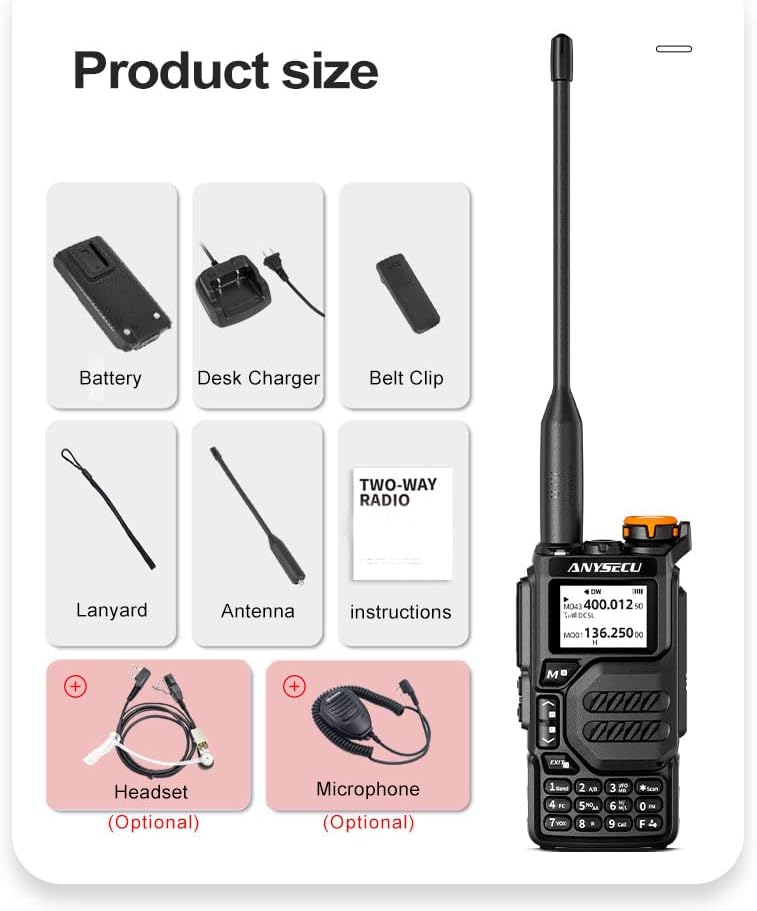
Figure 4.2: The UV-K5 supports both Type-C direct charging and traditional seat charging.
The battery provides durable power and long standby time, with a capacity of 1600mAh.

Figure 4.3: The UV-K5 features a 1600mAh polymer lithium-ion battery for extended use.
4.2. Fixació de l'antena
Enrosqueu l'antena en sentit horari al connector de l'antena a la part superior de la ràdio fins que quedi ben ajustada amb els dits. No l'estrengueu massa.
5. Instruccions de funcionament
5.1. Engegada/Apagada i Ajust de Volum
To power on the radio, rotate the Switch/Volume key clockwise. To power off, rotate it counter-clockwise until it clicks. Rotate the key to adjust the volume level.
5.2. Mode Switching (Channel/Frequency Mode)
The UV-K5 supports both Channel Mode and Frequency (VFO) Mode. You can switch between these modes using the appropriate function key or menu option. In Frequency Mode, you can directly input frequencies using the numeric keypad. In Channel Mode, you can select from up to 200 pre-programmed channels.

Figure 5.1: The UV-K5 features a dual-band dual display, allowing simultaneous monitoring of two frequencies or channels.
5.3. Navegació del menú
The UV-K5 has 51 menu options for various settings. Press the M (Menu/Confirm) key to enter the menu. Use the Amunt/Avall keys to navigate through options. Press M again to select an option, then use Amunt/Avall to change its value. Press M to confirm the change, or Sortida cancel·lar.
5.4. Característiques clau
- Alerta meteorològica de la NOAA: The radio can receive NOAA weather alerts. To hear the station, you need to press the RECEIVE side button (left side under PTT); it is not automatic RX.
- Fast Copy One Channel (Wireless Frequency Copy): Aquesta funció permet copiar ràpidament una freqüència d'una altra ràdio.
- DTMF: Senyalització multifreqüència de doble to per a diverses funcions de control.
- Ràdio FM: Listen to standard FM broadcast radio.
- Voice Encryption (Scrambler): Millora la privadesa de les comunicacions.
- Funció VOX: Transmissió activada per veu, que permet un funcionament amb mans lliures.
- Alerta d'emergència: Activa un senyal d'alarma per a situacions d'emergència.
- Power-on Protection Password: Establiu una contrasenya per evitar l'ús no autoritzat.

Figure 5.2: Activating NOAA receive function requires pressing the side button.

Figure 5.3: Wireless frequency copy in action, showing two radios.

Figure 5.4: Visual representation of key features including Emergency Alert, Wireless Replication, Power-on Password, Voice Encryption, NOAA Weather Reminder, and Intercom.
5.5. Programació de la ràdio
The UV-K5 can be programmed manually via the keypad or using dedicated software on a computer. A programming cable (same as Baofeng UV-5R 2-pin cable) is required for computer programming.
For software download and programming instructions, please refer to the official ANYSECU weblloc:
- Descàrrega de programari: http://www.szanysecu.com/h-col-106.html (named: UV-K5)
- Com programar: http://www.szanysecu.com/en/en/h-nd-37.html
5.6. Vídeo oficial del producte
Watch this official video for a demonstration of the ANYSECU UV-K5 Dual Band Radio's features and operation:
Video 5.1: Demonstration of the ANYSECU UV-K5 Dual Band Radio, showcasing its interface and basic functions.
6. Manteniment
To ensure the longevity and optimal performance of your UV-K5 radio, follow these maintenance guidelines:
- Neteja: Utilitzeu un suau, damp drap per netejar l'exterior de la ràdio. No utilitzeu productes químics agressius ni netejadors abrasius.
- Cura de la bateria: Carregueu la bateria regularment. Eviteu descarregar completament la bateria amb freqüència, ja que això pot reduir-ne la vida útil. Guardeu la ràdio i la bateria en un lloc fresc i sec quan no les utilitzeu durant períodes prolongats.
- Cura de l'antena: Manipuleu l'antena amb cura. Si la doblegueu o la forceu, podeu danyar el connector.
- Protecció del medi ambient: Protect the radio from extreme temperatures, direct sunlight, dust, and moisture. The radio is not water resistant.
7. Solució De Problemes
If you encounter issues with your UV-K5 radio, refer to the following common troubleshooting tips:
| Problema | Causa possible | Solució |
|---|---|---|
| La ràdio no s'encén | Low or dead battery; incorrect battery installation | Carregueu la bateria; assegureu-vos que la bateria estigui correctament instal·lada. |
| No es pot transmetre ni rebre | Freqüència/canal incorrecte; antena no connectada; nivell de silenciament massa alt | Verify frequency/channel settings; ensure antenna is securely attached; adjust squelch level. |
| Mala qualitat d'àudio | Weak signal; volume too low/high; microphone/speaker issues | Move closer to transmitting radio; adjust volume; check for obstructions on microphone/speaker. |
| El teclat no respon | Bloqueig del teclat activat | Deactivate keypad lock (refer to manual for specific key combination). |
For more complex issues or problems not listed here, please contact customer support or refer to the detailed troubleshooting section in the full user manual.
8. Especificacions
Below are the technical specifications for the ANYSECU UV-K5 Walkie Talkie:
| Especificació | Valor |
|---|---|
| Marca | ANYSECU |
| Número de model | UV K5 |
| Pes de l'article | 15.5 unces |
| Dimensions del producte | 1 x 3 x 5 polzades |
| Bateries | Necessites piles de 1 A (incloses) |
| Color | Negre |
| Nombre de canals | 200 (as per product title) |
| Característica especial | UHF, VHF, DTMF, FM, Scrambler, NOAA Weather Alert, Fast Copy One Channel |
| Interval de freqüència | UHF, VHF |
| Interval de conversa màxim | 5 quilòmetre |
| Tecnologia del sintonitzador | UHF, VHF |
| Voltage | 7.4 Volts |
| Nivell de resistència a l'aigua | No resistent a l'aigua |
| Data de primera disponibilitat | 3 d'abril de 2023 |
9. Garantia i Suport
The ANYSECU UV-K5 radio body comes with a 1 any de garantia des de la data de compra.
For technical support, software downloads, or further assistance, please visit the official ANYSECU website or contact their customer service. Relevant links for programming software and guides are provided in Section 5.5 of this manual.
Ask a question about this manual
Ask about setup, troubleshooting, compatibility, parts, safety, or missing instructions. Manuals+ will review the question and use this page’s manual context to help answer it.