1. Introducció
Welcome to the BOSGAME H77 Mini PC user manual. This guide provides essential information for setting up, operating, maintaining, and troubleshooting your new mini PC. Please read this manual thoroughly to ensure proper usage and to maximize the performance and longevity of your device.
2. Producte acabatview
The BOSGAME H77 is a compact yet powerful mini PC designed for a wide range of applications, from daily productivity to light gaming. It features an AMD Ryzen 7 7735HS processor, 32GB DDR5 RAM, and a 512GB NVMe M.2 SSD, offering high performance in a small form factor.

Figure 2.1: Powerful Performance. This image illustrates the core specifications of the BOSGAME H77 Mini PC, emphasizing its AMD Ryzen 7 7735HS processor with 8 cores, 16 threads, a clock speed range of 3.2 to 4.75GHz, and a Thermal Design Power (TDP) of 35W. A benchmark comparison for Cinebench R23 (Multi-Core) is also shown, positioning the 7735HS favorably against other Ryzen models.

Figure 2.2: Speedy Response. This image highlights the gaming capabilities of the BOSGAME H77 Mini PC, powered by AMD Radeon 680M integrated graphics. It displays estimated frames per second (FPS) for popular games such as League of Legends (148.0 FPS), Fortnite (132.0 FPS), CS:GO (135.0 FPS), Grand Theft Auto (98.0 FPS), and DOTA 2 (178.0 FPS), indicating smooth performance. The image also notes the system's 32GB DDR5 RAM, 512GB SSD, and support for up to 2TB HDD.

Figure 2.3: Triple Screen Display Support. This image demonstrates the BOSGAME H77 Mini PC's ability to support up to three displays simultaneously. It features two HDMI 2.0 ports and one Type-C (USB4.0) port, allowing for a versatile multi-monitor setup suitable for daily tasks, work, and entertainment. Key features like Wi-Fi 6, Bluetooth 5.2, cooling fan with heat sink, and 4K 60Hz support are also highlighted.
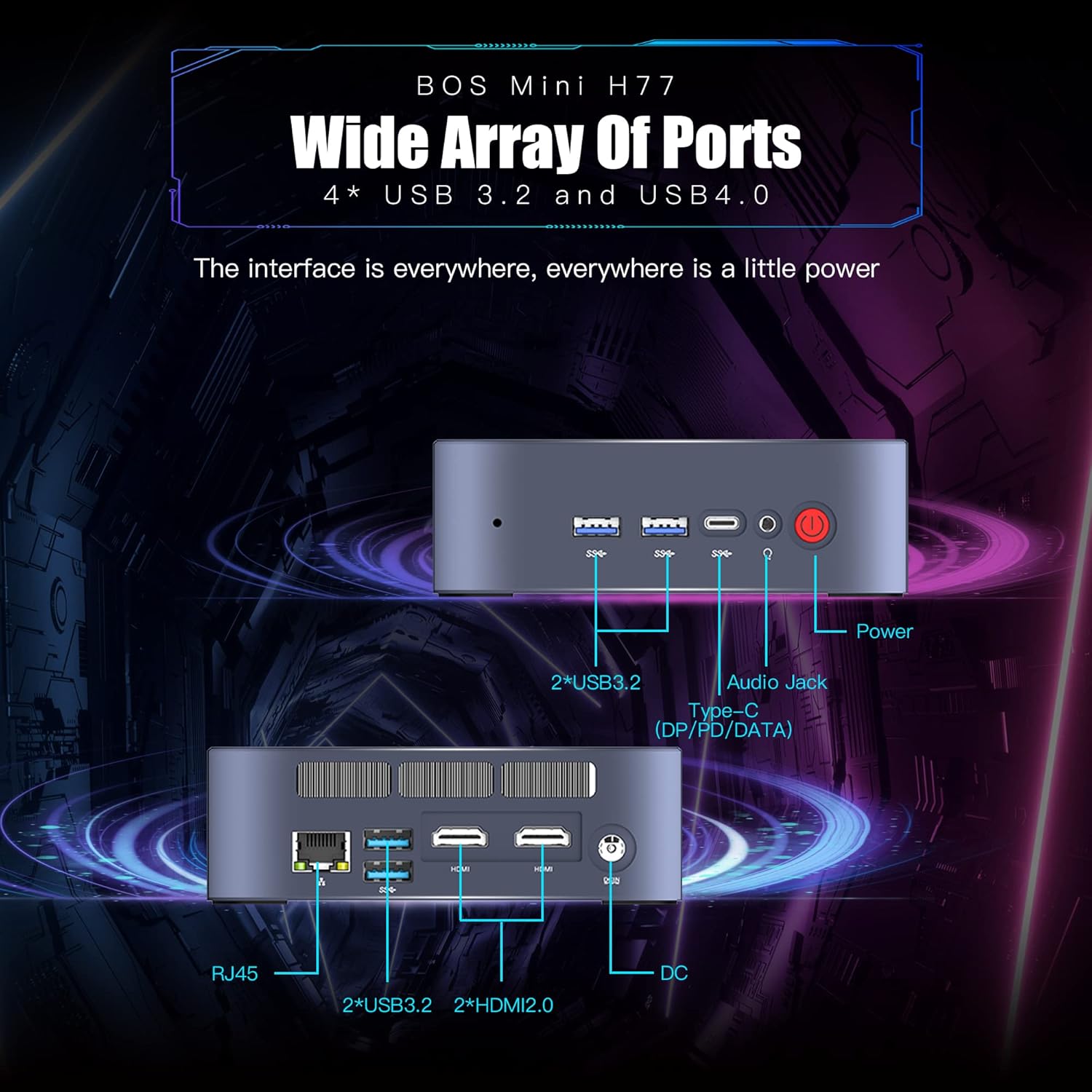
Figure 2.4: Wide Array of Ports. Aquesta imatge ofereix un detall view of the BOSGAME H77 Mini PC's connectivity options. The front panel includes two USB 3.2 ports, one USB4.0 Type-C port (supporting DP/PD/DATA), an audio jack, and the power button. The rear panel features an RJ45 Ethernet port, two additional USB 3.2 ports, two HDMI 2.0 ports, and the DC power input. This comprehensive selection of ports ensures broad compatibility with various peripherals and displays.

Figura 2.5: Disseny compacte. This image emphasizes the compact and space-saving design of the BOSGAME H77 Mini PC. With a 0.6L body and dimensions of 126mm (length), 112mm (width), and 40.8mm (height), its honeycomb design is both aesthetically pleasing and functional, allowing it to fit into various environments without occupying much space.
3. Guia de configuració
3.1 Contingut del paquet
Abans de continuar, assegureu-vos que tots els elements estiguin presents al paquet:
- BOSGAME H77 Mini PC
- Adaptador d'alimentació
- Cable HDMI
- Manual d'usuari (aquest document)
3.2 Connexió de perifèrics
- Connecta la pantalla: Use the provided HDMI cable to connect your monitor to one of the HDMI ports on the rear of the Mini PC. For triple display, connect additional monitors using the second HDMI port and the USB4.0 Type-C port (requires a compatible adapter, not included).
- Connecteu el teclat i el ratolí: Plug your USB keyboard and mouse into any available USB 3.2 ports on the front or rear of the Mini PC.
- Connectar l'alimentació: Connect the power adapter to the DC input port on the rear of the Mini PC, then plug the adapter into a power outlet.
- Connexió de xarxa (opcional): For a wired connection, plug an Ethernet cable into the RJ45 port on the rear. For wireless, ensure Wi-Fi is enabled during initial setup or via Windows settings.
3.3 Arrencada inicial
- Premeu el botó d'engegada a la part frontal del Mini PC. L'indicador lluminós d'engegada s'il·luminarà.
- Follow the on-screen instructions to complete the Windows 11 Pro setup. This typically involves selecting your region, language, creating a user account, and connecting to a network.
4. Instruccions de funcionament
4.1 Encès/Apagat
- Encès: Premeu el botó d'encesa una vegada.
- Apagar: Click the Windows Start button, then select Power > Shut down. Do not unplug the power adapter directly without proper shutdown to prevent data loss.
- Reinicia: Feu clic al botó Inici de Windows i, a continuació, seleccioneu Energia > Reinicia.
4.2 Connectivitat de xarxa
- Wi-Fi: To connect to a wireless network, click the Wi-Fi icon in the taskbar, select your desired network, and enter the password. The device supports Wi-Fi 6 for fast wireless speeds.
- Ethernet: If an Ethernet cable is connected, the system will automatically detect and connect to the wired network.
- Bluetooth: To connect Bluetooth devices (e.g., headphones, speakers), go to Windows Settings > Bluetooth & devices, and pair your device. The Mini PC supports Bluetooth 5.2.
4.3 Ús dels ports USB
The BOSGAME H77 features multiple USB 3.2 ports and a versatile USB4.0 Type-C port. These ports can be used for connecting external storage, peripherals, or for data transfer.
- USB 3.2: Provides high-speed data transfer for compatible devices.
- USB4.0 Type-C: This port supports DisplayPort (DP) for video output, Power Delivery (PD) for charging compatible devices, and high-speed data transfer.
4.4 Configuració de triple pantalla
To utilize the triple display feature:
- Connect your primary monitor to one HDMI port.
- Connect your second monitor to the other HDMI port.
- Connect your third monitor to the USB4.0 Type-C port using a compatible USB-C to DisplayPort or USB-C to HDMI adapter (sold separately).
- Once connected, right-click on the desktop, select "Display settings," and configure your displays (extend, duplicate, etc.) as needed.
5. Manteniment
5.1 Cleaning the Mini PC
Regular cleaning helps maintain optimal performance and extends the lifespan of your device.
- Exterior: Use a soft, dry, lint-free cloth to wipe the exterior surfaces. For stubborn marks, slightly dampRenta el drap amb aigua. Evita productes químics agressius.
- Ventilació: Feu servir aire comprimit periòdicament per eliminar la pols de les reixetes de ventilació per garantir un flux d'aire adequat i evitar el sobreescalfament.
5.2 Actualitzacions de programari
Keep your Windows 11 Pro operating system and drivers updated to ensure security, stability, and performance.
- Actualitzacions de Windows: Go to Windows Settings > Windows Update and check for available updates.
- Actualitzacions de controladors: Visit the BOSGAME official website for the latest drivers for your H77 Mini PC.
5.3 Gestió d'emmagatzematge
The 512GB NVMe M.2 SSD provides fast storage. To maintain performance:
- Elimina regularment els innecessaris files i aplicacions.
- Utilize Windows Disk Cleanup tool to free up space.
- Considereu solucions d'emmagatzematge extern per a grans files if the internal SSD becomes full.
6. Solució De Problemes
This section addresses common issues you might encounter with your BOSGAME H77 Mini PC.
6.1 Sense poder
- Assegureu-vos que l'adaptador de corrent estigui connectat correctament tant al Mini PC com a una presa de corrent que funcioni.
- Verifiqueu que la presa de corrent funciona connectant-hi un altre dispositiu.
- Comproveu si l'adaptador de corrent presenta algun dany visible.
6.2 Sense pantalla
- Confirm the HDMI cable (or USB-C display cable) is securely connected to both the Mini PC and the monitor.
- Ensure the monitor is powered on and set to the correct input source (HDMI 1, HDMI 2, DisplayPort, etc.).
- Try connecting the Mini PC to a different monitor or TV to rule out monitor issues.
6.3 Problemes de connectivitat de xarxa
- Wi-Fi: Check if Wi-Fi is enabled in Windows settings. Restart your router/modem. Ensure you are within range of your Wi-Fi network.
- Ethernet: Verify the Ethernet cable is properly connected. Check your router/modem for internet access.
6.4 Alentiment o bloqueig del sistema
- Tanca les aplicacions innecessàries que s'executen en segon pla.
- Consulteu el Gestor de tasques (Ctrl+Maj+Esc) per a processos que consumeixen molt de CPU, RAM o disc.
- Ensure your system is up-to-date with the latest Windows and driver updates.
- Perform a disk cleanup and check for malware.
If you encounter issues not covered here, please refer to the support section for further assistance.
7. Especificacions
| Característica | Especificació |
|---|---|
| Marca | BOSGAME |
| Número de model | H77 |
| Sistema operatiu | Windows 11 Pro |
| Model de CPU | AMD Ryzen 7 7735HS (8 Cores, 16 Threads) |
| Velocitat de la CPU | Up to 4.75 GHz (Base 3.2 GHz) |
| Coprocessador gràfic | Integrated AMD Radeon 680M Graphics |
| Mida instal·lada de la memòria RAM | 32 GB DDR5 SDRAM |
| Ranures de memòria disponibles | 2 |
| Descripció del disc dur | SSD NVMe M.2 de 512 GB |
| Interfície de sortida de vídeo | 2x HDMI, 1x USB4.0 Type-C (DP support) |
| Resolució de pantalla màxima | 3840 x 2160 píxels (4K) |
| Ports USB totals | 4x USB 3.2, 1x USB4.0 Type-C |
| Tecnologia de connectivitat | Ethernet, HDMI, LAN, Wi-Fi |
| Compatibilitat sense fils | Wi-Fi 6 (802.11ax), Bluetooth 5.2 |
| Mètode de refrigeració | Aire |
| Color | Negre |
| Característiques addicionals | Lector de targetes de memòria |
8. Garantia i Suport
Your BOSGAME H77 Mini PC comes with a standard manufacturer's warranty. Please refer to the warranty card included in your package for specific terms and conditions, including warranty duration and coverage details.
For technical support, troubleshooting assistance, or warranty claims, please visit the official BOSGAME weblloc web o poseu-vos en contacte amb el seu servei d'atenció al client. Mantingueu a mà el rebut de compra i el número de sèrie del producte quan busqueu assistència.