
1. Introducció
This manual provides detailed instructions for the HAOVM M8 PLUS 8-inch Android Tablet. Please read this manual thoroughly before using your device to ensure proper operation and to maximize its features. Keep this manual for future reference.
2. Què hi ha a la caixa
Upon opening your HAOVM M8 PLUS tablet package, you should find the following items:
- 1x HAOVM Android Tablet
- 1x adaptador de corrent (5V2A)
- 1x USB 2.0 Cable (Type-C)
- 1x Guia d’inici ràpid
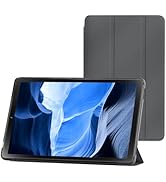
Image: Included accessories with the HAOVM M8 PLUS tablet.
3. Producte acabatview
The HAOVM M8 PLUS is an 8-inch Android tablet designed for versatile use. It features a sleek design and intuitive controls.

Imatge: Frontal view of the HAOVM M8 PLUS tablet.
3.1. Característiques físiques
- Visualització: 8-inch IPS HD (1280x800)
- Càmeres: Front camera, 8MP Rear camera
- Ports: USB Type-C for charging and data transfer, 3.5mm Headphone Jack
- Botons: Power On/Off, Volume Up/Down
- Ponents: Altaveus duals
- Ranures per a targetes: MicroSD card slot (expandable up to 1TB), SIM card slot (for cellular data/calls)
Vídeo: Un breu resumview of the tablet's physical design, including the case and SIM card tray.
4. Configuració
4.1. Engegada inicial
- Press and hold the Power On/Off button located on the side of the tablet until the screen lights up.
- Segueix les instruccions que apareixen a la pantalla per seleccionar l'idioma, connectar-te a una xarxa Wi-Fi i configurar el teu compte de Google.
4.2. Càrrega de la tauleta
Before first use, it is recommended to fully charge the tablet. Use the provided USB Type-C cable and power adapter.
- Connecteu el cable USB tipus C al port de càrrega de la tauleta.
- Connecteu l'adaptador de corrent a una presa de corrent.
- The charging indicator will appear on the screen. A full charge typically takes less than 3 hours.

Image: Battery and charging features of the tablet.
Video: Demonstrating the tablet's charging process and included accessories.
4.3. Inserció d'una targeta MicroSD (opcional)
To expand storage, you can insert a MicroSD card (up to 1TB, sold separately).
- Localitza la ranura per a targetes MicroSD al lateral de la tauleta.
- Use the provided SIM ejector tool (or a small paperclip) to gently press into the small hole next to the slot to eject the tray.
- Place the MicroSD card onto the tray with the gold contacts facing down.
- Torneu a inserir la safata a la ranura amb cura fins que encaixi al seu lloc.
4.4. Inserció d'una targeta SIM (opcional)
For cellular data and calls, you can insert a SIM card (sold separately).
- Follow the same steps as for inserting a MicroSD card to open the tray.
- Place your SIM card onto the designated slot on the tray.
- Carefully reinsert the tray into the slot.
5. Instruccions de funcionament
5.1. Navegació pel sistema operatiu Android
The tablet runs on a native Android OS, providing full access to the Google Play Store and a familiar user interface.
- Pantalla d'inici: Swipe left or right to access different app pages.
- Notificacions: Feu lliscar el dit cap avall des de la part superior de la pantalla fins a view notificacions i configuracions ràpides.
- Calaix d'aplicacions: Llisca cap amunt des de la part inferior de la pantalla per accedir a totes les aplicacions instal·lades.

Image: Full access to the Google Play Store for various applications.
5.2. Modes de visualització
The IPS HD display offers various modes for enhanced viewcomoditat:
- Mode normal: Provides crisp, clear details and vivid colors.
- Mode de lectura: Optimizes the display for comfortable reading, similar to paper.
- Eye Comfort Function: Filters blue light to reduce eye fatigue, especially useful at night.

Image: Different display modes for optimal viewing.
5.3. Connectivitat
- Wi-Fi: Supports ultra-fast 2.4Ghz and 5Ghz Wi-Fi for internet access.
- Bluetooth: Connect wireless accessories like headphones or speakers.
- Ràdio FM: Escolta les teves emissores de ràdio preferides.
- GPS: Built-in GPS for offline navigation. Download maps before traveling.
- Cellular (with SIM card): Make calls, send texts, and use mobile data.

Image: Tablet demonstrating GPS navigation capabilities.
5.4. Funcions de la càmera
The tablet is equipped with a front camera and an 8MP rear camera.
- Fent fotos: Open the Camera app and tap the shutter button.
- Gravació de vídeos: Canvia al mode de vídeo a l'aplicació Càmera i toca el botó de gravació.
- Videotrucades: Use the front camera for video calls through compatible applications.

Image: Tablet features including camera, speakers, and connectivity.
5.5. Control parental
The tablet includes parental control features to manage content and usage for children.
- Access parental controls through the device settings to set limits, filter content, and monitor activity.
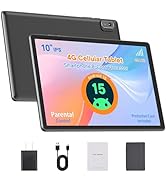
Image: Tablet designed with parental controls for kid-friendly content.
6. Especificacions
| Característica | Detall |
|---|---|
| Nom del model | M8PLUS |
| Mida de la pantalla | 8 polzades |
| Resolució de pantalla | 1280x800 (IPS HD) |
| Processador | MediaTek 2 GHz Octa-core (MT8183) |
| RAM | 4 GB SDRAM DDR4 |
| Emmagatzematge intern | 64 GB |
| Emmagatzematge ampliable | Up to 1 TB via TF card (MicroSD) |
| Capacitat de la bateria | 5100 mAh |
| Durada mitjana de la bateria | Up to 12 Hours (mixed-use) |
| Sistema operatiu | Android |
| Tipus sense fil | 802.11ac (2.4Ghz & 5Ghz WiFi) |
| Bluetooth | Sí |
| GPS | GPS, GLONASS i Galileo integrats |
| posterior WebResolució de la càmera | 8 MP |
| Pes de l'article | 13 unces |
| Dimensions del producte | 8.3 x 4.96 x 0.35 polzades |

Image: Tablet's processor and connectivity details.

Image: Tablet's memory and storage capabilities.
7. Manteniment
- Neteja: Use a soft, lint-free cloth to clean the screen and body. Avoid abrasive cleaners.
- Emmagatzematge: Guardeu la tauleta en un lloc fresc i sec, allunyat de la llum solar directa i de temperatures extremes.
- Cura de la bateria: To prolong battery life, avoid fully discharging the tablet frequently. Charge it regularly.
- Actualitzacions de programari: Comproveu i instal·leu regularment si hi ha actualitzacions del sistema per garantir un rendiment i una seguretat òptims.
8. Solució De Problemes
- La tauleta no s'encén: Assegureu-vos que la tauleta estigui carregada. Connecteu-la al carregador i espereu uns minuts abans d'intentar tornar-la a encendre.
- La pantalla no respon: Try restarting the tablet by holding down the power button for about 10-15 seconds.
- Problemes de connectivitat Wi-Fi: Check if Wi-Fi is enabled in settings. Restart your router and the tablet.
- Les aplicacions es bloquegen: Ensure apps are updated to their latest versions. Clear the app's cache or reinstall it if issues persist.
- Rendiment lent: Close unused applications, clear cache, or consider a factory reset if performance significantly degrades. Back up your data before a factory reset.
9. Garantia i Suport
HAOVM provides comprehensive service and a 1-year manufacturer warranty for this product.
- Període de garantia: 1 any des de la data de compra.
- Contacte amb l'assistència: For technical assistance, warranty claims, or any product-related inquiries, please refer to the contact information provided in your Quick Start Guide or visit the official HAOVM weblloc.
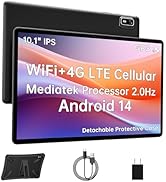
Image: HAOVM customer support and warranty details.