
ODK ZJXFZ-01
ODK L-Shaped Desk User Manual
Model: ZJXFZ-01
1. Introducció
Thank you for choosing the ODK L-Shaped Desk. This manual provides essential information for the assembly, operation, and maintenance of your new desk. Designed for both work and gaming, this ergonomic L-shaped desk offers a comfortable and organized workspace with its integrated monitor stand and versatile storage solutions.

This image displays the ODK L-Shaped Desk in a typical setup, featuring two monitors on the elevated stand, a keyboard, mouse, and a PC tower on the lower shelf. It highlights the desk's spacious design and integrated storage solutions, including headphone hooks.
2. Muntatge i muntatge
The ODK L-Shaped Desk is designed for easy assembly. Please follow these instructions carefully. All necessary hardware and tools are included in the package.
2.1. Contingut del paquet
- All desk panels (main desktop, side desktop, monitor stand, storage shelves)
- Components del marc metàl·lic
- Ferramenteria de muntatge (cargols, perns, femelles)
- Assembly tools (Allen wrench, screwdriver)
- Manual d'instruccions

Aquesta imatge ofereix una visió més àmplia view of the ODK L-Shaped Desk within a room, demonstrating its compact footprint and how it integrates into a modern living or working space. It shows the desk being used with a laptop and a single monitor, along with books and decorative items on the shelves.
2.2. Passos de muntatge
- Desempaquetar i verificar: Carefully unpack all components and verify against the parts list in the included instruction manual. Ensure no parts are missing or damaged.
- Preparar l'espai de treball: Clear a spacious area for assembly. It is recommended to assemble the desk on a soft surface to prevent scratches.
- Muntatge del marc: Begin by assembling the metal frame components according to the diagrams in your manual. Ensure all connections are secure but do not fully tighten screws until the entire frame is assembled.
- Adjunta els panells d'escriptori: Secure the main desktop and side desktop panels to the assembled frame. Note that the side storage shelves are reversible and can be installed on either the left or right side to suit your space and preference.
- Instal·leu el suport del monitor: Attach the monitor stand to the main desktop. This elevated shelf is designed to improve ergonomic posture.
- Add Storage Shelves: Install the two-tier storage shelves and the lower PC stand shelf. Ensure they are firmly attached.
- Ajustament final: Once all components are in place, systematically tighten all screws and bolts to ensure the desk is stable and sturdy.
- Adjuntar accessoris: Install the two headphone hooks as desired.

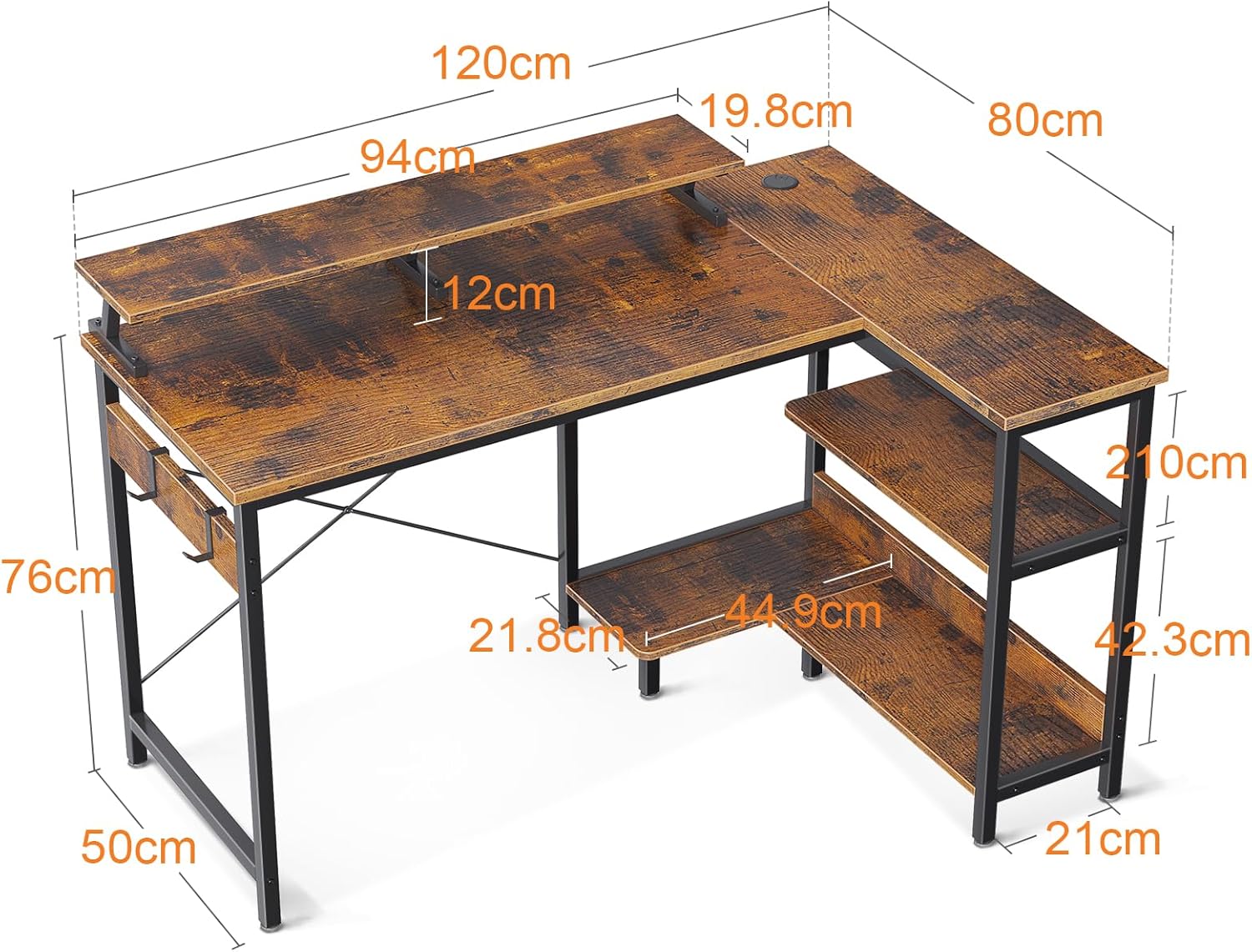
This diagram illustrates the precise measurements of the ODK L-Shaped Desk, including its overall length, width, height, and the dimensions of the monitor stand and side storage shelves. These measurements are crucial for planning placement and understanding the desk's capacity.

Una antena view of the ODK L-Shaped Desk, emphasizing the large surface area available for work or gaming. It shows a monitor centrally placed on the elevated stand, with a keyboard and mouse, and a laptop on the side extension, demonstrating efficient use of space.
3. Operating Your Desk
The ODK L-Shaped Desk is designed for versatile use in various settings, including home offices, gaming setups, and study areas.
3.1. Ergonomic Use
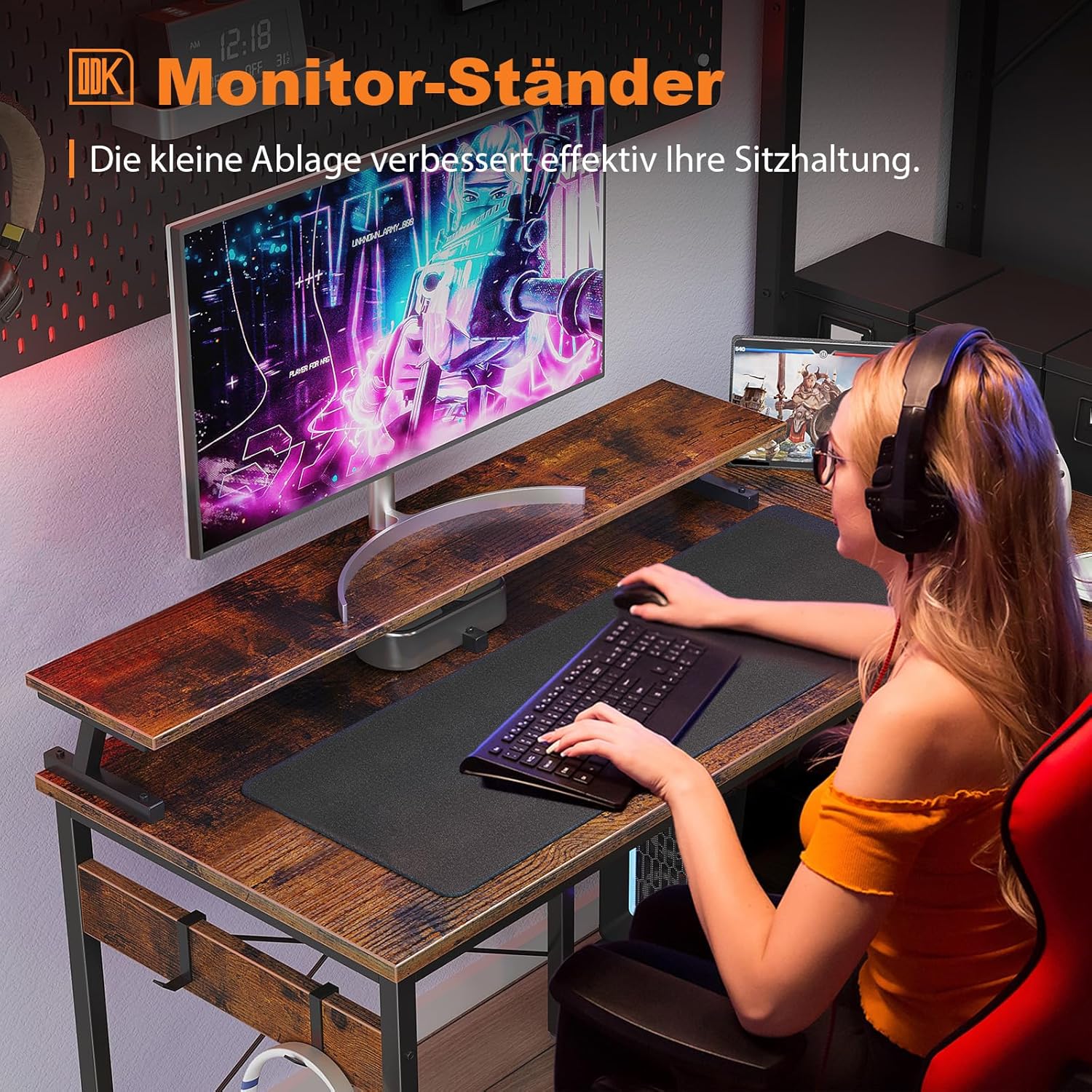
Utilize the elevated monitor stand to position your screen(s) at eye level, promoting a comfortable and ergonomic posture that helps prevent neck and eye strain. The 4.5-inch height of the monitor stand is specifically designed for this purpose.
Un primer pla view focusing on the ergonomic monitor stand of the ODK L-Shaped Desk, showing a user comfortably seated and interacting with the computer. This image emphasizes the health benefits of the elevated monitor position, designed to reduce neck strain.
3.2. Emmagatzematge i Organització
- Prestatge del monitor: The 7.8-inch wide monitor shelf can comfortably accommodate up to two monitors.
- Side Storage Shelves: The 10.2-inch wide side shelves provide ample space for books, office supplies, or decorative items.
- PC Stand: A dedicated lower shelf serves as a PC stand, keeping your computer tower off the floor and freeing up desktop space.
- Gestió de cables: The side shelf includes a cable hole to help manage and organize your wires, keeping your workspace tidy.
- Headphone Hooks: Use the two integrated hooks to hang headphones or other accessories, keeping them easily accessible.

This image showcases the versatility of the ODK L-Shaped Desk, featuring a printer conveniently placed on one of the side shelves and a PC tower on the dedicated lower shelf. It highlights the desk's ability to accommodate various office equipment while maintaining an organized workspace.
This comparative image demonstrates the benefit of the integrated PC tower shelf. The 'After Use' side shows the desk with a PC tower neatly tucked away on the lower shelf, freeing up desktop space, while the 'Before Use' side shows a PC tower occupying valuable desktop area.
4. Manteniment
Proper care and maintenance will ensure the longevity and appearance of your ODK L-Shaped Desk.
- Neteja: Netegeu les superfícies amb un suau, damp cloth. Avoid harsh chemicals or abrasive cleaners, which can damage the particle board and metal finish.
- Vessaments: Immediately wipe up any spills to prevent water damage to the particle board.
- Protecció: While the desk is designed to be scratch-resistant, using coasters for drinks and mouse pads for computer peripherals is recommended to further protect the surface.
- Comprovació d'estabilitat: Reviseu periòdicament tots els cargols i perns per assegurar-vos que romanen ajustats. Torneu a apretar-los si cal per mantenir l'estabilitat.
- Protecció del sòl: The desk is equipped with pads to protect your wooden floors from scratches. Ensure these pads are intact and properly positioned.
5. Solució De Problemes
If you encounter any issues with your ODK L-Shaped Desk, please refer to the following common solutions:
- Desk Wobbles/Unstable:
- Assegureu-vos que tots els cargols i perns de muntatge estiguin completament apretats.
- Check that the desk is placed on a level surface. Adjust the leveling feet if present.
- Peces que falten o components danyats:
- Before assembly, carefully check all contents against the parts list.
- If parts are missing or damaged upon arrival, please contact ODK customer support immediately.
- Dificultat durant el muntatge:
- Review acuradament les instruccions de muntatge, prestant molta atenció als diagrames.
- Ensure components are oriented correctly, especially the reversible side shelves.
- Do not force parts together. If a part does not fit, re-check the instructions for proper alignment.
6. Especificacions
| Característica | Detall |
|---|---|
| Marca | ODK |
| Número de model | ZJXFZ-01 |
| Color | marró |
| Dimensions (L x A x A) | 120 x 80 x 88 cm (47.2 x 31.5 x 34.6 polzades) |
| Material | Engineered Wood (Particle Board), Metal |
| Pes de l'article | 17.4 quilos (38.36 lliures) |
| Característiques especials | Reversible Design, Ergonomic Monitor Stand, Two-tier Storage Shelves, PC Stand, Headphone Hooks, Cable Hole, Scratch-resistant, Anti-collision, Waterproof |
| Disseny d'escriptori | Computer Desk (L-Shape) |
7. Atenció al client
For any product issues, questions, or assistance with assembly, please do not hesitate to contact ODK customer support. We are committed to providing a response within 24 hours.
Please refer to your purchase documentation or the seller's information on the platform where you purchased the desk for specific contact details.
Note: Information regarding spare parts availability is currently not provided.
Ask a question about this manual
Ask about setup, troubleshooting, compatibility, parts, safety, or missing instructions. Manuals+ will review the question and use this page’s manual context to help answer it.