
1. Introducció
The Audison Forza AF C4.10 bit is a high-fidelity 4-channel amplifier featuring an integrated 10-channel Digital Signal Processor (DSP). This unit delivers 90W x 4 at 4Ω or 150W x 4 at 2Ω, utilizing Audison D-Class technology for superior audio performance in a compact design. The native DSP operates at 24 bit/96 kHz, supporting an audio band up to 40 kHz, and is High-Resolution certified. This manual provides essential information for the proper installation, operation, and maintenance of your AF C4.10 bit ampmés viu.
2. Informació de seguretat
Please read all instructions carefully before installing and operating the amplifier. Failure to follow these guidelines may result in damage to the product, vehicle, or personal injury.
- Instal·lació professional recomanada: Installation should be performed by qualified personnel to ensure proper wiring and system integration.
- Desconnexió d'alimentació: Desconnecteu sempre el terminal negatiu de la bateria del vehicle abans de començar qualsevol treball d'instal·lació per evitar curtcircuits.
- Cablejat adequat: Ensure all power, ground, and speaker wires are correctly sized and securely connected. Use appropriate fuses as specified.
- Ventilació: Muntar el amplifier in a location that allows for adequate airflow to prevent overheating. Avoid enclosed spaces without ventilation.
- Humitat i calor: No exposar el amplifier to moisture, water, or extreme temperatures.
- Protecció auditiva: Prolonged exposure to high sound pressure levels can cause permanent hearing damage. Adjust volume levels responsibly.
3. Contingut del paquet
Verifiqueu que tots els elements siguin presents al paquet:
- Audison Forza AF C4.10 bit Ampmés viu
- Manual d'usuari (aquest document)
- Wiring Harnesses (specific to inputs/outputs)
- Maquinari de muntatge
4. Producte acabatview
The Audison Forza AF C4.10 bit amplifier features a comprehensive set of connections and controls on its rear panel for power, signal input, signal output, and DSP configuration. Understanding these connections is crucial for proper installation and operation.
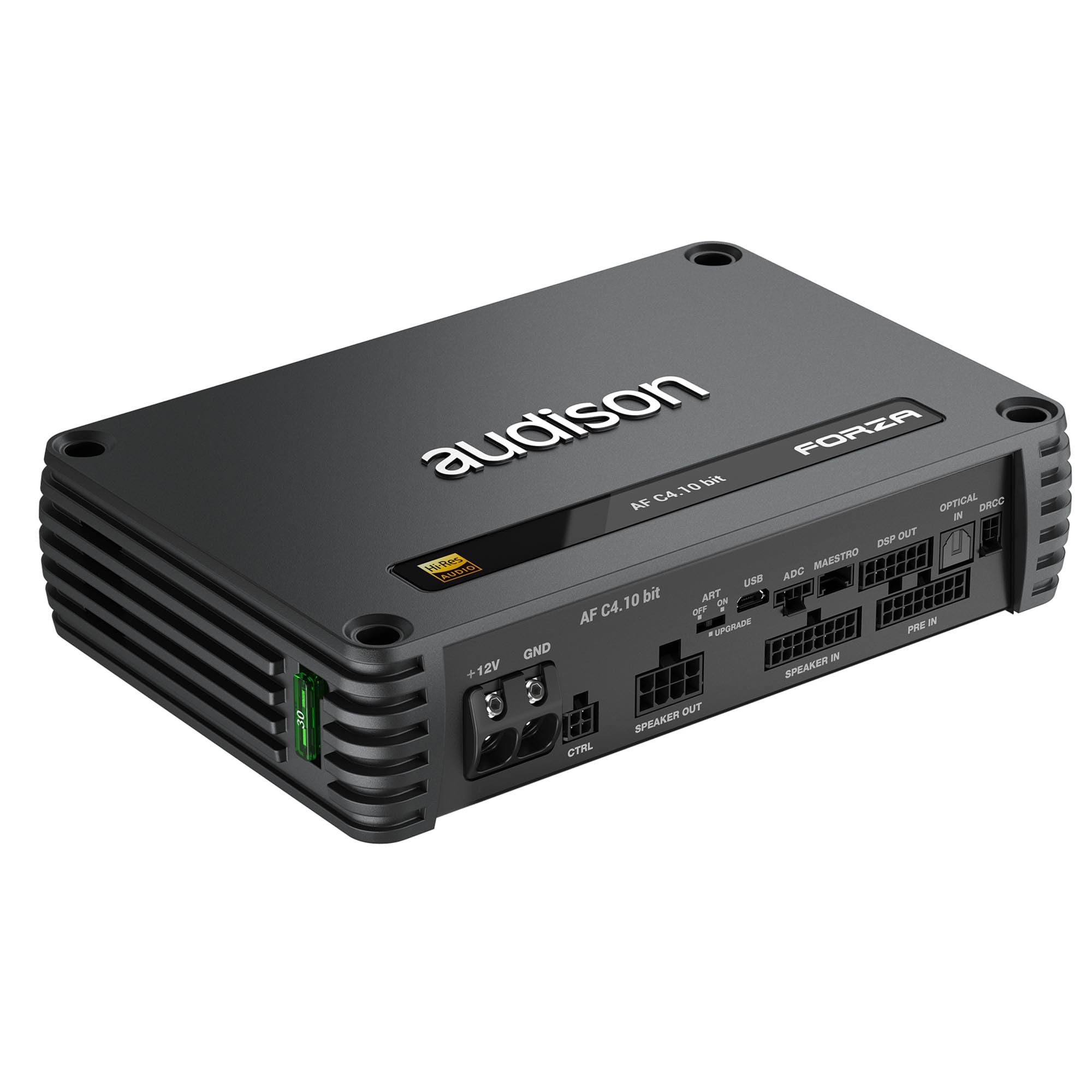
Figura 1: Rear panel of the Audison Forza AF C4.10 bit amplifier. This image displays the various connection terminals and switches, including power, ground, control, speaker inputs/outputs, pre-amplifier inputs, optical input, USB port, and DSP-related connectors.
Rear Panel Connections and Controls:
- + 12V: Main power input terminal for connection to the vehicle's positive battery terminal.
- GND: Ground input terminal for connection to the vehicle's chassis ground.
- CTRL: Control input/output connector, typically used for remote turn-on, external device control, or system integration.
- ART OFF ON: Automatic Remote Turn-on switch. When set to 'ON', the amplifier can automatically turn on by detecting a DC offset or audio signal on the speaker inputs (ART/AST). When 'OFF', a traditional remote turn-on wire is required.
- USB: Micro USB port for connecting the amplifier to a PC. This connection is used for configuring the integrated DSP via Audison's software.
- ADC: Analog Digital Converter input, typically for specific Audison accessories or expansion modules.
- MAESTRO: Connector for the Audison Maestro interface, allowing integration with OEM systems.
- DSP OUT: Digital Signal Processor output. These are pre-amplifier outputs that carry the processed audio signal from the DSP, allowing connection to additional ampaixecadors.
- TPTICA A: Optical digital audio input for high-quality digital audio sources.
- DRCC: Digital Remote Control Connector for connecting an Audison Digital Remote Control (DRC) unit, providing external control over DSP functions and volume.
- PONENT: Speaker output terminals for connecting the amplifier's four amplified channels to your speakers.
- PONENT EN: High-level speaker input terminals. These allow the amplifier to accept audio signals directly from a factory head unit's speaker outputs.
- PRE IN: Low-level RCA pre-amplifier input terminals for connecting to aftermarket head units or other audio sources with RCA outputs.
5. Configuració i instal·lació
Proper installation is critical for optimal performance and safety. Consult a professional installer if you are unsure about any steps.
5.1 Muntatge del Ampmés viu
- Choose a mounting location that is dry, well-ventilated, and protected from direct sunlight or excessive heat.
- Ensure the mounting surface is sturdy enough to support the amppes del vidador.
- Use the provided mounting hardware to secure the ampvidador fermament.
5.2 Power and Ground Connections
- Potència (+12 V): Connect a suitable gauge power cable from the vehicle's positive battery terminal (with an inline fuse located within 18 inches of the battery) to the amplificadors +12V terminal.
- Terra (GND): Connecteu un cable d'alimentació del mateix calibre des del amplificadors GND terminal to a clean, unpainted metal point on the vehicle's chassis. Ensure a solid electrical connection.
- Encès remot: If not using the ART feature, connect a remote turn-on wire from your head unit's remote output to the CTRL input. If using ART, set the ART OFF ON switch to 'ON'.
5.3 Connexions d'entrada d'àudio
- Low-Level Input (PRE IN): Connect RCA cables from your head unit's pre-out outputs to the amplificadors PRE IN terminals.
- High-Level Input (SPEAKER IN): If your head unit does not have RCA outputs, connect the speaker wires from your head unit directly to the amplificadors PONENT EN terminals using the provided harness.
- Optical Input (OPTICAL IN): For digital audio sources, connect an optical cable to the TPTICA EN terminal.
5.4 Connexions de sortida d'altaveus
- Connecteu els vostres altaveus al ORADOR terminals. Ensure correct polarity (+ to + and - to -) for each speaker.
- Observe the minimum impedance requirements for the amplifier (2Ω per channel, 4Ω bridged).
6. Instruccions de funcionament
The Audison Forza AF C4.10 bit amplifier's primary configuration and tuning are performed through its integrated DSP.
6.1 Configuració DSP
- Connecteu el amplifier to a PC using a Micro USB cable via the USB port.
- Install the Audison DSP software on your PC.
- Launch the software to access the DSP's full range of features, including crossovers, equalization, time alignment, and level controls for all 10 output channels.
- Save your configurations to the amplifier's memory.
6.2 Automatic Remote Turn-On (ART/AST)
- Si el ART OFF ON switch is set to 'ON', the amplifier will automatically power on when it detects an input signal (either DC offset on high-level inputs or audio signal).
- If the ART feature is not desired or causes issues, set the switch to 'OFF' and use a traditional remote turn-on wire connected to the CTRL entrada.
6.3 Digital Remote Control (DRC)
If an Audison DRC is connected to the DRCC port, refer to the DRC's specific manual for its operation. Typically, it allows for master volume control, preset selection, and input source switching.
7. Manteniment
The Audison Forza AF C4.10 bit ampEl lificador requereix un manteniment mínim per garantir un rendiment a llarg termini.
- Neteja: Utilitzeu un drap suau i sec per netejar-lo ampl'exterior del purificador. No utilitzeu productes químics agressius ni netejadors abrasius.
- Connexions: Periodically check all power, ground, and signal connections to ensure they remain secure and free from corrosion.
- Ventilació: Assegureu-vos que el amplifier's cooling fins are free from dust and obstructions to maintain proper heat dissipation.
8. Solució De Problemes
Si teniu problemes amb el vostre amplificador, consulteu els problemes i solucions habituals següents abans de contactar amb el servei d'assistència.
| Problema | Causa possible | Solució |
|---|---|---|
| Sense alimentació / Ampel lifier no s'encén |
|
|
| Sense sortida de so |
|
|
| So distorsionat |
|
|
| Ampsobreescalfament del lificador |
|
|
9. Especificacions
AmpS més viutage:
- Canals: 4
- Classe: D
- Output Continuous Power (RMS) @14.4 VDC, 1% THD:
- 4Ω: 90W x 4
- 2Ω: 150W x 4
- 4Ω (Bridged): 300W x 2
- Alimentació Voltage: 11 ÷ 15 VDC
- Font d'alimentació en funcionament Voltage: 6.5 ÷ 17.5 VDC
- Fusible: 1 x 30A
- Idling Current: 1.04 A
- Consum de corrent en espera: 1.4 A
- Consumption @ 14.4 VDC, 2Ω, Max Musical Power: 29 A
- Entrada remota: 4 ÷ 15 VDC (1 mA)
- Sortida remota: 6.5 ÷ 15 VDC (150 mA)
- ART (Automatic Remote Turn on/off from OUTPUT BTL speakers): 1.5 VDC
- AST (Automatic Signal Turn on/off): 1.5 VDC (Selectable)
- Efficiency Rated Power: 81%
- Distortion - THD @ 1 kHz, 4Ω, 70% Rated Power: 0.03%
- Bandwidth @ -1.5 dB: 10 Hz ÷ 42 kHz
- Damping Factor @ 1 kHz, 4Ω, 2 VRMS: 95
- S/N Ratio (A weighted @ 1 V Input) Master Input: 98 dBA
- S/N Ratio (A weighted @ 1 V Input) Optical Input: 105 dBA
- Input Sensitivity Pre-In: 0.6 ÷ 6 VRMS (15 kΩ Imp.)
Digital Signal Processor:
- Audio DSP Converter: Analog Devices ADAU1467 automotive qualified audio processor
- Tipus de filtre: Full / High-Pass / Low-Pass / Band-Pass
- Freqüència d'encreuament: 20 Hz ÷ 20 kHz
- Control de fase: 0° / 180°, All-Pass filters
Requisits generals:
- PC Connections: Micro USB 1.1 / 2.0 / 3
- Pes de l'article: 5 lliures
- Dimensions del paquet: 9.53 x 9.29 x 3.46 polzades
10. Garantia i Suport
Informació de la garantia:
The Audison Forza AF C4.10 bit amplifier ve amb a 1 any de garantia del fabricant. This warranty covers defects in materials and workmanship under normal use. Please retain your proof of purchase for warranty claims. The warranty does not cover damage caused by improper installation, accident, misuse, abuse, negligence, or unauthorized modification.
Atenció al client:
For technical assistance, troubleshooting beyond this manual, or warranty service, please contact your authorized Audison dealer or visit the official Audison weblloc web per a recursos de suport i informació de contacte.


