
1. Producte acabatview
The Agrieyes Z-W09 Mini Strobe Light Bar is a versatile, rechargeable, and magnetic LED beacon light designed for emergency and warning applications on various vehicles. It features both APP and remote control options for ease of use and offers multiple lighting modes and colors.
2. Contingut del paquet
En obrir el paquet, assegureu-vos que hi hagi tots els elements següents:
- Agrieyes Z-W09 Mini Strobe Light Bar
- Control Remot per Infrarojos
- 5V 2A Wall Charger
- 12V Cigarette Lighter Plug Charger

3. Configuració i instal·lació
The Agrieyes Z-W09 is designed for quick and secure installation on metal surfaces.
- Muntatge magnètic: The light bar is equipped with 2 x 6 N38 magnets, providing a strong pull force of 60 pounds. Simply place the light bar on a clean, flat metal surface of your vehicle's roof.
- Connexió d'alimentació: For continuous power or charging while in use, plug the provided 12V cigarette lighter adapter into your vehicle's 12-24V power outlet.
- Eliminació: When not in use, the light can be easily removed by hand without the need for tools.


4. Instruccions de funcionament
The Agrieyes Z-W09 offers multiple control methods and various lighting modes.
4.1 Mètodes de control
You can control the light bar using the integrated buttons, the infrared remote control, or the dedicated smartphone application.

4.1.1 Integrated Buttons
The light bar features buttons on its top surface for basic control:
- Interruptor ON / OFF: Encén o apaga la unitat.
- Interruptor de mode: Cycles through available flashing patterns.
- High/Low Brightness: Ajusta la intensitat de la llum.
- Pantalla de bateria: Indica el nivell actual de la bateria.

Comandament a distància per infrarojos 4.1.2
The included remote control provides convenient wireless operation.
- Encès/apagat: Turns the light bar on or off.
- Interruptor de mode: Cycles through the various flashing patterns.
- Control de brillantor: Adjusts between low and high brightness modes.
Note: Ensure the remote control has a clear line of sight to the light bar for optimal performance.
4.1.3 Smartphone Application (JW-TECH)
Download the 'JW-TECH' app to control the light bar via Bluetooth. The app allows you to:
- Directly control modes and colors.
- Access 4 different colors and 10 modes, including a special SOS mode.
4.2 Lighting Modes and Brightness
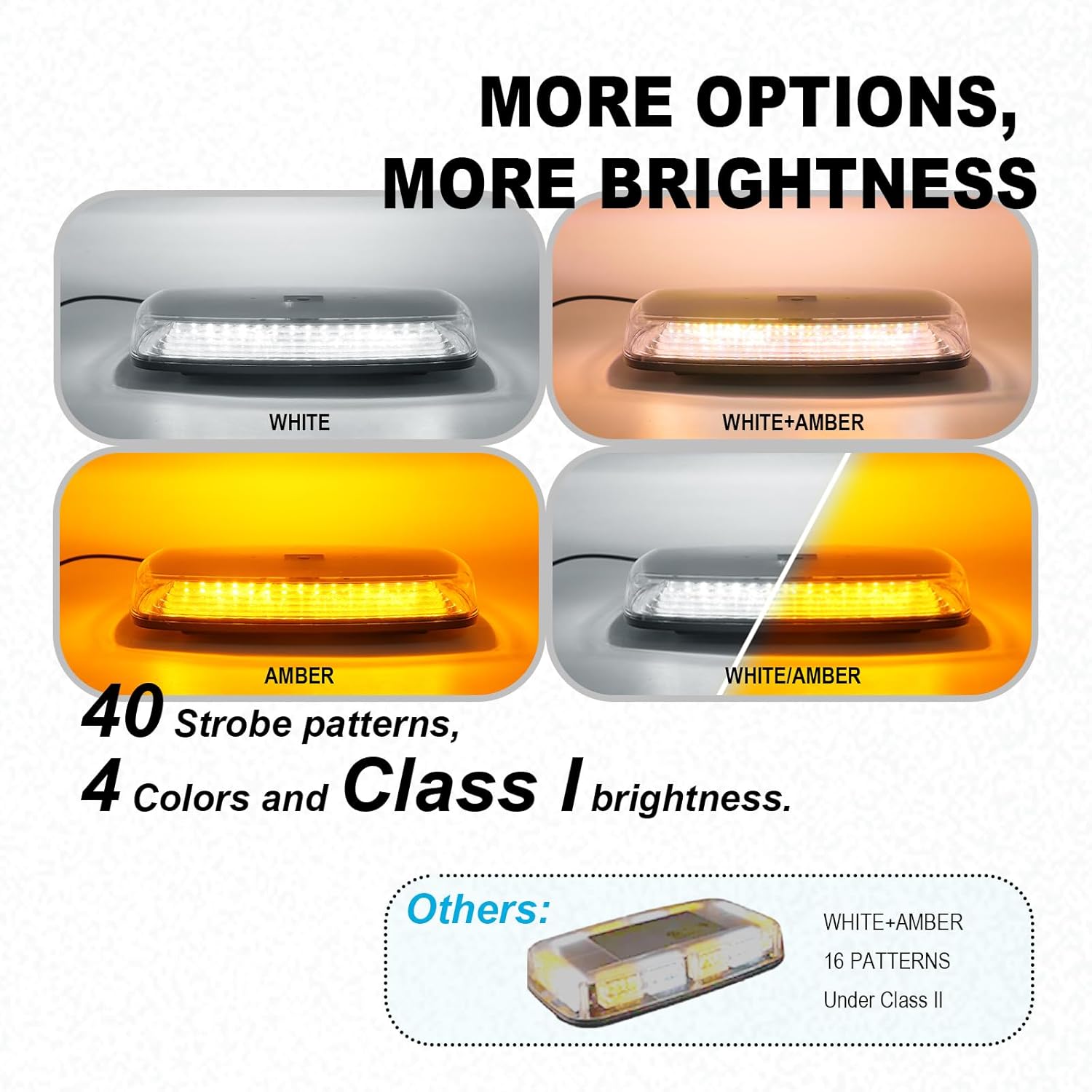
The Agrieyes Z-W09 features 84 high-brightness LED chips, offering Class I brightness and various patterns.
- Colors: Amber and White.
- Modes: Multiple flashing patterns are available, including a dedicated SOS mode via the app.
- Brillantor: Adjustable between high and low settings to suit different visibility requirements.
4.3 Demostracions en vídeo
Video: Demonstrates the Agrieyes APP Control Mini Strobe Light Bar's features, including app and remote control.
Video: Remote control instructions for the Agrieyes AG-W16R Mini LED Beacon, applicable to similar Agrieyes models.
Video: General demonstration of the wireless rechargeable strobe light in action.
5. Càrrega
The Agrieyes Z-W09 is rechargeable and includes overcharge, overdischarge, and overtemperature protection.
- Temps de càrrega: Aproximadament 4 hores per a una càrrega completa.
- Temps de funcionament: Lasts for approximately 6.5 hours on a full charge.
- Opcions de càrrega: Use the provided 5V 2A wall charger or the 12V cigarette lighter plug charger.

6. Durabilitat i manteniment
The light bar is built for durability and performance in various conditions.
- Construcció: Features a robust ABS housing that resists scratches.
- Classificació impermeable: IP67 waterproof rating ensures protection against dust and water immersion.
- Vida útil: Designed for over 5000 hours of service life.
- Neteja: Wipe the light bar with a soft, damp drap. Eviteu productes de neteja o dissolvents abrasius.
7. Especificacions
| Característica | Detall |
|---|---|
| Número de model | Z-W09 |
| Marca | Agrieyes |
| Dimensions | 30.48 x 15.75 x 5.89 cm |
| Pes | 453.59 g |
| Tipus de font de llum | LED (84 high-brightness chips) |
| Colors | Ambre, Blanc |
| Voltage | 12-24 volts |
| Wattage | 38 watts |
| Classificació impermeable | IP67 |
| Tipus de muntatge | Magnetic (2 x 6 N38 magnets) |
| Tipus de bateria | 2 bateries d'ions de liti (incloses) |
| Temps de càrrega | Aprox. 4 hores |
| Temps de funcionament | Aprox. 6.5 hores |
8. Solució De Problemes
- La llum no s'encén: Ensure the battery is charged. Check the power connection if using the cigarette lighter plug.
- El comandament a distància no funciona: Verify the remote's battery. Ensure there is no obstruction between the remote and the light bar.
- Problemes de connectivitat de l'aplicació: Ensure Bluetooth is enabled on your smartphone and the light bar is within range. Restart the app and the light bar if connection problems persist.
- Autonomia curta de la bateria: Ensure the unit is fully charged before use. Battery performance can vary with usage patterns and environmental conditions.
9. Garantia i Suport
For warranty information or technical support, please refer to the product packaging or contact Agrieyes customer service directly. Keep your purchase receipt for warranty claims.