
Earmor M20T-01
Earmor M20T Electronic Hearing Protection Earplugs User Manual
Model: M20T-01
1. Introducció
Thank you for choosing the Earmor M20T Electronic Hearing Protection Earplugs. These advanced earplugs are designed to provide superior hearing protection in noisy environments while enhancing situational awareness and communication. Featuring active noise reduction, Bluetooth connectivity, and multiple operating modes, the M20T is ideal for shooting, hunting, industrial use, and other high-decibel activities.
Please read this manual thoroughly before using the product to ensure proper operation and maintenance.
2. Contingut del paquet
- Earmor M20T Electronic Earplugs (1 pair)
- Portable Charging Case (1)
- Cable de càrrega USB (1)
- Silicone Ear Tips (S, M, L - 1 pair each)
- Foam Ear Tips (S, M, L - 1 pair each)
- Anti-loss Lanyard (1)
- Manual d'usuari (aquest document)
3. Producte acabatview

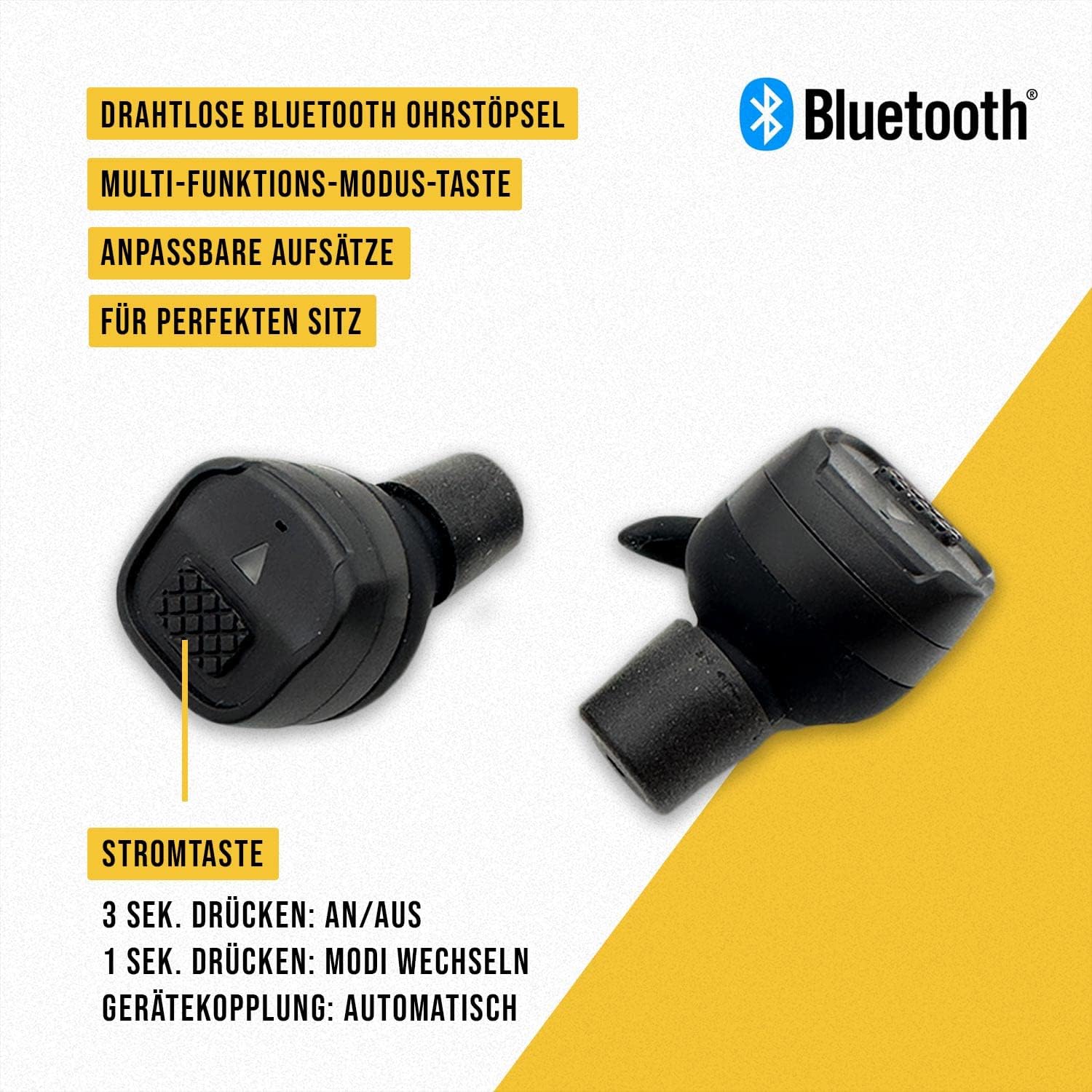

Earplug Components:
- Botó d'alimentació / mode: Controls power and switches between noise modes.
- Indicador LED: Displays power status, charging status, and mode.
- Micròfon: Captures ambient sound for amplification and noise reduction.
- Ponent: Entrega amplified sound and audio from connected devices.
- Punta de l'orella: Provides a seal in the ear canal for optimal noise reduction and comfort.
Components de la caixa de càrrega:
- Ranures de càrrega: Securely holds and charges the earplugs.
- Charging Case LED Indicators: Shows the charging status of the case and earplugs.
- Port de càrrega USB-C: Per carregar la funda.
- Anti-loss Lanyard Attachment Point: For securing the lanyard.
4. Configuració
4.1 Càrrega inicial
Before first use, fully charge both the earplugs and the charging case.
- Connecteu el cable de càrrega USB al port de càrrega de la carcassa i a una font d'alimentació (per exemple, un port USB de l'ordinador o un adaptador de paret).
- Place the earplugs into their respective charging slots in the case. Ensure they are correctly seated.
- The LED indicators on the case and earplugs will show charging progress. Refer to the LED indicator section for details.
- Charging is complete when all indicators show a full charge. The charging case can provide up to 3 full charges for the earplugs, and the case itself offers up to 6.5 hours of power on a full charge.
4.2 Fitting the Earplugs
Proper fit is crucial for effective noise reduction and comfort. The M20T comes with various sizes of silicone and foam ear tips.
- Select the ear tip size (S, M, L) that provides a snug and comfortable seal in your ear canal. Experiment with both silicone and foam tips to find the best fit.
- Gently insert the earplug into your ear canal, twisting slightly until it feels secure and comfortable.
- Test the seal by speaking or listening to ambient sounds. If sounds are not adequately attenuated or if the earplug feels loose, try a different size or type of ear tip.
4.3 Attaching the Anti-loss Lanyard
For added security, especially during active use, attach the anti-loss lanyard to the designated attachment points on the earplugs or charging case as desired.
5. Funcionament
5.1 Encès/Apagat
- Encès: Press and hold the power button on each earplug for approximately 3 seconds until the LED indicator illuminates and you hear an audible prompt.
- Apagar: Press and hold the power button on each earplug for approximately 3 seconds until the LED indicator turns off and you hear an audible prompt. Alternatively, placing the earplugs back into the charging case will automatically power them off.

5.2 Noise Reduction and Amplificació
The Earmor M20T features active noise reduction with an NRR of 26 dB, effectively suppressing harmful impulse noises above 82 dB, such as gunshots. It also amplifies quiet sounds to improve situational awareness.


5.3 Switching Noise Modes
The M20T offers three distinct noise modes to adapt to different environments:
- Mode interior: Optimized for indoor shooting ranges or environments with reflective surfaces.
- Mode exterior: Best for open-air environments, such as outdoor ranges or hunting.
- Mode silenciós: Provides maximum passive noise attenuation without sound amplificació.
To switch between modes, short press the power button on either earplug (approximately 1 second). The earplugs will provide an audible prompt indicating the current mode.

5.4 Connectivitat Bluetooth (BT 5.3)
The M20T earplugs feature Bluetooth 5.3 for wireless audio streaming and call management.
- Maridatge: When the earplugs are powered on for the first time or are not connected to a device, they will automatically enter pairing mode. The LED indicator will flash.
- On your device (smartphone, tablet, etc.), enable Bluetooth and search for "Earmor M20T" in the list of available devices.
- Select "Earmor M20T" to connect. Once connected, the LED indicator will stop flashing, and you will hear an audible confirmation.
- Reproducció de música: Once paired, you can stream audio from your device. Use your device's controls for volume, play/pause, and track skipping.
- Gestió de trucades: When a call comes in, the earplugs will ring. Press the power button once to answer/end a call.
6. Manteniment
6.1 Neteja
- Netegeu regularment les puntes de les orelles amb un drap suau iamp drap. Assegureu-vos que estiguin completament secs abans de tornar-los a enganxar.
- Wipe the earplug bodies and charging case with a dry, lint-free cloth.
- Do not use abrasive cleaners, solvents, or immerse the earplugs or case in water.
6.2 Emmagatzematge
- When not in use, store the earplugs in their charging case to protect them and keep them charged.
- Emmagatzemeu el producte en un lloc fresc i sec, lluny de la llum solar directa i de temperatures extremes.
7. Solució De Problemes
| Problema | Causa possible | Solució |
|---|---|---|
| Earplugs do not power on. | Bateria baixa. | Place earplugs in the charging case and ensure the case is charged. |
| No hi ha so o hi ha mala qualitat de so. | Improper fit; ear tips clogged; low battery; incorrect mode. | Adjust earplug fit; clean ear tips; charge earplugs; switch to appropriate mode (Indoor/Outdoor). |
| L'aparellament de Bluetooth falla. | Earplugs not in pairing mode; device Bluetooth off; too far from device. | Ensure earplugs are powered on and not connected to another device; enable Bluetooth on your device; move closer to your device. |
| L'estoig de càrrega no es carrega. | Cable not connected properly; faulty cable/adapter. | Check USB cable connection; try a different USB cable or power adapter. |
| Earplugs not charging in case. | Earplugs not seated correctly; charging contacts dirty; case battery low. | Ensure earplugs are properly seated; clean charging contacts on earplugs and case; charge the case. |
8. Especificacions
- Model: M20T-01
- Classificació de reducció de soroll (NRR): 26 dB
- Temps de reacció: 0.5 ms
- Versió Bluetooth: 5.3
- Earplug Battery Life: (Specific duration not provided, but case offers 3 charges)
- Durada de la bateria de la caixa de càrrega: Up to 6.5 hours (additional power for earplugs)
- Port de càrrega: USB-C
- Modes de funcionament: Indoor, Outdoor, Silent
9. Garantia i Suport
The Earmor M20T Electronic Hearing Protection Earplugs come with an 18 mesos de garantia des de la data de compra. Aquesta garantia cobreix els defectes de fabricació i la mà d'obra en condicions d'ús normal.
The warranty does not cover damage caused by misuse, accident, unauthorized modification, or improper maintenance. Please retain your proof of purchase for warranty claims.
For technical support, warranty claims, or any questions regarding your Earmor M20T earplugs, please contact Earmor customer service through the retailer where you purchased the product or visit the official Earmor weblloc per obtenir informació de contacte.
Ask a question about this manual
Ask about setup, troubleshooting, compatibility, parts, safety, or missing instructions. Manuals+ will review the question and use this page’s manual context to help answer it.