
1. Introducció
The Moondrop Littlewhite is a high-fidelity Bluetooth neckband designed to provide a superior wireless audio experience for compatible in-ear monitors (IEMs). It integrates advanced audio technologies to ensure high-quality sound transmission and clear communication. This manual provides instructions for setup, operation, maintenance, and troubleshooting.

Image 1.1: Moondrop Littlewhite Bluetooth Neckband. This image displays the overall design of the Littlewhite neckband.
2. Producte acabatview
The Littlewhite neckband features a lightweight design with integrated controls and universal 0.78 2-pin connectors for attaching your preferred IEMs. It is equipped with a Qualcomm QCC5144 Bluetooth chip and a CS43131 DAC for high-resolution audio.
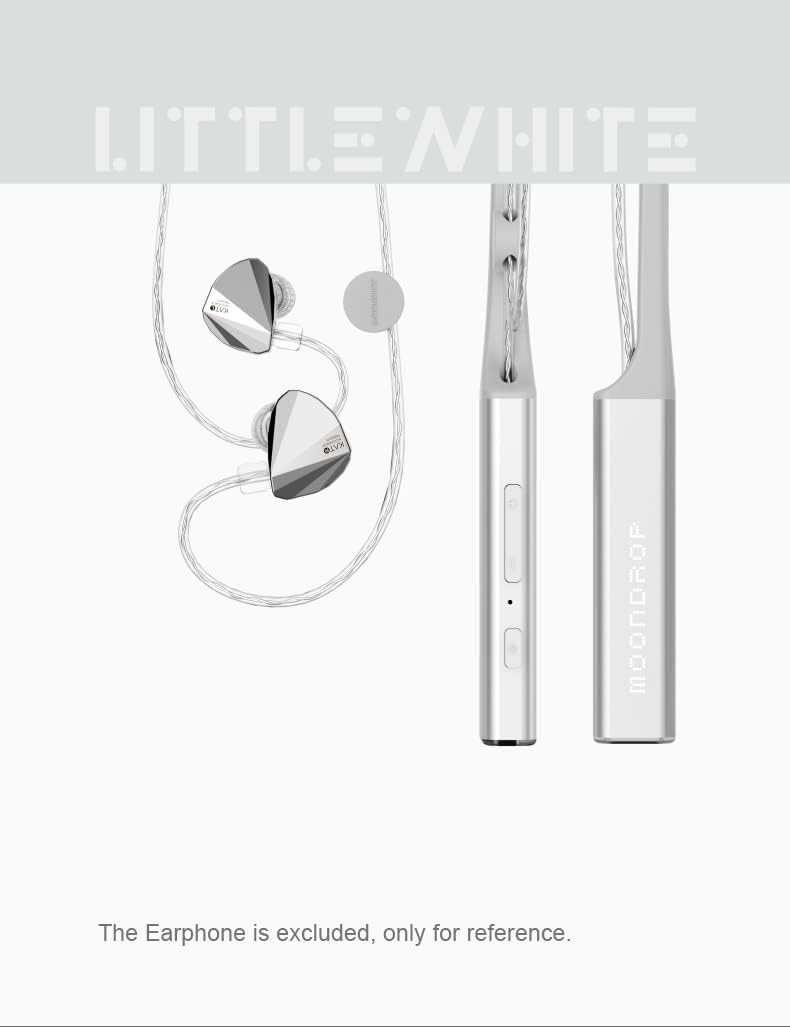
Imatge 2.1: Primer pla view of the Moondrop Littlewhite neckband controls. This image highlights the buttons and ports on the neckband.
3. Instruccions de configuració
3.1 Càrrega del dispositiu
Before first use, fully charge the Littlewhite neckband. Connect the provided USB Type-C charging cable to the charging port on the neckband and a compatible USB power source. A full charge typically takes approximately 2 hours.
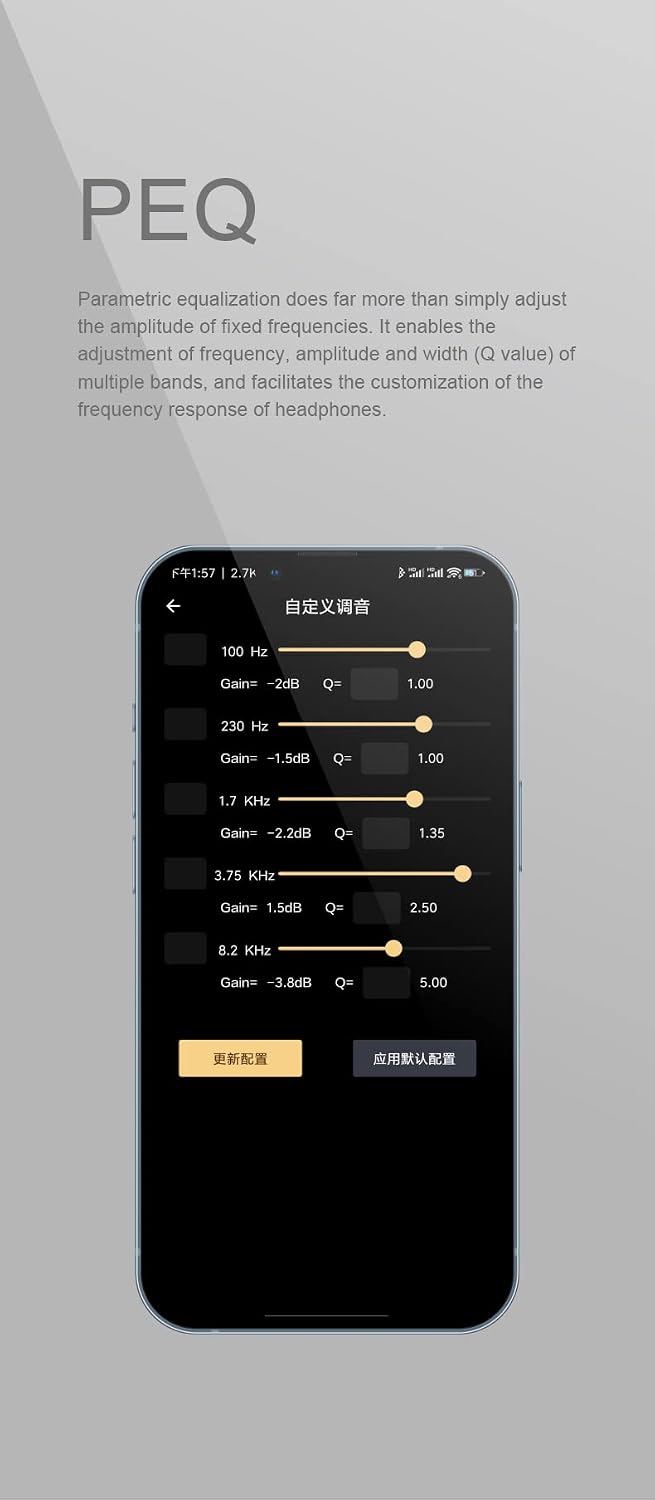
Image 3.1: Moondrop Littlewhite neckband connected to a charging cable. This image demonstrates how to connect the charging cable to the device.
3.2 Attaching In-Ear Monitors (IEMs)
The Littlewhite neckband is compatible with most IEMs that use a 0.78 2-pin connector. Carefully align the pins of your IEMs with the receptacles on the neckband and push them gently until they are securely connected. Ensure correct left and right orientation.

Image 3.2: Close-up of the universal 0.78 2-pin jack. This image shows the connector type for attaching IEMs.
3.3 Vinculació Bluetooth
- Ensure the Littlewhite neckband is powered off.
- Premeu i manteniu premut el botó d'engegada fins que l'indicador lluminós parpellegi, cosa que indica el mode d'emparellament.
- Al dispositiu (telèfon intel·ligent, tauleta, etc.), activeu el Bluetooth i cerqueu els dispositius disponibles.
- Select "Moondrop Littlewhite" from the list of found devices.
- Un cop connectat, l'indicador lluminós canviarà a blau fix o s'apagarà, segons el model.
4. Instruccions de funcionament
4.1 Encès/Apagat
- Encès: Premeu i manteniu premut el botó d'engegada durant aproximadament 3 segons fins que s'il·lumini l'indicador lluminós.
- Apagar: Premeu i manteniu premut el botó d'engegada durant aproximadament 5 segons fins que l'indicador lluminós s'apagui.
4.2 Control de mitjans
The neckband features touch controls for media playback:
- Reproduir/pausa: Single tap the multi-function button.
- Pista següent: Double tap the multi-function button.
- Pista anterior: Triple tap the multi-function button.
4.3 Gestió de trucades
Manage phone calls using the integrated controls:
- Respondre/Finalitzar la trucada: Single tap the multi-function button.
- Rebutja la trucada: Manteniu premut el botó multifunció durant 2 segons.
4.4 Control de volum
Adjust the playback volume using the dedicated volume buttons on the neckband.
4.5 Adjustable Cable Length
The Littlewhite neckband features adjustable cable length mechanisms to customize the fit and reduce cable slack. Slide the adjusters along the cables to achieve your desired length.

Image 4.1: User adjusting the cable length of the neckband. This image illustrates how to customize the cable length for a comfortable fit.
5. Funcions avançades
5.1 HiFi Audio Architecture
The Littlewhite neckband is engineered with a Qualcomm flagship Bluetooth master control chip QCC5144 and a CS43131 DAC. This architecture supports high bit rate transmission protocols and provides ample processing power for sound quality optimization and lossless transmission.
5.2 LHDC Bluetooth HiFi Audio Transmission Protocol Support
The Littlewhite supports the LHDC HiFi Bluetooth audio transmission protocol. When connected to a mobile phone compatible with LHDC, it offers lossless Bluetooth audio transmission, delivering sound quality beyond standard CD levels.

Image 5.1: The LHDC logo, indicating support for the LHDC HiFi audio transmission protocol.
5.3 aptX Adaptive High-Quality / Low-Delay Bluetooth Audio Transmission Protocol Support
The neckband also supports the aptX Adaptive Bluetooth audio transmission protocol. This allows for automatic switching between high-quality audio-visual and low-latency gaming experiences when paired with a compatible mobile device.

Image 5.2: The aptX Adaptive logo, signifying support for this high-quality, low-latency audio codec.
5.4 Superior Beamforming Microphone Environment Noise Cancellation (ENC)
The Littlewhite utilizes beamforming technology for effective Environmental Noise Cancellation. By optimizing the placement of two MEMS microphones, it significantly reduces environmental noise during calls without compromising call quality, offering a clear communication experience.

Image 5.3: A person using the Moondrop Littlewhite neckband for a phone call. This illustrates the use of the beamforming microphone for clear communication.
5.5 VDSF Targeted Headphone Optimization
This function optimizes the sound for compatible MOONDROP active in-ear headphones. It compensates the headphones to the VDSF Target Response through DSP digital signal processing, improving the balance and restoration of the audio. VDSF Target Response is a frequency response curve based on HRTF (head related transfer function) and B&K HATS diffusion, aiming for an ideal room preference curve.

Image 5.4: A frequency response graph illustrating VDSF targeted headphone optimization. This graph shows the target frequency response curve.
5.6 Parametric Equalization (PEQ)
Parametric Equalization (PEQ) allows for precise adjustment of frequency, amplitude, and bandwidth (Q value) of multiple bands. This feature facilitates detailed customization of the headphone's frequency response to suit individual preferences.

Image 5.5: Screenshot of a Parametric Equalization (PEQ) interface. This image shows various frequency, gain, and Q-value settings for audio customization.
5.7 Vídeo del producte
Video 5.1: Official product video for the Moondrop Littlewhite Neckband Bluetooth Cable. This video demonstrates the product in use and highlights its features.
6. Manteniment
6.1 Neteja
- Wipe the neckband and cables with a soft, dry cloth.
- No utilitzeu productes químics aggressivs, dissolvents de neteja o detergents forts.
- Assegureu-vos que el port de càrrega estigui lliure de pols i deixalles.
6.2 Emmagatzematge
- Guardeu el dispositiu en un lloc fresc i sec, allunyat de la llum solar directa i de temperatures extremes.
- Eviteu doblegar o torçar excessivament els cables per evitar danys.
7. Solució De Problemes
If you encounter issues with your Moondrop Littlewhite neckband, refer to the following common solutions:
| Problema | Causa possible | Solució |
|---|---|---|
| El dispositiu no s'encén | Bateria baixa; Mal funcionament del dispositiu | Charge the device fully. If the issue persists, contact support. |
| No es pot emparellar amb el dispositiu | Not in pairing mode; Device Bluetooth off; Interference | Ensure the neckband is in pairing mode. Check your device's Bluetooth settings. Move closer to your device. |
| Sense so ni amb una mala qualitat de so | IEMs not connected properly; Low battery; Incorrect audio source; Codec issues | Ensure IEMs are securely attached. Charge the neckband. Verify audio output settings on your device. Some users have reported issues with LHDC activation; try aptX Adaptive if available. |
| Problemes de càrrega | Faulty cable/charger; Port obstruction; Internal issue | Try a different USB-C cable and charger. Clean the charging port. If the device refuses to charge or only charges partially, contact support. |
| App not detecting device (if applicable) | App compatibility; Firmware issue | Ensure the app is updated. Check for firmware updates for the neckband. Some users have reported app functionality issues; use hardware controls if the app is not functional. |
8. Especificacions
| Característica | Detall |
|---|---|
| Marca | Moondrop |
| Nom del model | LITTLE WHITE |
| Tecnologia de connectivitat | Bluetooth |
| Versió Bluetooth | 5.2 |
| Interval Bluetooth | 15 metres |
| Tipus de control | Control de suports |
| Mètode de control | Toca |
| Temps de càrrega de la bateria | 2 hores |
| Durada mitjana de la bateria | 12 hores |
| Control de soroll | Cancel·lació de soroll ambiental |
| Tipus de controlador d'àudio | Conductor dinàmic |
| Interval de freqüència | 20 Hz-20 kHz ± 0.5 dB |
| Material de tancament | Silicona |
| Dispositius compatibles | Telèfons mòbils |
| Nivell de resistència a l'aigua | No resistent a l'aigua |
| Característiques addicionals | Lleuger |
9. Garantia i Suport
9.1 Informació de la garantia
The Moondrop Littlewhite Neckband Bluetooth Cable Earphones come with a one-year manufacturer's warranty from the date of purchase. This warranty covers defects in materials and workmanship under normal use. It does not cover damage caused by misuse, accidents, unauthorized modifications, or normal wear and tear.
9.2 Atenció al client
For technical assistance, warranty claims, or product inquiries, please contact Moondrop customer support through their official website or the retailer where the product was purchased. Please have your proof of purchase and product model information ready when contacting support.