
1. Introducció
Thank you for choosing the GANA HDMI Switch 5 in 1 Out 4K@60Hz. This device allows you to connect up to five HDMI source devices to a single HDMI display, such as a TV or monitor. It supports high-resolution video up to 4K@60Hz, including 3D, UHD, HDCP2.2, and HDR signals, providing a clear and immersive viewing experience. This manual provides detailed instructions for setup, operation, and troubleshooting.
Contingut del paquet:
- 1 x GANA HDMI Switch 5 in 1 Out
- 1 control remot IR
- 1 x cable d'alimentació micro USB
- 1 x Guia de l'usuari (aquest manual)

Image: The GANA HDMI Switch 5 in 1 Out device shown with its included remote control.
2. Característiques del producte
- 5 entrades HDMI, 1 sortida HDMI: Connect multiple source devices to a single display.
- Suport d'alta resolució: Supports 4K@60Hz, 4K@30Hz, 2560x1440@120Hz, and 1920x1080@240Hz.
- Tecnologies de vídeo avançades: Compatible with 3D, UHD, HDCP2.2, and HDR.
- Dual Switching Methods: Switch inputs using the manual button on the device or the included IR remote control.
- Fast and Stable Transmission: 18Gbps bandwidth for smooth video without loss.
- Alimentat per USB: Ensures stable performance (USB cable included, power adapter not included).
- Àmplia compatibilitat: Works with various HDMI source devices (PC, gaming consoles, streaming devices) and displays (TVs, monitors, projectors).

Image: A diagram illustrating the input ports, output port, power indicator, input signal indicators, IR receiver, and switch button on the GANA HDMI Switch.
3. Instruccions de configuració
Follow these steps to connect your GANA HDMI Switch:
- Connecteu la sortida HDMI: Connect one end of an HDMI cable (not included) to the 'Output' port on the GANA HDMI Switch and the other end to the HDMI input on your display (TV, monitor, or projector).
- Connecteu les entrades HDMI: Connect up to five HDMI source devices (e.g., gaming console, Blu-ray player, streaming stick, PC) to the 'Input 1' through 'Input 5' ports on the GANA HDMI Switch using HDMI cables (not included).
- Connectar l'alimentació: Connect the Micro USB power cable to the 'DC 5V' port on the HDMI Switch and the other end to a 5V USB power source (e.g., a USB port on your TV, a USB wall adapter, or a power bank). Nota: A power adapter is not included. Ensure the switch is always connected to a power source for stable operation.
- Dispositius d'encesa: Power on your HDMI source devices and your display.
- Seleccioneu l'entrada: Use the manual 'Select' button on the switch or the remote control to choose the desired input source. The corresponding LED indicator will light up.
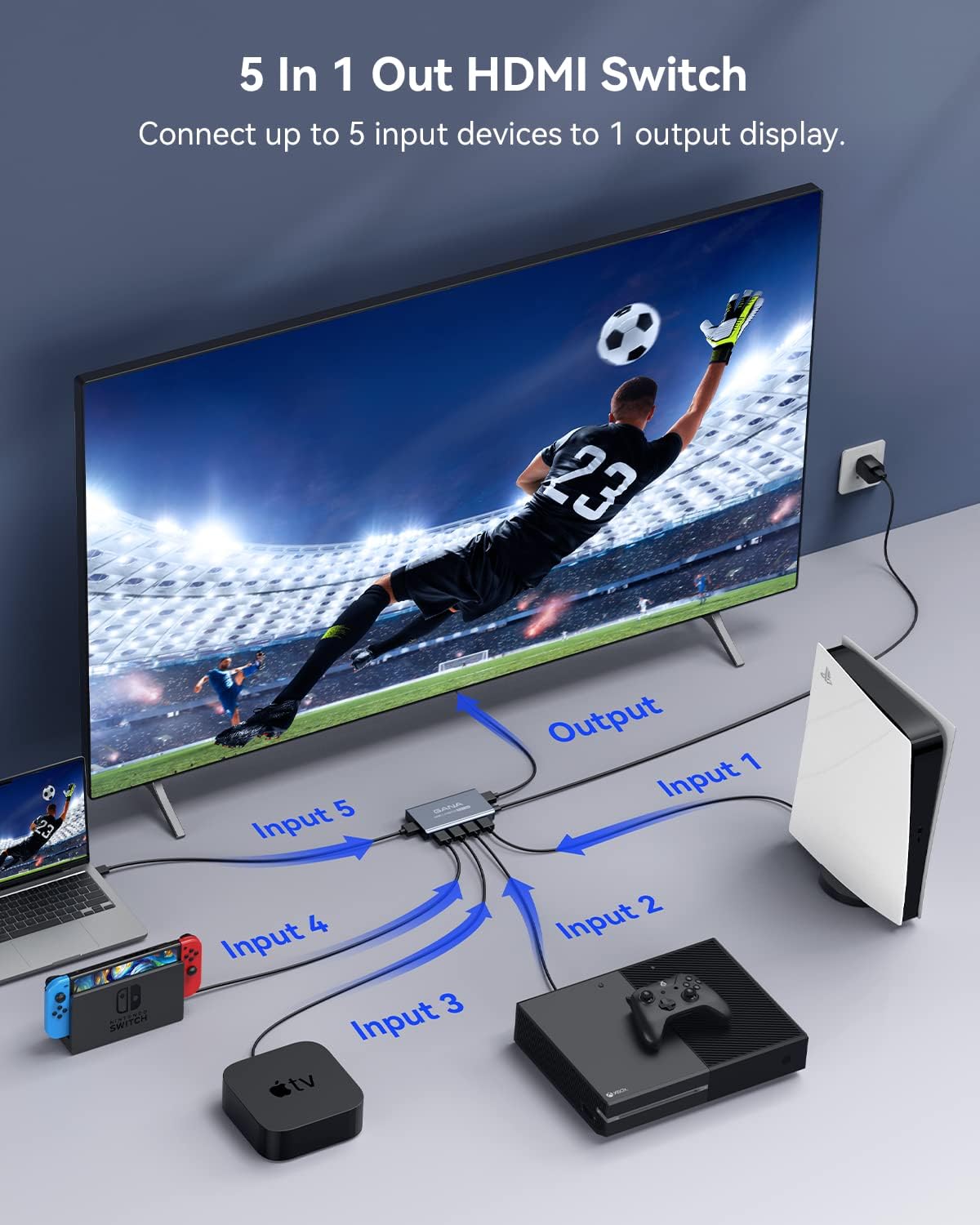
Image: A visual representation of connecting multiple input devices (laptop, Nintendo Switch, Apple TV, Xbox, PlayStation) to the GANA HDMI Switch, which then connects to a single display.

Imatge: Un primer pla view of the Micro USB power port (DC 5V) on the GANA HDMI Switch, indicating where the power cable should be connected.
4. Instruccions de funcionament
Canvi de fonts d'entrada:
There are two methods to switch between your connected HDMI devices:
- Botó manual: Press the 'Select' button on the front panel of the GANA HDMI Switch to cycle through the input sources (Input 1 to Input 5).
- Control remot IR: Use the included remote control to directly select the desired input (buttons 1-5) or cycle through inputs using the 'Next' button. The remote control has an effective range of up to 33 feet (10 meters).
Indicadors LED:
The front panel features LED indicators to show the status of the switch:
- LED d'alimentació: Indica si el dispositiu està encès.
- Input LEDs (1-5): The LED corresponding to the currently active HDMI input will illuminate.
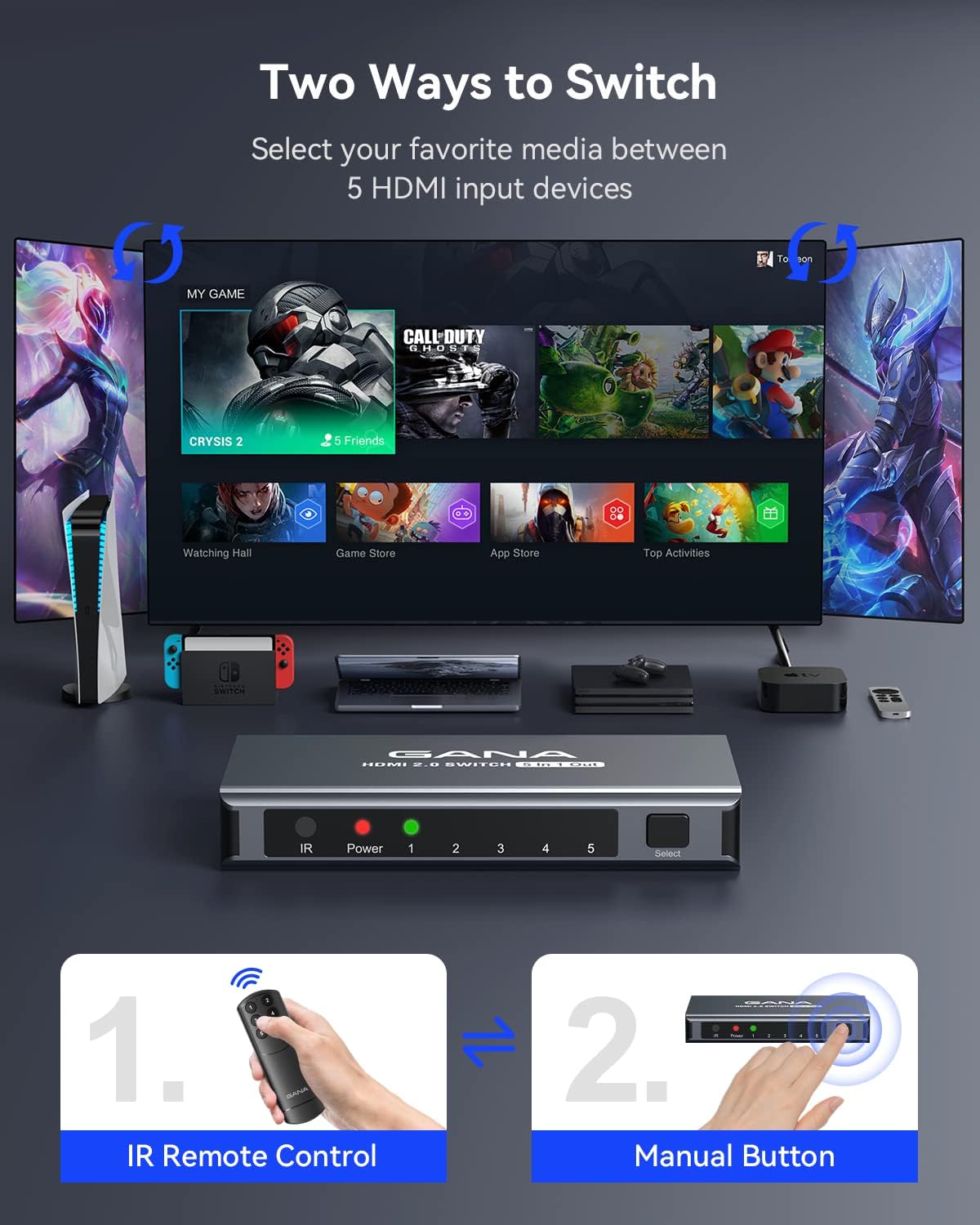
Image: Illustration showing both the IR remote control and the manual button on the GANA HDMI Switch as methods for selecting input sources.

Image: A close-up of the GANA HDMI Switch remote control, highlighting its buttons for input selection.

Image: A close-up of the GANA HDMI Switch's front panel, showing the Power, IR, and Input (1-5) LED indicators.
5. Especificacions
| Característica | Descripció |
|---|---|
| Número de model | IT-IG-5IN1 |
| Versió HDMI | HDMI 2.0 |
| Resolució màxima | 4K@60Hz |
| Ample de banda | 18 Gbps |
| Profunditat de color | 12-bit deep color per channel |
| Tecnologies suportades | 3D, UHD, HDCP2.2, HDR |
| Suport d'àudio | DTS Digital, Dolby Digital (compressed audio) |
| Ports d'entrada | 5 x HDMI |
| Ports de sortida | 1 x HDMI |
| Font d'alimentació | Micro USB 5V (USB cable included, adapter not included) |
| Dimensions | 6.8 x 5.05 x 0.85 polzades |
| Pes de l'article | 6.7 unces |
| Material de l'habitatge | Alumini |
6. Solució De Problemes
If you encounter issues with your GANA HDMI Switch, please refer to the following common problems and solutions:
- No Signal or Flickering Screen:
- Ensure all HDMI cables are securely connected to both the switch and your devices/display.
- Verify that the Micro USB power cable is connected and the switch's power LED is on. A stable power supply is crucial.
- Prova d'utilitzar cables HDMI 2.0 més curts i d'alta qualitat, especialment per a contingut 4K a 60 Hz.
- Test with different HDMI cables to rule out cable issues.
- Assegureu-vos que la pantalla estigui configurada a l'entrada HDMI correcta.
- Reinicieu tots els dispositius connectats (font, commutador, pantalla).
- El control remot no funciona:
- Assegureu-vos que no hi hagi obstacles entre el comandament a distància i el receptor d'infrarojos de l'interruptor.
- Comproveu si cal substituir la pila del comandament a distància.
- Confirm you are within the effective range (up to 33 feet).
- Problemes d'àudio (sense so o àudio distorsionat):
- Comproveu la configuració d'àudio al dispositiu i a la pantalla font.
- Ensure HDMI cables support audio transmission.
- Resolution or Refresh Rate Problems:
- Confirm your display and source devices support the desired resolution and refresh rate (e.g., 4K@60Hz).
- Use HDMI 2.0 compliant cables for 4K@60Hz and HDR content.
7. Manteniment
To ensure the longevity and optimal performance of your GANA HDMI Switch, follow these maintenance guidelines:
- Neteja: Feu servir un drap suau i sec per netejar el dispositiu. No utilitzeu netejadors líquids ni aerosols.
- Emmagatzematge: Guardeu el dispositiu en un lloc fresc i sec, allunyat de la llum solar directa i de temperatures extremes.
- Manipulació: Eviteu deixar caure o sotmetre el dispositiu a forts impactes.
- Ventilació: Ensure the device has adequate ventilation and is not covered, to prevent overheating.
8. Garantia i Suport
GANA provides lifetime technical support and friendly customer service for this product. If you encounter any issues or have questions, please contact GANA customer support. We are committed to resolving your problem within 24 hours.
For support, please refer to the contact information provided with your purchase or visit the official GANA weblloc.
