
Introducció
Thank you for choosing the Chieftec PPS-850FC-A3 850W ATX 3.0 Power Supply Unit. This manual provides essential information for the safe and efficient installation, operation, and maintenance of your new power supply. Please read this manual thoroughly before installation and retain it for future reference.
Instruccions de seguretat
- Always disconnect the AC power cord from the wall outlet before installing or removing the power supply.
- Do not open the power supply unit casing. Alt volumtaghi ha peces a l'interior i no hi ha peces que l'usuari pugui reparar. Obrint la caixaasing anul·larà la garantia.
- Assegureu-vos que la font d'alimentació estigui instal·lada en una zona ben ventilada, lliure de calor, humitat o pols excessives.
- Feu servir només els cables modulars que s'inclouen amb aquesta font d'alimentació. L'ús de cables incompatibles pot causar danys a la font d'alimentació o als components connectats.
- Ensure all connectors are securely attached before powering on the system.
- Aquest producte està dissenyat per al seu ús en sistemes informàtics personals. No l'utilitzeu per a cap altre propòsit.
Contingut del paquet
Si us plau, comproveu el contingut del vostre paquet. Si falta algun article o hi ha algun malmès, poseu-vos en contacte amb el vostre distribuïdor.
- Chieftec PPS-850FC-A3 850W ATX 3.0 Power Supply Unit
- Modular Cable Set (including PCIe Gen 5 connector)
- Cable d'alimentació CA
- Cargols de muntatge
- Manual d'usuari (aquest document)
Configuració i instal·lació
Follow these steps to properly install your Chieftec PPS-850FC-A3 power supply unit.
1. Comprovació prèvia a la instal·lació
- Ensure your computer case supports ATX form factor power supplies.
- Verify that your motherboard and other components are compatible with an 850W power supply and ATX 3.0 standard.
2. Instal·lació física
- Muntatge de la font d'alimentació: Carefully slide the power supply into the designated PSU bay in your computer case. Ensure the fan is oriented correctly for optimal airflow (typically facing down if there's a bottom vent, or facing inside the case). Secure the PSU with the provided mounting screws.
- Connexió de cables modulars: Identify the necessary modular cables for your system components (motherboard, CPU, GPU, storage drives). Connect them to the appropriate ports on the power supply.

Image: Chieftec PPS-850FC-A3 power supply shown with its retail packaging, highlighting the unit itself and a detailed view of the PCIe Gen 5 connector, which is essential for modern high-performance graphics cards.
- Connexió a la placa base: Connecteu el connector d'alimentació principal ATX de 24 pins a la placa base.
- Connecting to CPU: Connect the 4+4-pin or 8-pin EPS/CPU power connector(s) to your motherboard.
- Connecting to GPU: For graphics cards, use the appropriate PCIe power connectors. For modern GPUs, utilize the dedicated 12VHPWR (PCIe Gen 5) connector if your GPU supports it.
- Connecting to Peripherals: Connect SATA power cables to SSDs/HDDs and Molex connectors to other peripherals as needed.
- Connexió d'alimentació CA: Once all internal connections are secure, connect the AC power cord to the power supply and then to a wall outlet.
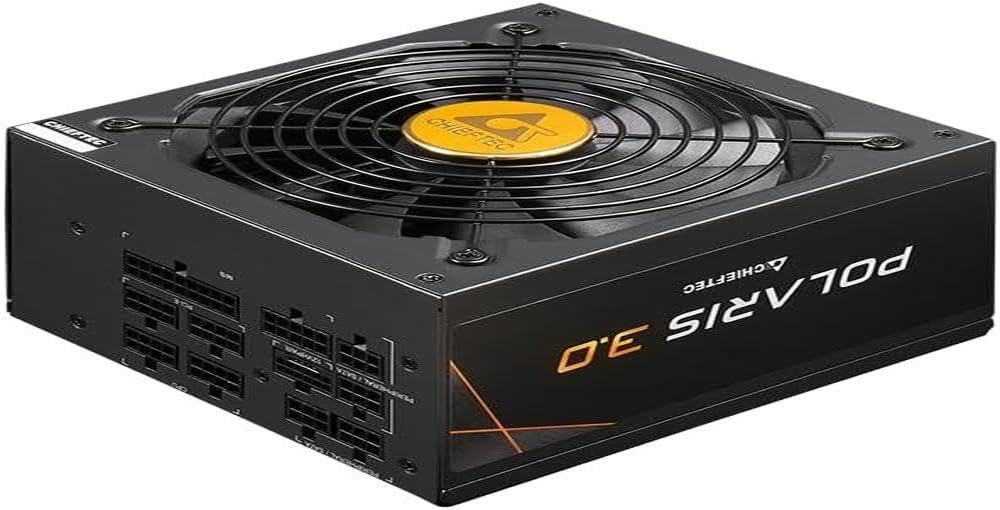
Imatge: Un front directe view of the Chieftec PPS-850FC-A3 power supply, showcasing its large cooling fan and the protective grille. The Chieftec logo is visible in the center of the fan.
Instruccions de funcionament
After successful installation, ensure the power switch on the back of the PSU is in the 'ON' position (usually marked 'I'). You can then power on your computer system using the case's power button. The power supply will automatically manage power delivery to your components.
Manteniment
- Neteja: Periodically clean the exterior of the power supply and its fan grille to prevent dust buildup, which can impede airflow and cooling performance. Use compressed air to gently remove dust. Ensure the system is powered off and unplugged before cleaning.
- Ventilació: Ensure that the computer case has adequate ventilation and that the power supply's fan intake and exhaust are not obstructed.
- Gestió de cables: Proper cable management can improve airflow within your case, contributing to better cooling for all components, including the PSU.
Resolució de problemes
Si teniu problemes amb la font d'alimentació, consulteu els passos habituals següents per a la resolució de problemes:
- Sense energia:
- Comproveu si el cable d'alimentació de CA està connectat correctament tant a la font d'alimentació com a la presa de corrent.
- Ensure the power switch on the PSU is in the 'ON' position ('I').
- Verifiqueu que la presa de corrent funciona connectant-hi un altre dispositiu.
- Confirm all internal power cables (24-pin ATX, CPU, GPU) are correctly and firmly seated.
- Inestabilitat del sistema/aturades aleatòries:
- This could indicate insufficient power or a faulty component. Ensure your system's power requirements do not exceed the PSU's 850W capacity.
- Check for overheating of components.
- Ensure the PSU fan is spinning freely and not obstructed.
- Sorolls inusuals:
- A rattling or grinding noise may indicate a fan issue. If the noise is persistent and loud, contact support.
- Coil whine (a high-pitched electronic noise) can occur under certain loads but is generally harmless.
If these steps do not resolve your issue, please contact Chieftec customer support or your retailer for further assistance.
Especificacions
| Característica | Especificació |
|---|---|
| Nom del model | PPS-850FC-A3 |
| Marca | Chieftec |
| Dispositius compatibles | Ordinador personal |
| Tipus de connector | ATX |
| Potència de sortidatage | 850 watts |
| Factor de forma | ATX |
| Mètode de refrigeració | Aire |
| Mida del ventilador | 120 mil·límetres |
| Volum d'entrada màximtage | 230 Volts |
| Tipus de connector utilitzat al cable | ATX |
| System Bus Connector Type | 4 Pin |
| UPC | 753263078131 |
Garantia i Suport
This Chieftec PPS-850FC-A3 power supply unit comes with a manufacturer's warranty. Please refer to the warranty card included in your package or visit the official Chieftec weblloc web per obtenir informació detallada sobre els termes i condicions de la garantia.
For technical support, product inquiries, or warranty claims, please contact Chieftec customer service through their official weblloc web o la informació de contacte proporcionada amb la compra.