
Introducció
This manual provides detailed instructions for the installation, operation, and maintenance of your Strong SRT 7040 Digital Satellite HD Receiver. Please read this manual carefully before using the device to ensure proper functionality and to prevent damage.

Image: The Strong SRT 7040 DTT Tuner and its retail packaging.
The Strong SRT 7040 is a Full HD digital satellite receiver designed for Free-To-Air (FTA) channels. It features a USB port for multimedia playback and software updates, and supports Dolby Audio for enhanced sound quality.
1. Configuració
1.1 Desembalatge
Traieu amb cura tots els components de l'embalatge. Assegureu-vos que hi hagi els elements següents:
- Strong SRT 7040 DTT Tuner
- Control remot (amb 2 piles AAA)
- Adaptador d'alimentació
- Manual d'usuari
1.2 Connexió del dispositiu
Follow these steps to connect your SRT 7040 receiver:
- Entrada de satèl·lit: Connect your satellite dish cable to the SEGUIT A port a la part posterior del receptor.
- Sortida de vídeo (HDMI): Connecteu un cable HDMI des del HDMI port on the receiver to an HDMI input on your television.
- Sortida de vídeo (SCART): Alternatively, for older televisions, connect a SCART cable from the TV SCART port on the receiver to the SCART input on your television.
- Audio Output (Digital): For digital audio, connect a coaxial cable from the COAXIAL S/PDIF port to your digital audio ampmés viu.
- Audio Output (Analog): For analog audio, connect RCA cables from the AUDIO R/L ports to your audio Hi-Fi ampmés viu.
- Dispositiu USB: If desired, connect a USB storage device to the USB port for multimedia playback or software updates.
- Potència: Connecteu l'adaptador d'alimentació a 12 V === 1.5 A input on the receiver, then plug the adapter into a wall outlet.

Image: Rear panel connections of the Strong SRT 7040 DTT Tuner, showing SAT IN, HDMI, TV SCART, COAXIAL S/PDIF, AUDIO R/L, USB, and Power input.
1.3 First-Time Installation and Channel Scan
Upon first power-on, the receiver will guide you through an initial setup wizard. Follow the on-screen prompts to select your language, country, and perform an automatic channel scan. This process will detect and store all available satellite channels.
2. Instruccions de funcionament
2.1 Control remotview
The included remote control allows you to access all functions of the SRT 7040. Insert the two AAA batteries into the remote control, ensuring correct polarity.

Image: The remote control for the Strong SRT 7040 DTT Tuner, showing buttons for power, numbers, volume, channel, menu, and special functions.
2.2 Funcions bàsiques
- Potència: Premeu el botó PODER button to turn the receiver on or off (standby mode).
- Selecció de canals: Utilitza el CH+ / CH- buttons to change channels sequentially, or use the numeric keypad to enter a channel number directly.
- Control de volum: Utilitza el VOL+ / VOL- botons per ajustar el volum de l'àudio.
- Silenciar: Premeu el botó MUT botó per silenciar temporalment l'àudio.
2.3 Navegació de menús
Premeu el botó MENÚ per accedir al menú principal. Feu servir les tecles de fletxa (UP, ABAIX, ESQUERRA, DRET) per navegar per les opcions i OK per confirmar les seleccions. Premeu Sortida to return to the previous screen or live TV.
2.4 Característiques especials
- Temporitzadors: The receiver supports programming timers for recording or switching to specific channels at scheduled times. Access this feature via the menu.
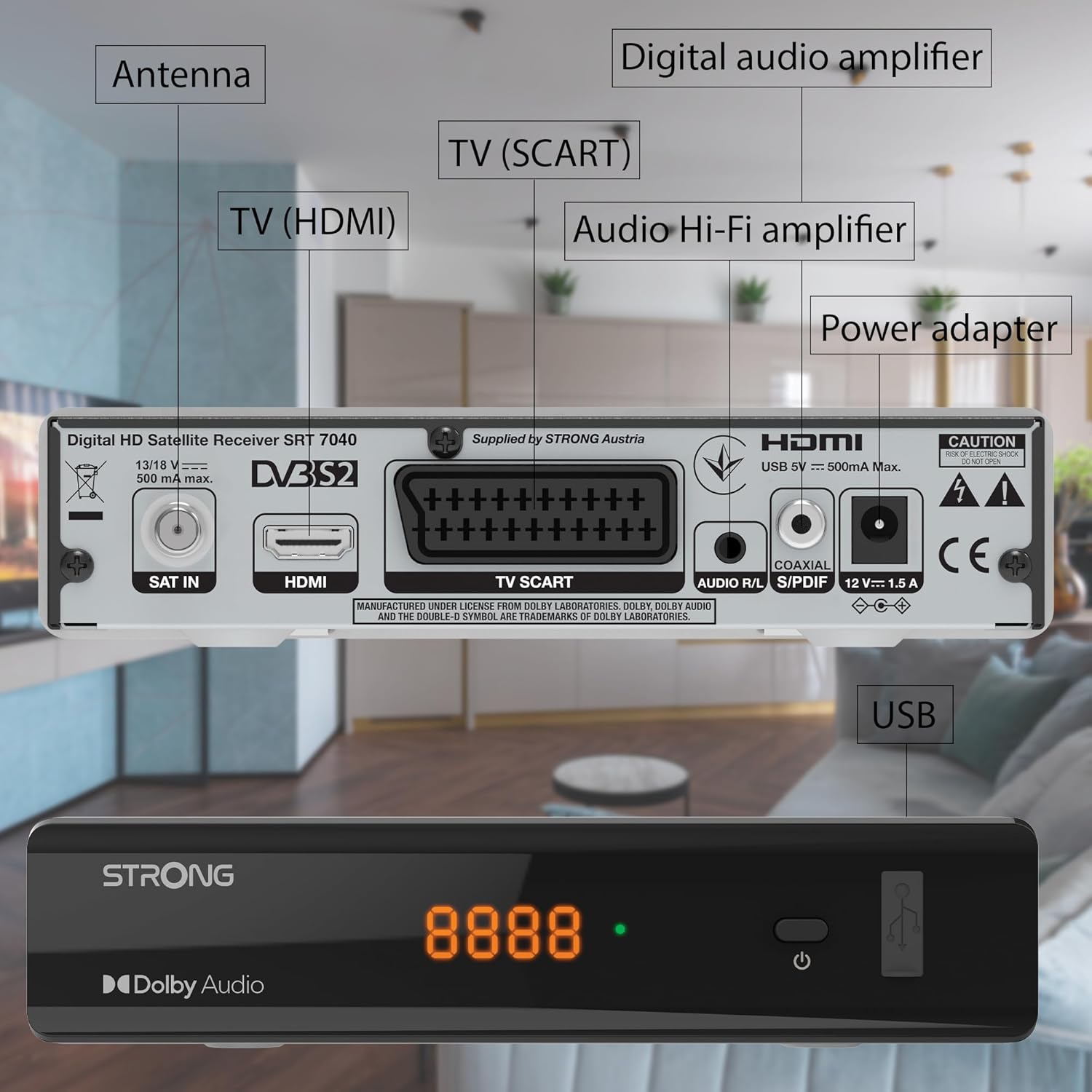
Image: The Strong SRT 7040 DTT Tuner displaying a timer icon, indicating its scheduling capabilities.
- Llistes de preferits: Create customized lists of your preferred channels for quick access.
- Subtítols: Enable or disable subtitles for compatible broadcasts using the SUB botó del comandament a distància.
- Guia electrònica de programes (EPG): Premeu el botó EPG botó per view program information for upcoming broadcasts.
- Dolby Audio: The receiver supports Dolby Audio for a high-quality sound experience.

Image: The Strong SRT 7040 DTT Tuner with the Dolby Audio logo, illustrating its sound processing capability.
3. Manteniment
3.1 Neteja
To clean the receiver, disconnect it from the power supply. Use a soft, dry cloth to wipe the exterior. Do not use liquid cleaners, aerosols, or abrasive materials, as these can damage the finish or internal components.
3.2 Actualitzacions de programari
Reviseu periòdicament el fabricant website for available software updates. Updates can improve performance, add new features, or resolve issues. Software updates are typically performed via the USB port following specific instructions provided with the update file.
3.3 Informació de seguretat
- No obriu el receptor casing. No hi ha peces a l'interior que l'usuari pugui reparar. Demaneu totes les tasques de manteniment a personal qualificat.
- Keep the receiver away from direct sunlight, heat sources, and moisture.
- Assegureu-vos que hi hagi una ventilació adequada al voltant del dispositiu per evitar el sobreescalfament.
- Utilitzeu només l'adaptador d'alimentació subministrat.
4. Solució De Problemes
If you encounter problems with your SRT 7040, consult the following table before contacting support.
| Problema | Causa possible | Solució |
|---|---|---|
| Sense poder | Adaptador de corrent no connectat; presa de corrent defectuosa | Check power adapter connection; Try a different power outlet |
| Sense senyal / Pantalla negra | Satellite cable loose or disconnected; Incorrect input selected on TV; Satellite dish alignment issue | Check SAT IN cable connection; Ensure TV is on correct HDMI/SCART input; Perform a channel scan; Consult a professional for dish alignment if necessary |
| El comandament a distància no funciona | Batteries depleted or incorrectly inserted; Obstruction between remote and receiver | Replace batteries; Ensure correct polarity; Remove any obstructions; Point remote directly at receiver |
| Poca qualitat d'imatge | Weak satellite signal; Incorrect display settings | Check satellite signal strength in menu; Adjust TV display settings; Ensure Full HD content is being broadcast |
5. Especificacions
The following are the technical specifications for the Strong SRT 7040 Digital Satellite HD Receiver:
- Model: SRT 7040 (SAT FTA Full HD)
- Marca: Fort
- Dimensions: 3.39 x 6.46 x 1.38 polzades (8.6 x 16.4 x 3.5 cm)
- Pes de l'article: 9.2 unces (260 grams)
- Color: Negre
- Tecnologia de connectivitat: USB
- Voltage: 100 - 240 V
- Freqüència: 50 - 60 Hz
- Consum d'energia: 18 kWh (operational, typical)
- Interval de temperatura de treball: 0ºC a 40ºC
- Humitat relativa: 10% - 95%
- Bateries: 2 piles AAA (incloses per al comandament a distància)
- Especificació complerta: DVB-S2
- Inclòs: Wally Receiver
6. Garantia i Suport
For warranty information and technical support, please refer to the warranty card included in your product packaging or visit the official Strong weblloc web. Conserveu el rebut de compra com a comprovant de compra per a reclamacions de garantia.
For further assistance, you may contact Strong customer service through the contact details provided on their official weblloc.