
1. Introducció
Gràcies per la compraasing the X-Cell XC-SB-02 100W Bluetooth Soundbar. This soundbar is designed to enhance your audio experience with powerful sound and versatile connectivity options, including Bluetooth, USB, TF card, AUX, and optical input. Please read this manual carefully before using the product to ensure proper operation and to maximize its performance.
2. Instruccions de seguretat
- No exposeu la barra de so a la pluja, la humitat ni a temperatures extremes.
- No obriu la c.asing. Demaneu totes les tasques de manteniment a personal qualificat.
- Assegureu-vos que l'adaptador de corrent sigui compatible amb la vostra font d'alimentació local.
- Keep the soundbar away from heat sources and direct sunlight.
- Clean the soundbar with a soft, dry cloth. Do not use liquid cleaners.
- Eviteu col·locar objectes pesats a la barra de so.
3. Contingut del paquet
Si us plau, comproveu el paquet per veure si hi ha els elements següents:
- X-Cell XC-SB-02 Soundbar Unit
- Adaptador d'alimentació
- Control remot
- Audio Cables (RCA, 3.5mm)
- Manual d'usuari
4. Producte acabatview
Familiarize yourself with the soundbar's ports and controls.
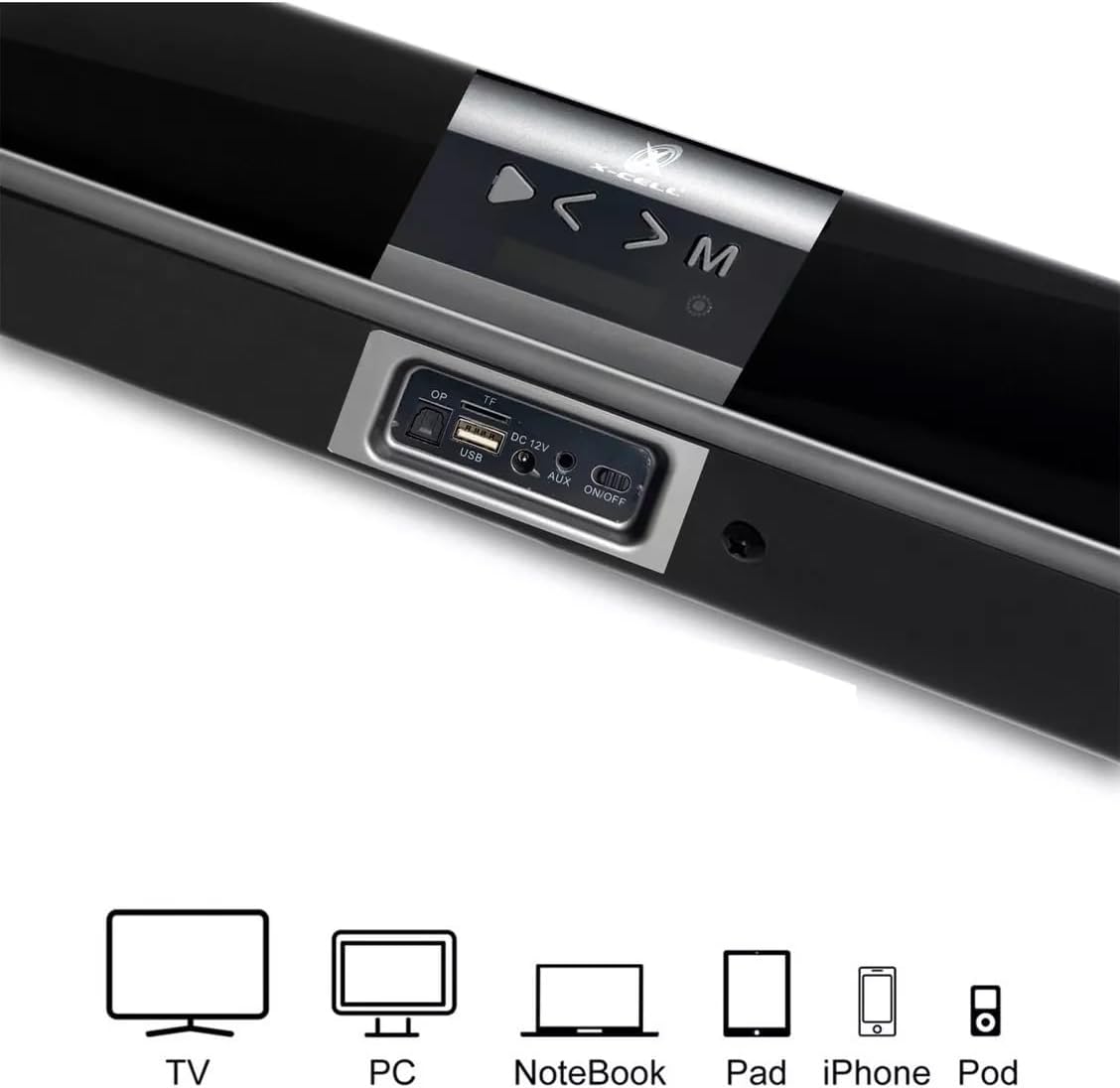
Imatge 1: Rear panel connections and compatible devices. This image displays the rear panel of the X-Cell XC-SB-02 soundbar, highlighting the USB port, TF card slot, DC 12V power input, AUX input, and the ON/OFF switch. Below the soundbar, icons illustrate compatible devices such as TV, PC, Notebook, Pad, iPhone, and iPod, indicating the versatility of the soundbar's connectivity.
4.1. Connexions del panell posterior
- Port USB: Per reproduir àudio files d'una unitat flash USB.
- Ranura per a targetes TF: Per reproduir àudio files des d'una targeta TF (MicroSD).
- Entrada DC 12V: Connecteu aquí l'adaptador de corrent proporcionat.
- Entrada AUX: Connect external audio devices using a 3.5mm or RCA cable.
- Interruptor ON / OFF: Main power switch for the soundbar.
4.2. Controls del panell superior
- Botó d'encesa: Turns the soundbar on or off (standby).
- Botó de mode (M): Switches between input modes (Bluetooth, AUX, USB, TF, Optical).
- Volume Up / Next Track (>): Increases volume or skips to the next track in USB/TF mode.
- Volume Down / Previous Track (<): Decreases volume or skips to the previous track in USB/TF mode.
5. Configuració
5.1. Col·locació
Place the soundbar on a stable, flat surface in front of your TV or desired listening area. Ensure there is adequate ventilation around the unit.
5.2. Connexió d'alimentació
- Connect the power adapter to the DC 12V input on the rear of the soundbar.
- Connecteu l'adaptador de corrent a una presa de corrent.
- Gireu l'interruptor ON/OFF del panell posterior a la posició 'ON'.
5.3. Connexió a dispositius

Imatge 2: Soundbar connected to a television. This image shows the X-Cell XC-SB-02 soundbar placed directly in front of a television, demonstrating a common and recommended setup for home entertainment systems.
5.3.1. Connexió Bluetooth
Refer to Section 6.2 for detailed Bluetooth pairing instructions.
5.3.2. AUX/RCA Connection
Use the provided 3.5mm audio cable or RCA cables to connect the soundbar's AUX input to the audio output of your TV, PC, or other audio device.
5.3.3. Connexió òptica
Connect an optical audio cable (not included) from your TV's optical audio output to the soundbar's optical input (if available on your specific model, as indicated by the product title).
6. Instruccions de funcionament
6.1. Encendre/apagar
- Ensure the rear ON/OFF switch is in the 'ON' position.
- Press the Power button on the soundbar's top panel or the remote control to turn the unit on or off (standby mode).
6.2. Selecció de mode

Imatge 3: Soundbar mode indicators. This image highlights the different input modes available on the X-Cell XC-SB-02 soundbar, including Bluetooth Mode, AUX Mode, and TF Card Mode, represented by their respective icons.
Press the 'M' (Mode) button on the soundbar or the remote control repeatedly to cycle through the available input modes: Bluetooth, AUX, USB, TF, and Optical.
6.3. Emparellament Bluetooth

Imatge 4: Bluetooth connectivity. This image shows a smartphone wirelessly connected to the X-Cell XC-SB-02 soundbar via Bluetooth, demonstrating music playback from the phone through the soundbar.
- Turn on the soundbar and switch to Bluetooth mode using the 'M' button. The soundbar will indicate it is in pairing mode (e.g., flashing LED or voice prompt).
- Enable Bluetooth on your device (smartphone, tablet, PC).
- Cerca available Bluetooth devices and select "XC-SB-02" (or similar name) from the list.
- Once connected, the soundbar will indicate successful pairing. You can now play audio from your device through the soundbar.
- The Bluetooth signal range is up to 12 meters.
6.4. Reproducció de targetes USB/TF
- Insert a USB flash drive or TF card into the corresponding port on the rear panel.
- Switch the soundbar to USB or TF mode using the 'M' button.
- La barra de so començarà a reproduir àudio automàticament files del dispositiu d'emmagatzematge.
- Use the Volume Up/Down buttons (which also function as Next/Previous track) on the soundbar or remote to control playback.
6.5. Control de volum
Adjust the volume using the Volume Up (>) and Volume Down (<) buttons on the soundbar's top panel or the dedicated volume buttons on the remote control.
7. Manteniment
- Neteja: Wipe the soundbar with a soft, dry, lint-free cloth. Do not use abrasive cleaners, waxes, or solvents.
- Emmagatzematge: Si no la feu servir durant un període prolongat, desendolleu la barra de so de la presa de corrent i guardeu-la en un lloc fresc i sec.
- Ventilació: Assegureu-vos que les reixetes de ventilació de la barra de so no estiguin bloquejades per evitar que es sobreescalfi.
8. Solució De Problemes
Si teniu problemes amb la barra de so, consulteu els problemes i solucions més comuns següents:
- Sense energia:
- Check if the power adapter is securely connected to the soundbar and the wall outlet.
- Ensure the rear ON/OFF switch is in the 'ON' position.
- Press the Power button on the soundbar or remote.
- Sense so:
- Assegureu-vos que la barra de so estigui engegada i no silenciada.
- Check the volume level on both the soundbar and the connected device.
- Verify that the correct input mode (Bluetooth, AUX, USB, TF, Optical) is selected.
- For wired connections, ensure cables are securely connected to both the soundbar and the audio source.
- Per al Bluetooth, assegureu-vos que el dispositiu estigui correctament emparellat i dins de l'abast.
- Bluetooth Disconnection/Cannot Pair:
- Assegureu-vos que la barra de so estigui en mode d'emparellament Bluetooth.
- Move your device closer to the soundbar (within 12 meters).
- Turn off Bluetooth on your device and the soundbar, then turn them back on and try pairing again.
- Clear the soundbar from your device's Bluetooth history and re-pair.
- El control remot no funciona:
- Comproveu si les piles estan correctament inserides i no estan esgotades. Substituïu-les si cal.
- Assegureu-vos que no hi hagi obstacles entre el comandament a distància i el sensor de la barra de so.
9. Especificacions
| Model | XC-SB-02 |
| Potència de sortida | 100 watts |
| Connectivitat | Bluetooth, USB, TF Card, AUX (3.5mm/RCA), Optical |
| Interval Bluetooth | Fins a 12 metres |
| Dimensions (L x A x A) | 99.2 cm x 6 cm x 6.2 cm |
| Pes | 2.02 quilos |
| Font d'alimentació | Wired Electric (DC 12V) |
| Dispositius compatibles | Notebook, Smartphone, Tablet, TV, PC |
10. Garantia i Suport
This product comes with a standard manufacturer's warranty. For specific warranty terms and conditions, please refer to the documentation provided at the time of purchase or contact your retailer. For technical support or service inquiries, please contact X-Cell customer service through their official channels.