1. Introducció
Thank you for choosing the Podofo 1 Din Android Car Stereo. This device integrates advanced features such as a 7-inch retractable touch screen, Android operating system, Bluetooth, GPS navigation, Wi-Fi connectivity, FM/RDS radio, Mirror Link, AUX-in, and support for a backup camera. This manual provides essential information for installation, operation, maintenance, and troubleshooting to ensure optimal performance and user experience.

Image 1.1: Podofo 1 Din Android Car Stereo with its main components and accessories.
2. Contingut del paquet
Si us plau, reviseu el paquet amb cura per assegurar-vos que hi hagi tots els elements:
- 1 x Single DIN Car Stereo Unit
- 1 x càmera de seguretat
- 1 x Antena GPS
- 1 x Arnès de cable d'alimentació
- 1 x Speaker Cable Harness
- 2 claus de desmuntatge
- 1 x Manual d'usuari
- 1 x conjunt de suports de muntatge

Image 2.1: Visual representation of the package contents.
3. Especificacions
| Sistema | Android 10.0 |
| Mida de la pantalla | 7-inch Retractable Touch Screen |
| Resolució | 1024 x 600 |
| Versió Bluetooth | 4.2 |
| Gamma de ràdio FM | 87.5 ~ 108 MHz |
| Temperatura de funcionament | -10 ℃ ~ +60 ℃ |
| Interfície USB | USB 2.0 |
| Voltage | 12 V |
| Potència de sortida | 60W |
| Emmagatzematge | 1 GB de RAM + 16 GB de ROM |
| Formats d'àudio | MP3 / WMA / WA / OGG / FLAC / APE |
| Formats de vídeo | RM / RMVB / MP4 / FLV / MKV / 3GP / AVIASF / SWFMP1 |
| Format d'imatge | JPG |
| Connectivitat | Wi-Fi |
| Dimensions del producte (L x A x A) | 18.8 cm x 5.8 cm x 16.5 cm |
| Pes | 1660 grams |

Image 3.1: Product details including dimensions and rear panel connections.
4. Configuració i instal·lació
Before installation, ensure your vehicle's power is disconnected. Professional installation is recommended.
4.1 Connexions de cablejat
- Connexió d'alimentació: Connect the power cable harness to your vehicle's power supply (ACC, B+, GND). Ensure correct polarity.
- Connexió de l'altaveu: Connect the speaker cable harness to your vehicle's speakers. Match positive and negative terminals.
- Antena GPS: Connect the GPS antenna to the dedicated port on the back of the unit and mount it in a location with a clear view del cel.
- Càmera de seguretat: Connect the backup camera's video output to the 'CAMERA IN' port on the stereo. Connect the camera's power to your vehicle's reverse light circuit for automatic activation.
- AUX-in/USB: Connect external devices via the AUX-in port or USB ports as needed.
- Control del volant (SWC): If your vehicle supports SWC, connect the SWC wires (KEY1, KEY2) to the corresponding wires from your vehicle's harness. Configuration will be done in the settings menu.

Image 4.1: Backup camera wiring diagram.
4.2 Muntatge de la unitat
Insert the single DIN unit into your vehicle's dashboard opening. Secure it using the provided mounting brackets and screws. Ensure the retractable screen mechanism has enough clearance to operate freely.
5. Instruccions de funcionament
5.1 Funcionament bàsic
- Encès/apagat: Press the power button (usually labeled SRC or PWR) to turn the unit on or off.
- Control de volum: Feu servir el botó giratori o els controls en pantalla per ajustar el volum.
- Screen Retraction: Manually adjust the screen's angle or retract it into the unit as desired.
5.2 Bluetooth Connectivity (Bluetooth 4.2)
Pair your mobile phone with the car stereo for hands-free calling and audio streaming.
- Go to the Bluetooth menu on the car stereo.
- Activa el Bluetooth al teu telèfon mòbil i busca els dispositius disponibles.
- Select "MY PODOFO" or a similar name from the list on your phone.
- Confirma el codi d'emparellament si se't demana.
- Once paired, you can make/receive calls and play music through the car stereo.

Image 5.1: Bluetooth connection and FM/RDS radio interface.
Ràdio 5.3 FM/RDS
Access the Radio application to listen to FM broadcasts. The RDS function displays station names and program information where available.
- Open the "Radio" app from the main menu.
- Feu servir els controls en pantalla per cercar emissores, sintonitzar-les manualment o seleccionar emissores preestablertes.
5.4 Navegació GPS
The unit supports both online and offline navigation. Ensure the GPS antenna is properly connected.
- Open the "Navigation" or "Maps" app.
- For offline maps, download them via Wi-Fi before driving.
- Introduïu la vostra destinació i seguiu les indicacions de veu.
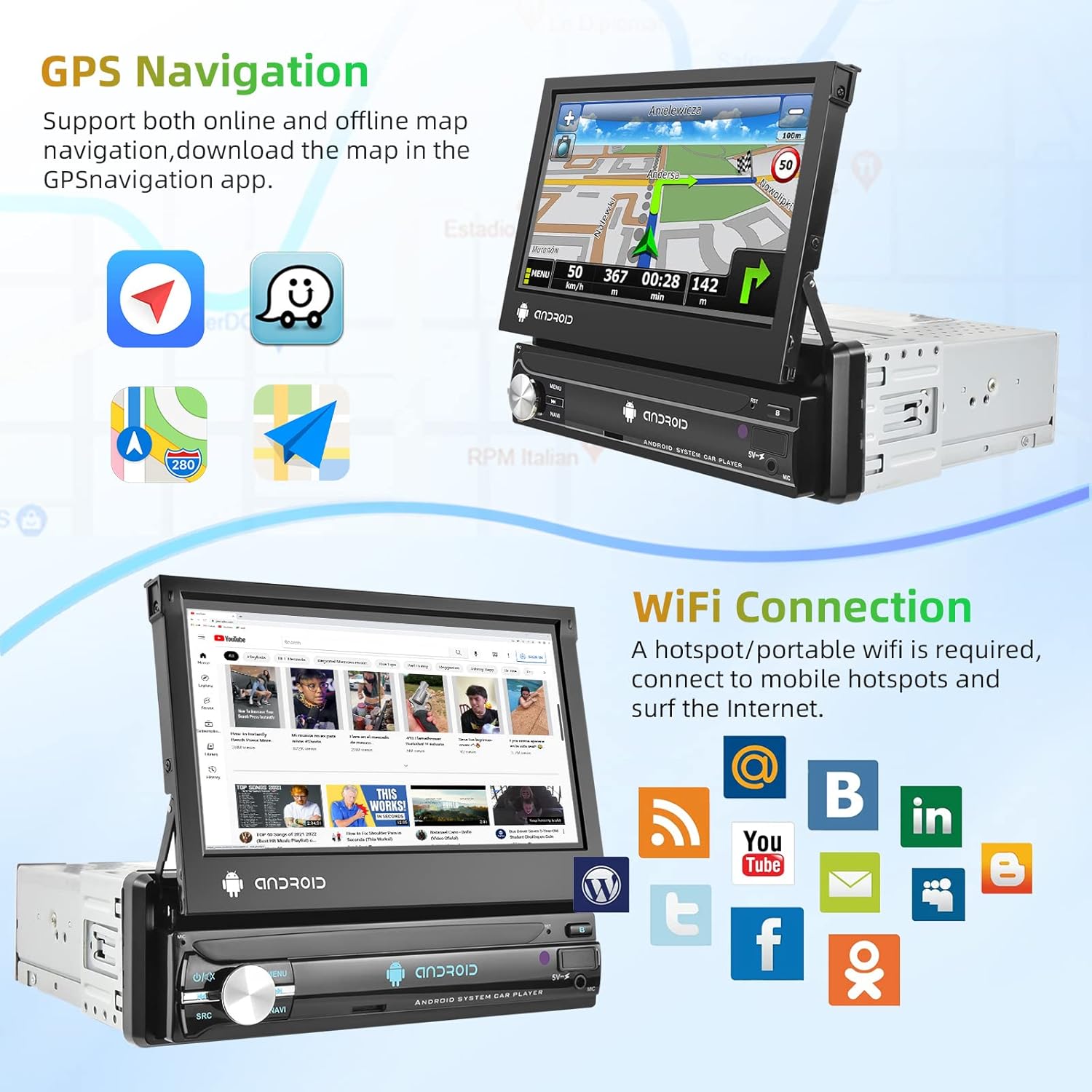
Image 5.2: GPS navigation and Wi-Fi connection features.
5.5 Connexió Wi-Fi
Connect to a mobile hotspot or Wi-Fi network to access online features, download apps, and browse the internet.
- Go to "Settings" and select "Wi-Fi".
- Activa el Wi-Fi i selecciona la xarxa que vulguis.
- Introduïu la contrasenya si cal.
5.6 Enllaç de mirall
Project your smartphone screen onto the car stereo display. Supports both Android and iOS devices via USB connection.
- Connecta el teu telèfon intel·ligent a l'estèreo del cotxe mitjançant un cable USB.
- Follow the on-screen prompts on both your phone and the stereo to establish the connection.

Image 5.3: Split screen, EQ settings, Mirror Link, and Steering Wheel Control features.
5.7 Backup Camera Display
When the vehicle is shifted into reverse gear, the car stereo will automatically display the view from the connected backup camera.
5.8 Control del volant (SWC)
Configure your vehicle's steering wheel buttons to control the car stereo functions.
- Aneu a "Configuració" i busqueu l'opció "Control del volant" o "Aprenentatge SWC".
- Seguiu les instruccions que apareixen a la pantalla per assignar funcions a cada botó.
5.9 EQ Setting
Adjust audio equalization for a personalized sound experience.
- Access the "EQ" or "Sound Settings" menu.
- Choose from preset equalizer modes or manually adjust frequency bands.
5.10 Pantalla dividida
Run two applications simultaneously on the screen for enhanced multitasking.
- While an app is open, long-press the recent apps button or drag an app to one side of the screen (depending on Android version).
- Select another app to open on the other side.
6. Manteniment
- Neteja de pantalla: Feu servir un drap suau i sense borrissol per netejar suaument la pantalla tàctil. Eviteu productes de neteja o dissolvents abrasius.
- Neteja general: Keep the unit free from dust and debris. Use a dry cloth for the main body.
- Actualitzacions de programari: Comproveu periòdicament si hi ha actualitzacions de programari a través de la configuració del sistema per garantir un rendiment òptim i l'accés a les noves funcions.
7. Solució De Problemes
| Problema | Causa possible | Solució |
|---|---|---|
| La unitat no s'encén. | Incorrect wiring, blown fuse, no power supply. | Check power cable connections (ACC, B+, GND). Verify vehicle fuse. Ensure vehicle battery is charged. |
| Sense so. | Cables d'altaveu desconnectats, volum massa baix, font d'àudio incorrecta. | Check speaker wiring. Increase volume. Select correct audio source (FM, Bluetooth, USB, AUX). |
| Senyal GPS perdut o inexacte. | GPS antenna improperly connected or obstructed. | Ensure GPS antenna is securely connected and mounted in a clear location (e.g., dashboard, not under metal). |
| El Bluetooth no es connecta. | Bluetooth off on either device, incorrect pairing process. | Ensure Bluetooth is enabled on both the stereo and phone. Delete previous pairings and try pairing again. |
| La càmera de marxa enrere no es mostra. | Camera not powered, video cable disconnected, reverse trigger wire not connected. | Check camera power and video connections. Ensure the reverse trigger wire is correctly connected to the vehicle's reverse light. |
8. Garantia i Suport
8.1 Informació de la garantia
Aquest producte ve amb un Garantia del fabricant de 2 anysSi us plau, conserveu el comprovant de compra per a reclamacions de garantia. La garantia cobreix defectes de materials i fabricació en condicions d'ús normal.
8.2 Atenció al client
For technical assistance, troubleshooting beyond this manual, or warranty inquiries, please contact Podofo customer support through the retailer where the product was purchased or visit the official Podofo weblloc per obtenir informació de contacte.