1. Introducció
Thank you for choosing the GenMachine Mini PC. This compact yet powerful computer is designed to deliver exceptional performance for a variety of tasks, including gaming, office productivity, and creative design. Equipped with an AMD Ryzen 7 3750H processor, ample memory, and fast storage, it offers a seamless computing experience. This manual provides essential information for setting up, operating, maintaining, and troubleshooting your new Mini PC.
2. Què hi ha a la caixa
Please verify that all items are present and in good condition upon unboxing.
- 1 x GenMachine Mini PC
- 1 x cable HDMI
- 1 x adaptador de corrent
- 1 x Manual d'usuari (aquest document)
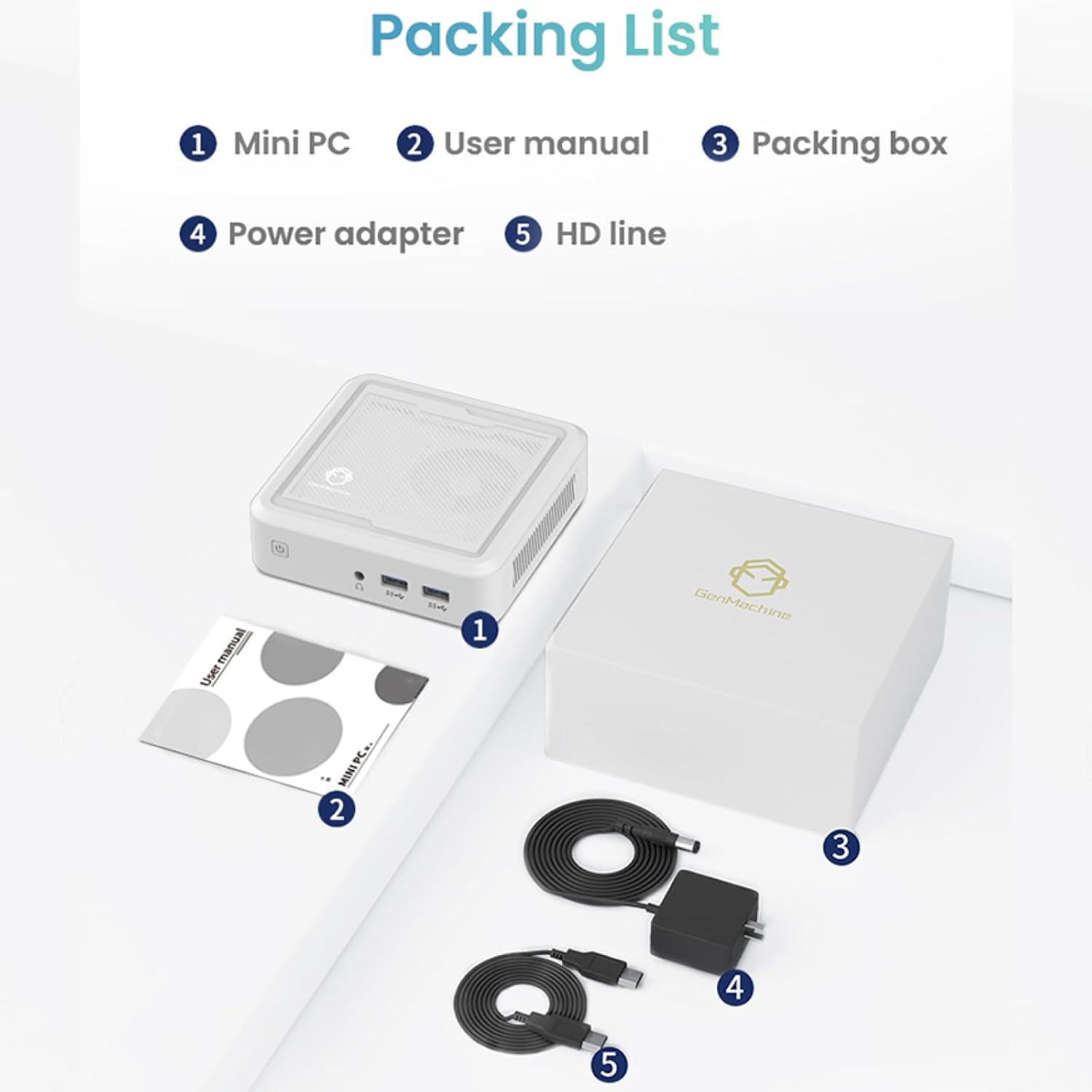
Figure 2.1: Packaging contents of the GenMachine Mini PC.
3. Característiques del producte
The GenMachine Mini PC is engineered with features to enhance your computing experience:
- Rendiment potent: Equipped with an AMD Ryzen 7 3750H processor, delivering speeds up to 4.0GHz with 4 cores and 8 threads for demanding tasks.
- AmpMemòria i emmagatzematge: Features 8GB of DDR4 RAM and a 256GB SSD with M.2 NVMe support for seamless multitasking and quick file accés.
- Connectivitat versàtil: Advanced WiFi 6 and Bluetooth 5.2 capabilities ensure high-speed internet and smooth device pairing.
- Disseny compacte: A sleek, small form factor that fits easily into any workspace or gaming setup.
- Multiple Display Options: HDMI and DisplayPort outputs support dual 4K displays for expanded productivity and immersive visuals.

Figura 3.1: Frontal view of the GenMachine Mini PC.
3.1 Rich Interface for Easy Connection
The Mini PC offers a comprehensive set of ports to meet various connectivity needs:
- USB 3.0 x 4
- HDMI x 1
- DisplayPort (DP) x 1
- LAN (Ethernet) x 1
- 3.5mm Audio Jack x 1
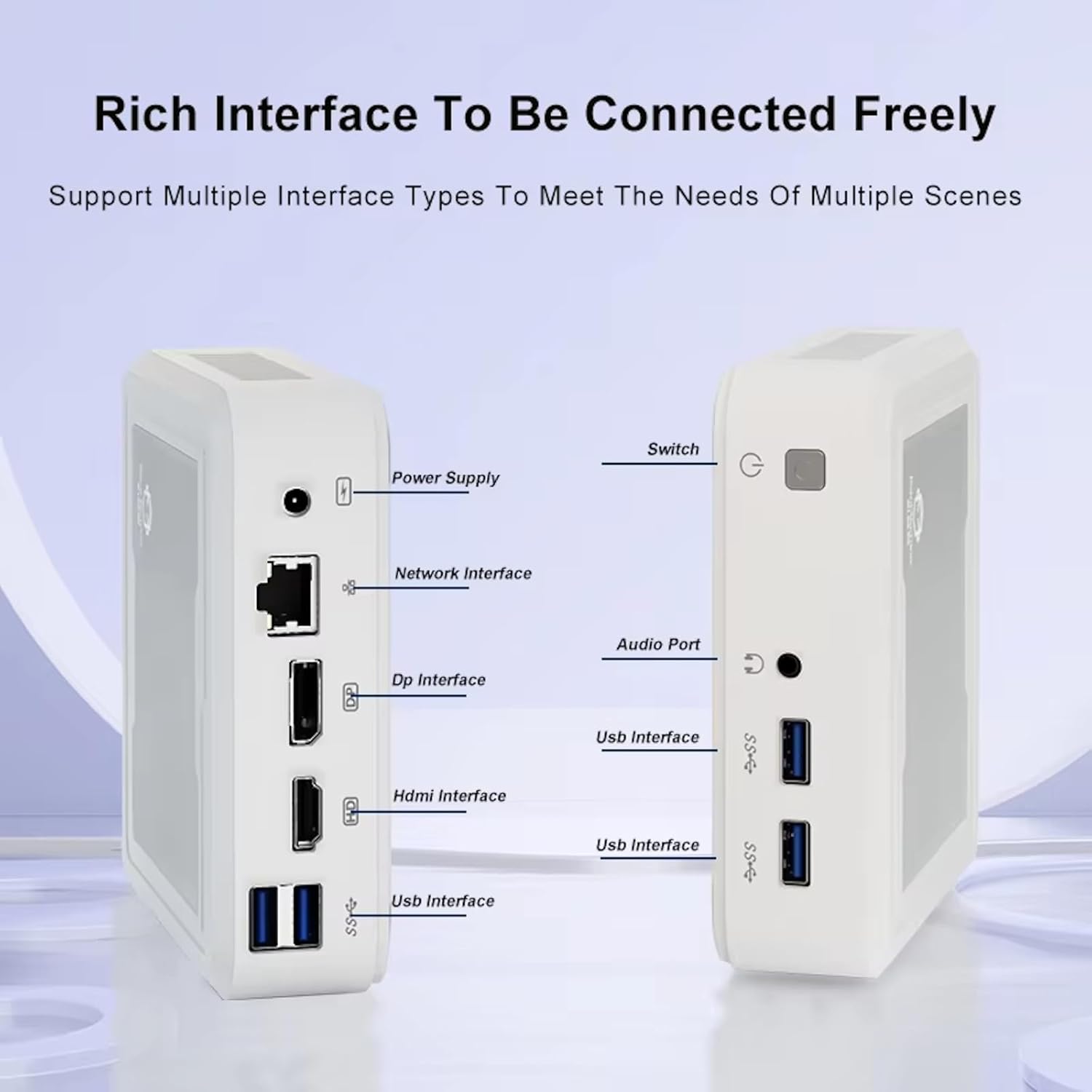
Figure 3.2: Available ports on the GenMachine Mini PC.
3.2 Compatibilitat amb monitors duals
Enhance your productivity or gaming experience by connecting up to two 4K displays simultaneously using the HDMI and DisplayPort outputs.

Figure 3.3: Dual 4K display setup with the GenMachine Mini PC.
Video 3.1: Demonstration of the GenMachine Mini PC supporting two monitors simultaneously.
3.3 Energy Efficiency and Quiet Operation
Designed for low noise operation, the Mini PC maintains a quiet environment, making it suitable for various settings.

Figure 3.4: Noise level comparison of the GenMachine Mini PC.
3.4 Compact and Durable Design
The Mini PC features an ultra-durable, lightweight metal casing, making it space-saving and robust for any work environment.
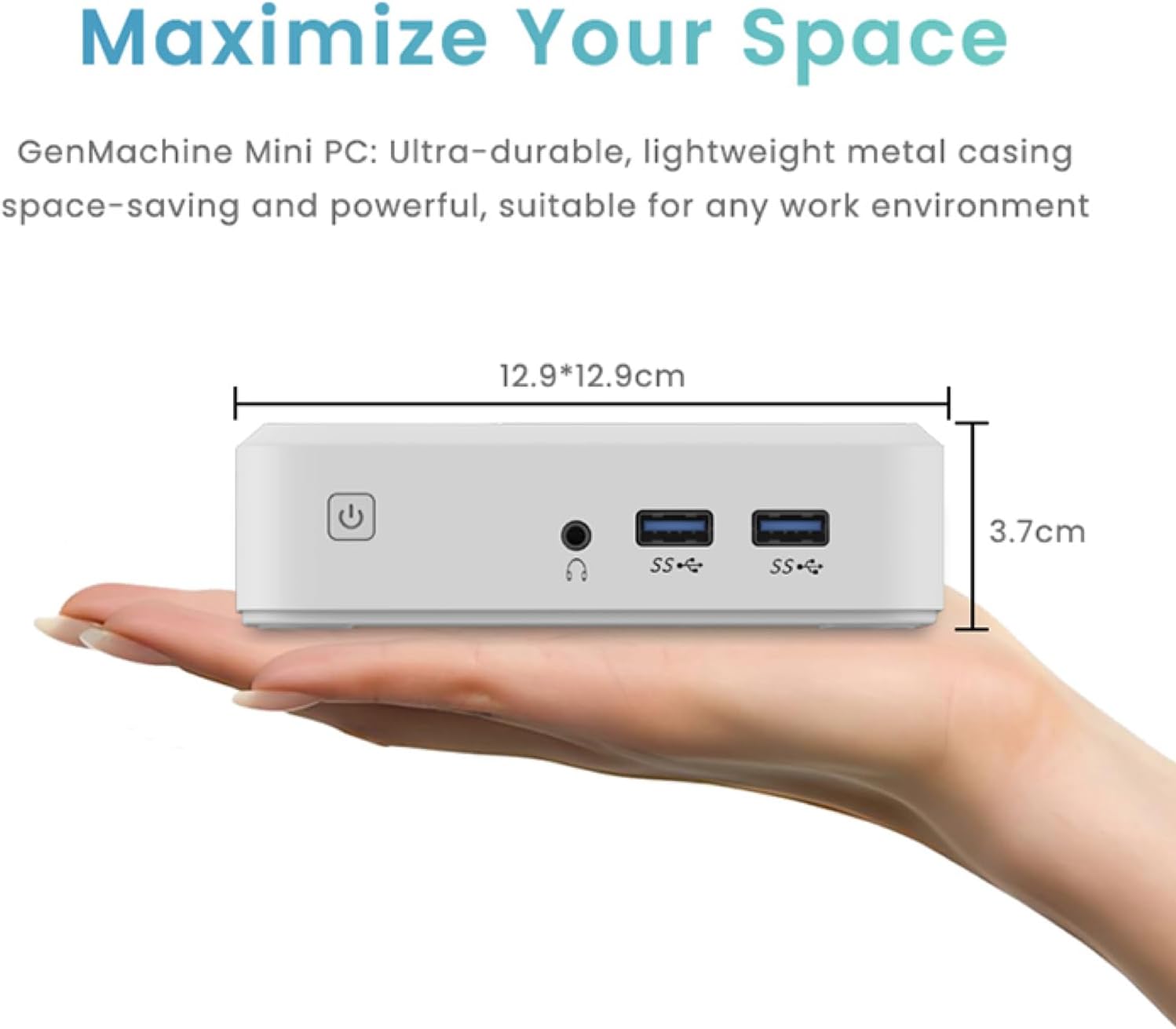
Figure 3.5: Compact size of the GenMachine Mini PC.
Vídeo 3.2: Acabatview of the GenMachine Mini PC's features and compact design.
4. Guia de configuració
Follow these steps to set up your GenMachine Mini PC:
- Unpack the Mini PC: Traieu amb cura tots els components de l'embalatge.
- Connect to a Display: Use the provided HDMI cable to connect the Mini PC to your monitor or TV. If using a DisplayPort monitor, use a compatible DP cable (not included).
- Connecteu els perifèrics: Plug in your keyboard, mouse, and any other USB devices into the available USB 3.0 ports.
- Connectar-se a la xarxa (opcional): For a wired internet connection, connect an Ethernet cable to the LAN port. For wireless, ensure your WiFi network is available during initial setup.
- Connectar l'alimentació: Plug the power adapter into the DC-in port on the Mini PC, then plug the adapter into a power outlet.
- Encès: Press the power button on the front of the Mini PC. The system should boot up.
5. Instruccions de funcionament
5.1 Arrencada inicial i configuració del sistema operatiu
Upon first power-on, the Mini PC will guide you through the operating system setup process. Follow the on-screen prompts to configure language, region, user accounts, and network settings.
5.2 Gestió de l'energia
- Encès: Premeu el botó d'encesa una vegada.
- Apagar: Access the power options through the operating system's start menu and select 'Shut down'.
- Reinicia: Access the power options through the operating system's start menu and select 'Restart'.
- Mode de repòs: Access the power options through the operating system's start menu and select 'Sleep'.
5.3 Connexió a Wi-Fi i Bluetooth
To connect to a wireless network or Bluetooth device, use the respective settings within your operating system. The Mini PC supports WiFi 6 and Bluetooth 5.2 for fast and reliable connections.
6. Manteniment
Regular maintenance helps ensure the longevity and optimal performance of your Mini PC:
- Neteja: Use a soft, dry cloth to clean the exterior. For dust in vents, use compressed air. Ensure the device is powered off and unplugged before cleaning.
- Ventilació: Ensure the Mini PC is placed in a well-ventilated area. Do not block the air vents.
- Actualitzacions de programari: Regularly update your operating system, drivers, and applications to ensure security and performance.
- Còpia de seguretat de dades: Feu còpies de seguretat periòdiques de les dades importants en un disc dur extern o en un emmagatzematge al núvol.
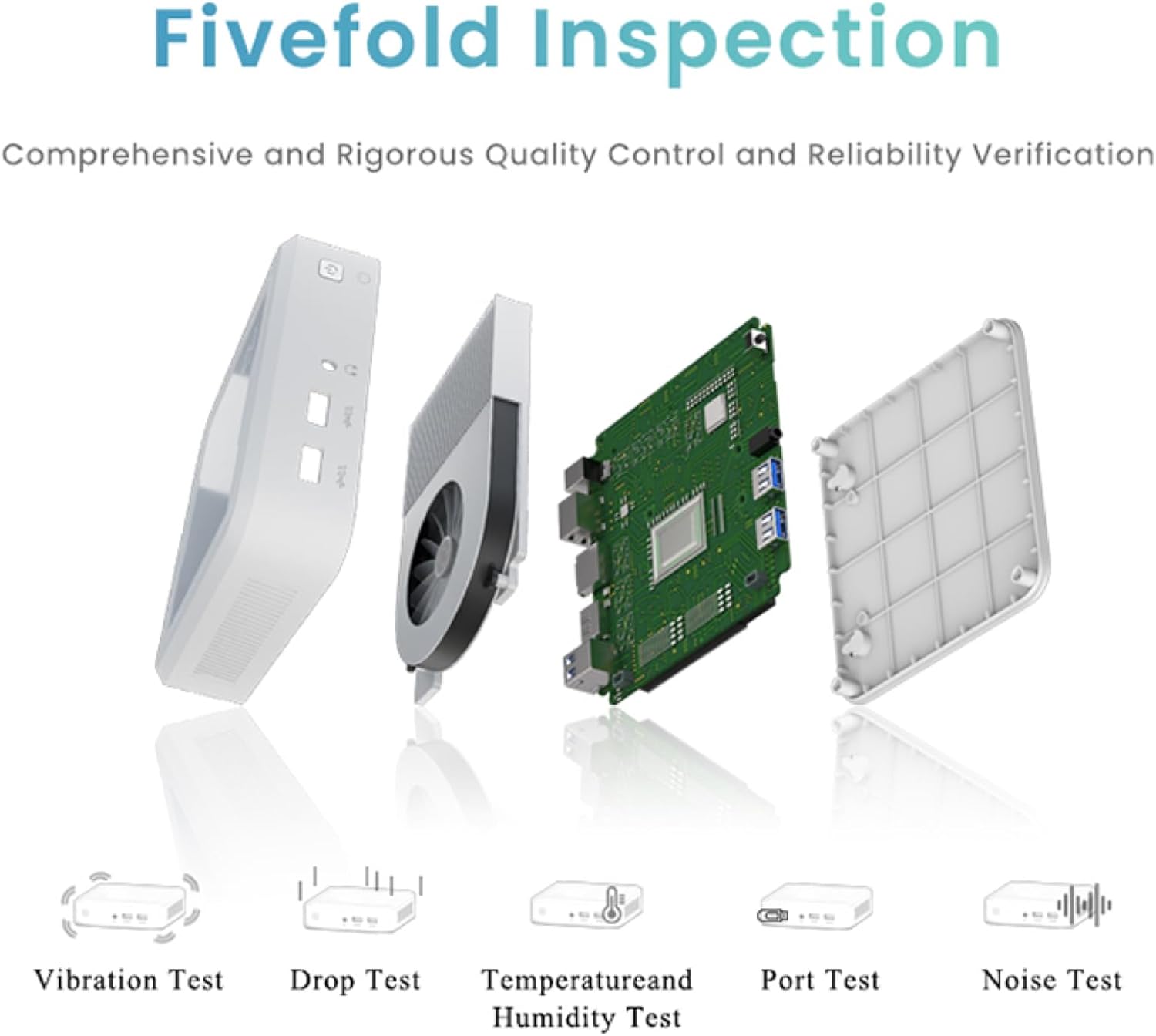
Figure 6.1: GenMachine's Fivefold Inspection process for quality control.
7. Solució De Problemes
If you encounter issues with your Mini PC, refer to the following common problems and solutions:
- Sense energia:
- Assegureu-vos que l'adaptador de corrent estigui connectat correctament tant al Mini PC com a una presa de corrent que funcioni.
- Proveu una presa de corrent diferent.
- Sense pantalla:
- Verify that the HDMI or DisplayPort cable is securely connected to both the Mini PC and the monitor.
- Assegureu-vos que el monitor estigui encès i configurat a la font d'entrada correcta.
- Prova un cable de pantalla o monitor diferent si és possible.
- System Freezes or Unresponsive:
- Feu un restabliment complet mantenint premut el botó d'engegada durant 5-10 segons fins que el dispositiu s'apagui i, a continuació, reinicieu-lo.
- Ensure the operating system and drivers are up to date.
- Comproveu si hi ha sobreescalfament; assegureu una ventilació adequada.
- Run a system diagnostic or memory test if the issue persists.
- Sense connexió a Internet:
- Per a connexions amb cable, comproveu l'estat del cable Ethernet i del router.
- For Wi-Fi, ensure Wi-Fi is enabled in the operating system and you are connected to the correct network with the correct password.
- Reinicieu el vostre encaminador/mòdem.
8. Especificacions
| Característica | Especificació |
|---|---|
| Processador | AMD Ryzen 7 3750H (4 cores, 8 threads, up to 4.0GHz) |
| RAM | 8 GB DDR4 |
| Emmagatzematge | 256GB SSD (with M.2 NVMe support) |
| Coprocessador gràfic | Gràfics AMD Radeon Vega 10 |
| Resolució de pantalla màxima | 3840 x 2160 píxels (4K) |
| Tipus sense fil | 802.11ac (WiFi 6), Bluetooth 5.2 |
| Ports USB | 4 x USB 3.0 |
| Sortides de vídeo | HDMI, DisplayPort |
| Sistema operatiu | OS (Pre-installed) |
| Pes de l'article | 2.1 lliures |
| Dimensions del producte | 4.9 x 4.9 x 1.4 polzades |
| Color | Negre |
9. Garantia i Suport
For warranty information and technical support, please refer to the warranty card included with your product or visit the official GenMachine weblloc web. Conserveu el rebut de compra com a comprovant de compra per a reclamacions de garantia.
If you require further assistance, please contact GenMachine customer support through the channels provided on their official weblloc.