
Introducció
This document provides comprehensive instructions for the SOMIC USB Dongle, specifically designed for use with the SOMIC GS510PRO Wireless Gaming Headset. It covers product overview, configuració, funcionament, manteniment, resolució de problemes i especificacions tècniques.
Note: This USB dongle is exclusively compatible with the SOMIC GS510PRO wireless gaming headset.
Producte acabatview
The SOMIC USB Dongle facilitates wireless connectivity between your SOMIC GS510PRO Wireless Gaming Headset and compatible devices such as desktops and laptops.
Contingut del paquet
- 1x USB Wireless Dongle
Identificació de components
The dongle features a standard USB Type-A connector for device integration, an LED indicator for status, and a small reset hole.

Imatge: Frontal view of the SOMIC USB dongle, highlighting the central blue LED indicator.
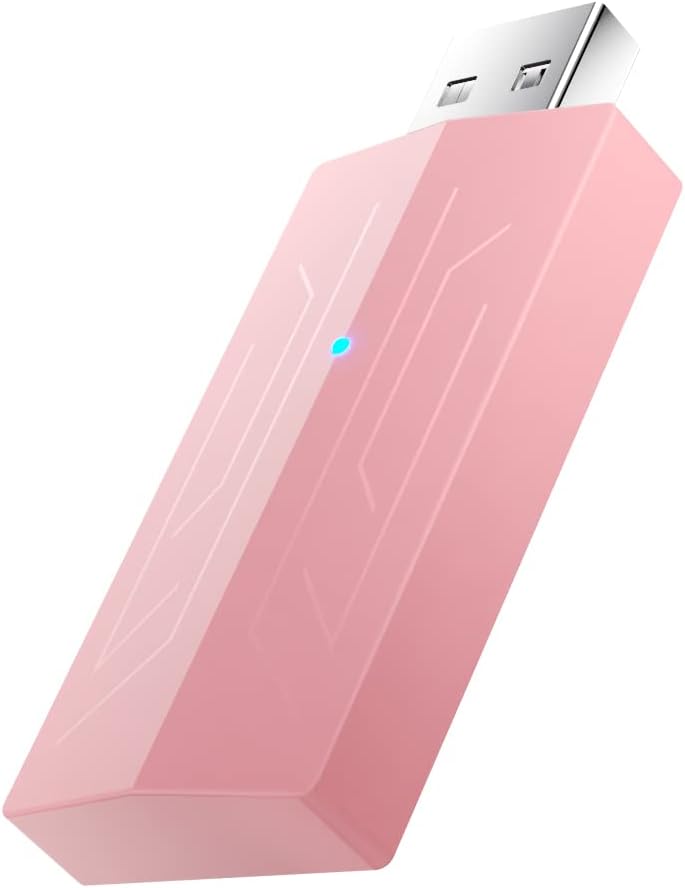
Imatge: Anglesa view of the SOMIC USB dongle, illustrating its compact design and the USB Type-A connector.

Imatge: Enrere view of the SOMIC USB dongle, featuring the SOMIC brand logo.
Instruccions de configuració i emparellament
Follow these steps to connect your SOMIC GS510PRO Wireless Gaming Headset to your device using the USB dongle:
- Plug the USB dongle into an available USB port on your device (e.g., desktop, laptop).
- Locate the small reset hole next to the LED indicator on the dongle. Insert a small pin (such as a paperclip) into this hole and press for at least 2 seconds until the LED rapidly blinks blue. This indicates the dongle is in pairing mode.
- Turn on your SOMIC GS510PRO headset and place it in close proximity to the USB dongle.
- The dongle's blue LED will become solid once pairing is successfully completed, indicating a stable connection.

Image: The SOMIC GS510PRO headset positioned next to a laptop with the USB dongle inserted, illustrating a typical setup.
Instruccions de funcionament
Once successfully paired, the SOMIC USB Dongle operates automatically. Ensure the dongle remains connected to your device and the headset is powered on for continuous wireless audio transmission.
Indicador LED d'estat
- Rapid Blue Blinking: The dongle is in pairing mode, actively searching for a headset.
- Blau sòlid: The dongle is successfully paired and connected to the headset, and is ready for use.
- Apagat: The dongle is either not powered, not connected to a device, or not actively communicating.
Manteniment
To ensure optimal performance and longevity of your SOMIC USB Dongle, observe the following maintenance guidelines:
- Keep the dongle clean and free from dust. Use a soft, dry cloth for cleaning.
- Avoid exposing the dongle to extreme temperatures, direct sunlight, or moisture.
- Store the dongle in a safe place when not in use to prevent physical damage to the connector or casing.
Resolució de problemes
Dongle Not Pairing with Headset
- Ensure the dongle is securely plugged into a functioning USB port on your device.
- Verify that the SOMIC GS510PRO headset is powered on and has sufficient battery charge.
- Repeat the pairing steps outlined in the "Setup and Pairing Instructions" section, ensuring the dongle's LED blinks rapidly blue during pairing mode.
- Try plugging the dongle into a different USB port on your device to rule out a port issue.
No Audio After Pairing
- Check your device's audio output settings to ensure the SOMIC GS510PRO headset is selected as the default playback device.
- Adjust the volume levels on both your device and the headset.
- Temporarily disconnect and then reconnect the dongle, then re-pair the dongle and headset if necessary.
Especificacions
| Característica | Detall |
|---|---|
| Model | GS510Pro |
| Dimensions del producte (L x A x A) | 1.97 x 1.38 x 0.39 polzades |
| Pes de l'article | 0.317 unces |
| Tipus de connector | USB tipus A |
| Dispositius compatibles | SOMIC GS510PRO Wireless Gaming Headset, Desktop, Laptop |
| Fabricant | SOMIC |
Garantia i Suport
For warranty information or technical assistance regarding your SOMIC USB Dongle, please contact SOMIC customer support. You can typically find contact details on their official website or through the retailer where the product was purchased. Please retain your purchase receipt as proof of purchase for any warranty claims.