
1. Introducció
This manual provides instructions for the CHONCHOW Gaming Keyboard and Mouse Combo. This wired peripheral set is designed for use with various gaming consoles and computers, offering RGB backlighting and ergonomic features for an enhanced user experience.
2. Contingut del paquet
- CHONCHOW Gaming Keyboard
- CHONCHOW Gaming Mouse
- Manual d'usuari (aquest document)
3. Configuració
The CHONCHOW Gaming Keyboard and Mouse Combo features a plug-and-play design, requiring no additional drivers or software installation for basic functionality.
- Localitza un port USB disponible a l'ordinador o a la consola de jocs.
- Connect the USB cable from the CHONCHOW Gaming Keyboard to the USB port.
- Connect the USB cable from the CHONCHOW Gaming Mouse to another available USB port.
- The devices should be automatically recognized by your system.

Figure 3.1: CHONCHOW Gaming Mouse with USB Plug & Play Connectivity. The image shows the gaming mouse connected via a USB cable, highlighting its simple plug-and-play setup.
Compatibilitat: This combo is compatible with Windows XP, Vista, Win7, Win8, Win10, MAC OS, Linux, Xbox, and PS4 operating systems.
4. Instruccions de funcionament
4.1 Funcionament del teclat
The keyboard features 104 keys, including a number pad and 12 multimedia function keys. It also supports 19 anti-ghosting keys for accurate input during gaming.

Figure 4.1.1: CHONCHOW Gaming Keyboard with Rainbow RGB Backlighting. The keyboard displays a vibrant rainbow backlighting effect across its keys.
Control de retroiluminació del teclat:
- Activa/desactiva la retroiluminació: Premeu el botó FN tecla + Tecla d'icona de bombeta (usually near CTRL or ALT) to turn the backlight on/off or cycle through modes.
- Change Color Settings: The keyboard offers 10 different color settings. Press FN + "=" or "-" to adjust the color's speed or direction.
- Ajusta la brillantor: Premeu FN + PG UP or PG DN per ajustar la brillantor de la llum de fons.
- Change Light Direction: Ús FN + Fletxa esquerra or Fletxa dreta to change the direction of the lighting effect.

Figure 4.1.2: CHONCHOW RGB Keyboard Lighting Modes. This image illustrates various RGB lighting patterns and effects available on the keyboard.
4.2 Funcionament del ratolí
The gaming mouse features an ergonomic design with a 7-color RGB breathing backlight and an anti-skid scroll wheel.
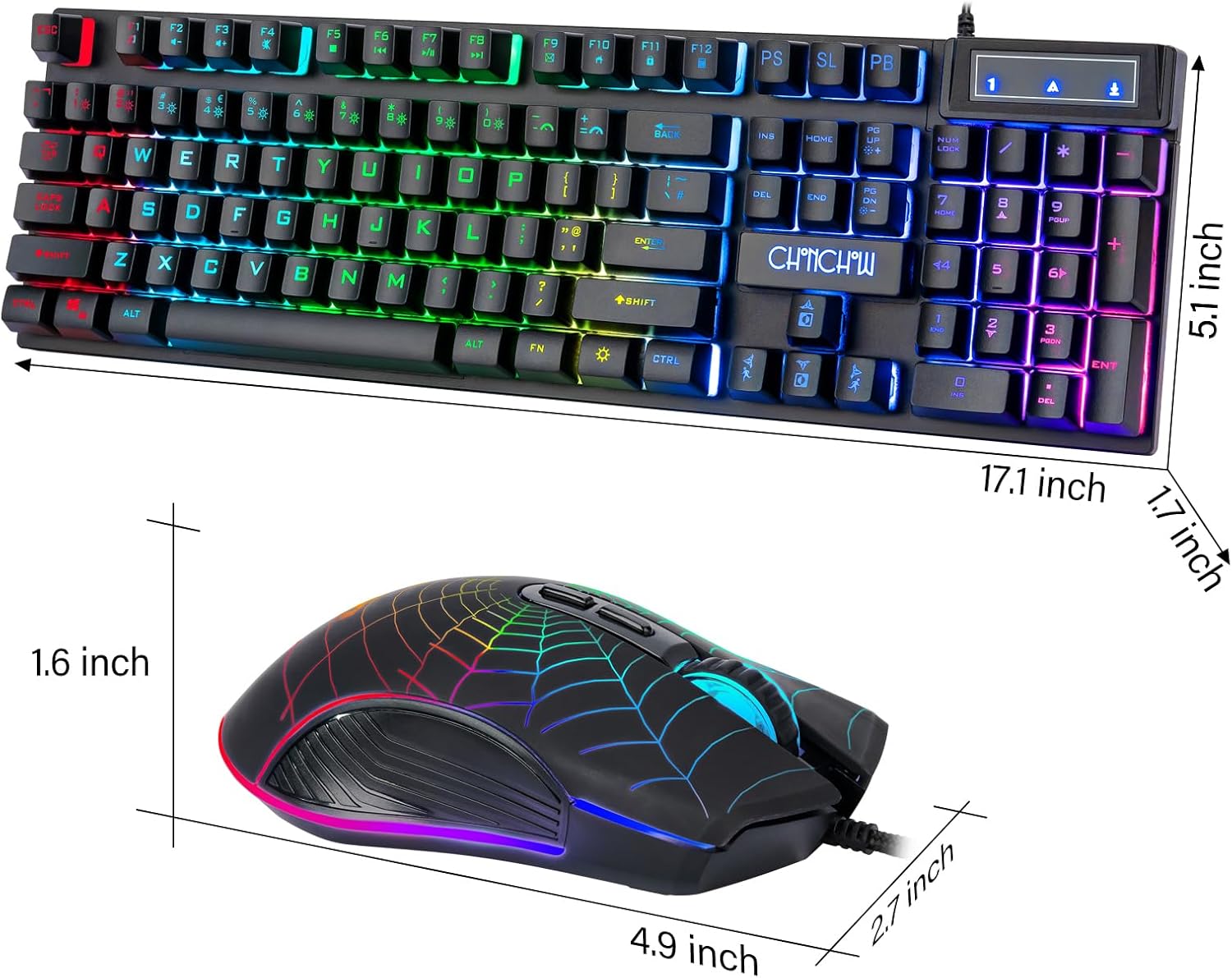
Figure 4.2.1: CHONCHOW Gaming Mouse with 7-Color Breathing Backlight. The image shows the gaming mouse with its distinct spiderweb design and glowing multi-color backlight.
Ajust de DPI del ratolí:
The mouse supports 4 levels of DPI adjustment for varying cursor sensitivity:
- 1200 DPI
- 1800 DPI
- 2400 DPI
- 3600 DPI
Press the DPI button (usually located behind the scroll wheel) to cycle through these settings. The illumination of the mouse can also be completely turned off if desired.
5. Característiques
- Construcció duradora: Crafted with premium ABS material and advanced keycap craftsmanship, ensuring characters and symbols do not wear off easily.
- Teclat resistent a l'aigua: Designed to withstand minor spills.
- Tecles multimèdia: 12 dedicated multimedia function keys for quick access to media controls.
- Anti-fantasma: 19 anti-ghosting keys provide accurate and responsive input during intense gaming sessions.
- Retroil·luminació RGB personalitzable: Keyboard features 10 different color settings with adjustable speed, brightness, and direction.
- Disseny ergonòmic: Both keyboard and mouse are ergonomically designed for comfortable use over extended periods. The keyboard includes adjustable stands for height customization.
- High-Precision Mouse: 7-color RGB breathing backlight mouse with 4 adjustable DPI levels (1200/1800/2400/3600) for precise control.
- Plug & Play: USB wired connection for instant setup without driver installation.

Figure 5.1: CHONCHOW Keyboard Features. This image highlights the 1.8m USB waterproof cable, two hidden brackets for adjusting keyboard height, and a non-slip rubber pad design.
6. Solució De Problemes
- El dispositiu no respon:
- Ensure both the keyboard and mouse USB cables are securely connected to your computer or console.
- Try connecting the devices to different USB ports.
- Reinicieu l'ordinador o la consola.
- La llum de fons no funciona:
- Premeu FN + Tecla d'icona de bombeta per assegurar-vos que la retroiluminació estigui activada.
- Ajusta la brillantor amb FN + PG UP/DN.
- Mouse Cursor Movement Issues:
- Ensure the mouse sensor is clean and free from obstructions.
- Adjust DPI settings using the mouse's DPI button.
- Prova el ratolí en una superfície diferent.
7. Especificacions
| Marca | CHONCHOW |
| Model | Combinació de teclat i ratolí per a jocs |
| Tecnologia de connectivitat | USB (per cable) |
| Descripció del teclat | Gaming, 104 Keys, Number Pad, Multimedia Keys, 19 Anti-Ghosting Keys |
| Il·luminació del teclat | RGB (10 color settings, adjustable speed, brightness, direction) |
| Retroil·luminació del ratolí | 7-Color RGB Breathing Backlight |
| Configuració de DPI del ratolí | 1200/1800/2400/3600 |
| Dispositius compatibles | Gaming Console (PS4, PS5, Xbox One), PC (Windows XP/Vista/7/8/10, MAC OS, Linux) |
| Material | Aluminum, ABS Plastic |
| Pes de l'article | 2.01 lliures |
| Dimensions del paquet | 17.63 x 8.27 x 1.93 polzades |
8. Manteniment
- Neteja: Feu servir un drap suau i sec per netejar les superfícies del teclat i el ratolí. Per a una neteja més profunda, feu servir un drap lleugerament sec.amp es pot fer servir un drap, assegurant-se que no entri líquid al dispositiu.
- Emmagatzematge: Guardeu els dispositius en un lloc fresc i sec, allunyat de la llum solar directa i de temperatures extremes.
- Cura del cable: Eviteu doblegar bruscament o estirar excessivament els cables USB per evitar danys.
9. Garantia i Suport
For any issues or questions regarding your CHONCHOW Gaming Keyboard and Mouse Combo, please contact CHONCHOW customer support. Refer to the product packaging or the CHONCHOW official website for contact information. We are committed to providing the best service and will respond to inquiries within 12 hours.