1. Introducció
The EPOS Impact 1060T is a professional double-sided wireless headset designed for PC use, optimized for high-performance communication environments. It features advanced AI Noise Cancellation and Super Wideband Audio to ensure exceptional clarity during calls, even in noisy surroundings. The headset is Microsoft Teams Certified, providing seamless integration and optimal performance for virtual meetings.
Engineered for all-day comfort, the Impact 1060T includes soft memory foam earpads and a lightweight frame. Smart features such as a 360° busylight, mic-tip LED mute alerts, and intuitive boom-arm call control enhance efficiency and focus. This manual provides detailed instructions for setting up, operating, and maintaining your headset to ensure optimal performance and longevity.

Figure 1: EPOS Impact 1060T highlighting key features.
2. Contingut del paquet
Verifiqueu que tots els elements siguin presents al vostre paquet:
- EPOS Impact 1060T Wireless Headset
- Cable USB-C a USB-C
- Adaptador USB-C a USB-A
- Soft Carry Pouch
- Guia de seguretat
- Full de compliment
- Guia ràpida
- BTD 800a Dongle (for models with dongle)

Figure 2: EPOS Impact 1060T package contents.
3. Configuració
3.1 Càrrega inicial
Before first use, fully charge your headset. Connect the provided USB-C to USB-C cable to the headset and a power source. Use the USB-C to USB-A adapter if your power source only has USB-A ports. The headset can also be charged wirelessly if a compatible charging stand is available (charging stand sold separately for some models).
3.2 Engegada/apagada
- Per engegar: premeu i manteniu premut el botó d'engegada fins que s'il·lumini l'indicador lluminós.
- Per apagar: premeu i manteniu premut el botó d'engegada fins que l'indicador lluminós s'apagui.
3.3 Connexió a dispositius
The EPOS Impact 1060T offers versatile connectivity options:
- Emparellament Bluetooth:
- Assegureu-vos que els auriculars estan apagats.
- Premeu i manteniu premut el botó d'engegada durant aproximadament 4 segons fins que l'indicador LED parpellegi en blau i vermell, cosa que indica el mode d'emparellament.
- On your device (PC, smartphone), go to Bluetooth settings and select "EPOS Impact 1060T" from the list of available devices.
- Un cop connectat, l'indicador LED mostrarà una llum blava fixa.
- Connexió amb cable USB-C: Connect the headset directly to your device using the provided USB-C to USB-C cable. The headset will be recognized automatically.
- USB-A Wired Connection: Use the USB-C to USB-A adapter with the USB-C cable to connect to devices with USB-A ports.
- Using the BTD 800a Dongle: For optimal wireless performance and extended range, plug the BTD 800a USB dongle into your PC. The headset will automatically connect to the dongle.
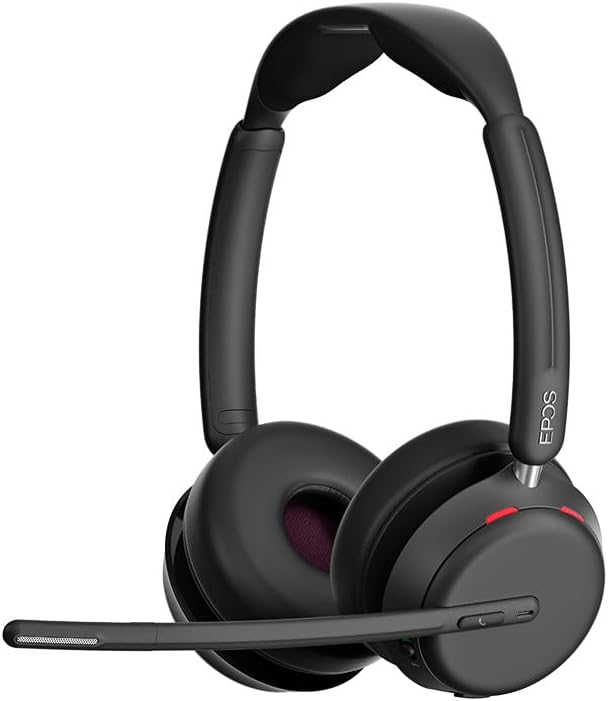
Figura 3: Frontal view of the EPOS Impact 1060T Headset.
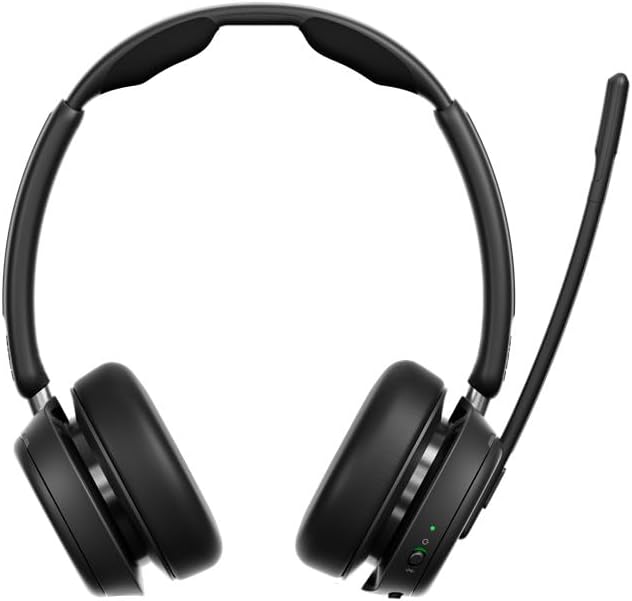
Figura 4: Esquena view of the EPOS Impact 1060T Headset.
4. Instruccions de funcionament
4.1 Com portar els auriculars
Adjust the headband for a comfortable and secure fit. The memory foam earpads are designed for extended wear. The microphone boom arm can be rotated to either side for optimal voice pickup.
4.2 Gestió de trucades
- Respondre/Finalitzar la trucada: Use the intuitive inline controller or the dedicated call button on the earcup.
- Silenciar/activar el micròfon:
- Lower the microphone boom arm to unmute and raise it to mute.
- A mic-tip LED will alert you if the microphone is muted.
- Alternatively, use the mute button on the inline controller.
- Control de volum: Adjust the volume using the dedicated buttons on the inline controller or earcup.
4.3 Noise Cancellation and Audio Features
- Cancel·lació de soroll per IA: Three digital beamforming microphones powered by EPOS AI™ actively block out background noise, ensuring your voice is heard clearly.
- Super Wideband Audio: Provides rich, natural sound for both calls and media.
- BrainAdapt™ Technology: Designed to reduce brain fatigue and enhance focus during long calls.
4.4 Funcions intel·ligents
- Busylight: A 360° busylight on the headset signals your availability to colleagues, preventing interruptions during calls.
- Certificació de Microsoft Teams: Optimized for Microsoft Teams, offering dedicated controls and seamless integration for calls and meetings.

Figure 5: Headset optimized for Unified Communications.
Video 1: "Powerful Sound and Comfort for Your Workday" - An official EPOS video showcasing the features and comfort of the Impact series headsets, including the 1060T.
Video 2: "EPOS IMPACT 860T Microsoft Teams Headset" - An official EPOS video demonstrating features of the similar Impact 860T model, highlighting Microsoft Teams integration and sound quality.
Video 3: "EPOS Impact 860T ANC Headset" - An official EPOS video showcasing the Active Noise Cancellation and design of the similar Impact 860T model.
5. Manteniment
- Neteja: Use a soft, dry cloth to clean the headset. Avoid using liquids or abrasive cleaners.
- Emmagatzematge: When not in use, store the headset in the provided soft carry pouch to protect it from dust and damage.
- Cura de la bateria: Per allargar la durada de la bateria, eviteu descarregar-la completament amb freqüència. Carregueu-la regularment.
- Actualitzacions de programari: Integrate with EPOS Manager for device updates and analytics to ensure optimal performance and access to the latest features.
6. Solució De Problemes
If you experience issues with your EPOS Impact 1060T, refer to the following common solutions:
| Problema | Causa possible | Solució |
|---|---|---|
| No audio/microphone not working | Headset not paired/connected, incorrect audio device selected, microphone muted. | Ensure headset is paired/connected. Check device audio settings to select "EPOS Impact 1060T" as input/output. Unmute microphone. |
| Poor audio quality/background noise | Weak Bluetooth signal, environmental interference, microphone not positioned correctly. | Move closer to the connected device. Ensure no obstructions. Adjust microphone boom arm for optimal voice pickup. |
| Els auriculars no s'estan carregant | Cable not connected properly, faulty cable/charger, wireless charging misalignment. | Verify cable connections. Try a different USB port or charger. Ensure headset is correctly placed on the wireless charging pad. |
| Headset randomly restarts/disconnects | Firmware issue, device compatibility, low battery. | Ensure headset firmware is up to date via EPOS Manager. Fully charge the headset. Try connecting to a different device to isolate the issue. |
7. Especificacions
- Nom del model: IMPACT 1060T
- Tecnologia de connectivitat: Sense fil (Bluetooth)
- Versió Bluetooth: 5.0
- Control de soroll: Cancel·lació adaptativa del soroll
- Micròfon: AI Noise Cancellation with three digital beamforming microphones
- Àudio: Super Wideband Audio
- Forma de l'auricular: A l'orella
- Material: Fabric/Silicone
- Pes de l'article: 3.68 unces (0.23 lliures)
- Dimensions del producte: 19.69 x 19.69 x 11.02 polzades
- Bateries: 1 bateria de ions de liti (inclosa)
- Característiques especials: Adjustable Headband, Lightweight, Noise Cancellation, Volume Control, Wireless Charging
- Fabricant: Demant Sound Epos Audio A/S
8. Garantia i assistència
The EPOS Impact 1060T is built for durability and comes with a 3 any de garantia. For technical support, warranty claims, or further assistance, please visit the official EPOS weblloc web o poseu-vos en contacte amb el servei d'atenció al client. Conserveu el comprovant de compra per validar la garantia.
For additional resources and software updates, visit the EPOS Store on Amazon.