
amazon basics B0C58TDFPR
Amazon Basics Handheld Gimbal Stabiliser User Manual
Model: B0C58TDFPR
Introducció
The Amazon Basics Handheld Gimbal Stabiliser is designed to provide smooth and steady footage for your smartphone photography and videography. This manual provides essential information for setting up, operating, maintaining, and troubleshooting your device.

Image: The Amazon Basics Handheld Gimbal Stabiliser with a smartphone attached, ready for use.
Contingut del paquet
Abans de començar, comproveu que tots els elements siguin presents al paquet:
- 1N Handheld Gimbal with attached holder
- 1N Charging cable
- 1N User Manual (this document)
- 1 Trípode
- 1N Hanging belt
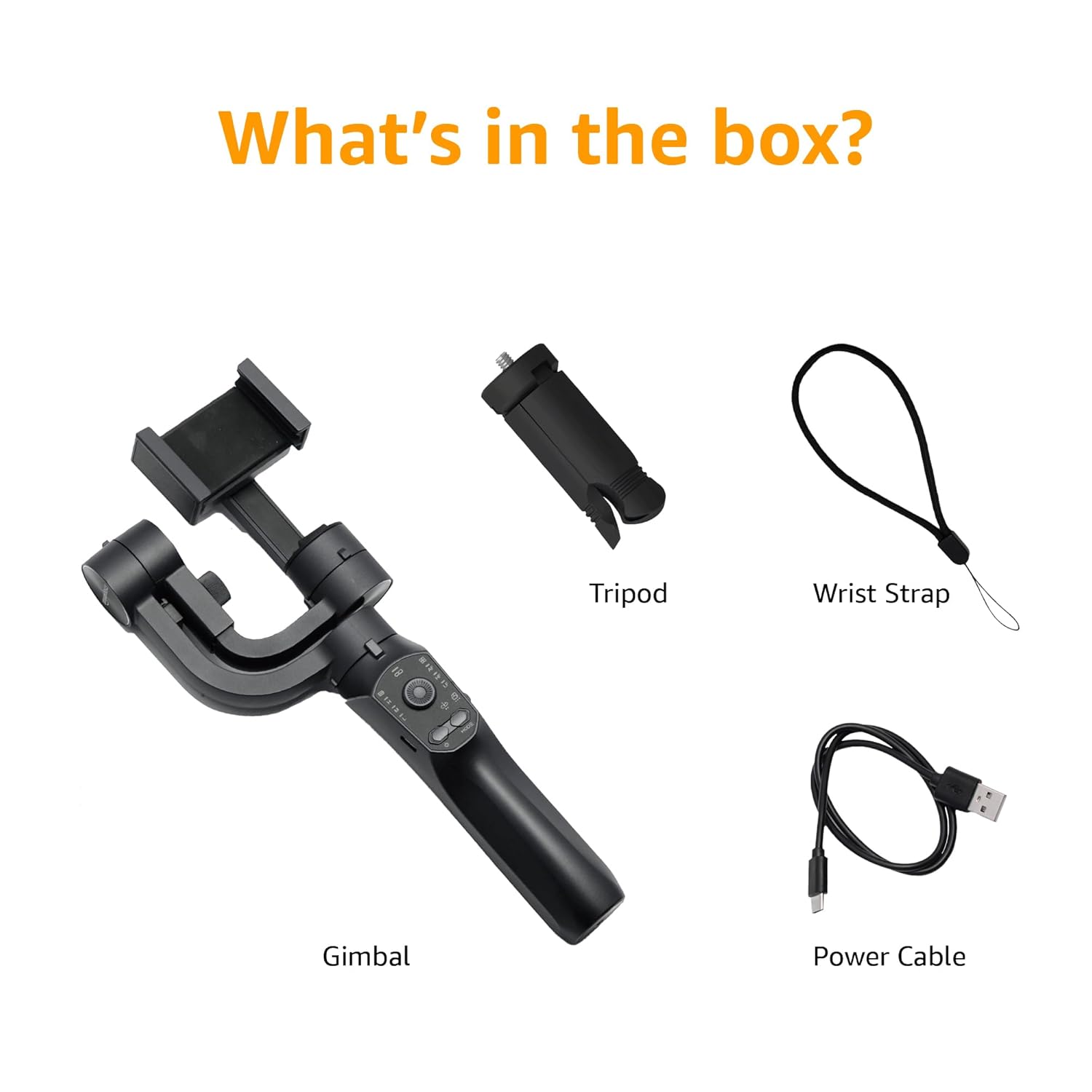
Image: A visual representation of the package contents, including the gimbal, tripod, power cable, and wrist strap.
Components del producte
Familiarize yourself with the different parts of your gimbal stabiliser:
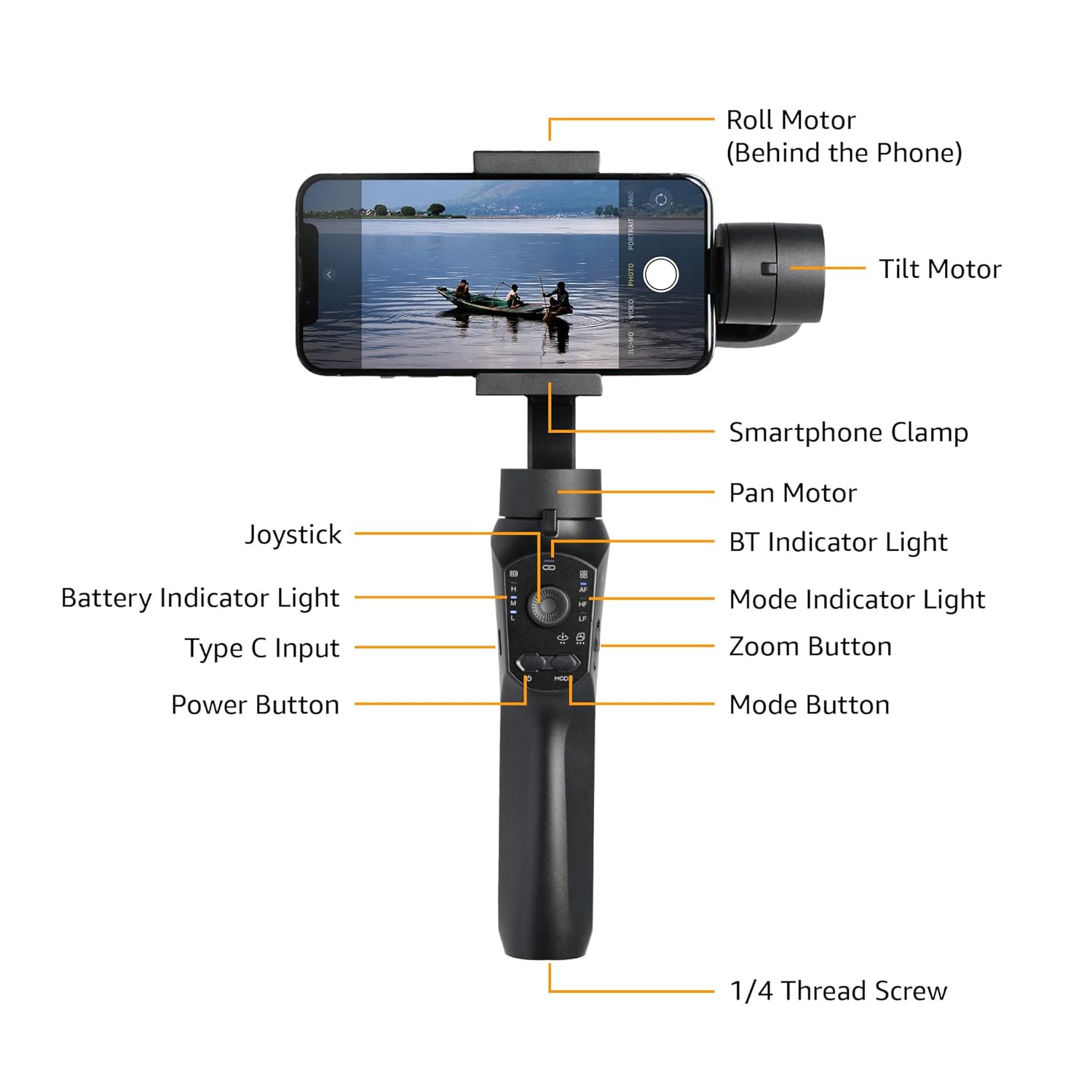
Image: Labeled diagram showing the various components of the gimbal, including the Roll Motor, Tilt Motor, Smartphone Clamp, Pan Motor, BT Indicator Light, Mode Indicator Light, Zoom Button, Mode Button, Power Button, Type C Input, Battery Indicator Light, Joystick, and 1/4 Thread Screw.
- Motor de rotlle: Controls the roll axis (rotation along the lens axis).
- Motor d'inclinació: Controls the tilt axis (up and down movement).
- Smartphone Clamp: Subjecta el teu telèfon intel·ligent de manera segura.
- Motor panoràmic: Controls the pan axis (left and right rotation).
- Palanca de control: For manual control of gimbal movement.
- BT Indicator Light: Indica l'estat de la connexió Bluetooth.
- Llum indicador de bateria: Mostra el nivell actual de la bateria.
- Entrada tipus C: Charging port for the gimbal.
- Botó d'encesa: Turns the gimbal on/off.
- Llum indicadora de mode: Mostra el mode de funcionament actual.
- Botó de zoom: Controls digital zoom (via app).
- Botó de mode: Switches between different operating modes.
- 1/4 Thread Screw: For attaching accessories like the included tripod.
Configuració
- Charge the Gimbal: Before first use, fully charge the gimbal using the provided Type-C charging cable. The battery indicator light will show charging status.
- Install the Smartphone:
- Allarga la cobertura del telèfon intel·ligentamp and carefully place your smartphone in the center.
- Ensure the phone is balanced as centrally as possible within the clamp to reduce motor strain.
- Manual Balancing (Crucial):
Important: Do not switch on this Gimbal without manual balancing. Doing so may lead to motor damage and fast battery draining.
- With the smartphone mounted, adjust the position of the phone within the clamp until it remains level when you release it. This minimizes the work the motors need to do.
- Adjust the horizontal arm if necessary to achieve perfect balance.
- Encès: Press and hold the Power Button until the gimbal powers on and stabilizes.
- Descarrega l'aplicació: Download the "Gimbal Pro" app from your smartphone's app store (available for Android and iOS). This app unlocks advanced features and controls.
- Connecteu-vos mitjançant Bluetooth: Open the Gimbal Pro app and follow the on-screen instructions to connect your gimbal via Bluetooth. The BT Indicator Light will confirm a successful connection.

Image: An illustration demonstrating the three axes of stabilization: Tilt Axis, Roll Axis, and Pan Axis, which work together to keep footagi estable.
Instruccions de funcionament
Funcionament bàsic
- Encès/apagat: Manteniu premut el botó d'engegada.
- Control del joystick: Use the joystick to manually control the pan and tilt movements of the gimbal.
- Botó de mode: Press the Mode Button to cycle through different operating modes (e.g., Pan Follow, Lock Mode, FPV). The Mode Indicator Light will change accordingly.
- Botó de zoom: Use the Zoom Button to zoom in or out within the Gimbal Pro app.
- Multifunction Push Key: This key allows you to focus or zoom, providing a more professional photography experience.
Advanced Features (via Gimbal Pro App)
The Gimbal Pro app unlocks a variety of advanced shooting modes and features:
- Facial Tracking: Automatically tracks a subject's face to keep them in frame.
- Laps de temps: Capture stunning time-lapse videos.
- càmera lenta: Record high-frame-rate videos for slow-motion effects.
- Intelligent Zoom: Provides precise zoom control.
- Hitchcock Mode: Creates a "Dolly Zoom" effect.
- Mad Dog Mode: A dynamic, fast-response mode.
- Mode inicial: Rotates the camera 360 degrees along the roll axis.
- Mode FPV: Follows the gimbal's orientation for an immersive first-person view.
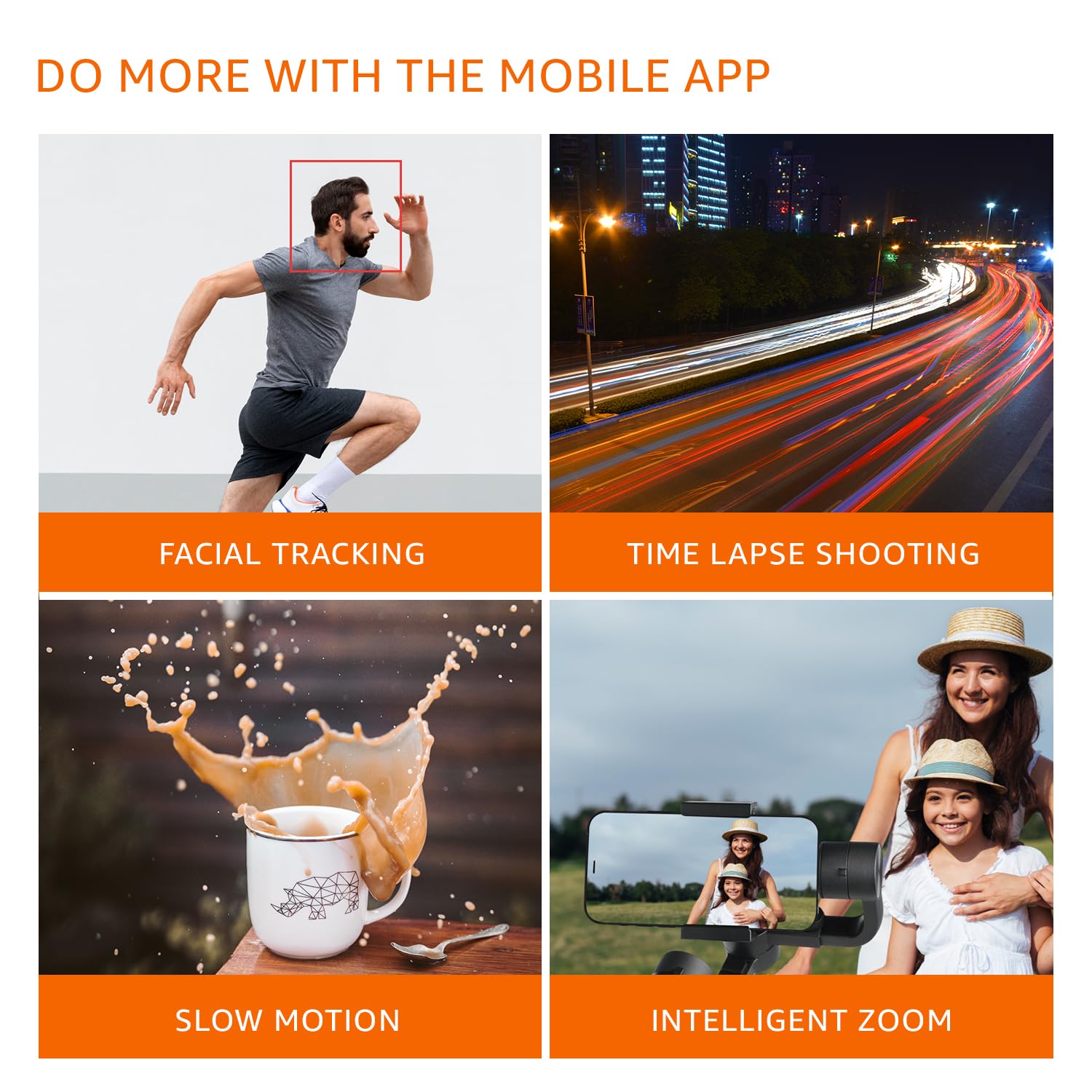
Imatge: Visual examples of features available through the mobile app, including Facial Tracking, Time Lapse Shooting, Slow Motion, and Intelligent Zoom.

Image: Icons illustrating various shooting modes such as Mad Dog Mode, Hitchcock Mode, Inception Mode, and FPV Mode, available on the gimbal.
Portrait-to-Landscape Rotation
The gimbal supports effortless rotation between portrait and landscape orientations for versatile shooting.

Image: A three-panel image demonstrating the gimbal's ability to effortlessly rotate a smartphone from portrait to landscape orientation.
Bateria i càrrega
The gimbal is equipped with a 3600mAh Lithium Ion battery, providing up to 10 hours of operational time.
- Càrrega: Connect the provided Type-C cable to the gimbal's charging port and a suitable USB power source.
- Funció del banc d'energia: The gimbal can also function as a power bank to charge your smartphone during extended shoots. Connect your smartphone to the gimbal's Type-C port using a compatible cable.
- Indicador de bateria: Monitor the battery level using the Battery Indicator Lights on the control panel.
Manteniment
- Neteja: Use a soft, dry cloth to clean the gimbal. Avoid using harsh chemicals or abrasive materials.
- Emmagatzematge: Store the gimbal in a cool, dry place away from direct sunlight and extreme temperatures.
- Cura de la bateria: For long-term storage, charge the battery to approximately 50-60% to prolong its lifespan. Recharge every 3 months if not in use.
- Eviteu la sobrecàrrega: Do not mount smartphones heavier than the recommended payload capacity (approx. 180 grams, as per user experience). Overloading can damage the motors.
Resolució de problemes
| Problema | Causa possible | Solució |
|---|---|---|
| Gimbal not powering on. | Bateria baixa. | Charge the gimbal fully. |
| Gimbal motors vibrate or do not stabilize properly. | Improper manual balancing. | Ensure the smartphone is perfectly balanced before powering on. Refer to the "Manual Balancing" section under Setup. |
| Gimbal disconnects from phone or app features not working. | Bluetooth connection issue; App malfunction. |
|
| Footage is still shaky. | Improper balancing; Exceeding gimbal's stabilization limits. |
|
Especificacions
| Característica | Detall |
|---|---|
| Número de model | B0C58TDFPR |
| Estabilització | 3-Axis (Pan, Tilt, Roll) |
| Tipus de bateria | Ió de liti |
| Capacitat de la bateria | 3600 mAh |
| Temps de funcionament | Fins a 10 hores |
| Port de càrrega | Tipus-C |
| Dispositius compatibles | Telèfons intel·ligents |
| Dimensions del producte (LxWxH) | 10 x 7 x 28.9 cm |
| Pes de l'article | 460 g |
| Color | Negre |
| Fabricant | SHENZHEN JX ROBOT TECHNOLOGY CO. LTD |

Image: A diagram illustrating the dimensions of the gimbal in both folded and extended states.
Garantia i Suport
This Amazon Basics Handheld Gimbal Stabiliser comes with a Garantia limitada d'1 any des de la data de compra.
For warranty claims, technical support, or any product-related inquiries, please contact Amazon Basics customer service or refer to the official Amazon support channels.
Ask a question about this manual
Ask about setup, troubleshooting, compatibility, parts, safety, or missing instructions. Manuals+ will review the question and use this page’s manual context to help answer it.