
1. Introducció
This manual provides detailed instructions for the safe and effective use of your TOYOGO Instant Print Kids Camera Model Q5K. Please read this manual thoroughly before operating the device and retain it for future reference.
2. Producte acabatview
2.1 Contingut del paquet
El paquet inclou:
- TOYOGO Instant Print Kids Camera Model Q5K
- 5 Rolls of Thermal Print Paper
- Cable de càrrega USB
- Corda
- Targeta Micro SD de 32 GB
- Manual d'usuari
2.2 Components de la càmera
Familiarize yourself with the camera's buttons and ports:

Image: Labeled diagram of the camera's front lens, rear lens, TF card slot, charging port, control buttons, and paper slot.
- Lent frontal: For taking forward-facing photos and videos.
- Lent posterior: For taking selfies.
- Ranura per a targetes TF: Insert the Micro SD card here for storage.
- Port de càrrega: Connect the USB cable for charging.
- Back/Left/Delete Button: Navigate menus, move left, or delete files.
- Confirm/Play/Print Button: Select options, play media, or initiate printing.
- Botó d'engegada / apagada: Encén o apaga la càmera.
- Paper Slot: Where printed photos exit.
- Photo/Video/Right/Convert Lens Button: Switch between photo and video modes, navigate right, or switch between front/rear lenses.
- Up/Zoom In/Volume Up Button: Navigate up, zoom in during photo/video, or increase volume.
- Down/Zoom Out/Volume Down Button: Navigate down, zoom out during photo/video, or decrease volume.
2.3 Característiques clau
- Inkless Instant Printing: Utilizes thermal printing technology for immediate black and white photo output without ink cartridges.
- Dual 12MP Lenses: Equipped with both front and rear cameras for versatile photography, including selfies.
- Gravació de vídeo HD 1080P: Capture high-definition video moments.
- Pantalla LCD d'2.4 polzades: Provides a clear display for viewfer fotos, vídeos i navegar pels menús.
- Dispositiu multifuncional: Supports photo taking, instant printing, video recording, MP3 playback, and built-in games.
- Emmagatzematge ampliable: Includes a 32GB Micro SD card to store thousands of photos and videos.
- Bateria recarregable: Integrated 1000mAh battery offers 3-4 hours of continuous use.
- Zoom digital: Up to 6x digital zoom for capturing distant subjects.
- Fotografia time-lapse: Capture sequences with 3s, 5s, or 10s intervals.
- Creative Options: Includes various photo frames and filters.
3. Configuració
3.1 Càrrega de la càmera
Before first use, fully charge the camera battery.
- Connect the small end of the provided USB charging cable to the camera's charging port.
- Connecteu l'extrem més gran del cable USB a un adaptador de corrent USB (no inclòs) o al port USB d'un ordinador.
- The charging indicator light will illuminate. Once charging is complete, the light may change color or turn off.

Image: Camera charging port with USB cable.
3.2 Inserció de la targeta Micro SD
The camera requires a Micro SD card for storing photos and videos. A 32GB card is included.
- Localitzeu la ranura per a targetes TF al lateral de la càmera.
- Gently insert the Micro SD card into the slot with the gold contacts facing down until it clicks into place.
- Per treure-la, torneu a prémer suaument la targeta fins que surti.
3.3 Càrrega de paper d'impressió
The camera uses thermal paper for instant printing. Five rolls are included.
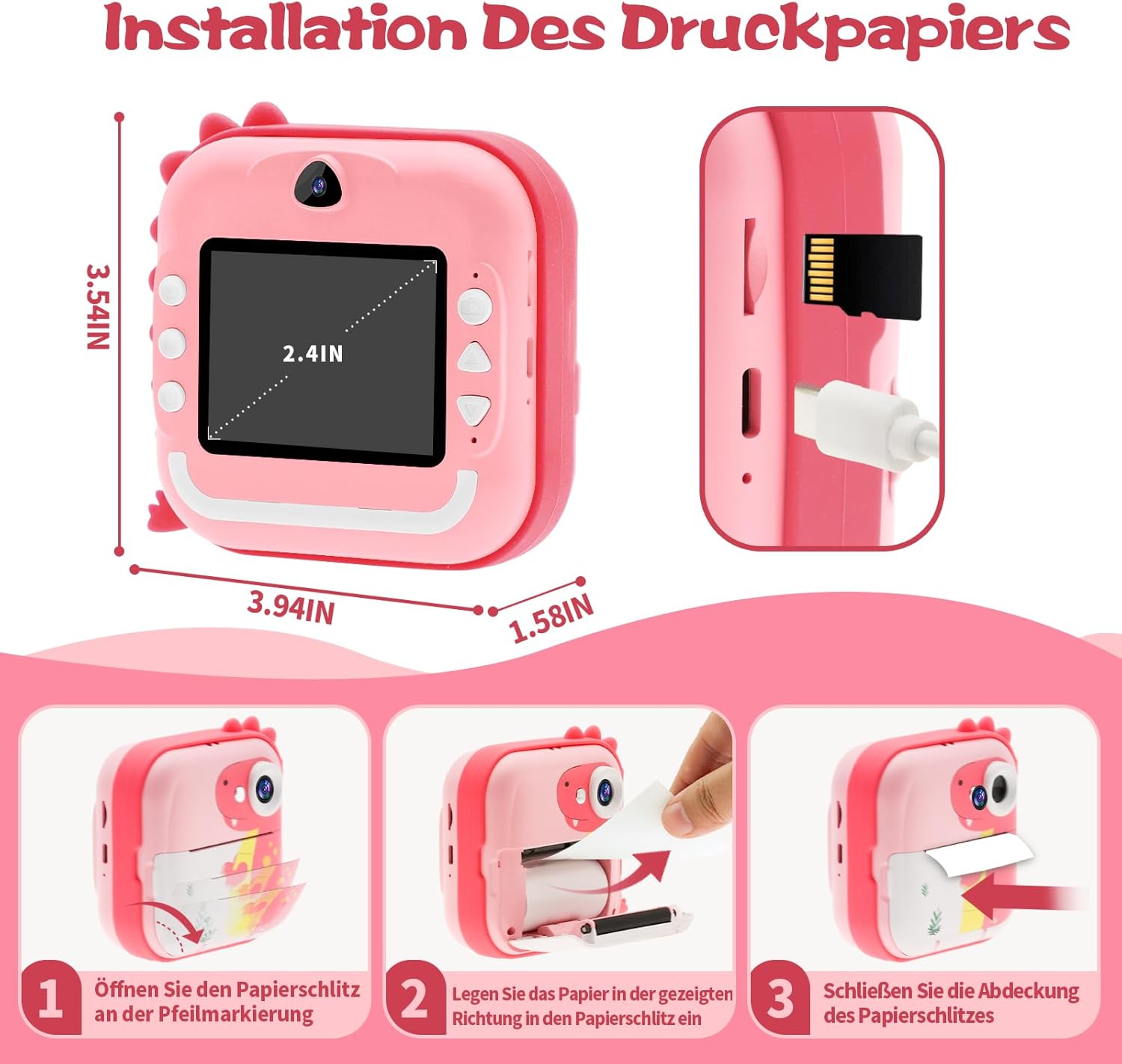
Image: Step-by-step guide for loading print paper.
- Locate the paper slot cover on the front of the camera and open it according to the arrow marking.
- Insert a roll of thermal paper into the compartment, ensuring the paper feeds out in the correct direction (as shown in the diagram).
- Tanqueu bé la tapa de la ranura de paper.
3.4 Fixació del cordó
Attach the lanyard to the designated loop on the camera for secure carrying and to prevent accidental drops.

Image: Camera with lanyard attached.
4. Instruccions de funcionament
4.1 Encès/Apagat
Manteniu premut el botó Botó d'encesa/apagada for a few seconds to turn the camera on or off.
4.2 Fer fotos
- Turn on the camera. It will typically start in photo mode.
- To switch between the front and rear lenses, press the Photo/Video/Right/Convert Lens Button.
- Enquadra la teva foto amb la pantalla LCD de 2.4 polzades.
- Utilitza el Up/Zoom In i Down/Zoom Out buttons to adjust the digital zoom (up to 6x).
- Premeu el botó Confirm/Play/Print Button per fer una foto.

Image: Instant photo printing from the camera.
4.3 Instant Printing
After taking a photo, you can choose to print it instantly. Depending on settings, some photos may print automatically, or you can select them from the gallery.
- After taking a photo, or while viewing a photo in the gallery, press the Confirm/Play/Print Button to print the image.
- The camera will use its thermal printer to output a black and white image.
4.4 Gravació de vídeos
- From photo mode, press the Photo/Video/Right/Convert Lens Button to switch to video recording mode.
- Premeu el botó Confirm/Play/Print Button per iniciar la gravació. Premeu-lo de nou per aturar la gravació.
- Videos are saved to the Micro SD card.

Image: Camera displaying 1080P HD video recording.
4.5 Reproducció de MP3
The camera can play MP3 audio files'emmagatzema a la targeta Micro SD.
- Assegura't que MP3 files are loaded onto the Micro SD card.
- Navigate to the MP3 playback function in the camera's menu.
- Use the navigation buttons to select and play desired tracks.

Image: Camera interface showing MP3 player and puzzle game options.
4.6 Jocs integrats
The camera includes several simple games for entertainment.
- Navigate to the Games section in the camera's menu.
- Select a game and use the navigation buttons to play.

Image: Camera displaying a puzzle game.
4.7 Time-lapse Photography
Captura una sèrie de fotos al llarg del temps amb la funció de time-lapse.
- Navigate to the Time-lapse mode in the camera's menu.
- Select the desired interval (e.g., 3s, 5s, 10s).
- Premeu el botó Confirm/Play/Print Button to start the time-lapse sequence.

Image: Camera showing time-lapse recording options.
4.8 Transferència Files a un ordinador
You can transfer photos and videos from the camera to a computer.
- Connecteu la càmera a l'ordinador mitjançant el cable USB proporcionat.
- The camera should appear as a removable disk or device on your computer.
- Open the camera's folder and copy the desired files al vostre ordinador.
5. Manteniment
5.1 Replacing Print Paper
When the camera runs out of thermal paper, follow the steps in Section 3.3 "Loading Print Paper" to replace the roll.

Image: Rolls of thermal print paper for replacement.
5.2 Cura de la bateria
Per allargar la durada de la bateria:
- Eviteu descarregar completament la bateria amb freqüència.
- Charge the camera regularly, even if not in use for extended periods.
- Do not expose the camera to extreme temperatures.
5.3 Neteja de la càmera
Use a soft, dry cloth to clean the camera's exterior. Do not use liquid cleaners or abrasive materials.
6. Solució De Problemes
Si teniu problemes amb la càmera, consulteu els problemes i solucions més comuns següents:
| Problema | Causa possible | Solució |
|---|---|---|
| La càmera no s'encén. | Bateria baixa. | Carregueu la càmera completament. |
| Les fotos no s'imprimeixen. | No thermal paper loaded or paper loaded incorrectly. | Check and reload thermal paper as per Section 3.3. |
| Poca qualitat d'impressió. | Low battery, dirty print head, or low-quality paper. | Ensure battery is charged. Gently clean the print head with a cotton swab. Use recommended thermal paper. |
| No es reconeix la targeta Micro SD. | Card inserted incorrectly or card is corrupted. | Reinsert the Micro SD card. If the issue persists, try formatting the card (this will erase all data) or use a different card. |
| La càmera es bloqueja o no respon. | Error de programari. | Press and hold the Power On/Off button to force a restart. |
7. Especificacions
| Característica | Especificació |
|---|---|
| Marca | TOYOGO |
| Model | Q5K |
| Pantalla | LCD de 2.4 polzades |
| Effective Photo Resolution | 12 megapíxels |
| Resolució de vídeo | 1080p |
| Zoom digital | 6x |
| Bateria | Polímer de liti de 1000 mAh |
| Connectivitat | Bluetooth |
| Emmagatzematge | Micro SD card (32GB included) |
| Dimensions (L x A x A) | 10 x 9 x 4.4 cm |
| Característiques especials | Inkless instant printing, dual lenses, MP3 player, games, time-lapse |
8. Garantia i Suport
Per obtenir informació sobre la garantia o assistència tècnica, consulteu l'embalatge del producte o poseu-vos en contacte directament amb el fabricant. Conserveu el rebut de compra com a comprovant de compra.
