
Introducció
Thank you for choosing the Metronic Vintage Bluetooth Turntable, Model 477360. This device allows you to enjoy your vinyl records at three different speeds (33, 45, and 78 RPM) and stream audio wirelessly via Bluetooth. It features integrated speakers for direct playback and a classic wood finish. This manual provides essential information for safe operation, setup, and maintenance of your turntable.
Instruccions de seguretat
- Font d'alimentació: Use only the provided 12V power adapter. Ensure the voltage coincideix amb la vostra font d'alimentació local.
- Aigua i humitat: Do not expose the unit to water, rain, or excessive moisture. Do not place objects filled with liquids, such as vases, on the apparatus.
- Fonts de calor: Keep the turntable away from heat sources such as radiators, heat registers, stoves, or other apparatus (including amplificadors) que produeixen calor.
- Ventilació: Assegureu-vos que hi hagi una ventilació adequada. No bloquegeu cap obertura de ventilació.
- Neteja: Desendolleu la unitat de la presa de corrent abans de netejar-la. Feu servir un drap suau i sec. No utilitzeu netejadors líquids ni aerosols.
- Manteniment: No intenteu atendre aquest producte vosaltres mateixos. Consulteu tots els serveis a personal de servei qualificat.
- Col·locació: Place the turntable on a stable, level surface to prevent vibrations and ensure proper playback.
Contingut del paquet
Si us plau, comproveu el paquet per veure si hi ha els elements següents:
- Metronic Vintage Bluetooth Turntable (Model 477360) with pre-installed stylus
- 12-Volt Power Adapter
- Manual d'instruccions (aquest document)
Producte acabatview
Familiarize yourself with the components of your Metronic turntable.

Figura 1: Davant view of the Metronic turntable. The volume/power knob is visible on the left, and the Metronic brand name is on the right side of the wooden base.

Figura 2: En angle view of the turntable with the dust cover open. A clear vinyl record is on the platter, and the tonearm with its red stylus is positioned above it.

Figura 3: Rear panel of the turntable. From left to right, it shows the 'Wireless connect' button, RCA Line Out ports (R and L), and the 12V power input.

Figura 4: Detallada view of the tonearm assembly, including the stylus cartridge, positioned over a vinyl record.
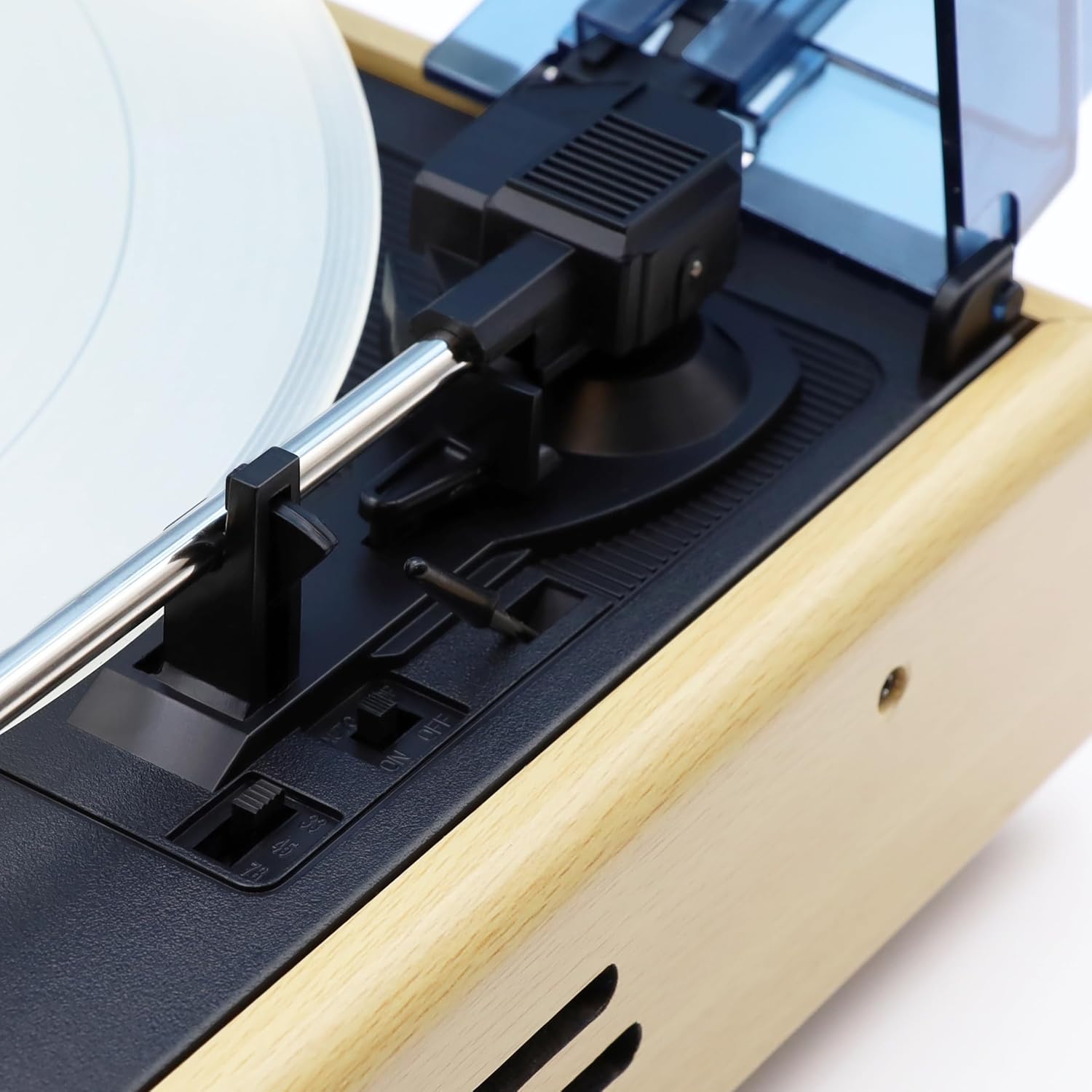
Figura 5: Control switches located near the tonearm base. These include the speed selector (33, 45, 78 RPM) and the Auto-Stop ON/OFF switch.

Figura 6: lateral view of the turntable, showing the design of the wooden casing and the integrated speaker grille.
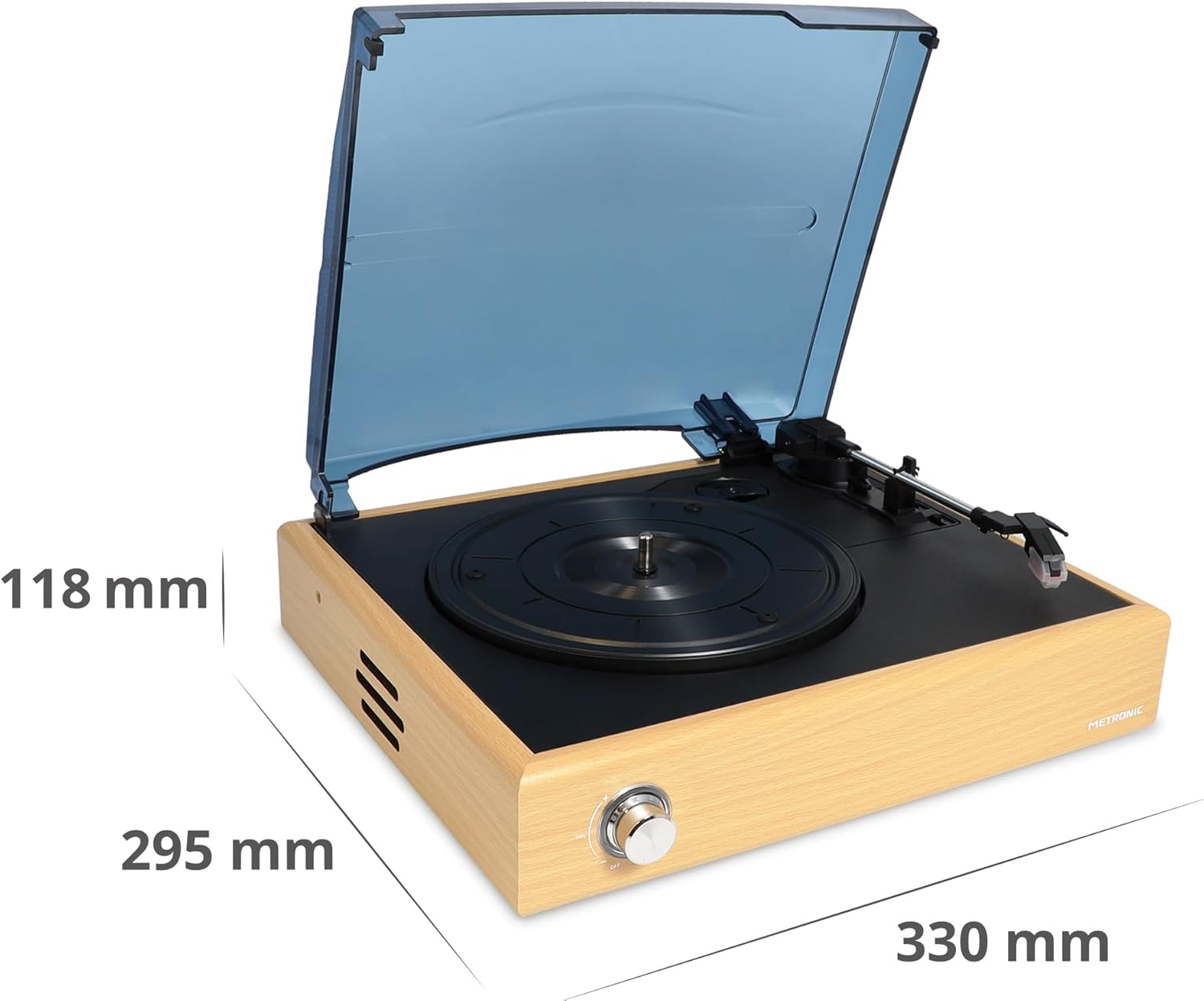
Figura 7: Dimensional diagram of the turntable, indicating its length, width, and height.
Configuració
- Desempaquetar el tocadiscos: Traieu amb cura tots els components de l'embalatge. Conserveu l'embalatge per a futurs transports o emmagatzematge.
- Place the Turntable: Position the turntable on a flat, stable, and vibration-free surface. Ensure there is adequate space around the unit for ventilation.
- Treure el protector del llapis òptic: Gently remove the clear plastic stylus protector from the needle cartridge. Be careful not to bend the stylus.
- Connectar l'alimentació: Insert the small end of the 12V power adapter into the DC IN port on the rear of the turntable. Plug the other end into a wall outlet.
- Funda antipols: The turntable comes with a hinged dust cover. You can leave it open during playback or close it when not in use to protect the platter and tonearm.
Instruccions de funcionament
Reproducció de discos de vinil
- Encès: Turn the Volume/Power knob clockwise until it clicks to power on the unit.
- Seleccioneu la velocitat: Set the speed selector switch (located near the tonearm base) to the appropriate speed for your record (33, 45, or 78 RPM). For 45 RPM records, place the included 45 RPM adapter on the spindle if needed.
- Registre del lloc: Col·loca amb cura el disc de vinil al plat del tocadiscos.
- Funció d'aturada automàtica: The Auto-Stop switch (next to the speed selector) can be set to ON or OFF. When ON, the platter will automatically stop spinning when the tonearm reaches the end of the record. When OFF, the platter will continue to spin.
- Posició del braç: Gently lift the tonearm using the cueing lever. Move the tonearm over the desired starting groove of the record.
- Braç inferior: Baixeu lentament el braç sobre el disc utilitzant la palanca de cueing. La música començarà a reproduir-se.
- Ajustar el volum: Use the Volume/Power knob to adjust the playback volume from the integrated speakers.
- Final de la reproducció: At the end of the record, if Auto-Stop is ON, the platter will stop. If OFF, manually lift the tonearm using the cueing lever and return it to the tonearm rest. Turn the Volume/Power knob counter-clockwise until it clicks to power off the unit.
Connexió Bluetooth
The Metronic turntable can receive audio from a Bluetooth-enabled device (e.g., smartphone, tablet) and play it through its integrated speakers.
- Encès: Turn the Volume/Power knob clockwise to power on the turntable.
- Activa el mode Bluetooth: Press the 'Wireless connect' button on the rear panel (refer to Figure 3). The Bluetooth indicator light will flash, indicating it is in pairing mode.
- Activa el Bluetooth al teu dispositiu: On your smartphone or tablet, go to the Bluetooth settings and enable Bluetooth.
- Pair with Turntable: Cerca available devices. You should see "METRONIC" or a similar name appear in the list. Select it to pair.
- Reproducció: Once paired, the Bluetooth indicator light will become solid. You can now play audio from your device through the turntable's speakers. Adjust volume using both your device and the turntable's volume knob.
- Desconnectar: To disconnect, simply turn off Bluetooth on your device or press the 'Wireless connect' button again on the turntable.
Manteniment
- Neteja de la unitat: Wipe the turntable's exterior with a soft, dry, lint-free cloth. Do not use abrasive cleaners, waxes, or solvents.
- Cura del stylus: The stylus (needle) is delicate. Clean it periodically with a soft brush, brushing gently from back to front. Avoid touching the stylus with your fingers. A worn or damaged stylus can damage your records and degrade sound quality. Replace the stylus if you notice a significant drop in sound quality or visible damage.
- Funda antipols: Keep the dust cover closed when the turntable is not in use to prevent dust accumulation on the platter and tonearm. Clean the dust cover with a soft, damp tela.
- Cura de registres: Mantingueu els vostres discos nets i sense pols. Guardeu-los verticalment dins de les seves fundes per evitar que es deformin.
Resolució de problemes
| Problema | Causa possible | Solució |
|---|---|---|
| Sense poder | Power adapter not connected; Power outlet not working; Unit not turned on. | Ensure power adapter is securely connected to the unit and a working outlet. Turn the Volume/Power knob clockwise until it clicks. |
| No hi ha so dels altaveus | Volume too low; Stylus protector still on; Stylus damaged; Bluetooth mode active. | Increase volume. Remove stylus protector. Check stylus for damage. Ensure Bluetooth mode is not active if playing vinyl. |
| Saltar registres | Record is dirty or scratched; Turntable not level; Stylus worn or dirty. | Clean the record. Place the turntable on a level surface. Clean or replace the stylus. |
| Bluetooth no connectat | Turntable not in pairing mode; Device Bluetooth off; Device too far. | Press 'Wireless connect' button to enter pairing mode. Ensure Bluetooth is enabled on your device. Keep devices within range (approx. 10 meters). |
| El plat no gira | Unit not powered on; Auto-Stop engaged at end of record. | Ensure unit is powered on. If tonearm is at the end of a record and Auto-Stop is ON, the platter will stop. Lift the tonearm and return it to rest. |
Especificacions
- Marca: Metrònic
- Nom del model: 477360
- Color: Fusta natural
- Connexions: Bluetooth
- Característiques especials: Integrated Bluetooth receiver, Auto-stop function
- Dispositius compatibles: Smartphone, tauleta
- Velocitats de rotació: 33, 45 i 78 RPM
- Sortida d'àudio: Stereo 2 x 3 W (integrated speakers)
- Braç: Manual straight arm
- Font d'alimentació: 12V adapter (included)
- Material: Fusta
- Pes de l'article: 700 grams
- Dimensions (aprox.): 330 mm (Llargada) x 295 mm (Amplada) x 118 mm (Alçada)
Garantia i Suport
This Metronic turntable comes with a Garantia del fabricant de 2 anysSi us plau, conserveu el comprovant de compra per a reclamacions de garantia.
For technical support, troubleshooting beyond this manual, or warranty inquiries, please contact your retailer or visit the official Metronic weblloc web per a informació d'atenció al client.