
Introducció
Thank you for choosing the ARROWMAX SGS PRO PLUS Smart Electric Engraving & Polishing Pen. This precision tool is designed for detailed engraving, polishing, and sanding tasks on various materials. This manual provides essential information for safe and effective operation, maintenance, and troubleshooting. Please read it thoroughly before using the device.
Contingut del paquet
Verifiqueu que tots els elements que s'enumeren a continuació siguin presents al vostre paquet:
- ARROWMAX SGS PRO PLUS Engraving & Polishing Pen
- Wireless Magnetic Charging Base
- Cable de càrrega USB
- 42 Assorted Bits (30 Engraving Bits, 12 Polishing Bits)
- Smart Tool Bag
- Manual d'usuari
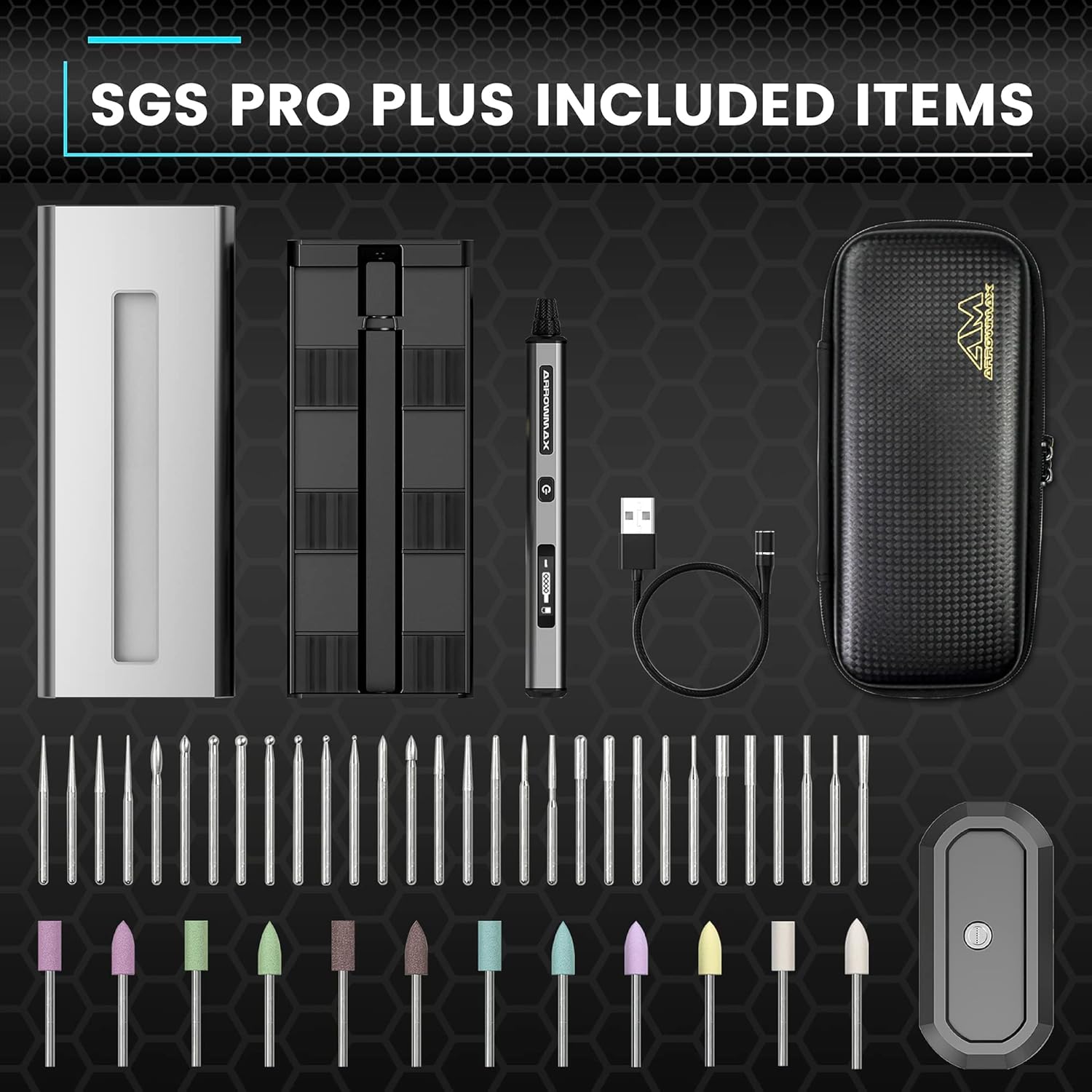
Image: Complete package contents of the ARROWMAX SGS PRO PLUS.
Producte acabatview
Familiarize yourself with the main components of your ARROWMAX SGS PRO PLUS pen:
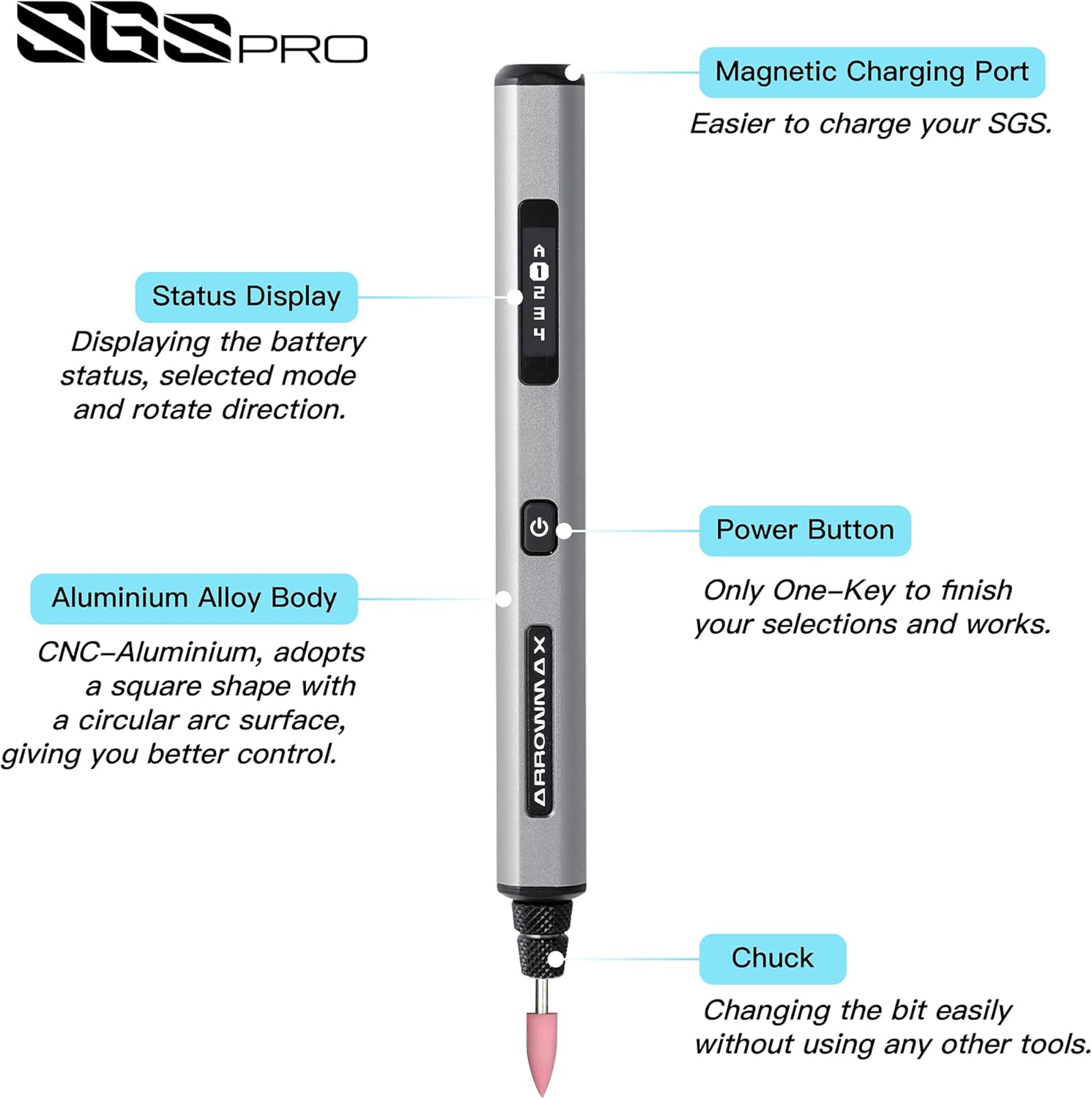
Image: Labeled diagram of the SGS PRO PLUS pen highlighting its key parts.
- Port de càrrega magnètica: For connecting to the wireless charging base.
- Status Display (OLED): Shows battery status, selected mode, and rotation direction.
- Botó d'encesa: Turns the device on/off and cycles through settings.
- Cos d'aliatge d'alumini: Durable and ergonomic design for comfortable grip.
- chuck: Holds the engraving or polishing bits securely.
Configuració
1. Càrrega del dispositiu
Before first use, fully charge the ARROWMAX SGS PRO PLUS pen. The device is equipped with a 500 mAh Lithium-polymer battery.
- Connect the USB charging cable to the wireless magnetic charging base and a suitable USB power adapter (not included).
- Place the ARROWMAX pen onto the magnetic charging base. Ensure the magnetic charging port on the pen aligns correctly with the base.
- The OLED display will indicate charging status. A full charge typically takes approximately 120 minutes of uninterrupted work time.

Imatge: Interna view of the pen showing the 500 mAh LiPo battery and the magnetic charging mechanism.
2. Installing and Changing Bits
The SGS PRO PLUS uses standard 2.35mm diameter bits. Always ensure the device is powered off before changing bits.
- Gently unscrew the chuck at the tip of the pen counter-clockwise.
- Insert the desired engraving or polishing bit into the opening. Ensure the bit is fully seated.
- Screw the chuck clockwise until the bit is securely fastened. Do not overtighten.

Image: Illustration of bit insertion into the chuck.
Instruccions de funcionament
1. Engegada/Apagada i Control de Velocitat
The device features a single power button for basic operation.
- Per encendre: Press and hold the Power Button for 2 seconds. The OLED display will illuminate.
- Per ajustar la velocitat: Briefly press the Power Button to cycle through the 5 available speed settings (up to 20,000 RPM). The current speed setting will be shown on the OLED display.
- Per apagar: Manteniu premut el botó d'engegada durant 2 segons.
2. App Control (Smart Motion Control)
For advanced control and customization, download the ARROWMAX app from Google Play or the App Store.
- Assegureu-vos que el Bluetooth estigui habilitat al vostre telèfon intel·ligent.
- Open the ARROWMAX app and follow the on-screen instructions to pair with your SGS PRO PLUS pen.
- Through the app, you can precisely adjust the rotation speed (up to 30,000 RPM), change rotation direction (forward/reverse), and monitor battery status.

Image: ARROWMAX app interface for controlling the engraving pen.
3. Consells d'ús
- Gravat: Select an appropriate engraving bit for your material (e.g., wood, glass, metal, crystal). Start with a lower speed and apply light, consistent pressure. Practice on scrap material first.
- Polit: Use the designated polishing bits. Apply polishing compound if necessary for optimal results. Move the pen smoothly over the surface.
- Polit/Esmolat: Choose suitable grinding bits. Maintain a steady hand and avoid excessive pressure to prevent damage to the material or the bit.

Image: Engraving a delicate pattern.

Image: Polishing a metal surface.

Image: Versatile use on different materials.
Manteniment
1. Neteja
- Apagueu sempre el dispositiu abans de netejar-lo.
- Wipe the pen's body with a soft, dry cloth.
- Remove any dust or debris from the chuck area using a small brush or compressed air.
- No utilitzeu productes químics ni productes de neteja abrasius.
2. Emmagatzematge
- Store the pen and its accessories in the provided smart tool bag to protect them from dust and damage.
- Mantingueu el dispositiu en un lloc fresc i sec, allunyat de la llum solar directa i de temperatures extremes.
- Ensure the battery is partially charged (around 50%) if storing for extended periods to prolong battery life.
Resolució de problemes
| Problema | Causa possible | Solució |
|---|---|---|
| El dispositiu no s’encén. | Bateria baixa. | Charge the device fully using the magnetic charging base. |
| Bit is loose or falls out. | Mandril no prou apretat. | Ensure the bit is fully inserted and the chuck is securely tightened. |
| El dispositiu s'atura inesperadament durant l'ús. | Sobrecàrrega o bateria baixa. | Reduce pressure on the workpiece. Check battery level and recharge if necessary. |
| Cannot connect to ARROWMAX app. | Bluetooth off or pairing issue. | Ensure Bluetooth is enabled on your phone and the pen is powered on. Restart both devices and try pairing again. |
Especificacions
- Model: SGS PRO PLUS (AM-199214-3)
- Marca: ARROWMAX
- Font d'alimentació: Funciona amb bateria
- Tipus de bateria: 1 Lithium-polymer (500 mAh)
- Voltage: 5 Volts
- RPM màxim: 30,000 RPM (via App), 20,000 RPM (on-device)
- Compatibilitat de bits: 2.35 mm de diàmetre
- Característiques especials: Smart Motion Control, OLED Display, Magnetic Wireless Charger, Bluetooth Connectivity
- Material del cos: Aliatge d'alumini
- Components inclosos: Engraving Pen, Magnetic Charger, 42 Bits, Tool Bag
Garantia i Suport
For warranty information, technical support, or service inquiries, please refer to the contact details provided with your purchase documentation or visit the official ARROWMAX weblloc web. Conserveu el comprovant de compra per a reclamacions de garantia.
