
1. Introducció
Thank you for choosing the CAMKORY DC403 Digital Camera. This compact and easy-to-use camera is designed for capturing high-quality photos and videos, making it suitable for beginners and children. This manual provides essential information on setting up, operating, and maintaining your camera to ensure optimal performance and longevity.

Image 1.1: The CAMKORY DC403 camera is designed to be pocket-sized and easy to use, making it ideal for children and beginners. It has passed drop tests for durability.
2. Producte acabatview
2.1 Característiques clau
- Alta resolució: 44 Megapixel photos and 1080p Full HD video recording.
- Zoom digital: 16x digital zoom for capturing distant subjects.
- Estabilització d'imatge: Optical image stabilization to reduce blur.
- Visualització: 2.5-inch LCD screen for clear viewing.
- Modes versàtils: Includes self-timer, fill light, fun filters, smile capture, burst shooting, and webfuncionalitat de càmera.
- Portabilitat: Compact and lightweight design (9.5 x 5.5 x 2 cm, 120g) for easy carrying.
- Potència: Comes with two 3.7V 700mAh rechargeable lithium-polymer batteries.
- Connectivitat: USB Type-C for charging and data transfer to PC.
2.2 Components de la càmera
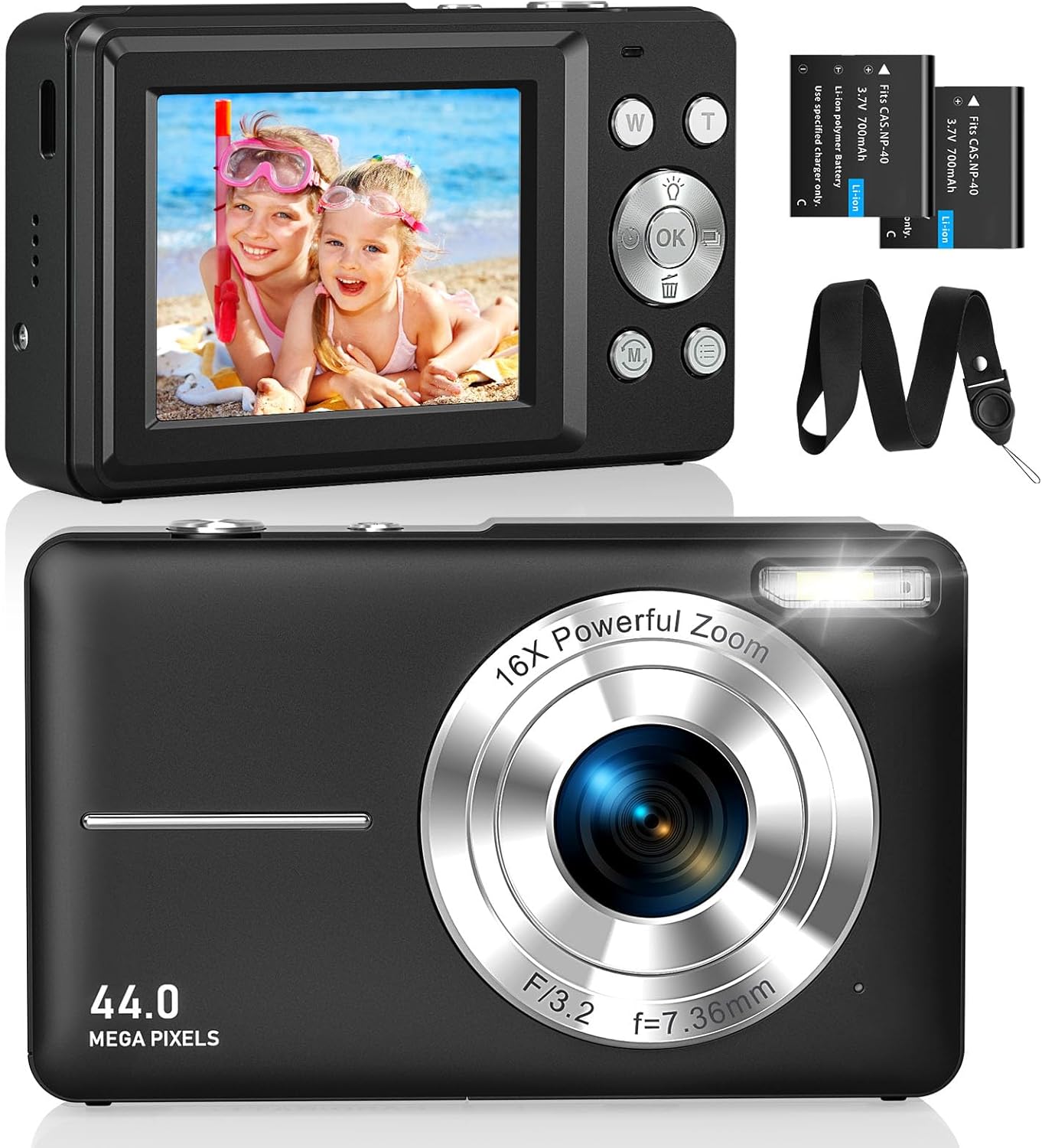
Imatge 2.1: Davant i darrere views of the CAMKORY DC403 Digital Camera, illustrating the lens, flash, LCD display, and various control buttons. Two rechargeable batteries are also shown.
The camera features an intuitive layout with ergonomically placed buttons suitable for small hands. Key controls include the power button, shutter button, zoom (W/T) buttons, mode button, and an OK button for menu navigation.

Imatge 2.2: Detallada view of the camera's side controls, including the ON/OFF button, Shutter, W/T (Zoom), Fill Light, and Mode button.
3. Configuració
3.1 Instal·lació i càrrega de la bateria
- Obriu la tapa del compartiment de la bateria a la part inferior de la càmera.
- Insert the two provided 3.7V 700mAh rechargeable lithium-polymer batteries, ensuring correct polarity.
- Tanqueu bé la tapa del compartiment de la bateria.
- Connect the camera to a power source using the supplied USB Type-C cable for charging. The charging indicator will show the charging status.
3.2 Instal·lació de la targeta de memòria
The camera supports Micro SD memory cards from 4GB to 32GB. A memory card is required to save photos and videos.
- Locate the Micro SD card slot, usually near the battery compartment.
- Insert the Micro SD card with the metal contacts facing the front of the camera until it clicks into place.
- Before first use, it is recommended to format the memory card directly within the camera's settings menu. This ensures compatibility and optimal performance.
3.3 Encès inicial
Press and hold the power button (usually located on the top or side of the camera) to turn on the device. The LCD screen will illuminate, and the camera will be ready for use.
4. Instruccions de funcionament
4.1 Fer fotos
- Enceneu la càmera.
- Enquadra la teva foto amb la pantalla LCD de 2.5 polzades.
- Use the W/T buttons to adjust the 16x digital zoom.
- Press the shutter button halfway down to focus, then press it fully to capture the 44MP image.

Image 4.1: The camera captures 44MP images, allowing for detailed and clear photographs.
4.2 Gravació de vídeos
- Switch to video mode using the Mode button.
- Press the shutter button to start recording 1080p FHD video.
- Press the shutter button again to pause or stop recording.

Image 4.2: The camera supports 1080p Full HD video recording, allowing users to capture moments with clarity.
4.3 Característiques especials
- Zoom digital: Use the W/T buttons to zoom in and out. The camera features 16x digital zoom.
- Estabilització d'imatge: The optical image stabilization feature helps reduce blur from camera shake.
- Llum d'ompliment: Activate the fill light for better illumination in low-light conditions.
- Temporitzador automàtic: Set a delay (e.g., 2s, 5s, 10s) before taking a photo, useful for group shots or selfies.
- Tret continu: Captura una seqüència ràpida de fotos mantenint premut el botó de l'obturador.
- Filtres: Experiment with 20 different built-in filters to add creative effects to your photos.
- Detecció de somriures: The camera can automatically detect and capture a photo when a smile is detected.
- WebMode de càmera: Connecteu la càmera a un ordinador mitjançant USB per utilitzar-la com a webcàmera per a transmissió en directe o videotrucades.

Image 4.3: Demonstrations of 16x digital zoom and image stabilization. The zoom feature allows for closer shots, while stabilization helps maintain clarity during movement.

Imatge 4.4: Ex.amples of self-timer, continuous shooting, and fill light functions. These features enhance photographic flexibility and quality in various scenarios.

Image 4.5: The camera can be used as a webcam when connected to a computer, suitable for streaming or video calls.
5. Manteniment
5.1 Neteja de la càmera
- Feu servir un drap suau i sense borrissol per netejar el cos de la càmera.
- For the lens and LCD screen, use a specialized lens cleaning cloth and solution. Avoid harsh chemicals.
- Assegureu-vos que la càmera estigui apagada abans de netejar-la.
5.2 Emmagatzematge
- Guardeu la càmera en un lloc fresc i sec, allunyat de la llum solar directa i de temperatures extremes.
- Si l'emmagatzemeu durant un període prolongat, traieu les piles per evitar fuites.
- Use the provided long strap and pouch to protect the camera from drops and scratches during transport.
6. Solució De Problemes
If you encounter issues with your CAMKORY DC403 camera, please refer to the following common solutions:
| Problema | Possible solució |
|---|---|
| La càmera no s'encén | Ensure batteries are correctly inserted and fully charged. Try using the second battery if available. |
| No puc fer fotos/vídeos | Check if a Micro SD card is inserted and has sufficient free space. Ensure the card is formatted in the camera. |
| Les imatges són borroses | Ensure the lens is clean. Hold the camera steady or use the image stabilization feature. Check lighting conditions. |
| Càmera no reconeguda per l'ordinador | Ensure the USB Type-C cable is securely connected to both the camera and the PC. Try a different USB port or cable. |
| La bateria s'esgota ràpidament | Reduce screen brightness. Turn off features like flash or continuous shooting when not needed. Ensure batteries are fully charged before use. |
7. Especificacions
| Característica | Detall |
|---|---|
| Marca | CAMKORY |
| Nom del model | DC403 |
| Color | Negre |
| Tipus de producte | Càmera digital compacta |
| Resolució de fixes efectius | 44 megapíxels |
| Resolució de vídeo | 1080p Full HD |
| Zoom digital | 16x |
| Zoom òptic | 16x (Note: This appears to be a mislabeling in the source data, likely referring to digital zoom) |
| Estabilització d'imatge | Òptic |
| Mida de la pantalla | LCD de 2.5 polzades |
| Tecnologia de connectivitat | USB (tipus C) |
| Targeta de memòria compatible | Micro SD (4-32GB) |
| Tipus de bateria | Lithium-polymer (2 x 3.7V 700mAh included) |
| Dimensions (L x A x A) | 9.5 x 2 x 5.5 cm |
| Pes de l'article | 120 grams |
| Burst Mode Speed | 30 fotogrames per segon |
| Interval ISO | ISO 100 to ISO 1600 |
| Abertura | F3.5-F5.6 |
| Tipus d'enfocament | Enfocament automàtic |
| Nivell de resistència a l'aigua | No impermeable |
8. Garantia i Suport
For any questions, technical support, or warranty inquiries regarding your CAMKORY DC403 Digital Camera, please contact CAMKORY customer service through the retailer's platform or the official CAMKORY weblloc web. Si us plau, conserveu el comprovant de compra per a reclamacions de garantia.