
1. Introducció
The Teslong TTM160P is a compact thermal imaging camera designed for use with Android smartphones, tablets, and PCs that support OTG functionality. It provides high-resolution thermal imagery for various applications, including home inspections, industrial diagnostics, and automotive services. This manual provides detailed instructions for setting up, operating, maintaining, and troubleshooting your TTM160P thermal camera.
1.1 Producte acabatview
The TTM160P features a 160x120 pixel infrared resolution and a 25Hz frame rate, allowing for clear thermal image capture and smooth video recording. Its 50mK thermal sensitivity enables detection of subtle temperature variations. The device operates within a wide temperature range of 5℉ to 1112℉ (-15°C to 600°C) with an accuracy of ±2°C or ±2%.

This image displays the Teslong TTM160P thermal imaging camera connected to an Android smartphone, showing a thermal view of a circuit board. A small black carrying case is also visible, indicating portability.
1.2 Contingut del paquet
- Teslong TTM160P Thermal Imaging Camera
- Funda protectora de transport
- Manual d'usuari (aquest document)
2. Especificacions
| Característica | Especificació |
|---|---|
| Número de model | TTM160P |
| Resolució infraroja | 160 x 120 píxels |
| Velocitat de fotogrames | 25 Hz |
| Sensibilitat tèrmica (NETD) | 50 mK |
| Interval de temperatura | 5℉ to 1112℉ (-15°C to 600°C) |
| Precisió de la temperatura | ±2°C o ±2% |
| Paletes de colors | 6 (Iron, White Hot, Black Hot, Rainbow, Red Hot, Cold Blue) |
| Connectivitat | USB Type-C (OTG compatible) |
| Font d'alimentació | Powered by connected device (no internal battery) |
| Dimensions (L x A x A) | 2.05 x 3.63 x 1.09 cm (aprox. 0.81 x 1.43 x 0.43 polzades) |
| Pes | 19 grams (només dispositiu) |
| Material | Aliatge d'alumini |

This image illustrates the difference in clarity between various thermal resolutions, highlighting the 160x120 IR resolution of the Teslong TTM160P camera. Three thermal images of a circuit board are shown at 160x120, 144x108, and 80x60 pixels, demonstrating the higher detail captured at 160x120.
3. Configuració
3.1 Requisits del sistema
- Android smartphone, tablet, or PC with USB Type-C port.
- Device must support USB On-The-Go (OTG) functionality.
- Not compatible with iOS devices.
3.2 Instal·lació del programari
- Descarrega l'aplicació: Cerca "Teslong Thermal" on the Google Play Store or scan the QR code provided in the product packaging to download and install the application.
- Concedir permisos: Upon first launch, the app may request certain permissions (e.g., camera, storage). Grant these permissions for full functionality.
3.3 Connexió del dispositiu
- Ensure the "Teslong Thermal" app is installed on your Android device.
- Carefully plug the Teslong TTM160P thermal camera into the USB Type-C port of your Android device.
- The device is plug-and-play and will draw power directly from your smartphone, tablet, or PC. No additional batteries or charging are required for the thermal camera itself.
- Launch the "Teslong Thermal" app. The thermal image feed should appear automatically.

This image shows the Teslong TTM160P thermal camera with an arc indicating its wide temperature detection range from 5℉ to 1112℉ (-15°C to 600°C). Icons below confirm its plug-and-play nature, Type-C USB connection, Android compatibility, and lack of iOS support.
4. Instruccions de funcionament
Once connected and the app is running, the thermal camera will display a live thermal feed. The app interface provides various tools and settings to optimize your thermal imaging experience.
4.1 Funcionament bàsic
- Viu View: The main screen displays the real-time thermal image.
- Capture Image/Video: Use the dedicated buttons within the app to capture still images or record thermal videos.
- Galeria: Access captured images and videos through the app's gallery feature.
4.2 Temperature Measurement Modes
The Teslong Thermal app offers several modes for precise temperature analysis:
- Max/Min/Center Point Analysis: Displays the highest, lowest, and central temperature readings within the current view.
- Seguiment de la temperatura: Continuously monitors and updates the Max/Min/Center point temperatures as the camera moves.
- Point Measurement: Manually select specific points on the screen to display their exact temperatures.
- Mesura de línia: Draw a line across the thermal image to identify the highest and lowest temperatures along that line.
- Mesura de superfície: Define a rectangular area to display the highest and lowest temperatures within that region.

This image demonstrates the temperature tracking feature, showing a thermal view of a circuit board on a smartphone screen. It highlights the minimum, maximum, and center point temperatures detected, along with a comparison of thermal readings before and after equipment testing.
4.3 Paletes de colors
The camera offers 6 color palettes to visualize temperature differences. You can switch between these palettes to best suit your application and enhance contrast for specific scenarios:
- Planxa: A common palette, good for general use.
- Blanc calent: Hotter areas appear white, cooler areas appear black.
- Negre calent: Hotter areas appear black, cooler areas appear white.
- Arc de Sant Martí: Uses a spectrum of colors to represent temperature.
- Roent: Highlights hotter areas with shades of red.
- Cold Blue: Emphasizes cooler areas with shades of blue.
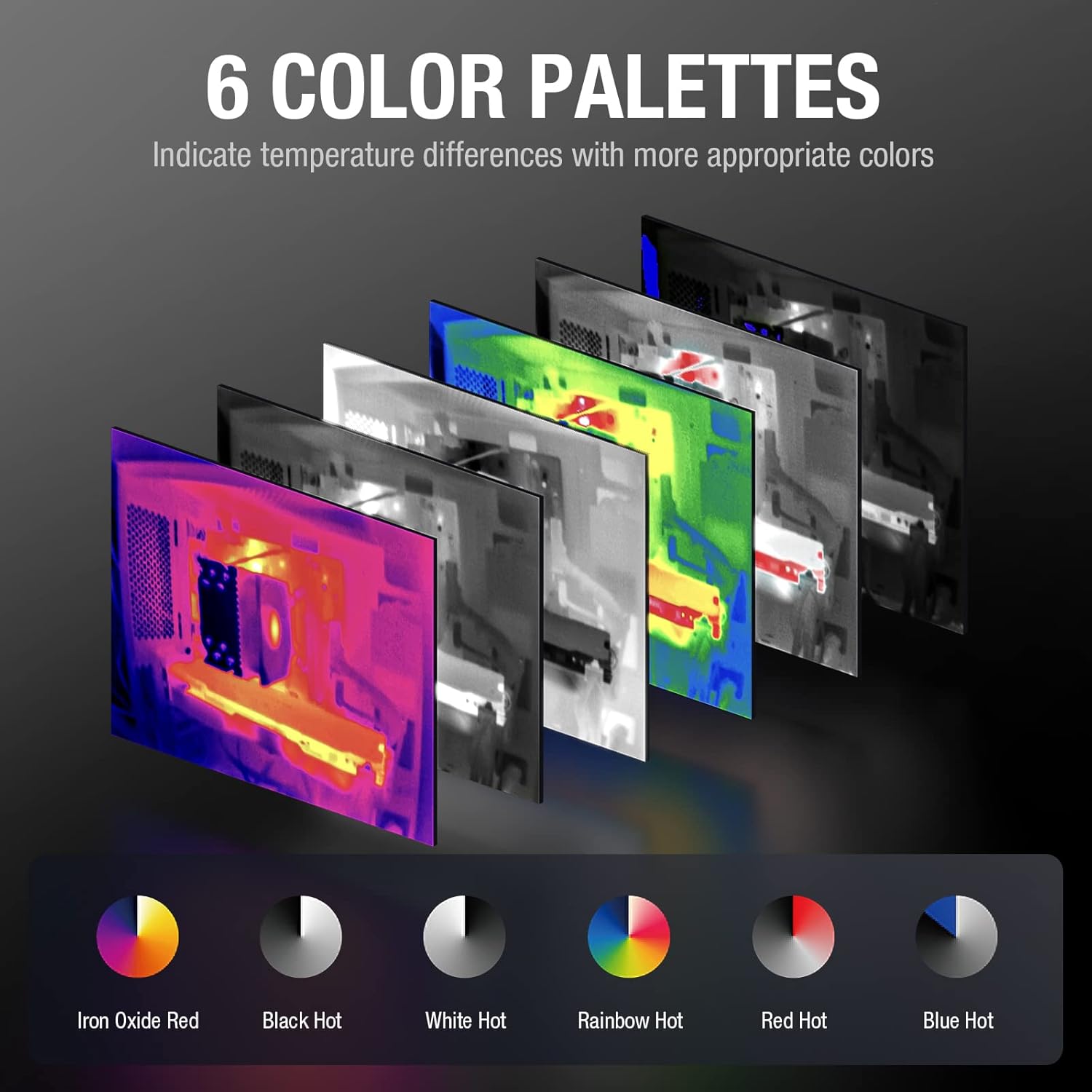
This image presents six distinct color palettes available for the thermal imager: Iron, White Hot, Black Hot, Rainbow, Red Hot, and Cold Blue. Each palette is shown applied to a thermal image, demonstrating how different color schemes can highlight temperature variations.
4.4 Funcions avançades
The Teslong Thermal app includes additional features for enhanced analysis:
- Regional Temperature Measurement: Allows for detailed temperature analysis within user-defined regions.
- Highlight Rectangle Temperature: Focuses on and highlights temperature data within a specific rectangular area.
- Alarma d'alta temperatura: Set a threshold for high temperatures, and the app will alert you when this threshold is exceeded.
- Highlight High-Temperature Regions: Automatically identifies and visually emphasizes areas exceeding a specified temperature.

This image illustrates various functional modes within the Teslong Thermal app. It shows options for regional temperature measurement, highlighting rectangular areas, setting high-temperature alarms, and automatically highlighting high-temperature regions on the thermal display.
5. Manteniment
5.1 Cura i neteja
- Keep the thermal camera lens clean. Use a soft, lint-free cloth to gently wipe the lens. Avoid abrasive materials or harsh chemicals.
- Clean the device body with a dry or slightly damp tela. No submergiu el dispositiu en aigua.
- Ensure the USB Type-C connector is free from dust and debris.
5.2 Emmagatzematge
- When not in use, store the thermal camera in its protective carrying case to prevent damage.
- Emmagatzemar en un lloc fresc i sec, lluny de la llum solar directa i de temperatures extremes.
6. Solució De Problemes
6.1 Problemes comuns i solucions
- Sense visualització d'imatges:
- Ensure the camera is securely plugged into the USB Type-C port.
- Verify that your Android device supports OTG functionality.
- Check if the "Teslong Thermal" app is installed and has necessary permissions.
- Restart the app or your Android device.
- Lectures de temperatura inexactes:
- Assegureu-vos que la lent de la càmera estigui neta i lliure d'obstruccions.
- Verify that the emissivity settings in the app are appropriate for the surface being measured (refer to app settings for adjustments).
- Allow the camera to stabilize in the environment for a few minutes before taking critical measurements.
- Bloqueig/bloqueig de l'aplicació:
- Tanca i torna a obrir l'aplicació.
- Ensure your Android device's operating system is up to date.
- Clear the app's cache from your device settings.
7. Garantia i Suport
7.1 Informació de la garantia
The Teslong TTM160P Thermal Imaging Camera comes with a 12 mesos de garantia des de la data de compra, cobrint defectes de fabricació i avaries en condicions d'ús normal.
7.2 Suport tècnic
For any questions, technical assistance, or warranty claims, please contact Teslong customer support:
- Servei telefònic dels EUA: 1-877-899-8809
- Horari de funcionament: Monday - Friday, 8:00 AM - 5:00 PM PST