
1. Introducció
Gràcies per la compraasing the Akozon Portable DV Camcorder. This manual provides essential information for the safe and effective operation of your device. Please read it thoroughly before use and retain it for future reference.
This camcorder is designed for capturing video and still images, featuring a 1080P video resolution, 16MP photo capability, a 2.7-inch rotating TFT screen, and 16x digital zoom. It is suitable for various recording scenarios, including family events, travel, and personal vlogging.
2. Producte acabatview
2.1 Característiques clau
- Resolució de vídeo: 1080P (1920x1080), HD (1280x720), 640x480
- Resolució d'imatge: 16MP (4608x3456), 12MP, 5MP, 1MP, VGA
- Visualització: 2.7-inch TFT rotating screen
- Zoom: Zoom digital de 16x
- Emmagatzematge: Supports up to 32GB Micro SD card (not included)
- Connectivitat: USB port for PC connection and charging
- Característiques especials: Selfie fill light, self-timer (2s/10s), built-in speakers, HD output, recording while charging
2.2 Contingut del paquet
- Akozon Portable DV Camcorder
- Bateria de liti (1020 mAh)
- Cable USB
- Corretja de canell
- Manual d'usuari (aquest document)
2.3 Components de la càmera de vídeo

Figure 2.3.1: Akozon Portable DV Camcorder with included battery and USB cable. This image shows the camcorder, a rechargeable battery, and a USB charging cable, providing a complete view of the product and its essential accessories.
- Video Lens: Main lens for capturing images and videos.
- 2.7-inch TFT Rotating Screen: Per viewing, playback, and menu navigation. Can be rotated for selfie mode.
- Selfie Fill Light: Provides additional illumination for close-up shots and selfies.
- Botó d'encesa: To turn the camcorder on or off.
- Botó de gravació/obturador: To start/stop video recording or take a photo.
- Controls de zoom: For digital zoom in/out.
- Botó de menú: To access settings and options.
- Botons de navegació: For moving through menus and selections.
- Port USB: Per carregar i connectar a un ordinador.
- Compartiment de la bateria: Conté la bateria de liti recarregable.
- Ranura per a targetes Micro SD: Per inserir la targeta de memòria.

Figura 2.3.2: Primer pla view of the Akozon DV Camcorder's video lens. This image highlights the camcorder's lens, showing details like "VIDEO LENS" and "Aperture 5.0".
3. Configuració
3.1 Instal·lació de la bateria
- Locate the battery compartment cover on the camcorder.
- Feu lliscar la coberta oberta.
- Insert the provided 1020mAh lithium battery, ensuring the correct polarity (+/-) as indicated inside the compartment.
- Tanqueu bé la tapa del compartiment de la bateria.
3.2 Instal·lació de la targeta de memòria
The camcorder requires a Micro SD card (up to 32GB, not included) to store videos and photos.
- Locate the Micro SD card slot, usually near the battery compartment or on the side.
- Insert the Micro SD card with the gold contacts facing down (or as indicated by a diagram near the slot) until it clicks into place.
- To remove, gently push the card in until it clicks again, then release, and it will spring out.
Nota: Ensure the camcorder is powered off before inserting or removing the memory card.
3.3 Càrrega inicial
Before first use, fully charge the camcorder battery.
- Connect the small end of the USB cable to the camcorder's USB port.
- Connecteu l'extrem més gran del cable USB a un adaptador de corrent USB (no inclòs) o al port USB d'un ordinador.
- El llum indicador de càrrega s'il·luminarà. S'apagarà o canviarà de color quan la càrrega s'hagi completat.
Nota: The camcorder supports recording while charging.
4. Instruccions de funcionament
4.1 Encès/Apagat
- Per encendre: Premeu i manteniu premut el botó d'engegada fins que la pantalla s'il·lumini.
- Per apagar: Manteniu premut el botó d'engegada fins que s'apagui la pantalla.
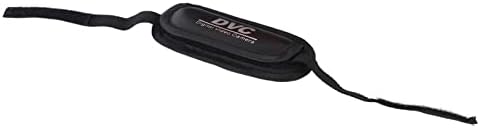
Figure 4.1.1: Akozon DV Camcorder screen displaying the 'Digital Camcorder' startup message. This image shows the camcorder's screen powered on, displaying the initial "Digital Camcorder" text.
4.2 Gravació de vídeo
- Ensure the camcorder is in video recording mode (check the icon on the screen). If not, use the Mode button (if available) or menu to switch.
- Frame your subject using the rotating TFT screen.
- Press the Record/Shutter button once to start recording. A red indicator or recording timer will appear on the screen.
- Press the Record/Shutter button again to stop recording. The video file es desarà a la targeta Micro SD.
4.3 Fer fotos
- Ensure the camcorder is in photo capture mode.
- Emmarca el teu subjecte.
- Press the Record/Shutter button once to take a photo. The image will be saved to the Micro SD card.
4.4 Selfie Mode and Fill Light
The rotating screen allows for easy selfie capture. The front-facing fill light can be used for additional illumination.
- Rotate the TFT screen 180 degrees towards yourself.
- To activate the fill light, navigate to the menu settings or use a dedicated button (if available).
- Utilize the self-timer function (2 seconds or 10 seconds) for hands-free photo or video capture. Access this setting via the menu.

Figure 4.4.1: Akozon Portable DV Camcorder with rotating screen displaying a selfie. This image shows the camcorder's screen rotated, capturing a group selfie, demonstrating its selfie capability.
4.5 Reproducció
- Enter Playback mode via the Mode button or menu.
- Use the navigation buttons to browse through your recorded videos and photos.
- Press the Record/Shutter button (or a dedicated Play button) to view un seleccionat file.
4.6 Connecting to a Computer (PC Mode)
You can connect the camcorder to a computer to transfer files or use it as a PC camera.
- Assegureu-vos que la càmera de vídeo estigui engegada.
- Connecteu la càmera de vídeo a l'ordinador amb el cable USB proporcionat.
- The camcorder screen may display options like "Mass Storage" (for file transfer) or "PC Camera". Select the desired mode using the navigation buttons and confirm.
- If "Mass Storage" is selected, the camcorder will appear as a removable drive on your computer, allowing you to copy files.
- If "PC Camera" is selected, the camcorder can be used as a webcam with compatible software.
5. Manteniment
- Neteja: Use a soft, dry cloth to clean the camcorder body. For the lens, use a specialized lens cleaning cloth and solution. Avoid harsh chemicals.
- Emmagatzematge: Guardeu la càmera de vídeo en un lloc fresc i sec, allunyat de la llum solar directa i de temperatures extremes. Traieu la bateria si la guardeu durant períodes prolongats.
- Cura de la bateria: Do not expose the battery to high temperatures or disassemble it. Recharge the battery regularly, even if not in use, to maintain its lifespan.
- Targeta de memòria: Periodically back up your files from the Micro SD card to a computer or other storage device.
6. Solució De Problemes
| Problema | Causa possible | Solució |
|---|---|---|
| La càmera de vídeo no s'encén. | La bateria està esgotada o instal·lada incorrectament. | Carregueu la bateria completament. Assegureu-vos que la bateria estigui inserida amb la polaritat correcta. |
| No es poden gravar vídeos/fer fotos. | No Micro SD card inserted, card full, or card error. | Insert a Micro SD card. Delete unnecessary files or replace the card. Format the card (this will erase all data). |
| Computer does not recognize camcorder via USB. | Incorrect USB mode selected, faulty cable, or driver issue. | Ensure "Mass Storage" or "PC Camera" mode is selected on the camcorder. Try a different USB port or cable. Restart both camcorder and computer. |
| Mala qualitat d'imatge/vídeo. | Il·luminació insuficient, lent bruta o configuració incorrecta. | Ensure adequate lighting. Clean the lens. Check resolution settings in the menu. |
7. Especificacions
| Característica | Especificació |
|---|---|
| Número de model | Akozon3v6tcg2u7b-12 |
| Marca | Akozon |
| Tecnologia del sensor d'imatge | CMOS |
| Resolució de gravació de vídeo | 1080p (FHD), HD, 640x480 |
| Effective Capture Resolution | 16 megapíxels |
| Tipus de memòria flash | Micro SD (admet fins a 32 GB) |
| Format de captura de vídeo | AVI |
| Format d'imatge | JPEG |
| Mida de la pantalla | 2.7 Inches (TFT rotating screen) |
| Zoom digital | 16x |
| Tecnologia de connectivitat | USB |
| Característiques especials | Selfie fill light, Rotating screen |
| Bateria | Bateria de liti de 1020 mAh (inclosa) |
| Autònom | 2 segons, 10 segons |
| SORTIDA DE TV | NTSC 30fps, PAL 25fps |
| Dimensions del producte | 12.5 x 10.5 x 7.2 cm; 210 grams |
| País d'origen | Xina |
8. Garantia i Suport
For warranty information and technical support, please refer to the documentation provided at the time of purchase or contact your retailer. You may also visit the official Akozon weblloc per obtenir més ajuda.
Si us plau, conserveu el comprovant de compra per a qualsevol reclamació de garantia.