
1. Introducció
Gràcies per la compraasing the Nobsound Q10 Digital Amplifier. This ultra-compact amplifier is designed to deliver high-fidelity audio with versatile input options, including Bluetooth 5.0, Optical, and AUX. Equipped with a TPA3221 Class D amplifier chip, it provides stable and powerful output for various audio setups, from desktop speakers to car audio systems. This manual provides detailed instructions for proper setup, operation, and maintenance to ensure optimal performance and longevity of your device.

Figura 1: Frontal view of the Nobsound Q10 Digital Amplifier, showing the main control knob, volume display, AUX input, and Optical input.
2. Característiques clau
- High-Efficiency TPA3221 Class D Chip: Features a Texas Instruments TPA3221 amplifier chip, achieving ultra-low distortion below 0.001% and a high-speed response with a 1.2MHz switching frequency. Delivers stable 80W per channel (nominal 100W) into 4Ω speakers.
- Versatile 3-Way Multi-Input: Seamlessly integrates Bluetooth 5.0 (15m transmission, low-latency codec), Optical digital (for TV/game console connection), and AUX analog inputs.
- Innovative Single Knob Interface: A durable 18mm metal knob controls Power ON/OFF (long press for 3 seconds), Input Switching (short press), and Volume Adjustment (rotate). Designed for intuitive operation, even in low light.
- Vol. Amplitage DC9-24V Compatibility: Supports various power sources like car cigarette lighters (12V), portable power supplies (19V), and USB-PD adapters (9V). Includes a built-in ESD protection circuit to prevent surge noise.
- Optimized Compact Design: Ultra-thin body (77x22x62mm) with a heat-dissipating aluminum base plate, maintaining surface temperature below 65°C during continuous 100W output. Integrated protection circuits safeguard speakers against short circuits, overload, and overheating.

Figure 2: Illustration highlighting the TPA3221 chip and the amplifier's maximum 100W x 2 output power.
3. Contingut del paquet
Si us plau, comproveu que tots els elements siguin presents al paquet:
- 1 × Nobsound Q10 Ampmés viu
- 1 × 19V Power Adapter (Optional, included with this variant)
- 1 × 3.5mm AUX Cable
- 1 × Cable RCA
- 1 × Optical Cable
- 1 × Manual d'usuari
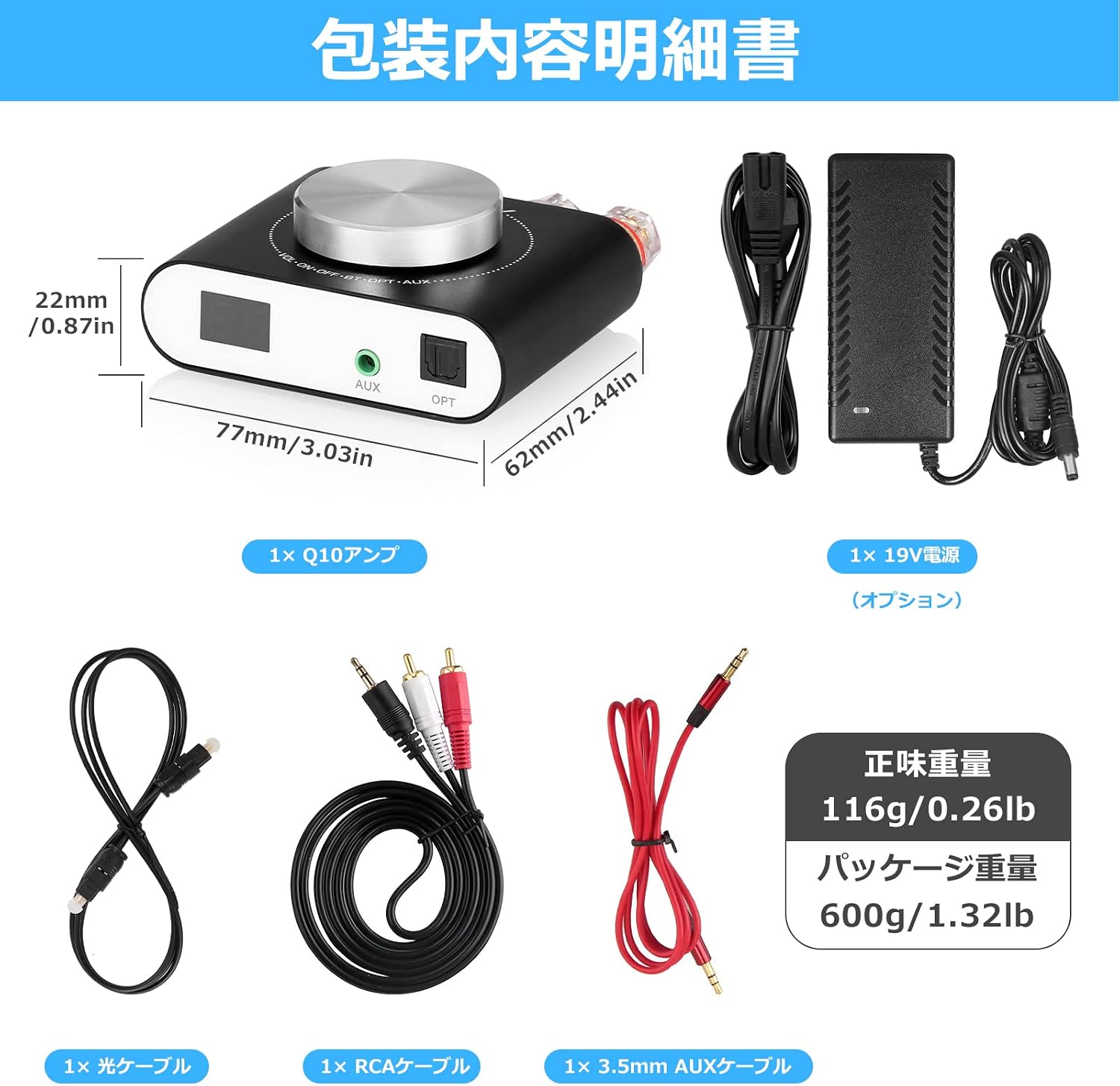
Figure 3: Diagram showing the Nobsound Q10 amplifier, included cables, power adapter, and product dimensions.
4. Instruccions de configuració
Follow these steps to connect your Nobsound Q10 ampmés viu:
- Connectar els altaveus: Connect your passive speakers to the speaker terminals on the rear of the amplifier. Ensure correct polarity (red to red, black to black for each channel R/L). The amplifier supports 4Ω speakers.
- Connecta la font d'àudio: Trieu un dels mètodes d'entrada següents:
- Bluetooth: No physical connection needed. The amplifier will be discoverable once powered on.
- Optical Input (OPT): Connect an optical cable from your TV, game console, or other digital audio source to the OPT input on the front of the ampmés viu.
- Entrada AUX: Connect a 3.5mm AUX cable from your smartphone, tablet, or other analog audio device to the AUX input on the front of the amplifier. For devices with RCA output, use the provided RCA to 3.5mm cable.
- Connectar l'alimentació: Connect the provided 19V power adapter to the DC9-24V IN port on the rear of the amplifier, then plug the adapter into a power outlet.

Figure 4: Detailed diagram illustrating the front and rear connections of the Nobsound Q10, including speaker terminals, power input, and various audio inputs.
5. Instruccions de funcionament
The Nobsound Q10 features a single multi-function knob for all primary controls.
5.1 Encès/apagat
- Per encendre: Long press the main knob for approximately 3 seconds. The display will light up.
- Per apagar: Long press the main knob for approximately 3 seconds. The display will turn off.
5.2 Selecció d'entrada
- To Switch Inputs: Short press the main knob. The input mode will cycle through Bluetooth (BT), Optical (OPT), and AUX. The corresponding indicator light (Blue for BT, Red for AUX, Purple for OPT) will illuminate.
5.3 Ajust de volum
- Per ajustar el volum: Rotate the main knob clockwise to increase volume and counter-clockwise to decrease volume. The current volume level will be shown on the digital display.
5.4 Vinculació Bluetooth
Quan el amplifier is in Bluetooth mode (blue indicator light), it will automatically enter pairing mode. Cerca "Nobsound Q10" on your device's Bluetooth settings and connect. Once paired, the blue indicator will remain solid.

Figure 5: A hand demonstrating the operation of the single multi-function knob on the Nobsound Q10 ampmés viu.
6. Manteniment
To ensure the longevity and optimal performance of your Nobsound Q10 amplificador, seguiu aquestes pautes de manteniment:
- Neteja: Utilitzeu un drap suau i sec per netejar l'exterior amplifier. Do not use liquid cleaners, aerosols, or solvents, as they may damage the finish or internal components.
- Ventilació: Assegureu-vos el amplifier is placed in a well-ventilated area. Avoid blocking the heat-dissipating surfaces. Do not place it in enclosed spaces without adequate airflow.
- Emmagatzematge: When not in use for extended periods, disconnect the power adapter and store the ampGuardar en un lloc fresc i sec, allunyat de la llum solar directa i de temperatures extremes.
- Eviteu la humitat: Mantenir el amplifier away from water, humidity, and other liquids. Exposure to moisture can cause electrical shorts and damage the device.
7. Solució De Problemes
If you encounter any issues with your Nobsound Q10 amplifier, please refer to the following troubleshooting guide:
| Problema | Causa possible | Solució |
|---|---|---|
| Sense sortida de so |
|
|
| So distorsionat o de mala qualitat |
|
|
| Problemes de vinculació de Bluetooth |
|
|
| Amplifier suddenly turns off |
|
|
8. Especificacions
| Característica | Detall |
|---|---|
| Marca | Nobsound |
| Número de model | P10 |
| AmpXip lificador | TPA3221 Class D |
| Potència de sortida | 80W x 2 (4Ω, nominal 100W x 2) |
| Opcions d'entrada | Bluetooth 5.0, Optical, 3.5mm AUX |
| Interval Bluetooth | Fins a 15 metres |
| Font d'alimentació | DC 9V-24V |
| Dimensions del producte (LxWxH) | 7.7 x 6.2 x 2.2 cm (3.03 x 2.44 x 0.87 polzades) |
| Pes del producte | 116 g (0.26 lliures) |
| Components inclosos | P10 Amplifier, 19V Power Adapter (optional), 3.5mm AUX Cable, RCA Cable, Optical Cable, User Manual |
9. Garantia i Suport
Nobsound products are designed for reliability and performance. This product comes with a standard manufacturer's warranty against defects in materials and workmanship. The specific warranty period may vary by region and retailer. Please retain your proof of purchase for warranty claims.
For technical support, troubleshooting assistance, or warranty inquiries, please contact your retailer or visit the official Nobsound website. You can often find additional resources, FAQs, and contact information on the manufacturer's support pages.
Oficial Weblloc: www.doukaudio.com


![[PDF] Nobsound 200W Bluetooth 4.2 Class D Digital Ampmés viu](https://manuals.plus/m/31ef5962da2bf8a819ffcaf3c03cc0974a95576bcf03df709324e276b5fea8d6.png)


