
1. Introducció
The Dreadbox Erebus Reissue is a compact yet powerful analog synthesizer, designed for musicians, sound designers, and producers. This semimodular, paraphonic instrument offers Eurorack compatibility and is a faithful rerelease of the original V1 desktop unit. It features two Voltage Controlled Oscillators (VCOs), an analog 2-pole low-pass filter, an OTA Voltage Controlat Amplifier (VCA), ADSR and AR envelopes, a wide-range Low Frequency Oscillator (LFO), and a lo-fi delay effect. With 18 patch points, the Erebus Reissue provides extensive sound design possibilities and seamless integration with other Eurorack gear.
2. Què hi ha a la caixa
Upon unboxing your Dreadbox Erebus Reissue, please ensure all components are present:
- 1x Dreadbox Erebus Reissue Synthesizer
- 1x cable d'alimentació
If any items are missing or damaged, please contact your retailer or Dreadbox support immediately.
3. Configuració
Follow these steps to set up your Erebus Reissue for the first time:
- Connexió d'alimentació: Connect the provided power cord to the power input on the rear of the Erebus Reissue and then to a suitable power outlet. Ensure the power switch is in the 'OFF' position before connecting.
- Sortida d'àudio: Connect the 'OUT' jack (1/4" TS) on the rear panel to your mixer, audio interface, or amplifier using an appropriate audio cable.
- Connexió MIDI (opcional): If using a MIDI controller or sequencer, connect a standard MIDI cable from your device's MIDI OUT to the Erebus Reissue's MIDI IN port.
- Encès: Flip the power switch to the 'ON' position. Allow a few moments for the synthesizer to stabilize.
Your Erebus Reissue is now ready for basic operation. For advanced patching and Eurorack integration, refer to the 'Patch Points' section.
4. Controls i funcions anteriorsview
The Erebus Reissue features a clearly laid out front panel with dedicated sections for sound generation and modulation. Familiarize yourself with the layout:
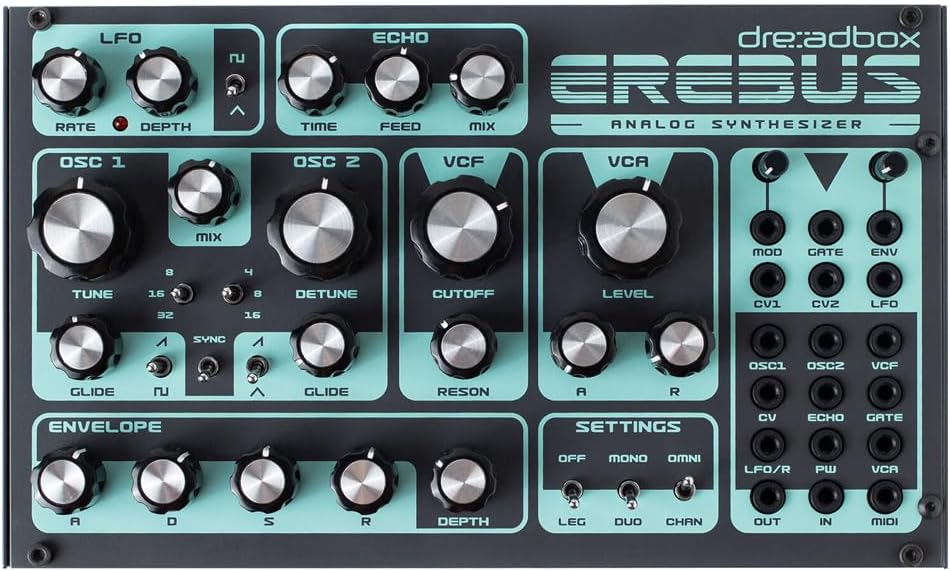
Figura 4.1: Panell frontal view of the Dreadbox Erebus Reissue, showcasing the layout of all knobs, switches, and patch points. The turquoise and dark grey color scheme is visible.

Figura 4.2: Angled perspective of the Erebus Reissue, highlighting its compact desktop form factor and the side panel construction.

Figura 4.3: A second angled view of the Erebus Reissue, providing a comprehensive look at the top panel controls and the overall physical design.
4.1. LFO Section
- TARIFA: Controls the speed of the Low Frequency Oscillator.
- PROFUNDITAT: Adjusts the intensity of the LFO modulation.
- Waveform Switch: Selects between square and triangle LFO waveforms.
4.2. Oscillator Section (OSC 1 & OSC 2)
The Erebus Reissue features two paraphonic Voltage Controlled Oscillators.
- TUNE (OSC 1): Adjusts the pitch of Oscillator 1.
- DETUNE (OSC 2): Adjusts the pitch of Oscillator 2 relative to Oscillator 1.
- BARCELONA: Blends the output of OSC 1 and OSC 2.
- GLIDE (Independent for each OSC): Controls the portamento (slide) effect for each oscillator.
- Octave Switches (16', 8', 4', 32'): Sets the octave range for each oscillator.
- Waveform Switches: Selects between square and sawtooth waveforms for each oscillator.
- Interruptor SYNC: Engages hard sync for Oscillator 2 to Oscillator 1.
4.3. Filter (VCF) Section
An analog 2-pole Dreadbox low-pass filter shapes the timbre.
- TALLAR: Sets the frequency at which the filter begins to attenuate harmonics.
- RESON: Increases the resonance (emphasis) at the cutoff frequency.
4.4. Amplifier (VCA) Section
The OTA VCA controls the overall output level.
- NIVELL: Adjusts the output volume of the VCA.
- AR Envelope (A, R): Controls the Attack and Release stages of the VCA's ampsobre de litud.
4.5. Envelope Section (ADSR)
A dedicated ADSR envelope for modulating various parameters.
- A (Attack): Controla el temps que triga el so a assolir el seu nivell màxim.
- D (Decay): Controla el temps que triga el so a baixar del nivell màxim al nivell de sosteniment.
- S (Sustain): Sets the level at which the sound is held as long as a key is pressed.
- R (Release): Controla el temps que triga el so a desaparèixer després de deixar anar la tecla.
- PROFUNDITAT: Adjusts the intensity of the ADSR envelope modulation.
4.6. Echo Section
A built-in lo-fi delay effect.
- HORA: Ajusta el temps de retard.
- ALIMENTACIÓ: Controls the feedback amount (number of repeats).
- BARCELONA: Blends the dry (unaffected) signal with the wet (delayed) signal.
4.7. Settings Section
- OFF/MONO/OMNI Switch: Selects between different MIDI modes.
- LEG/DUO/CHAN Switch: Configures legato, duophonic, or channel settings.
5. Patch Points
The Erebus Reissue features 18 patch points for extensive modular synthesis possibilities and Eurorack integration. These 3.5mm (1/8") jacks allow you to reroute internal signals and connect to external Eurorack modules.
5.1. Inputs (CV)
- MOD: Entrada de modulació.
- PORTA: Entrada de porta per activar envolvents.
- ENV: External envelope input.
- CV1, CV2: Control Voltage entrades.
- LFO: LFO input.
5.2. Outputs (CV/Audio)
- OSC1, OSC2: Individual oscillator audio outputs.
- VCF: Filter output.
- ECO: Delay effect output.
- PORTA: Gate output.
- LFO/R: LFO output or Release output.
- PW: Pulse Width output.
- VCA: VCA output.
5.3. MIDI
- EN: MIDI input for receiving note and control data.
- SORTIDA: MIDI output for sending MIDI data.
6. Operating the Erebus Reissue
6.1. Basic Sound Generation
To create a basic sound:
- Ensure the Erebus is powered on and connected to an audio output.
- Set OSC 1 and OSC 2 octave switches to 8'.
- Set the MIX knob to the center position to hear both oscillators.
- Set VCF CUTOFF to maximum and RESON to minimum.
- Set VCA LEVEL to a comfortable position.
- Play a note on your MIDI controller. You should hear a basic tone.
- Adjust the ADSR envelope controls (A, D, S, R) to shape the sound's amplitud al llarg del temps.
- Experiment with the VCF CUTOFF and RESON to change the timbre.
6.2. Paraphonic Operation
The Erebus Reissue is paraphonic, meaning both oscillators share a single filter and VCA, but their pitches can be controlled independently via MIDI. When playing multiple notes, the pitches of OSC 1 and OSC 2 will respond to the incoming MIDI notes, allowing for two-note chords with shared articulation.
6.3. Using the Delay
The built-in lo-fi delay can add space and texture to your sounds. Adjust the TIME knob for the delay repetition interval, FEED for the number of repeats, and MIX to blend the delayed signal with the dry signal. Higher FEED settings can lead to self-oscillation.
6.4. Eurorack Integration
The patch points allow for extensive modular patching. For exampLI:
- Patch the LFO output to the VCF CUTOFF input to create filter sweeps.
- Connect an external envelope generator to the ENV input for alternative amplitude shaping.
- Route the individual OSC1 or OSC2 outputs to external effects or filters for parallel processing.
7. Manteniment
To ensure the longevity and optimal performance of your Dreadbox Erebus Reissue:
- Neteja: Use a soft, dry cloth to clean the exterior. Avoid abrasive cleaners, solvents, or excessive moisture.
- Medi ambient: Operate and store the synthesizer in a dry, dust-free environment away from direct sunlight, extreme temperatures, and humidity.
- Potència: Always use the provided power adapter. Disconnect power when not in use for extended periods.
- Manipulació: Handle with care. Avoid dropping or subjecting the unit to strong impacts.
8. Solució De Problemes
If you encounter issues with your Erebus Reissue, consult the following common problems and solutions:
- Sense so:
- Check power connection and ensure the unit is switched on.
- Verify audio output cable connection to your mixer/interface.
- Ensure VCA LEVEL is not at minimum.
- Check ADSR envelope settings; if Attack is too long or Sustain is zero, you might not hear sound immediately or at all.
- If using MIDI, ensure MIDI IN is connected and your controller is sending notes on the correct channel.
- So distorsionat:
- Reduce VCA LEVEL or the input gain on your mixer/interface.
- Check if ECHO FEED is too high, causing self-oscillation.
- MIDI no respon:
- Ensure MIDI cable is securely connected.
- Check MIDI channel settings on both the Erebus (via the 'Settings' switches) and your MIDI controller.
- Unexpected Behavior with Patch Cables:
- Ensure patch cables are correctly inserted into the desired input/output jacks.
- Verify that the patched signals are compatible (e.g., CV to CV input, audio to audio input).
If the problem persists, please refer to the Dreadbox weblloc web per obtenir més ajuda o poseu-vos en contacte amb el seu servei d'atenció al client.
9. Especificacions
- Nom del model: Erebus Reissue
- Número de model: DBX-ERE-RE
- Tipus: Semimodular Paraphonic Analog Synthesizer
- Oscil·ladors: 2x VCOs with independent glide, hard sync, square/sawtooth waveforms
- Filtre: 2-pole Analog Low-Pass Filter
- Ampmés viu: OTA VCA
- Sobres: 1x ADSR, 1x AR (for VCA)
- LFO: Wide-range LFO with square/triangle waveforms
- Efectes: Lo-fi Delay (Echo)
- Punts de pegat: 18 (3.5mm / 1/8" jacks)
- MIDI: MIDI IN, MIDI OUT
- Components inclosos: 1x cable d'alimentació
- Dimensions del producte: 10.43 x 6.3 x 3.54 polzades (26.5 x 16 x 9 cm)
- Pes de l'article: 2.6 lliures (1.18 quilograms)
- Color: Turquesa
- Fabricant: Dreadbox
- Data de primera disponibilitat: 17 d'agost de 2023
10. Garantia i Suport
For warranty information, please refer to the official Dreadbox website or the warranty card included with your product. Dreadbox provides support for their products through their official channels. For technical assistance, troubleshooting beyond this manual, or service inquiries, please visit the Dreadbox support page or contact your authorized dealer.
Dreadbox Official Weblloc: www.dreadbox-fx.com
