
1. Introducció
This manual provides detailed instructions for the installation, operation, and maintenance of the SOGTICPS 80A MPPT Solar Charge Controller, model SY8048. This intelligent regulator is designed for 12V, 24V, 36V, and 48V battery systems, featuring an LCD display, dual USB 5V charging ports, and a maximum PV input of 100V. It is compatible with various battery types including Sealed, GEL, Flooded, and LiFePO4.
The controller utilizes advanced Maximum Power Point Tracking (MPPT) technology to optimize energy harvesting from solar panels, ensuring efficient charging of your battery bank. It also incorporates multiple protection features to safeguard your system.
2. Informació de seguretat
- Ensure all connections are correct and secure before operation. Incorrect wiring can cause damage to the controller, battery, or solar panels.
- Always connect the battery to the controller primer, then the solar panel, and finally the DC load.
- When disconnecting, follow the reverse order: primer disconnect the DC load, then the solar panel, and finally the battery.
- Install the controller in a well-ventilated area, away from flammable materials and moisture.
- No intenteu desmuntar ni reparar el controlador vosaltres mateixos. Poseu-vos en contacte amb personal qualificat per al servei tècnic.
- Assegureu-vos que la bateria voltage coincideix amb el sistema voltage setting of the controller.
- Wear appropriate personal protective equipment, including eye protection, when working with batteries and electrical systems.
3. Producte acabatview
The SOGTICPS SY8048 solar charge controller is designed for robust performance and user-friendly operation. Key features include:
- Tecnologia MPPT avançada: High tracking efficiency (not less than 99.5%) for maximum power point tracking of the PV array.
- Volum automàtictage Reconeixement: Supports 12V, 24V, 36V, and 48V battery systems.
- Pantalla LCD multifuncional: Backlit display shows real-time operating data and status.
- Ports USB dobles: 5V charging ports for external devices.
- Múltiples modes de funcionament: Includes charging mode, light control mode, light control + time delay, universal control, manual control, and timing control.
- Protecció integral: Sobrevoltage, over-current, power failure, overcharge, deep discharge, reverse connection, and overheat temperature protection.
- Compatibilitat de la bateria: Supports Sealed, GEL, Flooded, and LiFePO4 batteries.

Figura 1: Frontal view of the SY8048 Solar Charge Controller.

Figura 2: Detallada view of the controller's features including USB ports and heat sink.
4. Configuració
4.1 Muntatge
Mount the controller vertically on a flat, non-flammable surface in a dry, well-ventilated indoor location. Ensure adequate clearance around the controller for heat dissipation. The dimensions of the controller are approximately 7.67 x 7.24 x 2.59 inches.
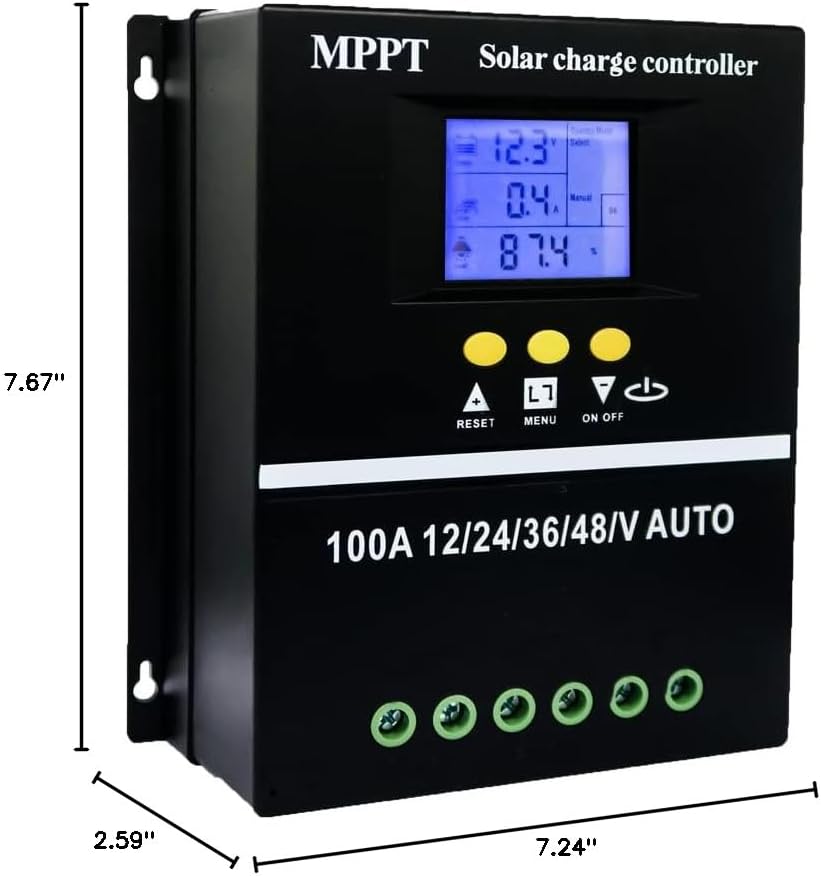
Figure 3: Controller dimensions for mounting.
4.2 Wiring Sequence
Follow the correct wiring sequence to prevent damage to the controller and other components. Use appropriate gauge wiring for your system's current and distance requirements.
- Connecteu la bateria: Connect the battery to the controller's battery terminals (positive to positive, negative to negative). The controller will automatically detect the battery voltage.
- Connecteu el panell solar: Connect the solar panel array to the controller's PV terminals (positive to positive, negative to negative).
- Connect the DC Load: Connect the DC load to the controller's load terminals (positive to positive, negative to negative).
Seqüència de desconnexió: To disconnect the system, reverse the order: first disconnect the DC load, then the solar panel, and finally the battery.

Figure 4: Wiring diagram for the solar charge controller.
5. Instruccions de funcionament
Interfície de pantalla LCD 5.1
The LCD provides dynamic display of operational data and working status. It includes:
- Battery work status display area (voltage, actual).
- Operating status of the solar panel (charging current).
- Load output status and display areas for all parameters (discharging current, working temperature, delay time).
- Mode control display area.
- Normal and fault status display area.

Figure 5: LCD Display Interface details.
5.2 Modes de funcionament
The controller offers seven operating modes, selectable via the menu:
- Mode de càrrega: Càrrega de bateria estàndard.
- Mode de control de la llum: La càrrega s'encén a la posta de sol i s'apaga a la sortida del sol.
- Control de llum + Mode de control de retard de temps: La càrrega s'encén a la posta de sol i roman encesa durant un temps determinat.
- Mode de control universal: Load is always on (24H).
- Mode de control manual: Load can be manually switched on/off.
- Mode de control de temps: La càrrega funciona segons un horari establert.

Figure 6: Load Working Modes.
5.3 Càrrega de la bateria Stages
The controller employs a four-stage charging algorithm to ensure efficient and safe battery charging:
- Càrrega massiva: Carrega la bateria al corrent màxim fins al volumtage reaches the absorption level.
- Augment de la càrrega: Maintains absorption voltage for a set period to fully charge the battery.
- Càrrega del flotador: Reduces voltage to a lower level to maintain a full battery charge.
- Càrrec d'igualtat: Periodically overcharges flooded batteries to balance cell voltages (if applicable and configured).

Figure 7: Four Battery Charging Stages.
5.4 Selecció del tipus de bateria
The controller is compatible with Sealed, GEL, Flooded, and LiFePO4 batteries. Ensure the correct battery type is selected in the controller settings for optimal charging and protection. Refer to the controller's menu for specific battery type configuration.

Figure 8: Compatible Battery Types.
6. Manteniment
- Regularly inspect all wiring connections for tightness and corrosion.
- Mantingueu el controlador net i lliure de pols i brutícia. Feu servir un drap sec per netejar-lo.
- Assegureu-vos que les obertures de ventilació no estiguin bloquejades per permetre una correcta dissipació de la calor.
- Periodically check battery terminals for corrosion and clean if necessary.
- Monitoritzeu la pantalla LCD per detectar qualsevol codi d'error o lectures inusuals.
7. Solució De Problemes
If you encounter issues with your SOGTICPS SY8048 controller, refer to the following common troubleshooting steps:
| Problema | Causa possible | Solució |
|---|---|---|
| El controlador no s'encén | Bateria no connectada o de baix volumtage; polaritat inversa. | Comproveu les connexions de la bateria i el voltage. Ensure correct polarity. Charge battery if voltage és massa baixa. |
| La bateria no es carrega | Solar panel not connected; insufficient sunlight; faulty panel; incorrect battery type setting. | Verify solar panel connections. Check for adequate sunlight. Test solar panel output. Confirm correct battery type is selected in settings. |
| La càrrega no funciona | Load not connected; battery low voltage protection; load overcurrent protection; incorrect load mode. | Comproveu les connexions de càrrega. Assegureu-vos del volum de la bateria.tage està per sobre del baix volumtage disconnect. Reduce load if overcurrent. Verify selected load operating mode. |
| LCD display error | Internal fault; temporary glitch. | Restart the controller by disconnecting all power sources (load, solar, battery) and reconnecting in the correct sequence. If error persists, contact support. |
Per a problemes que no es tracten aquí, consulteu la secció Garantia i assistència.
8. Especificacions
| Paràmetre | Valor |
|---|---|
| Model | SY8048 |
| Corrent de càrrega nominal | 80A |
| Volum del sistematage | Reconeixement automàtic de 12V/24V/36V/48V |
| Volum d'entrada PV màximtage | 100 V |
| Sortida USB | Dual 5V |
| Temperatura de funcionament | Fins a 60°C |
| Dimensions del producte | 7.67 x 7.24 x 2.59 polzades |
| Pes de l'article | 1.87 lliures |
| Tipus de visualització | LCD |
| Material | Plàstic |
9. Garantia i Suport
The SOGTICPS 80A MPPT Solar Charge Controller SY8048 comes with a 1 any de garantia from the date of purchase. SOGTICPS also provides suport tècnic de per vida per aquest producte.
If you require technical assistance, have questions about installation, operation, or encounter any issues with your controller, please do not hesitate to contact our support team. Our engineers are available to provide advice and solutions to any problems you may experience.
For support, please visit the SOGTICPS store on Amazon or refer to the contact information provided with your product packaging.