
AMZSA GT88
Manual d'usuari del rellotge intel·ligent AMZSA GT88
Model: GT88
1. Introducció
Thank you for choosing the AMZSA GT88 Smartwatch. This device is designed to enhance your daily life with its comprehensive features, including Bluetooth calling, advanced health monitoring, and a wide array of sports modes. This manual provides detailed instructions to help you set up, operate, and maintain your smartwatch effectively.

Figure 1: The AMZSA GT88 Smartwatch, featuring a vibrant orange band and a clear yellow watch face that displays essential information such as time, date, weather, steps, and calories burned.
2. Guia de configuració
2.1 Instal·lació de l'aplicació
To unlock the full potential of your AMZSA GT88 Smartwatch, you need to install the companion application, "DAfit," on your smartphone. The app is compatible with both Android and iOS devices.
- Descarrega l'aplicació: Cerca "DAfit" in your smartphone's app store (Google Play Store for Android or Apple App Store for iOS).
- Instal·lar: Seguiu les instruccions a la pantalla per instal·lar l'aplicació.
- Permisos: Grant necessary permissions (e.g., Bluetooth, notifications, location) when prompted to ensure proper functionality.
2.2 Emparellament de dispositius
Once the DAfit app is installed, follow these steps to pair your smartwatch with your smartphone:
- Activa el Bluetooth: Assegureu-vos que el Bluetooth estigui habilitat al vostre telèfon intel·ligent.
- Open DAfit App: Launch the DAfit application on your smartphone.
- Afegeix un dispositiu: In the app, navigate to the "Device" or "Add Device" section. The app will scan for available devices.
- Select GT88: Select "GT88" or the corresponding device name from the list of found devices.
- Confirmeu l'aparellament: A pairing request will appear on both your smartphone and the smartwatch. Confirm the pairing on both devices.
- Enable BT Audio: For call functionality, ensure "BT audio" and "phone calls" are enabled within the smartwatch settings and the DAfit app.
3. Característiques clau
3.1 Vigilància de la salut
The GT88 Smartwatch offers comprehensive health tracking features to help you monitor your well-being.
- Monitorització de la freqüència cardíaca: Seguiment de la freqüència cardíaca en temps real durant tot el dia.
- Mesura de la pressió arterial: Monitor your blood pressure readings.
- Seguiment de l'oxigen en sang (SpO2): Mesura els teus nivells de saturació d'oxigen a la sang.
- Seguiment del son: Accurately records your sleep state and analyzes sleep quality, providing insights into deep sleep, light sleep, and awake times.
- Entrenament de la respiració: Guided breathing exercises to help with relaxation.

Figure 2: The AMZSA GT88 Smartwatch displaying real-time health metrics including heart rate, blood pressure, and SpO2 levels, providing a quick overview of your vital signs.

Figure 3: A user sleeping while wearing the AMZSA GT88 Smartwatch, with a smartphone screen showing detailed sleep analysis, including sleep duration and quality metrics.
3.2 Característiques de comunicació
Stay connected directly from your wrist.
- Trucades per Bluetooth: Make and receive calls directly from the smartwatch using its built-in microphone and speaker.
- Notificacions de missatges: Receive alerts for incoming messages from various social applications (e.g., WhatsApp, Facebook) and SMS.
- Contact Sync: Add up to 5 frequently used contacts to your watch for quick dialing.

Figure 4: The AMZSA GT88 Smartwatch displaying its phone call interface, including a dial pad and options for recent calls and contacts, enabling direct calls from the wrist.

Figure 5: The AMZSA GT88 Smartwatch showing an incoming message notification, demonstrating its ability to display alerts from various communication platforms.
3.3 Sports Modes & Activity Tracking
Track your fitness journey with over 120 sports modes.
- Més de 120 modes esportius: Supports a wide range of activities including swimming, cycling, tennis, running, walking, and more.
- Seguiment de l'activitat diària: Monitors steps taken, calories burned, distance covered, and active hours.
- Movement Tracking Map: Available via the DAfit app to visualize your activity routes.

Figure 6: A person engaged in cycling, with the AMZSA GT88 Smartwatch on their wrist displaying a summary of their cycling activity, highlighting its multi-sport tracking capabilities.
3.4 Customization & AI Voice Assistant
Personalitza la teva experiència amb el rellotge intel·ligent.
- Esferes de rellotge personalitzades: Choose from over 150 watch faces or use your own photos as backgrounds.
- Assistent de veu AI: Controla el teu rellotge i accedeix a la informació mitjançant ordres de veu.

Figure 7: A selection of diverse watch faces surrounding the AMZSA GT88 Smartwatch, illustrating the extensive customization options available to users.
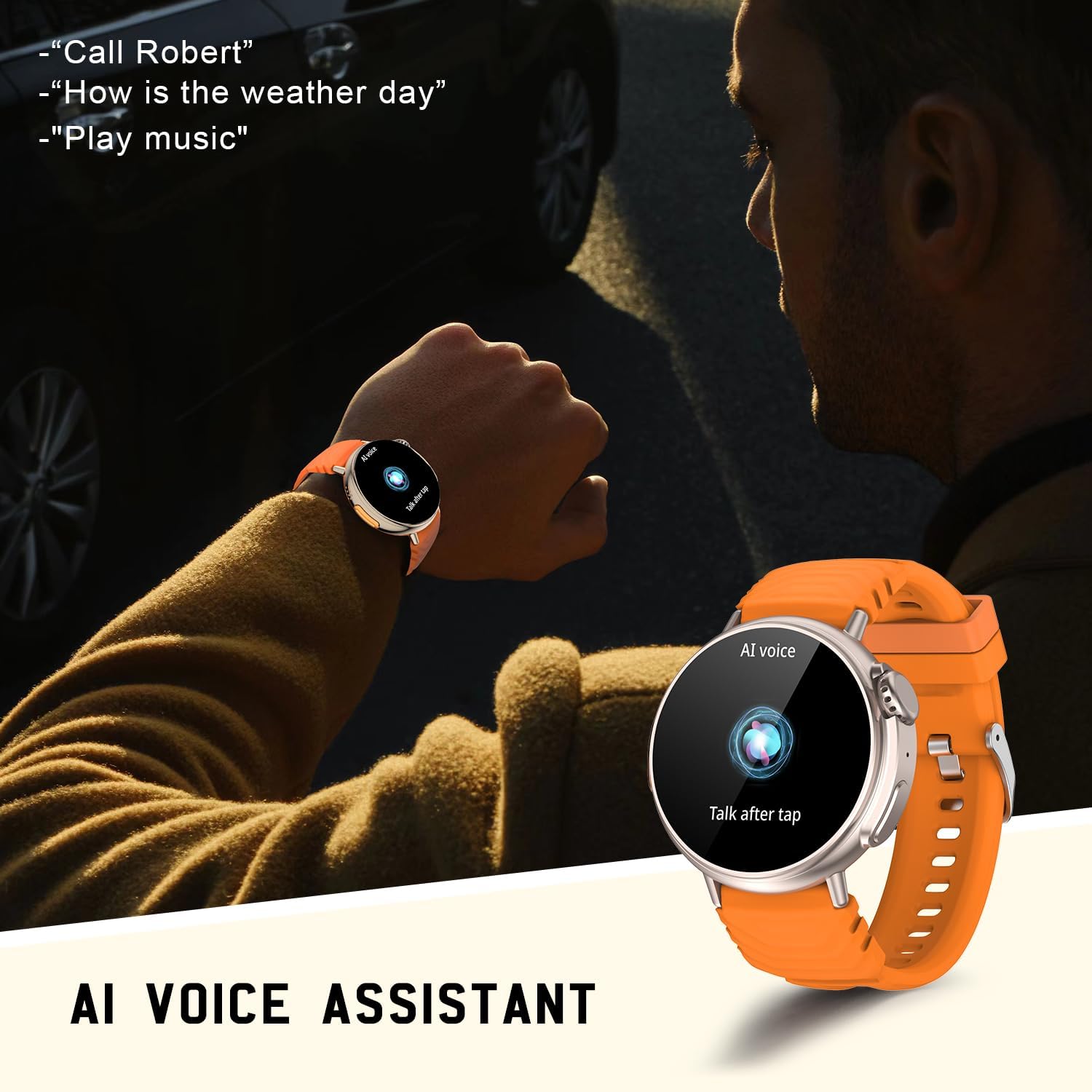
Figure 8: The AMZSA GT88 Smartwatch displaying the AI Voice Assistant interface, ready to receive voice commands for various functions.
4. Instruccions de funcionament
4.1 Navegació bàsica
- Pantalla tàctil: Swipe left/right to navigate between main screens, swipe up/down for quick settings or notifications. Tap to select.
- Botons laterals: Use the physical buttons for power on/off, screen wake, and quick access to specific functions. The digital crown can be rotated for scrolling and pressed for selection.
4.2 Control de música
Controla la reproducció de música del teu telèfon intel·ligent directament des del teu rellotge intel·ligent.
- Reproduir/pausa: Tap the play/pause icon on the watch's music control interface.
- Omet les pistes: Use the next/previous track icons to change songs.
- Volum: Adjust volume directly from the watch.

Figure 9: The AMZSA GT88 Smartwatch displaying its music player controls, allowing users to manage audio playback on their connected smartphone.
4.3 Control de la càmera
Feu servir el vostre rellotge intel·ligent com a obturador remot per a la càmera del vostre telèfon intel·ligent.
- Càmera oberta: Navigate to the camera control function on your smartwatch.
- Obturador remot: Tap the camera icon on your watch to remotely trigger your smartphone's camera shutter.
4.4 Weather Forecasts
Receive real-time weather updates directly on your smartwatch when connected to your phone.

Figure 10: The AMZSA GT88 Smartwatch showing current weather conditions, synchronized with a smartphone displaying a more detailed weather forecast.
5. Manteniment
5.1 Càrrega
The smartwatch is equipped with a 300mAh lithium-polymer battery, offering long standby time. To charge your device:
- Connecteu el cable de càrrega magnètic als punts de càrrega de la part posterior del rellotge.
- Plug the USB end of the cable into a standard USB power adapter (e.g., phone charger, computer USB port).
- A charging indicator will appear on the watch screen. Ensure the watch is fully charged before first use.
5.2 Neteja
Per mantenir l'aspecte i la funcionalitat del teu rellotge intel·ligent:
- Netegeu la pantalla i la carcassa del rellotge amb un drap suau i sense borrissol.
- Per a taques persistents, lleugerament dampRenta el drap amb aigua. Evita utilitzar productes químics agressius o materials abrasius.
- Netegeu els contactes de càrrega periòdicament per garantir una bona connexió.
5.3 Resistència a l'aigua (IP67)
The AMZSA GT88 Smartwatch is IP67 waterproof, meaning it is resistant to dust and can withstand immersion in water up to 1 meter for up to 30 minutes. While it is suitable for daily use and activities like swimming, it is not recommended for diving or high-pressure water activities.

Figure 11: The AMZSA GT88 Smartwatch shown with water droplets, emphasizing its IP67 waterproof rating, making it suitable for various daily activities.
6. Solució De Problemes
| Problema | Causa possible | Solució |
|---|---|---|
| El rellotge no s'encén | Bateria baixa; dispositiu bloquejat. | Charge the watch for at least 30 minutes. Press and hold the power button for 10-15 seconds to force restart. |
| No es pot vincular amb el telèfon | Bluetooth off; app not running; watch not discoverable. | Ensure phone Bluetooth is on. Restart both phone and watch. Make sure the DAfit app is open and scanning. Forget previous pairings on phone. |
| No s'han rebut notificacions | App permissions not granted; notification access disabled. | Check DAfit app notification permissions in phone settings. Ensure notification access is enabled for DAfit. Keep the app running in the background. |
| Dades de salut inexactes | Improper fit; movement during measurement. | Ensure the watch is snug but comfortable on your wrist. Remain still during measurements. Note that readings are for reference and not medical grade. |
| Durada de la bateria curta | Frequent use of power-intensive features (calls, bright screen). | Reduce screen brightness, shorten screen-on time, limit continuous heart rate monitoring, and disable unnecessary notifications. |
7. Especificacions tècniques
| Característica | Detall |
|---|---|
| Marca | AMZSA |
| Número de model | GT88 |
| Color | Taronja |
| Mida de la pantalla | 1.52 polzades |
| Sistema operatiu | Android (Compatible with Android & iOS) |
| Connectivitat | Bluetooth |
| Capacitat de la bateria | Polímer de liti de 300 mAh |
| Resistència a l'aigua | IP67 |
| Característiques especials | Heart Rate Tracking, Blood Pressure, Blood Oxygen, Sleep Tracking, Voice Assistant, Customizable Dials, Long Battery Life, Bluetooth Calling |
8. Garantia i Suport
Specific warranty information for the AMZSA GT88 Smartwatch is not provided in the product details. Please refer to the retailer's return policy or contact the seller directly for warranty details and support inquiries.
For technical assistance or further questions, please consult the DAfit app's help section or visit the official AMZSA support weblloc (si està disponible).
Ask a question about this manual
Ask about setup, troubleshooting, compatibility, parts, safety, or missing instructions. Manuals+ will review the question and use this page’s manual context to help answer it.