
1. Introducció
Thank you for choosing the LOUTOC Replacement Remote Control. This remote is designed to provide seamless control for compatible Roku streaming devices. It offers a straightforward, out-of-the-box experience without the need for complex programming. Please read this manual carefully to ensure proper use and to understand the full capabilities and limitations of your new remote.
2. Compatibilitat
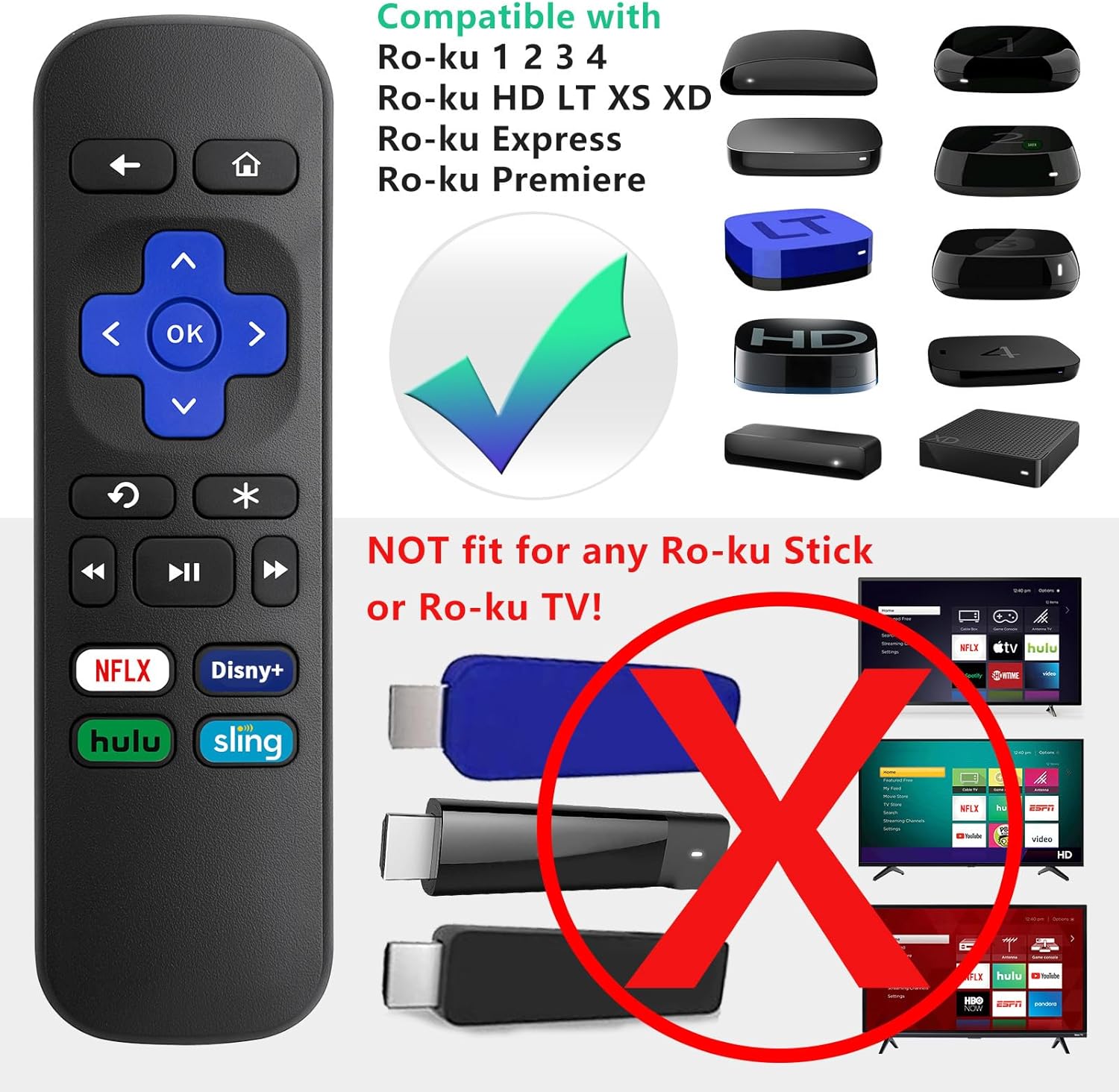
This LOUTOC Replacement Remote Control is specifically designed for use with the following Roku models:
- Roku Express
- Estrena Roku
- Roku Box
- Roku Player (Models 1, 2, 3, 4)
- Roku HD, LT, XS, XD
Notes importants de compatibilitat:
- Aquest comandament a distància és NO compatible with any Roku Stick or Roku TV models.
- This is an IR (Infrared) remote. It does NO feature volume control, a power button, a headphone jack, a pairing button, or voice search functionality.

3. Característiques
Your LOUTOC Replacement Remote Control offers the following features:
- Configuració instantània: No programming required. Simply insert batteries and it's ready to use.
- IR Technology: Operates using infrared signals, requiring a direct line of sight to your Roku device.
- Dedicated Shortcut Buttons: Quick access to popular streaming channels including Netflix, Disney+, Hulu, and Sling.
- Construcció duradora: Fet de material ABS per a una major longevitat.


4. Configuració i instal·lació
Follow these simple steps to begin using your new remote:
- Insereix les piles: Open the battery compartment cover on the back of the remote. Insert two (2) AAA batteries, ensuring correct polarity (+/-). Close the cover securely.
- Connexió automàtica: Point the remote directly at your compatible Roku device. The remote should function immediately without any additional programming or pairing steps.

Video 4.1: This video demonstrates the ease of setup for the LOUTOC Replacement Remote Control, highlighting that it works immediately after battery insertion with compatible Roku devices.
5. Instruccions de funcionament
The remote features standard navigation and playback controls:
- Directional Pad (Purple Cross): Feu servir les fletxes amunt, avall, esquerra i dreta per navegar pels menús i el contingut.
- Botó D'acord: Confirma les seleccions.
- Back Button (Left Arrow): Torna a la pantalla o menú anterior.
- Botó Inici (icona de casa): Torna a la pantalla d'inici de Roku.
- Controls de reproducció: Play/Pause, Fast Forward, Rewind buttons for media control.
- Repetició instantània: The curved arrow button allows for quick replay of content.
- Botons de drecera: Directly launch Netflix, Disney+, Hulu, and Sling with a single press.

6. Solució De Problemes
If you encounter issues with your remote, consider the following:
- El comandament a distància no respon: Ensure fresh AAA batteries are correctly inserted.
- No Line of Sight: As an IR remote, ensure there are no obstructions between the remote and your Roku device.
- Incorrect Roku Model: Double-check that your Roku device is one of the compatible models listed in Section 2. This remote will not work with Roku Sticks or Roku TVs.
7. Especificacions
| Dimensions del producte | 3.93 x 1.12 x 0.59 polzades |
| Pes de l'article | 1.76 unces |
| Piles necessàries | 2 piles AAA (no incloses) |
| Tecnologia | Infrarojos (IR) |
| Material | ABS |
8. Garantia i Suport
Your LOUTOC Replacement Remote Control comes with a 60-day replacement policy. For any questions or support needs, please refer to the LOUTOC store on Amazon or contact customer service.

Visita el LOUTOC Store per a més productes i suport.