
Introducció
This manual provides detailed instructions for the setup, operation, and maintenance of your TONOR TW630 UHF Dual Wireless Microphone System. Please read this manual thoroughly before using the product to ensure proper function and longevity.
Què hi ha a la caixa
Verifiqueu que tots els elements que s'enumeren a continuació s'inclouen al vostre paquet:
- 2 micròfons de mà
- 1 x Receiver with 6.35mm Plug
- 2 anells antilliscants
- 2 x Mic Covers (Foam Windscreens)
- 1 x cable de càrrega USB
- 1 x Manual d'usuari

Image: All components included in the TONOR TW630 package.
Producte acabatview
The TONOR TW630 system features two durable metal handheld microphones and a compact plug-in receiver, designed for clear audio transmission over a UHF frequency band.

Imatge: Detallada view of the microphone, showing its display, power button, and channel switch button.
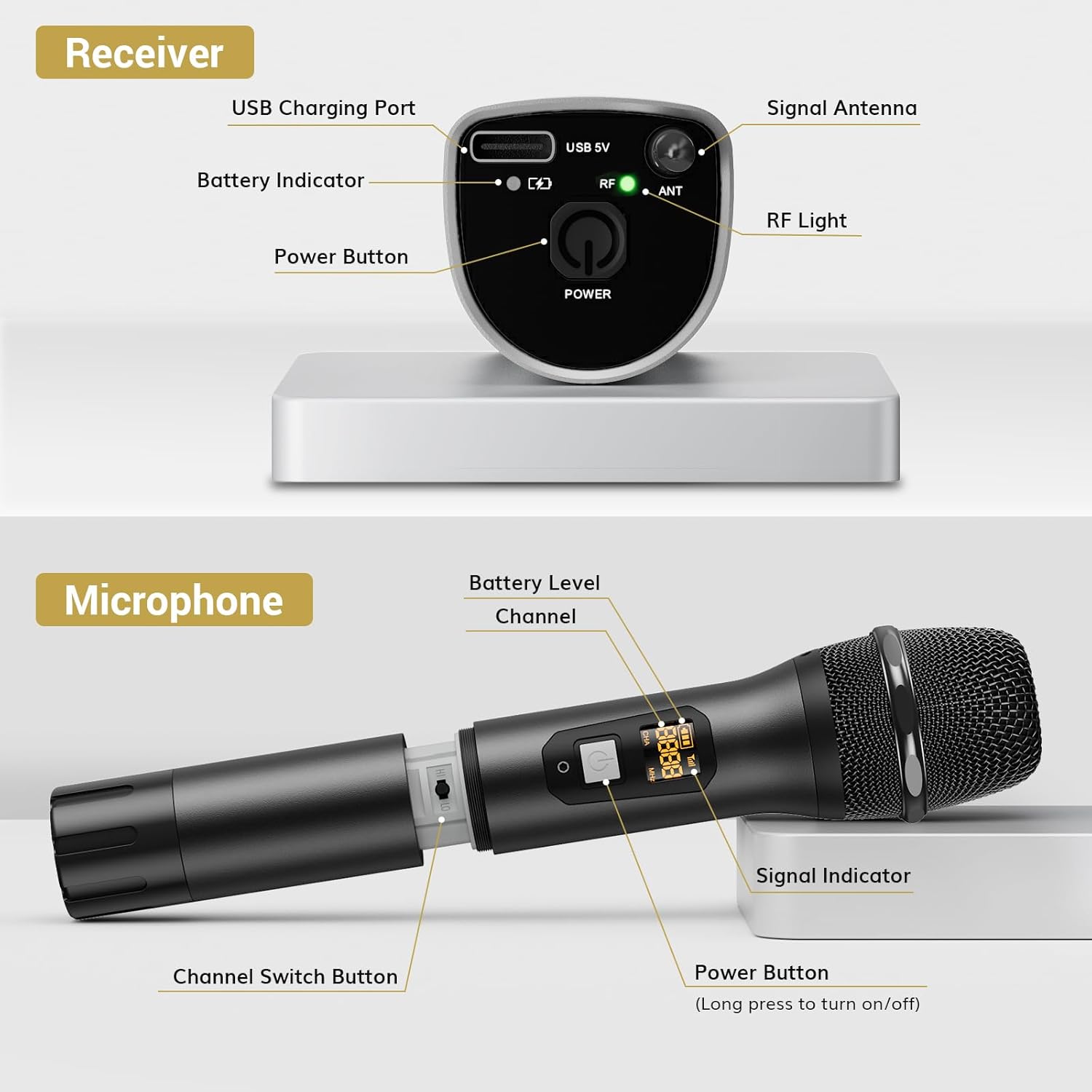
Imatge: Detallada view of the receiver, highlighting its charging port, antenna, and indicator lights.
Característiques principals:
- Llibertat sense fil: Up to 200ft (60m) operating range (line of sight).
- Senyal estable: 15 adjustable channels to minimize interference.
- Construcció duradora: Microphones and receiver are made of rugged metal.
- Durada de la bateria ampliada: Receiver provides up to 6 hours of use on a 2-3 hour charge.
Guia de configuració
1. Font d'alimentació
- Micròfons: Each microphone requires 2 x AA batteries (not included). Open the battery compartment at the bottom of the microphone and insert the batteries, observing polarity.
- Receptor: The receiver has a built-in rechargeable battery. Charge it using the provided USB cable and a 5V adapter (not included). A full charge takes approximately 2-3 hours and provides up to 6 hours of operation.

Image: Instructions for powering the microphone with AA batteries and charging the receiver via USB.
2. Pairing the Microphones and Receiver
The system is designed for automatic pairing:
- Turn on both the microphone(s) and the receiver.
- The receiver will automatically sync its frequency with the microphone(s). The RF light on the receiver will illuminate when a stable connection is established.
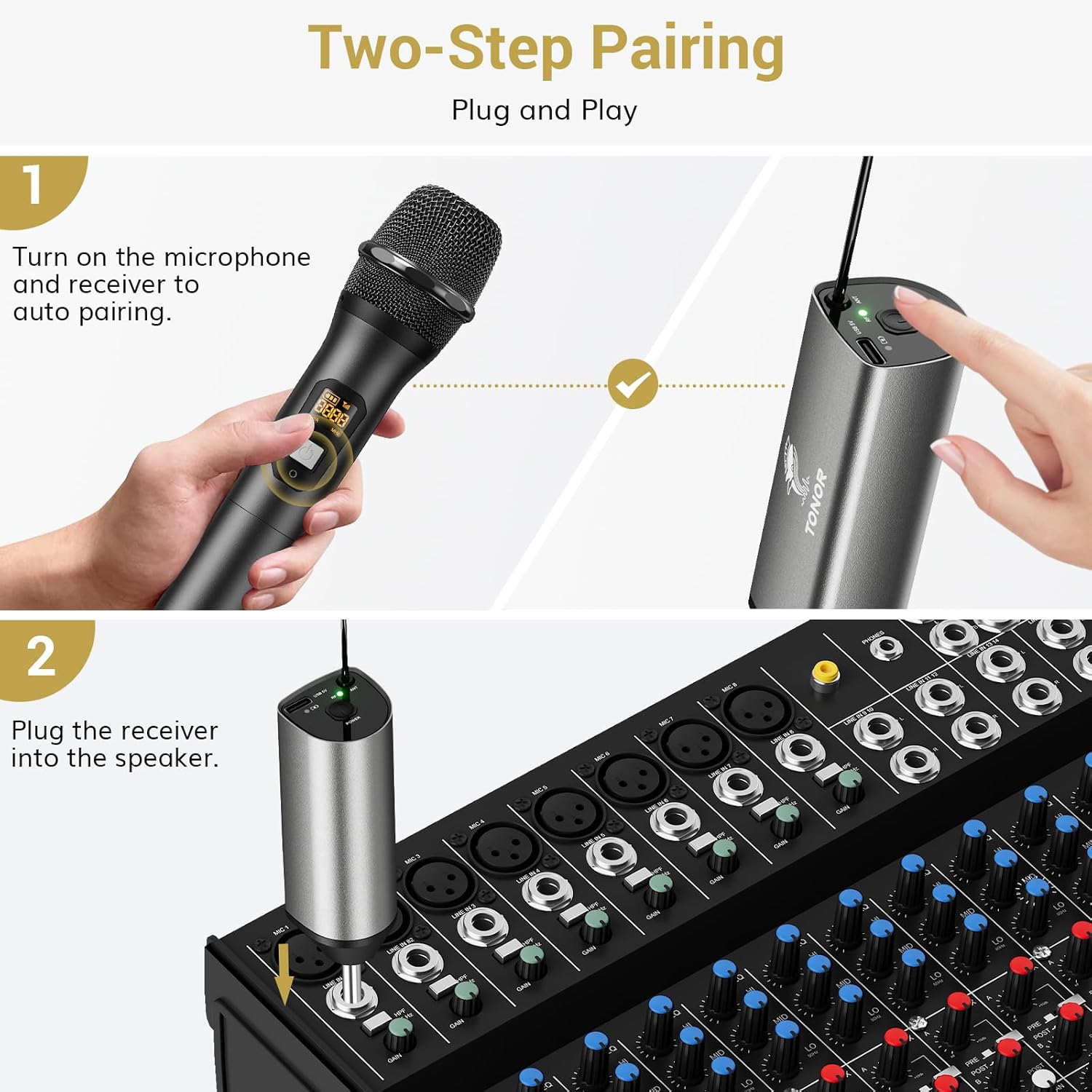
Image: Visual guide for the two-step pairing process and connecting the receiver.
3. Connexió a dispositius d'àudio
Plug the 6.35mm receiver directly into the "MIC IN" input of compatible audio equipment.
- Dispositius compatibles: Powered speakers, karaoke machines, amplifiers, mixers, and audio interfaces.
- Dispositius incompatibles: This system is not compatible with phones, computers, or tablets directly. An additional 3.5mm (1/8") adapter is required for these devices (not included).

Imatge: Examples of compatible audio devices and correct input connection.
Instruccions de funcionament
Canvi de canal
The TW630 system offers 15 adjustable channels to avoid interference. If you experience signal issues or are using multiple sets simultaneously, you can change the microphone's channel:
- To switch channels, briefly press the "Channel Switch Button" located inside the microphone's battery compartment (after unscrewing the bottom part).
- The display on the microphone will show the current channel (CHA) and frequency (MHz).
- The receiver will automatically adjust to the new channel.

Image: Guide to changing microphone channels.
Using Multiple Microphone Sets
Up to 15 sets of TONOR TW630 systems can be used simultaneously without interference. Ensure each set operates on a different channel to prevent signal conflicts.
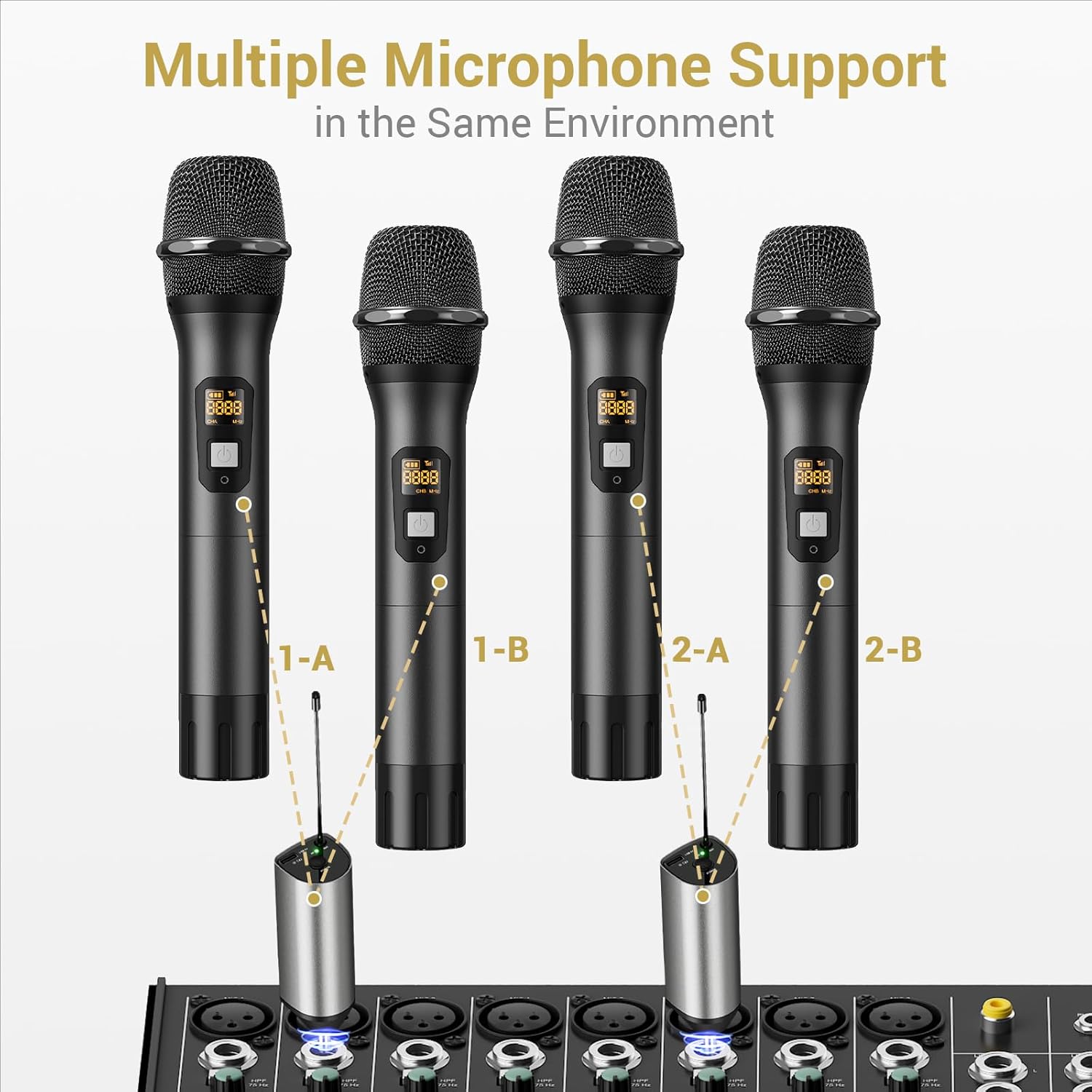
Image: Setup for using multiple microphone systems in the same environment.
Manteniment
- Neteja: Wipe the microphones and receiver with a soft, dry cloth. Do not use liquid cleaners or solvents.
- Cura de la bateria: Remove AA batteries from microphones if not in use for extended periods to prevent leakage. Recharge the receiver regularly to maintain battery health.
- Emmagatzematge: Guardeu el sistema en un lloc fresc i sec, allunyat de la llum solar directa i de temperatures extremes.
- Fundes de micròfon: Use the provided foam mic covers to protect against wind noise and moisture.
Resolució de problemes
| Problema | Causa possible | Solució |
|---|---|---|
| No hi ha so del micròfon |
|
|
| Interferències o mala qualitat de so |
|
|
| El receptor no es carrega |
|
|
Especificacions
| Característica | Detall |
|---|---|
| Marca | TONOR |
| Nom del model | TW630 |
| Número de model de l'article | TN120106 |
| Tecnologia de connectivitat | UHF |
| Tipus de connector | 6.35 mm Jack |
| Factor de forma del micròfon | Portàtil |
| Material | Metall |
| Nombre de canals | 15 |
| Sensibilitat d'àudio | 52 decibels |
| Ràtio senyal / soroll | 70 dB |
| Patró polar | Unidireccional |
| Font d'alimentació | Battery Powered (Microphones: 2x AA each; Receiver: Rechargeable Lithium Ion) |
| Temps de càrrega del receptor | 2-3 hores |
| Temps de treball del receptor | Fins a 6 hores |
| Interval d'operació | 200 peus / 60 m (línia de visió) |
| Pes de l'article | 1.32 lliures (600 grams) |
| Dimensions del paquet | 11.18 x 6.42 x 2.99 polzades |
Informació de seguretat
- No exposeu el producte a l'aigua ni a una humitat excessiva.
- Eviteu deixar caure o sotmetre el producte a forts impactes.
- Use only a 5V adapter for charging the receiver to prevent damage.
- Mantenir fora de l'abast dels nens.
- No intenteu desmuntar ni reparar la unitat vosaltres mateixos. Poseu-vos en contacte amb personal de servei qualificat.
Garantia i Suport
For warranty information and technical support, please refer to the official TONOR website or contact TONOR customer service directly. Keep your purchase receipt for warranty claims.
You can visit the TONOR store on Amazon for more information: TONOR Store