
Introducció
This manual provides essential information for the safe and efficient operation of your Sharp 40FH6EA 40-inch Full HD Android TV. Please read these instructions thoroughly before using your television and retain them for future reference.
Informació de seguretat
Seguiu sempre les precaucions de seguretat bàsiques quan utilitzeu aquest televisor per reduir el risc d'incendi, descàrrega elèctrica i lesions.
- No exposeu el televisor a la pluja o la humitat.
- No bloquejar les obertures de ventilació.
- Assegureu-vos que no es trepitgi ni es pissi el cable d'alimentació.
- Desendolleu el televisor durant tempestes o quan no l'utilitzeu durant períodes prolongats.
- Demaneu tot el servei a personal de servei qualificat.
Contingut del paquet
Verify that all items listed below are included in your TV package:
- Sharp 40FH6EA 40-inch Full HD Android TV
- Control remot
- 2 piles AAA (per al comandament a distància)
- Guia d'inici ràpid
- TV Stands (if not pre-attached)
Configuració
1. Desembalatge i col·locació
Carefully remove the TV from its packaging. Place the TV on a stable, flat surface or mount it on a wall using a compatible VESA mount (200 x 200 mm). Ensure adequate ventilation around the TV.
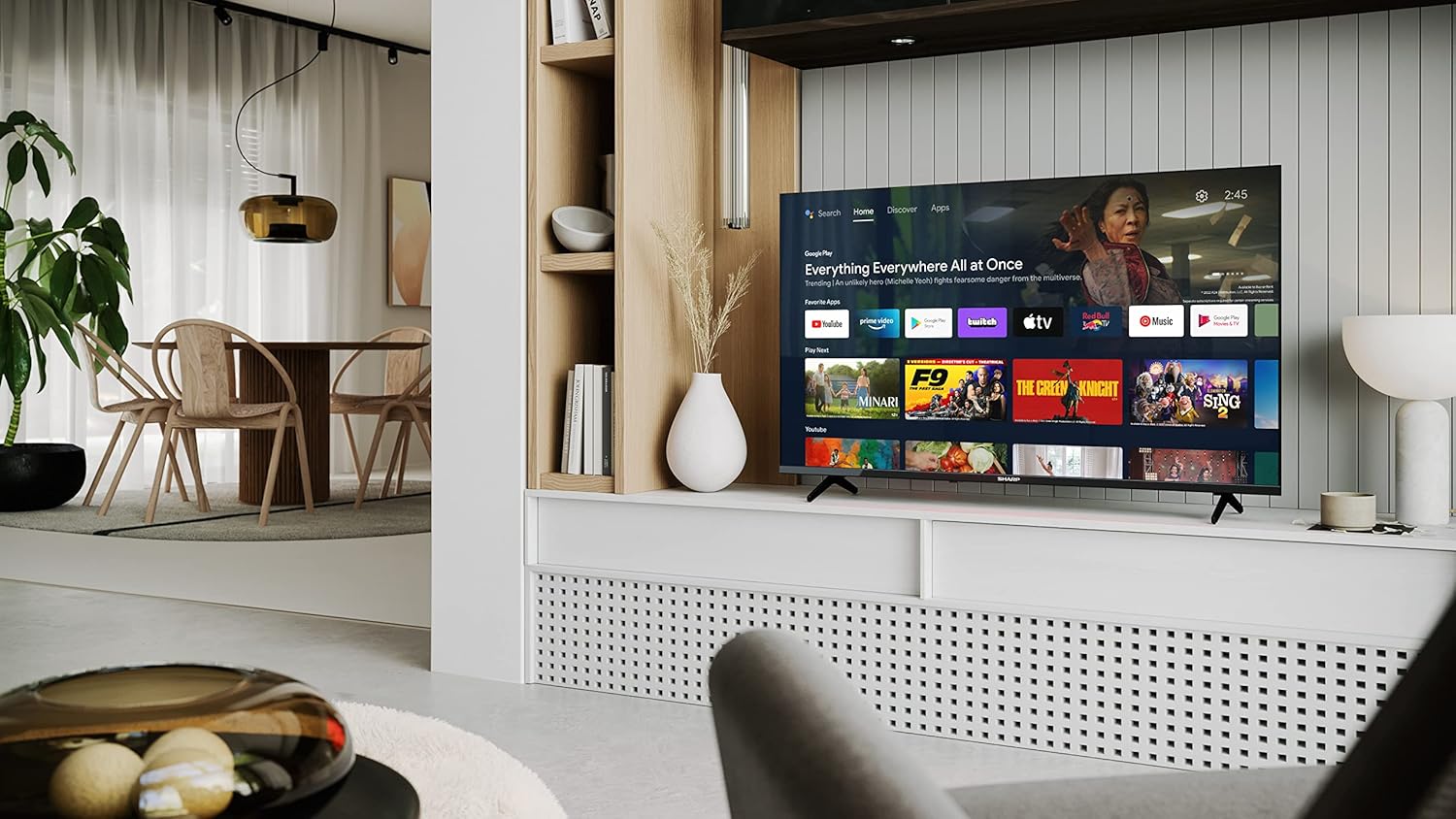
Image: Sharp 40FH6EA TV integrated into a living room environment, showcasing el seu disseny sense marc.
2. Fixació del suport
If you are not wall-mounting, attach the included stands to the bottom of the TV. Follow the instructions in the Quick Start Guide for proper assembly.

Imatge: Primer pla view of the TV stand attached to the bottom of the Sharp 40FH6EA television.
3. Connexió de dispositius externs
Connect your devices such as Blu-ray players, game consoles, or sound systems to the TV's input ports.
- HDMI: Use HDMI cables for high-definition video and audio. This TV has 3 HDMI ports.
- USB: Connect USB devices for media playback. This TV has 2 USB ports.
- Antena/cable: Connect your antenna or cable TV feed for broadcast channels.
- Ethernet: Per a una connexió a Internet per cable.
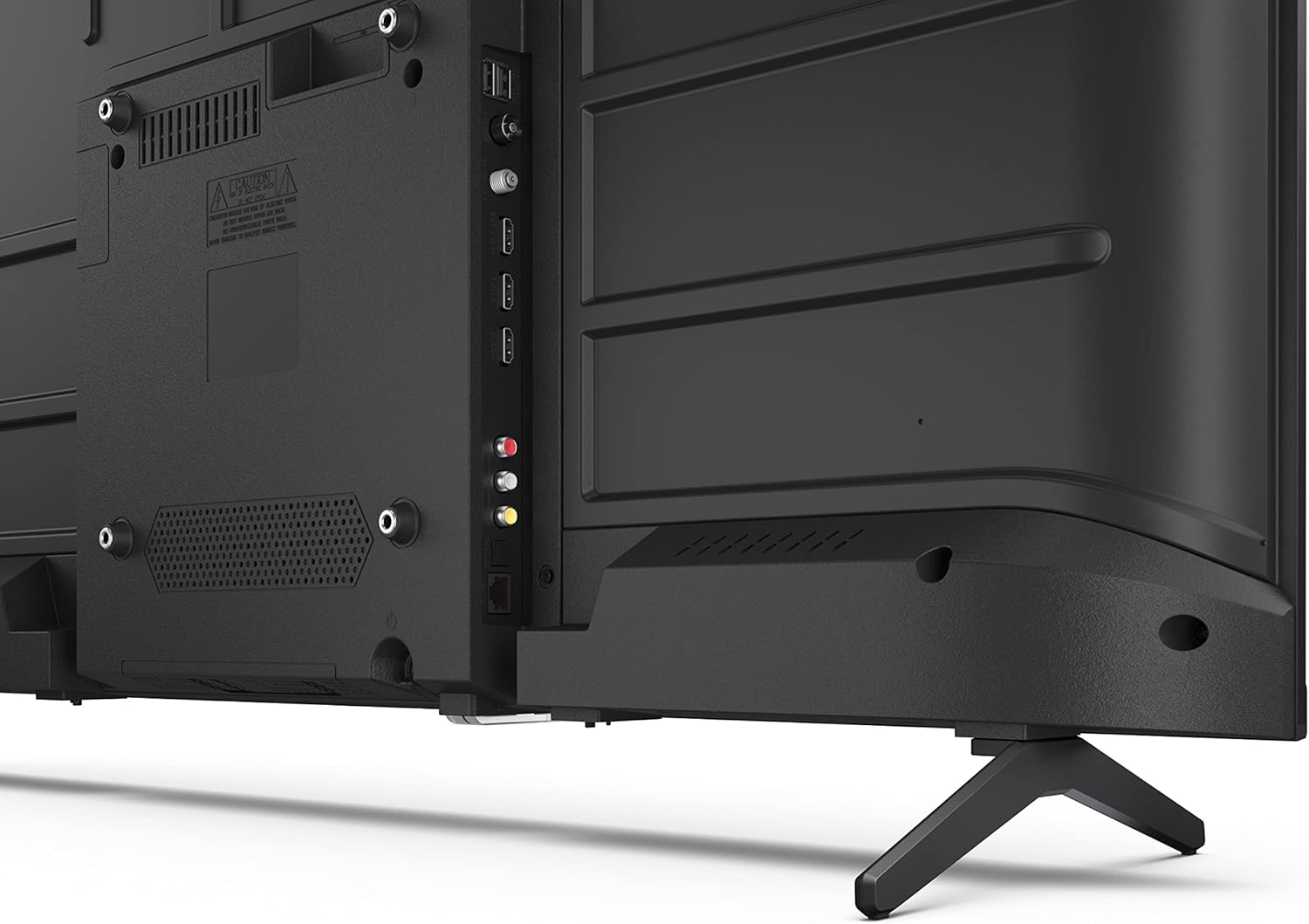
Imatge: Part posterior view of the Sharp 40FH6EA TV, highlighting the various input ports including HDMI, USB, and antenna connections.

Imatge: Lateral view of the Sharp 40FH6EA TV, showing additional connectivity ports for easy access.
4. Connexió d'alimentació
Connecteu el cable d'alimentació a l'entrada d'alimentació del televisor i després a una presa de corrent.
5. Configuració inicial
En engegar-lo per primera vegada, el televisor us guiarà pel procés de configuració inicial. Això inclou la selecció de l'idioma, la connexió a una xarxa Wi-Fi i l'inici de sessió amb el vostre compte de Google per accedir a les funcions d'Android TV.
Instruccions de funcionament
1. Control remot sobreview
The included remote control allows you to navigate the TV's interface and control various functions. Insert the 2 AAA batteries as indicated.
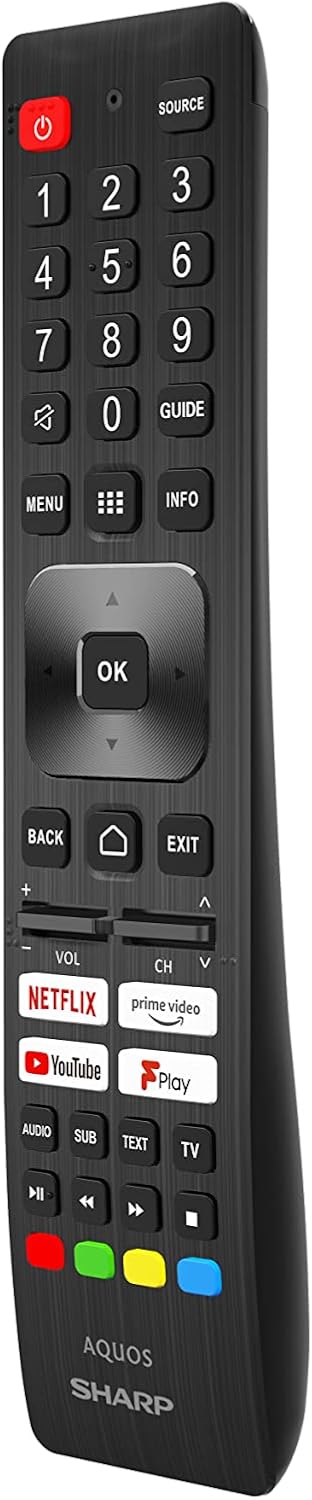
Image: The Sharp 40FH6EA TV remote control, featuring dedicated buttons for popular streaming services and Google Assistant.
- Botó d'encesa: Encén o apaga el televisor.
- Panell de navegació (botó D'acord): Per a la navegació i selecció de menús.
- Volum +/-: Ajusta el nivell de volum.
- Canal +/-: Canvia els canals de televisió.
- Botó d'inici: Torna a la pantalla d'inici d'Android TV.
- Botó de l'Assistent de Google: Activa el control per veu.
- Botons de drecera d'aplicacions: Direct access to Netflix, Prime Video, YouTube, etc.
2. Interfície d'Android TV
Your Sharp 40FH6EA runs on Android TV 11, providing access to a wide range of apps, streaming services, and smart features.

Image: The Sharp 40FH6EA Android TV displaying its home screen with various streaming applications and content recommendations.
- Pantalla d'inici: Provides quick access to installed apps, recommended content, and settings.
- Assistent de Google: Feu servir ordres de veu a través del comandament a distància per cercar contingut, controlar dispositius domèstics intel·ligents i obtenir informació.
- Chromecast integrat: Emet contingut des del teu telèfon intel·ligent, tauleta o ordinador directament al televisor.
- Google Play Store: Baixeu aplicacions i jocs addicionals.
3. Selecció d'entrada
Press the "Source" button on your remote control to switch between different input sources (HDMI 1, HDMI 2, HDMI 3, TV, USB, etc.).
Manteniment
1. Neteja del televisor
- Desendolla sempre el televisor abans de netejar-lo.
- Feu servir un drap suau i sec per netejar la pantalla i la carcassa.
- Per a marques difícils, esbandiu lleugeramentampNetegeu el drap amb aigua o un netejador de pantalles suau i no abrasiu. No ruixeu el netejador directament sobre la pantalla.
2. Actualitzacions de programari
Your Android TV may receive automatic software updates. Ensure your TV is connected to the internet to receive these updates, which can improve performance and add new features. You can also manually check for updates in the TV's settings menu.
Resolució de problemes
Si teniu problemes amb el televisor, consulteu els problemes i solucions més comuns següents:
| Problema | Possible solució |
|---|---|
| Sense poder | Comproveu si el cable d'alimentació està ben connectat al televisor i a la presa de corrent. Assegureu-vos que la presa de corrent tingui corrent. |
| No hi ha imatge, però hi ha so | Verifiqueu que s'ha seleccionat la font d'entrada correcta. Comproveu les connexions dels cables als dispositius externs. |
| No hi ha so, però hi ha imatge | Check the volume level and mute settings. Ensure external audio devices are properly connected and configured. |
| El comandament a distància no funciona | Canvieu les piles. Assegureu-vos que no hi hagi cap obstacle entre el comandament a distància i el televisor. |
| No es pot connectar a la Wi-Fi | Comproveu el vostre encaminador i mòdem. Reinicieu el televisor i l'equip de xarxa. Torneu a introduir la contrasenya del Wi-Fi. |
| Les aplicacions són lentes o es bloquegen | Close unused apps. Clear app cache or data in settings. Restart the TV. |
Especificacions
Detailed technical specifications for the Sharp 40FH6EA Android TV:
| Característica | Detall |
|---|---|
| Número de model | 40FH6EA |
| Mida de la pantalla | 40 polzades (101 cm en diagonal) |
| Tecnologia de visualització | LED |
| Resolució | Full HD (1920 x 1080p) |
| Freqüència d'actualització | 50 Hz (Native), 60 Hz (Display) |
| Relació d'aspecte | 16:9 |
| Relació de contrast | 1000:1 |
| Viewangle ing | 178 graus |
| Suport HDR | HDR10 |
| Millora de la imatge | Active Motion 400 |
| Sistema operatiu | Android TV (Version 11) |
| Característiques especials | Assistent de Google, Chromecast integrat |
| Sortida d'àudio | 2 x 8W RMS Stereo Speakers |
| Tecnologies d'àudio | Dolby Audio, Dolby Digital, Dolby Digital Plus, Dolby AC-4 |
| Connectivitat | Wi-Fi, Bluetooth, Ethernet |
| Ports HDMI | 3 (compatible amb HDMI 2.1) |
| Ports USB | 2 |
| Tipus de sintonitzador | DVB-T/T2/C/S/S2 |
| Estàndard de muntatge VESA | 200 x 200 mm |
| Consum d'energia | 36 Watts (Operational) |
| Dimensions (A x A x P) | 89.2 x 55.5 x 21.3 cm (amb suport) |
| Color | Negre |

Image: Diagram illustrating the physical dimensions of the Sharp 40FH6EA TV, including width, height, and depth.

Image: The energy efficiency label for the Sharp 40FH6EA TV, showing its energy class and consumption.
View Informació del producte EPREL
Garantia i Suport
Your Sharp 40FH6EA television comes with a standard manufacturer's warranty. Please refer to the warranty card included in your package for specific terms and conditions.
For technical support, service inquiries, or to obtain replacement parts, please contact Sharp customer service. Contact information can typically be found on the Sharp official weblloc web o a la documentació que s'inclou amb el televisor.
- Fabricant: Afilat
- Any model: 2023
- Actualitzacions de programari garantides fins a: Information not available (as per product data)
- Disponibilitat de peces de recanvi: Information not available (as per product data)