
Roseland GE015877
Roseland Over-Ear Bluetooth Headphones User Manual
Model: GE015877
Introducció
Thank you for choosing Roseland Over-Ear Bluetooth Headphones. These wireless headphones are designed to provide an optimal audio experience with comfort and convenience. Featuring soft ear cushions and an integrated microphone, they are perfect for listening to music and making calls on the go. This manual provides essential information on setting up, operating, maintaining, and troubleshooting your headphones.
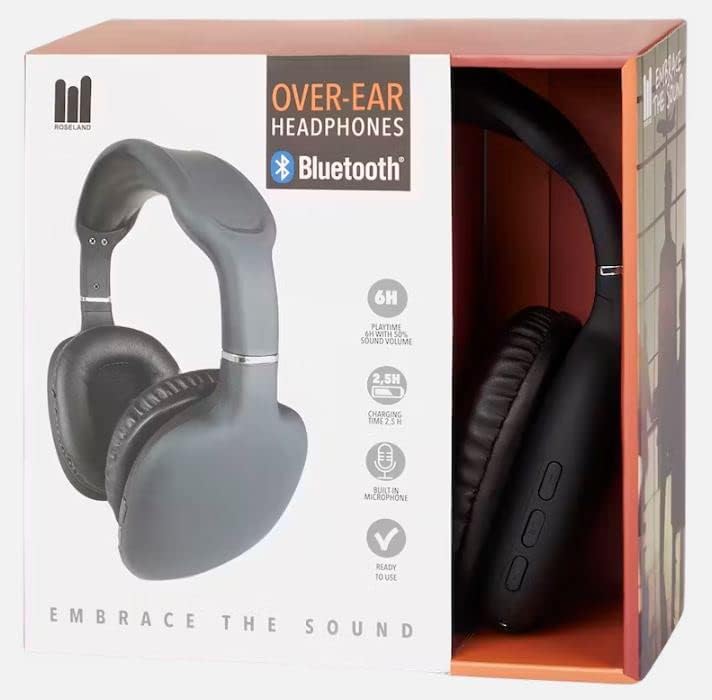
Producte acabatview

Configuració
1. Càrrega dels auriculars
Before first use, fully charge your headphones. Connect the included charging cable to the charging port on the headphones and the other end to a USB power source (e.g., computer USB port, wall adapter). The charging indicator light will show the charging status. A full charge takes approximately 2.5 hores.
2. Encès / apagat
- To power on: Press and hold the Power button until the indicator light flashes.
- Per apagar: premeu i manteniu premut el botó d'engegada fins que l'indicador lluminós s'apagui.
3. Emparellament Bluetooth
The Roseland headphones use Bluetooth 5.0 for stable and efficient connection.
- Assegureu-vos que els auriculars estiguin apagats.
- Press and hold the Power button for approximately 5-7 seconds until the indicator light flashes red and blue alternately, indicating pairing mode.
- Al telèfon intel·ligent o a un altre dispositiu amb Bluetooth, aneu a la configuració de Bluetooth.
- Cerca "Roseland Casque Bluetooth" or a similar name in the list of available devices.
- Select the headphones to connect. Once connected, the indicator light will turn solid blue or flash slowly.
- Si se us demana una contrasenya, introduïu "0000".
Note: The headphones will automatically try to reconnect to the last paired device when powered on.
Instruccions de funcionament
Basic Controls (Buttons on the side)
- Botó d'encesa: Power on/off, Play/Pause music, Answer/End calls.
- Puja el volum (+): Augmentar el volum, Pista següent (pressió llarga).
- Baixar el volum (-): Baixar el volum, pista anterior (pressió llarga).
Reproducció de música
- Reproduir/pausa: Premeu el botó d'engegada una vegada.
- Pista següent: Premeu llargament el botó d'apujar el volum (+).
- Pista anterior: Premeu llargament el botó per baixar el volum (-).
- Ajustar el volum: Premeu breument els botons de pujar el volum (+) o baixar el volum (-).
Trucades telefòniques
The integrated microphone allows for hands-free calling.
- Respon a la trucada: Premeu el botó d'engegada una vegada quan rebeu una trucada.
- Finalitzar la trucada: Premeu el botó d'engegada una vegada durant una trucada.
- Rebutja la trucada: Premeu llargament el botó d'engegada quan rebeu una trucada.
- Torna a marcar l'últim número: Premeu dues vegades el botó d'engegada.
Durada de la bateria
The headphones provide approximately 6 hores de joc on a single charge, depending on volume level and usage.
Confort de vestir
The soft, memory foam earcups are designed for superior comfort during extended listening sessions. They provide a circum-aural fit, enveloping your ears for an immersive sound experience. For optimal comfort and ear health, it is recommended to remove the headphones every De 2 a 3 hores to allow your ears to rest.
Manteniment
- Neteja: Feu servir un drap suau i sec per netejar els auriculars. No utilitzeu productes de neteja abrasius ni dissolvents.
- Emmagatzematge: Guardeu els auriculars en un lloc fresc i sec, allunyat de la llum solar directa i de temperatures extremes.
- Resistència a l'aigua: Aquests auriculars ho són no impermeable. Avoid exposure to water, rain, or excessive moisture. While they are sweat-resistant, prolonged exposure to heavy sweat should be avoided.
- Càrrega: Always use the provided charging cable or a certified equivalent.
Resolució de problemes
- Els auriculars no s'encenen: Assegureu-vos que els auriculars estiguin completament carregats.
- No es pot emparellar amb el dispositiu:
- Assegureu-vos que el Bluetooth estigui habilitat al vostre dispositiu.
- Assegureu-vos que els auriculars estiguin en mode d'emparellament (parpellejant en vermell i blau).
- Acosta els auriculars al dispositiu.
- Apagueu i engegueu tant els auriculars com el dispositiu.
- Clear previous Bluetooth connections on your device if too many are stored.
- Sense so o volum baix:
- Comproveu el nivell de volum tant dels auriculars com del dispositiu connectat.
- Assegureu-vos que els auriculars estiguin correctament emparellats.
- Prova de reproduir àudio des d'una altra aplicació o font.
- Mala qualitat del so:
- Acosteu-vos més al dispositiu connectat per evitar interferències.
- Assegureu-vos que no hi hagi obstacles físics entre els auriculars i el dispositiu.
- Check if the audio source quality is good.
- Problemes de càrrega:
- Assegureu-vos que el cable de càrrega estigui ben connectat.
- Proveu un altre port USB o adaptador de corrent.
Especificacions
| Marca | Roseland |
| Número de model | GE015877 |
| Tecnologia de connectivitat | Sense fil (Bluetooth 5.0) |
| Estil | Over-Ear (Circum-Aural) |
| Col·locació de l'orella | Supra-Aural |
| Color | Negre |
| Material | Plàstic |
| Durada de la bateria (temps de reproducció) | Aprox. 6 hores |
| Temps de càrrega | Aprox. 2.5 hores |
| Interval de freqüència | 20 Hz - 20,000 Hz |
| Tipus de control | Control de volum |
| Característiques especials | Lightweight, Sweat-resistant, Built-in Microphone |
| Nivell de resistència a l'aigua | No impermeable |
| Dispositius compatibles | Telèfons intel·ligents |
| Usos recomanats | Sport, Running, Calls, Music Listening |
| Components inclosos | Cable de càrrega |
Garantia i Suport
Specific warranty information for the Roseland Over-Ear Bluetooth Headphones (Model: GE015877) is not available in the provided product details. Please refer to the product packaging or the retailer's website for any applicable warranty terms.
For technical support or further assistance, please contact the manufacturer, ZD Trading, or your point of purchase. Contact details are typically found on the product packaging or the manufacturer's official weblloc.
Ask a question about this manual
Ask about setup, troubleshooting, compatibility, parts, safety, or missing instructions. Manuals+ will review the question and use this page’s manual context to help answer it.