
1. Introducció
This manual provides essential information for the installation, operation, and maintenance of your KiriNavi Qualcomm Car Radio. This advanced head unit features an Android 13 operating system, an 8-core CPU, 4GB RAM, and 64GB ROM, offering enhanced performance and a 12.1-inch 2K IPS touch screen. It integrates seamlessly with your vehicle's existing systems, providing modern connectivity and entertainment options.
Please read this manual thoroughly before installation and use to ensure proper functionality and to maximize your experience with the product.
2. Compatibilitat del vehicle
This KiriNavi car radio is specifically designed for the following Ford truck models:
- Ford F250 (2009-2012)
- Ford F350 (2009-2012)
- Ford F450 (2009-2016)
- Ford F650 (2009-2016)
Nota important:
This unit is compatible ONLY with vehicles that DO NOT have the SYNC 2 System. Please verify your vehicle's current AC control panel configuration to ensure compatibility. Refer to the image below for visual guidance.

Image: Visual guide for compatible (top) and incompatible (bottom) AC control panels. Units with the specified AC control (red X) are not compatible.
3. Contingut del paquet
En obrir el paquet, assegureu-vos que hi hagi tots els components següents:
- 1x KiriNavi Android Head Unit
- 1 x Antena GPS
- 1x Power Cable and other necessary cables and plugs
- 1x Micròfon extern
- 1x Backup Camera

Imatge: Més deview of the head unit's rear connections and all included wiring harnesses and accessories.
4. Configuració i instal·lació
The KiriNavi car radio is designed for a standard fit, eliminating the need for additional accessories. Installation typically involves removing the existing stereo and connecting the new unit using the provided wiring harnesses.
4.1 Comprovació prèvia a la instal·lació
- Confirm your vehicle's compatibility as detailed in Section 2.
- Ensure the vehicle's battery is disconnected before beginning installation to prevent electrical damage.
- Familiarize yourself with the included cables and their corresponding ports on the head unit and your vehicle.
4.2 Passos d'instal·lació (Guia general)
- Carefully remove the existing factory radio and trim panels from your dashboard.
- Connect the main power harness from the KiriNavi unit to your vehicle's wiring. The connectors are designed to be plug-and-play, with different sizes preventing incorrect connections.
- Connect the GPS antenna, external microphone, and backup camera cables to their respective ports on the head unit.
- Route all cables neatly to avoid interference and ensure a clean installation.
- Mount the KiriNavi head unit into the dashboard opening.
- Reconnect the vehicle's battery and test the unit's functionality before fully reassembling the dashboard trim.

Image: A visual comparison showing the factory radio setup (bottom) and the KiriNavi unit installed (top) in a Ford F-Series truck dashboard.
For detailed, vehicle-specific installation instructions, it is recommended to consult a professional installer or refer to your vehicle's service manual.
5. Instruccions de funcionament
The KiriNavi car radio offers a wide range of features powered by Android 13. Below are instructions for key functionalities.
5.1 Engegada/Apagada i Navegació Bàsica
- Encès: La unitat s'encendrà automàticament quan s'activi el contacte del vehicle.
- Apagar: La unitat s'apagarà automàticament quan s'apagui el contacte del vehicle.
- Pantalla tàctil: Navigate through menus and applications using the responsive 12.1-inch touch screen.
5.2 Apple CarPlay i Android Auto
The unit supports both wireless and wired Apple CarPlay and Android Auto. This allows for seamless integration with your smartphone, providing access to navigation, phone contacts, messages, music, and more.
- Connexió: Connect your smartphone via USB for wired connection or wirelessly via Bluetooth and Wi-Fi.
- Control de veu: Utilize Siri or Google Assistant for hands-free operation, allowing you to stay focused on the road.
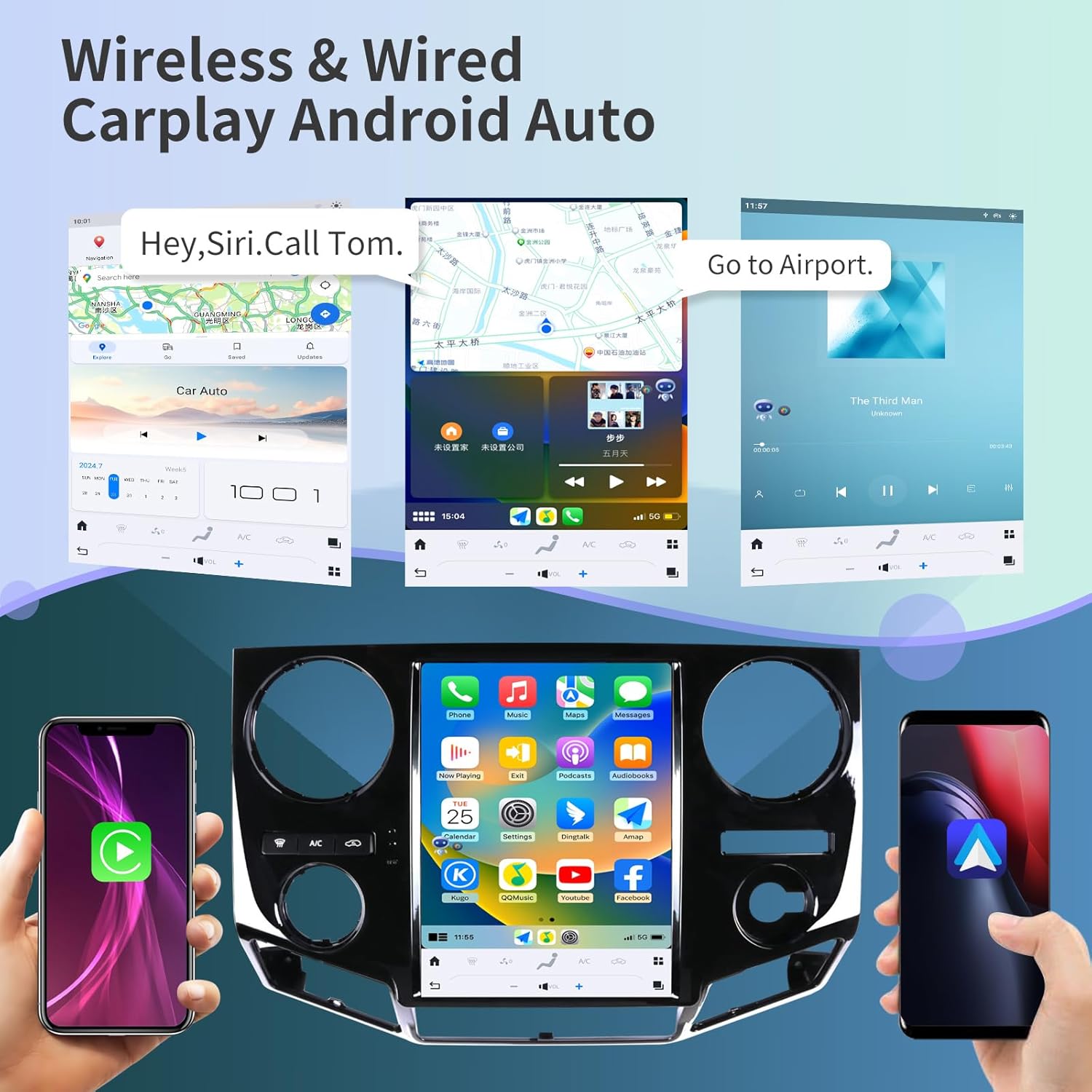
Imatge: Examples of Apple CarPlay and Android Auto interfaces displayed on the head unit, showing navigation and music playback.
5.3 Navegació GPS
The unit features a built-in GPS module with support for both online and offline maps, utilizing GPS + GLONASS for high-precision navigation.
- Map Applications: Compatible with popular navigation apps such as Apple Maps, Google Maps, and Waze.
- En línia/Fora de línia: Download offline maps for navigation without an internet connection, or use online maps for real-time traffic updates.

Image: The head unit displaying various navigation application icons and indicating Wi-Fi and 4G network capabilities.
5.4 Wi-Fi & 4G Network Connectivity
Access the internet via Wi-Fi or a 4G network (SIM card required for 4G, not included) to enhance your in-car experience.
- Online Content: Stream online videos, browse the web, and download applications from the app store (e.g., YouTube, Netflix, Facebook).
- Punt d'accés: Connect to your smartphone's hotspot for internet access.
5.5 Bluetooth 5.0
The integrated Bluetooth 5.0 module enables wireless audio streaming and hands-free calling.
- Trucades mans lliures: Make and receive calls safely using the external microphone and the unit's display.
- Transmissió d'àudio: Play music from your Bluetooth-enabled devices.
- Contact Sync: Sync your phone contacts for easy access.
5.6 Control del volant
La unitat és compatible amb els controls originals del volant del vehicle, cosa que permet gestionar l'àudio, les trucades i altres funcions sense treure les mans del volant.
- Configuració: The unit can be configured to learn and map your vehicle's steering wheel buttons. Refer to the unit's settings menu for steering wheel control setup.

Image: The head unit displaying the interface for configuring steering wheel controls, alongside a view of the backup camera in action.
5.7 Funcionalitat de la càmera de marxa enrere
The included HD backup camera provides a 170° wide viewing angle and night vision capabilities, enhancing safety during reversing maneuvers.
- Visualització automàtica: The camera feed automatically appears on the unit's screen when the vehicle is shifted into reverse.
- Visió nocturna: Improved visibility in low-light conditions.
Processador de so digital 5.8 (DSP)
Customize your audio experience with the built-in 16-band equalizer and DSP settings.
- Equalitzador: Ajusta les bandes de freqüència perquè coincideixin amb les teves preferències d'àudio.
- Modes de so: Seleccioneu entre diversos modes de so preestablerts o creeu un professional personalitzatfiles.
Pantalla dividida 5.9
Enhance multitasking by displaying two applications simultaneously on the screen.
- Ús: Per example, use navigation on one side and music playback on the other.
6. Manteniment
Proper maintenance ensures the longevity and optimal performance of your KiriNavi car radio.
- Neteja de pantalla: Feu servir un drap suau i sense borrissol per netejar suaument la pantalla tàctil. Per a taques difícils, fregueu lleugerament.ampNetegeu el drap amb aigua o un netejador de pantalles. Eviteu productes químics agressius o materials abrasius.
- Actualitzacions de programari: Periodically check for software updates through the unit's settings menu to ensure you have the latest features and performance improvements.
- Comprovacions de connexió: Occasionally inspect all visible cable connections to ensure they are secure and free from damage.
- Cura del medi ambient: Eviteu exposar la unitat a temperatures extremes, a la llum solar directa durant períodes prolongats o a una humitat excessiva.
7. Solució De Problemes
This section addresses common issues you might encounter with your KiriNavi car radio.
| Problema | Causa possible | Solució |
|---|---|---|
| La unitat no s'encén. | Loose power connection, blown fuse, vehicle ignition issue. | Check power cable connections. Inspect vehicle's fuse box for blown fuses. Ensure vehicle ignition is on. |
| Sense so o àudio distorsionat. | Incorrect wiring, volume set to zero, DSP settings. | Verify speaker wiring. Adjust volume. Check DSP equalizer settings. Perform a soft reset. |
| Senyal GPS perdut o inexacte. | Obstrucció de l'antena GPS o connexió defectuosa. | Assegureu-vos que l'antena GPS estigui muntada en un lloc clar i sense obstacles. view del cel. Comproveu la connexió de l'antena a la unitat. |
| Wi-Fi/4G connectivity issues. | Weak signal, incorrect network settings, SIM card issue (for 4G). | Move to an area with better signal. Verify Wi-Fi password or 4G SIM card installation and activation. Restart the unit. |
| El CarPlay/Android Auto no es connecta. | Incorrect phone settings, faulty USB cable, software glitch. | Ensure CarPlay/Android Auto is enabled on your phone. Try a different USB cable. Restart both phone and head unit. |
| Unit is slow or unresponsive. | Too many applications running, low memory, software issue. | Close unused applications. Restart the unit. If issues persist, consider a factory reset (see warning below). |
| La càmera de marxa enrere no es mostra. | Loose camera connection, incorrect wiring, camera fault. | Check camera cable connections. Ensure the camera is receiving power. Verify settings in the unit. |
Warning regarding Factory Reset:
Performing a factory reset will erase all user data and settings. If you decide to perform a factory reset, ensure you have noted any critical information or settings. Some users have reported losing backup camera functionality after a factory reset without proper re-configuration. Refer to the product's included booklet or contact support for specific instructions if a factory reset is necessary.
8. Especificacions
| Característica | Detall |
|---|---|
| Model | B0C7BP28RS |
| Sistema operatiu | Android 13 |
| Processador | 8 Core CPU (Qualcomm 665) |
| RAM | 4 GB |
| ROM | 64 GB |
| Mida de la pantalla | 12.1 polzades |
| Resolució | 1920 x 1080 (2K IPS Touchscreen) |
| Connectivitat | Bluetooth 5.0, Ethernet, USB, Wi-Fi, 4G Network Support |
| Característiques especials | Android Auto, Apple CarPlay, Built-In Bluetooth, DSP, GPS Navigation, Steering Wheel Control Support, Backup Camera Input |
| Tipus de mapa | Satellite (Online/Offline) |
| Comandament de veu | Buttons, Microphone, Touchscreen |
| Mode de sortida d'àudio | estèreo |
| Tipus de muntatge | Muntatge al quadre de comandament |
| Pes de l'article | 10.43 lliures |
| Dimensions del paquet | 22 x 16.12 x 8 polzades |
9. Garantia i Suport
KiriNavi is committed to providing excellent customer service and technical support for your product.
9.1 Suport tècnic
If you encounter any issues during installation or operation, or if you have questions about your KiriNavi car radio, please contact our technical support team. We offer one-on-one service to assist you.
To contact support, please follow these steps:
- Visit the KiriNavi store page on Amazon.
- Locate the 'Ask a question' button to send a message to the seller.

Image: A visual guide demonstrating how to navigate to the KiriNavi seller page on Amazon and use the 'Ask a question' feature for support.
9.2 Informació de la garantia
Specific warranty details are typically provided with your purchase documentation. Please retain your proof of purchase for warranty claims. Protection plans may also be available for extended coverage.