
Introducció
Gràcies per la compraasing the ELECOM Wireless Mouse EX-G Bluetooth Silent S-size 5-button Multi-pairing, model M-XGS30BBSKBK. This ergonomic mouse is designed to provide a comfortable and strain-free experience, developed in collaboration with orthopedic surgeons. It features silent clicks, multi-pairing capabilities, and an antimicrobial surface for enhanced hygiene. This manual will guide you through the setup, operation, and maintenance of your new mouse.

Image: The ELECOM EX-G Bluetooth Silent Mouse, model M-XGS30BBSKBK.
Característiques clau
- Disseny ergonòmic: Co-developed with orthopedic surgeons, the EX-G series mouse is shaped to fit the natural curve of your hand, minimizing strain on wrist and finger muscles. This design has been certified by the AskDoctors evaluation service, with 99% of 100 doctors recommending it.
- Interruptors de clic silenciós: Equipped with Panasonic silent switches for left and right clicks, as well as the scroll wheel, allowing for quiet operation in any environment, such as during web conferences or in shared workspaces.
- Multi-pairing Functionality: Connects to up to two Bluetooth-compatible devices simultaneously. Easily switch between paired devices with a dedicated button.
- Superfície antimicrobiana: The mouse body and printed parts are treated with an antimicrobial coating to inhibit bacterial growth, keeping the mouse clean.
- Disseny de 5 botons: Includes left click, right click, scroll wheel, and two side buttons (forward/back) for enhanced navigation and productivity.

Image: Comparison of the ergonomic EX-G mouse design (right) with a traditional mouse (left), illustrating the natural hand position.
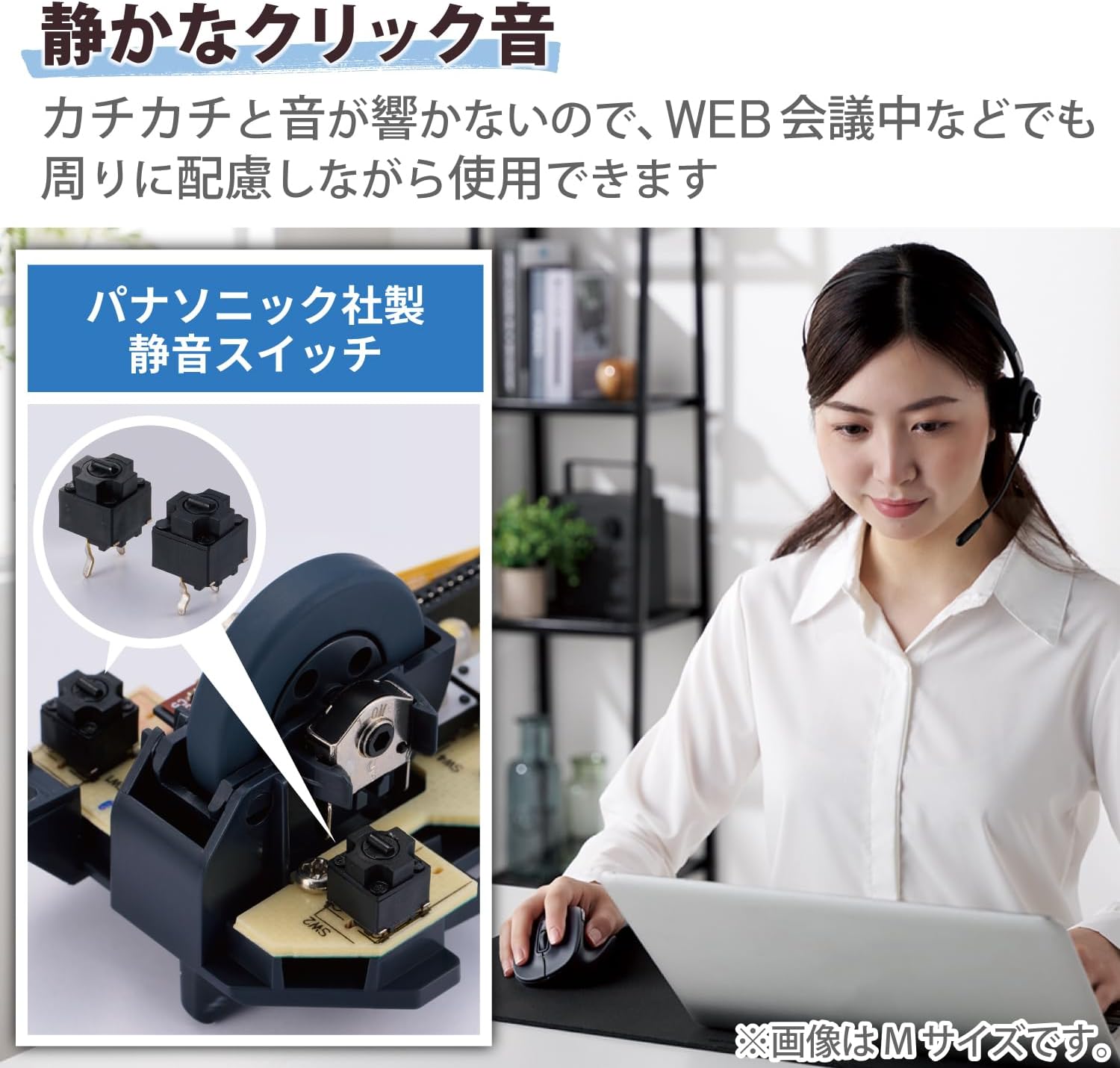
Image: A close-up of the internal Panasonic silent click switches and a user operating the mouse quietly.

Image: Illustration of the multi-pairing feature, showing indicator lights (white for device 1, green for device 2) for switching connections.

Image: Various color models of the EX-G mouse, highlighting the antimicrobial surface treatment.

Image: Diagram illustrating the functions of the 5 buttons: Left Click, Right Click, Double Click, Forward, and Back.
Configuració
1. Instal·lació de la bateria
- Obriu la tapa de la bateria que es troba a la part inferior del ratolí.
- Insert one AAA alkaline battery (included) into the battery compartment, ensuring correct polarity (+/-).
- Tanqueu la tapa de la bateria amb seguretat.
2. Emparellament Bluetooth
- Enceneu el ratolí amb l'interruptor d'encesa a la part inferior.
- Press and hold the pairing button on the bottom of the mouse until the LED indicator starts flashing (e.g., white for device 1, green for device 2).
- On your computer or device (Windows, macOS, Android, iOS, iPadOS, ChromeOS), navigate to the Bluetooth settings.
- Cerca available Bluetooth devices and select "ELECOM EX-G" or a similar name.
- Follow any on-screen prompts to complete the pairing process. The LED indicator on the mouse will stop flashing and remain solid when successfully paired.
- To pair a second device, repeat steps 2-5, ensuring the mouse is in the correct pairing mode (e.g., green LED for device 2).
Instruccions de funcionament
Funcions bàsiques del ratolí
- Clic esquerre: Selecció i activació primàries.
- Clic dret: Obre els menús contextuals.
- Roda de desplaçament: Scrolls content vertically. Pressing the scroll wheel often acts as a middle click.
- Botons Endavant/Enrere: Situats al lateral, aquests botons permeten una navegació ràpida web navegadors i file exploradors.
Canvi entre dispositius aparellats
If you have paired the mouse with two devices, press the device switching button (usually located near the pairing button on the bottom or a dedicated button on top) to toggle between Device 1 (white LED) and Device 2 (green LED).
Ajust de DPI
The mouse has a maximum sensitivity of 2000 dpi. While there isn't a dedicated DPI switch mentioned, sensitivity can typically be adjusted through your operating system's mouse settings for personalized control.
Manteniment
Neteja
- Wipe the mouse surface with a soft, dry cloth.
- Per a la brutícia tossuda, lleugerament dampNetegeu el drap amb aigua o un netejador suau i no abrasiu. Eviteu productes químics agressius.
- Do not allow liquids to enter the mouse body.
Canvi de bateria
When the mouse performance degrades or the indicator light suggests low battery, replace the AAA battery following the installation steps in the Setup section.
Resolució de problemes
- El ratolí no respon:
- Check if the power switch on the bottom of the mouse is ON.
- Assegureu-vos que la bateria estigui correctament instal·lada i que no estigui esgotada. Substituïu-la si cal.
- Verify that the mouse is paired with the correct device (check the LED indicator for Device 1 or 2).
- Prova de tornar a emparellar el ratolí amb el dispositiu.
- Moviment erràtic del cursor:
- Netegeu el sensor òptic de la part inferior del ratolí.
- Assegureu-vos que feu servir el ratolí sobre una superfície adequada. Eviteu superfícies molt reflectants o transparents.
- Comproveu si hi ha interferències d'altres dispositius sense fil.
- Scroll wheel issues (e.g., scrolling in the wrong direction, jumping):
- This can sometimes indicate a hardware issue. Ensure the scroll wheel is clean and free of debris.
- Si el problema persisteix, poseu-vos en contacte amb el servei d'atenció al client.
- No es pot connectar a un segon dispositiu:
- Ensure the mouse is in the correct pairing mode for the second device (green LED).
- Confirm your device's Bluetooth is enabled and discoverable.
Especificacions
| Marca | ELECOM |
| Número de model | M-XGS30BBSKBK |
| Color | Negre |
| Tecnologia de connectivitat | Bluetooth |
| Característiques especials | Ergonomic Design, Silent, Multi-pairing, Wireless |
| Tecnologia de detecció de moviment | Òptic |
| Nombre de botons | 5 |
| Orientació de la mà | Destra |
| Dispositius compatibles | Bluetooth(R) HOGP compatible Windows OS, Android, macOS, iOS, iPadOS, ChromeOS devices |
| Sistemes operatius | Android 12, Chrome OS, Windows 11/10, iPadOS 16, macOS Ventura 13 |
| Nombre de bateries | 1 bateria AAA (inclosa) |
| Plataforma de maquinari | Mac, PC, Tablet |
| Font d'alimentació | Funciona amb bateria |
| Mouse Max Sensitivity | 2000 ppp |
| Pes del producte | 82 grams |
| Dimensions del producte (L x A) | 10.8 cm x 7.1 cm |
| Recompte d'unitats | 1 unitat |
| Usos recomanats | Oficina, jocs |
Size Guide (S-size)
The S-size mouse is designed to fit hands where the length from the tip of the middle finger to the base of the palm is approximately 165mm.

Image: Diagram showing the S-size mouse dimensions (Length 108mm, Width 71mm, Height 52mm) and a hand measurement guide for optimal fit.
Garantia i Suport
This ELECOM product comes with a 2 any de garantia des de la data de compra. Si us plau, conserveu el comprovant de compra per a reclamacions de garantia.
For technical support, troubleshooting assistance, or warranty service, please visit the official ELECOM website or contact their customer service department. You can find more information and support resources on the Botiga de la marca ELECOM a Amazon.