1. Introducció
The SYMA X550 Military RC Helicopter is a 4-channel remote control aircraft designed for both beginners and experienced pilots. Inspired by military helicopters, it offers a lifelike flying experience with features such as high/low-speed control, multiple stunt flying capabilities, and altitude hold. This manual provides essential information for safe operation, setup, and maintenance of your SYMA X550.

Image 1.1: SYMA X550 Military RC Helicopter and Remote Control.
2. Precaucions de seguretat
- Keep small parts of the aircraft out of reach of children to prevent accidents.
- After the flight, turn off the remote control first, then turn off the aircraft's power.
- Do not place the battery in high-temperature or heated areas (such as fire or near heating devices).
- Maintain a distance of 2-3 meters between the aircraft during flight and users or other people to avoid collisions during takeoff and landing.
- Children operating the aircraft should be guided by an adult, ensuring the aircraft remains within the operator's (or supervisor's) line of sight for easy control.
- Non-rechargeable batteries should not be charged. Do not mix new and old or different types of batteries.
- Els terminals d'alimentació no s'han de curtcircuitar.
- If the battery is not used for more than 10 days, store it at 40%-50% capacity to extend the battery's lifespan.
- Maintain a safe distance from rapidly rotating propellers to avoid the risk of injury.
- To meet electromagnetic environment requirements of aviation radio stations, the use of all types of model remote controllers is prohibited within a radius of 5000m centered on the airport runway.
- During the period and in areas where relevant authorities issue radio control orders, model remote control use should be stopped as required.
- Only use recommended transformers for the model; transformers are not models. Disconnect the model from the transformer or charger before cleaning with a liquid. Regularly check the transformer's wires, plugs, casing, and other parts for damage. If damage is found, stop using it until it is repaired.
- Turn off the remote control and aircraft power when not in use, and remove the batteries from the remote control.
- Important information is included in the packaging or manual and should be retained.
- Avoid direct exposure to laser radiation beams.
3. Contingut del paquet
Verifiqueu que tots els elements siguin presents al paquet:
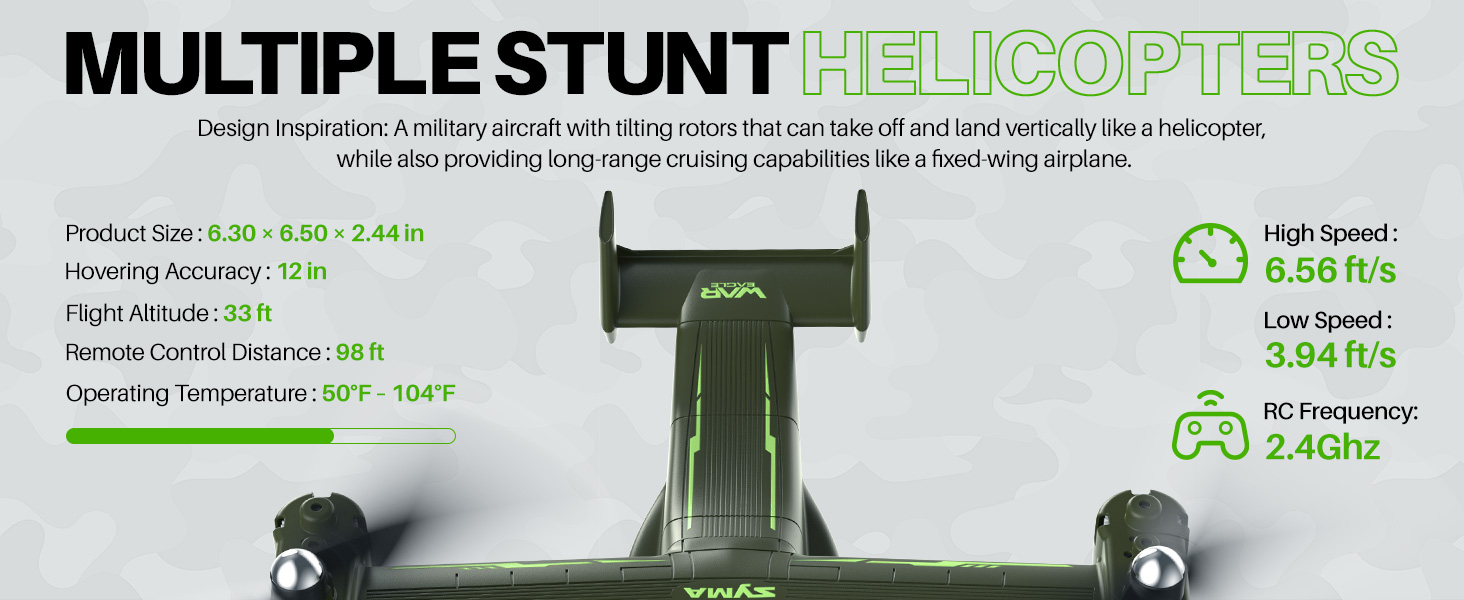
Image 3.1: All components included in the SYMA X550 package.
- Army Helicopter x 1
- 2.4GHz Controller x 1
- Cable USB x 1
- Manual d'usuari x 1
- Tornavís x 1
- Spare Wind Blade x 4
- Fan Blade Hat x 4
- Spare Blade Screw x 8
- Protection Frame x 4
- Suport x 1
4. Components mésview
4.1 Drone Overview
The SYMA X550 features a military-inspired design with tilting rotors, allowing for vertical takeoff and landing like a helicopter, and long-range cruising like a fixed-wing airplane. It is equipped with LED lights for visibility and a built-in battery.

Image 4.1: The SYMA X550 drone in flight, showcasing el seu disseny.
4.2 Control remotview
The 2.4GHz remote controller provides intuitive control over the drone's functions. It features dual joysticks for movement and rotation, along with dedicated buttons for stunts, speed control, and one-key takeoff/landing.

Image 4.2: Remote control layout with labeled functions.
- Joystick esquerre: Controls ascend/descend and rotation (left/right). Long press for fine-tuning adjustment, release to exit. Press and hold + Power button for fine-tuning reset.
- Joystick dret: Controls forward/backward and sideways flight (left/right). Short press for high/low-speed switch.
- Botó d'encesa: Encén/apaga el comandament a distància.
- Botó d'enlairament/aterratge d'un sol botó: Inicia l'enlairament o l'aterratge automàtic.
- Botó de salt: Performs stunt jumps.
- Fly in Circles Button: Initiates circular flight patterns.
- Rotate and Ascend Button: Performs combined rotation and ascent.
5. Configuració
5.1 Instal·lació de la bateria del comandament a distància
- Use a screwdriver to remove the screw on the battery cover at the back of the remote control.
- Introduïu 4 piles AAA al compartiment de les piles, assegurant-vos la polaritat correcta.
- Torneu a col·locar la tapa de la bateria i premeu el cargol.
5.2 Drone Charging
The SYMA X550 features a built-in rechargeable battery. Use the provided USB-C charging cable.
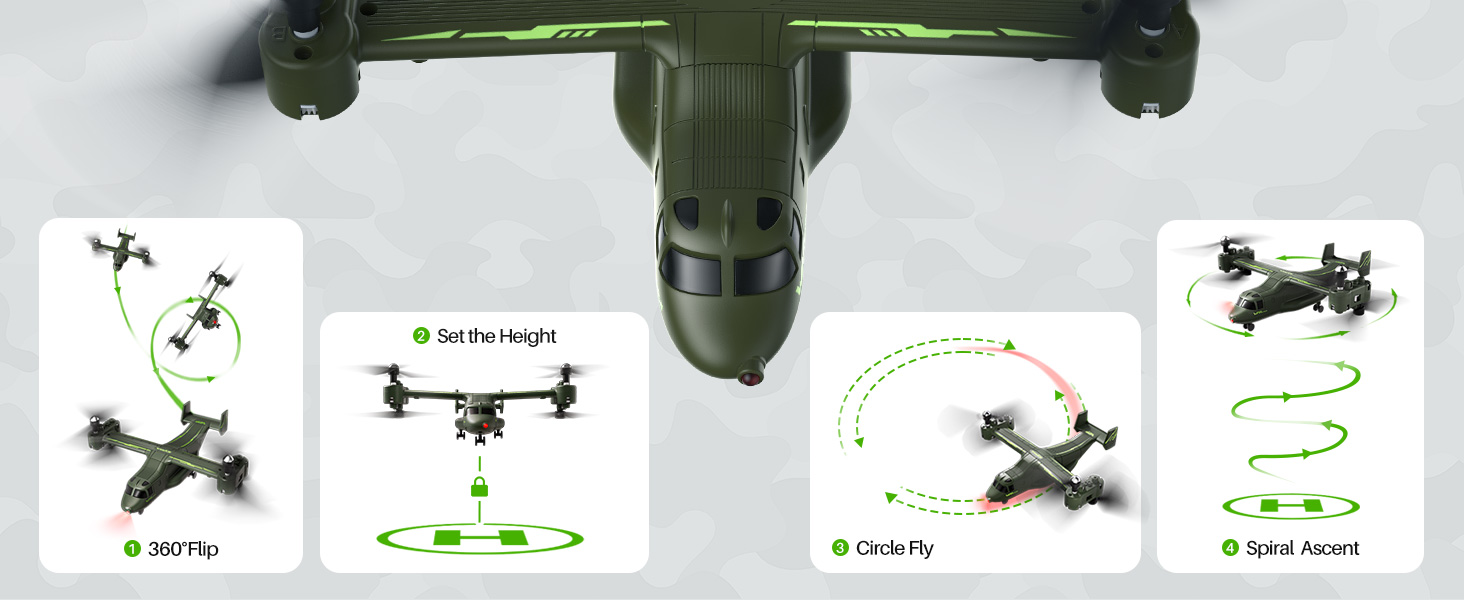
Image 5.1: Drone charging via USB-C port.
- Ensure the drone's power switch is in the OFF state before charging.
- Connect the USB charging cable to the drone's Type-C charging port.
- Plug the other end of the USB charging cable into a compatible USB power adapter (not included) or a computer's USB port.
- During charging, a red indicator light on the drone will be on.
- The indicator light will turn off when the drone is fully charged.
5.3 Propeller and Propeller Guard Installation
The propellers are marked A, B, C, and D and must be installed on the corresponding shafts. The propeller guards provide protection during flight.
- Match each propeller (A, B, C, D) to its corresponding shaft on the drone.
- Secure each propeller with the provided screws using the screwdriver.
- Place the propeller nut caps on top of the secured propellers.
- Attach the propeller guards by inserting them into the designated slots around each propeller assembly.
6. Instruccions de funcionament
6.1 Pairing and Frequency Matching
- Turn on the drone's power switch (located at the bottom). The drone's lights will start flickering.
- Turn on the remote control's power switch. The remote's indicator light will start blinking.
- Raise the left joystick (throttle) to its highest point, then return it to the lowest point. The indicator light on the drone will change from fast flashing to steady, indicating successful pairing.
6.2 Calibració horitzontal
If the drone drifts during flight, perform a horizontal calibration:
- Col·loqueu el drone sobre una superfície plana i plana.
- Simultaneously push both the left and right joysticks on the remote control to the lower-right corner for about 3 seconds.
- The indicator light on the drone will flash quickly and then stay steady, indicating successful calibration.
- Nota: Horizontal calibration cannot be performed if the aircraft's tilt angle is greater than 10 degrees.
6.3 Enlairament i aterratge
Method 1: Manual Takeoff/Landing
- Enlairament: After successful pairing, push the left joystick (throttle) upward. All blades will begin to rotate. Push the left joystick upward again, and the helicopter will take off.
- Aterratge: Push the left joystick (throttle) downward. The helicopter will descend and land.
Method 2: One-Key Takeoff/Landing
- Enlairament: After successful pairing, press the One-Key Takeoff/Landing button. The helicopter will automatically take off and hover at a certain height.
- Aterratge: Press the One-Key Takeoff/Landing button again. The helicopter will automatically land.

Image 6.1: Easy flight features including one-key takeoff/landing and altitude hold.
6.4 Controls bàsics de vol
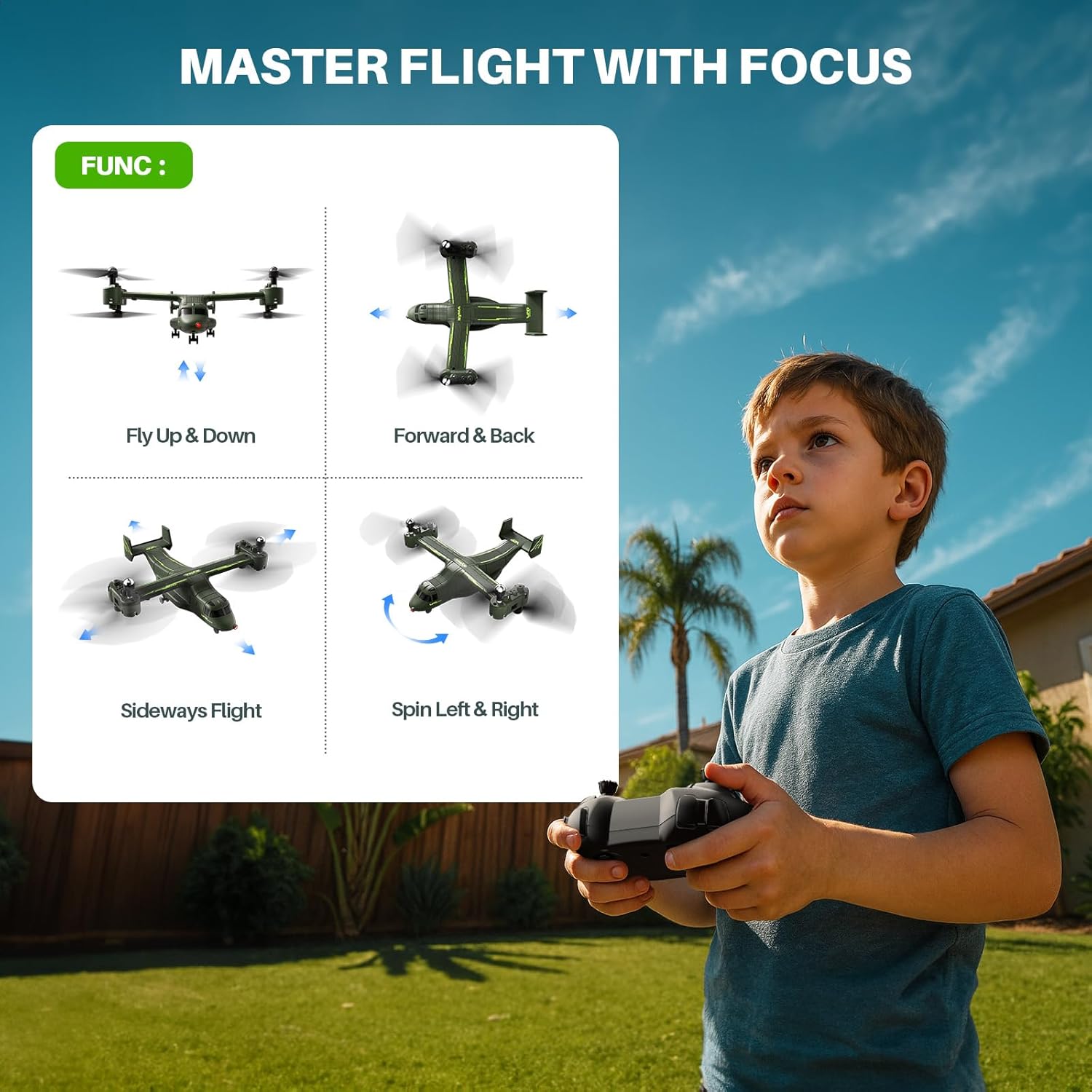
Image 6.2: Visual guide to basic flight controls.
- Pujar/Descens: Empenyeu el joystick esquerre cap amunt per pujar, estireu-lo cap avall per baixar.
- Girar: Empenyeu el joystick esquerre cap a l'esquerra per girar a l'esquerra, empenyeu-lo cap a la dreta per girar a la dreta.
- Endavant/Enrere: Push the right joystick up to move forward, pull down to move backward.
- Vol lateral: Empenyeu el joystick dret a l'esquerra per volar a l'esquerra, empenyeu-lo a la dreta per volar a la dreta.
6.5 Speed Control (High & Low Speed)
The drone offers two-speed modes for different flying environments and skill levels.
- Short press the right control stick (vertically downward, do not pull down) to switch between quick (Fast Mode) and slow (Slow Mode) flight.
- The remote controller emits two "beeps" for fast mode and one "beep" for slow mode.
6.6 Stunt Flying
Perform various aerial maneuvers with ease.
Imatge 6.3: Ex.amples of stunt maneuvers.
- Volteig de 360°: Press the upper-left jump button while simultaneously pushing the right control stick upward. The drone will perform three up-and-down jumps.
- Vol circular: Press the upper-right circle button while simultaneously pushing the right control stick to the left or right. The drone will fly in a circular pattern.
6.7 Altitude Hold
The built-in altitude hold function ensures steady hovering at a set height, making control easier for all skill levels.
6.8 Drone Shutdown
Method 1: Manual Shutdown
- Push the left control stick (throttle) to the lowest point and then return it to the center.
- Turn off the drone's power switch.
- Turn off the remote control's power switch.
Method 2: Figure-Eight Motion Shutdown
- Press the left and right control sticks inward in a 'figure-eight' motion for about 2 seconds.
- Turn off the drone's power switch.
- Turn off the remote control's power switch.
Method 3: One-Key Shutdown
- Press the one-key takeoff/landing button. The drone will land and shut down.
- Turn off the drone's power switch.
- Turn off the remote control's power switch.
6.9 Official Instruction Videos
SYMA X550 Drone Setup Tutorial
Video 6.4: A detailed tutorial on setting up the SYMA X550 drone, including battery installation, charging, and propeller assembly.
SYMA X550 First Flying Video Instruction
Video 6.5: A beginner's guide to the first flight of the SYMA X550, demonstrating basic controls and maneuvers.
7. Manteniment
- Regularly inspect propellers for damage. Replace any broken or bent blades immediately.
- Keep the drone and remote control clean and free from dust and debris. Use a soft, dry cloth for cleaning.
- Store the drone and its accessories in a cool, dry place away from direct sunlight and extreme temperatures.
- Ensure the battery is charged to 40-50% capacity before long-term storage.
8. Solució De Problemes
| Problema | Causa possible | Solució |
|---|---|---|
| El dron no respon al comandament a distància. | Not paired successfully. | Repetiu el procés d'emparellament (Secció 6.1). |
| El dron es desplaça durant el vol. | Necessita calibratge. | Perform horizontal calibration (Section 6.2). |
| El dron no s'enlaira. | Low battery or propellers not rotating. | Charge the drone's battery. Check for obstructions around propellers. Ensure pairing is successful. |
| Temps de vol curt. | Bateria no completament carregada o bateria envellida. | Ensure full charge. Consider replacing the battery if performance degrades significantly. |
| Les hèlixs estan danyades. | Collision or wear and tear. | Replace damaged propellers with spare parts (Section 5.3). |
9. Especificacions
- Número de model: X550
- Marca: SYMA
- Pes de l'article: 13.4 unces
- Dimensions del paquet: 12.76 x 8.15 x 3.9 polzades
- Bateries: 1 Lithium Polymer battery required (built-in)
- Hovering Accuracy: Aproximadament 12 polzades
- Altitud de vol: Fins a 33 peus
- Distància de control remot: Fins a 98 peus
- Temperatura de funcionament: 50 °C - 104 °C
- RC Frequency: 2.4 GHz

Image 9.1: SYMA X550 drone on display with key dimensions.
10. Garantia i Suport
For warranty information and customer support, please refer to the contact details provided on the product packaging or visit the official SYMA weblloc web. Conserveu el rebut de compra com a comprovant de compra.