1. Introducció
This manual provides essential information for the proper setup, operation, and maintenance of your new Generic replacement infrared (IR) remote control. This remote is designed to function as a direct replacement for specific Dynex and other compatible television models. Please read this manual thoroughly before use to ensure optimal performance and longevity of your device.

Figura 1: Angle frontal view of the replacement remote control.
2. Compatibilitat
This replacement remote control is specifically designed to be compatible with the following television models. Please verify your television's model number against this list to ensure compatibility.
- Dynex LC-42LT46
- Dynex DX-32L-151A11
- Dynex DX-L37-10A
- Dynex DX-L42-10A
- Dynex LC-15KT46
- Dynex DX-37L-130A11
- RC-401-0A (original remote model)
- Other Smart LCD LED DVD TV Television models as specified by the manufacturer.
Important: If your television model number is not included in this list, this remote control may not be compatible. Refer to the product images for the actual remote's appearance.
3. Configuració
3.1 Instal·lació de la bateria
The remote control requires two (2) AAA batteries for operation. Batteries are not included with the remote control and must be purchased separately.
- Localitzeu la tapa del compartiment de la bateria a la part posterior del comandament a distància.
- Premeu la pestanya i feu lliscar la tapa cap avall per obrir el compartiment.
- Introduïu dues piles AAA noves, assegurant-vos que els terminals positiu (+) i negatiu (-) s'alineïn correctament amb les marques de l'interior del compartiment.
- Feu lliscar la tapa del compartiment de la bateria fins que faci clic de manera segura.
Once the batteries are correctly inserted, the remote control is ready for use. No additional programming or setup is typically required for compatible models; simply insert new brand batteries to get it to work.

Figura 2: Compartiment de les piles a la part posterior del comandament a distància.
4. Instruccions de funcionament
This remote control operates using infrared (IR) technology. Ensure there is a clear line of sight between the remote control and the television's IR receiver for proper functionality. Point the remote directly at the television when pressing buttons.
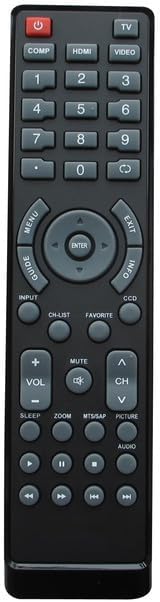
Figure 3: Layout of the remote control buttons.
4.1 Funcions dels botons anteriorsview
| Botó | Funció |
|---|---|
| PODER | Encén o apaga el televisor. |
| TV / VIDEO / HDMI / COMP | Selects input sources (e.g., TV tuner, external video devices, HDMI inputs, Component video). |
| Bloc numèric 0-9 | Introdueix directament els números de canal. |
| VOL +/- | Ajusta el nivell de volum amunt o avall. |
| CH +/- | Canvia el canal de televisió amunt o avall. |
| MUT | Silencia o activa el so de la televisió. |
| MENÚ | Accedeix al menú principal del televisor. |
| Navigation (Up/Down/Left/Right) & ENTER | Navigates through menu options and confirms selections. |
| Sortida | Surt del menú actual o de la visualització en pantalla. |
| INFO | Mostra informació sobre el programa o l'entrada actual. |
| GUIDE / CH-LIST | Accesses the electronic program guide or channel list. |
| PREFERITS | Accesses favorite channels or settings. |
| CCD | Activa o desactiva els subtítols. |
| DORMIR | Estableix un temporitzador de son per al televisor. |
| ZOOM | Ajusta el nivell de zoom de la pantalla. |
| MTS/SAP | Selects Multi-channel Television Sound (MTS) or Secondary Audio Program (SAP) options. |
| IMATGE | Accedeix a la configuració de la imatge. |
| ÀUDIO | Accesses audio settings. |
| Playback Controls (e.g., Play, Pause, Stop, Rewind, Fast Forward) | Controls playback for integrated DVD players or media functions (if supported by TV). |
Note: Not all buttons may be functional on every compatible television model, as functionality depends on the original remote's capabilities and the television's features.
5. Manteniment
Per garantir la longevitat i el bon funcionament del comandament a distància, seguiu aquestes pautes de manteniment:
- Neteja: Wipe the remote control regularly with a soft, dry cloth. For stubborn dirt, slightly dampNetegeu el drap amb aigua o un netejador suau i no abrasiu. Eviteu utilitzar productes químics agressius o materials abrasius.
- Substitució de la bateria: Replace batteries when the remote's response becomes sluggish or it stops functioning. Always replace both batteries at the same time with new ones. Do not mix old and new batteries, or different types of batteries.
- Emmagatzematge: Guardeu el comandament a distància en un lloc fresc i sec, lluny de la llum solar directa i de temperatures extremes.
- Eviteu líquids: Do not expose the remote control to water or other liquids.
- Caiguda: Eviteu deixar caure el comandament a distància, ja que això pot danyar els components interns.
6. Solució De Problemes
If you experience issues with your remote control, please refer to the following common troubleshooting steps:
| Problema | Possible causa/solució |
|---|---|
| Remote is not working at all. |
|
| Alguns botons no funcionen. |
|
| El remot funciona de manera intermitent. |
|
| "Replacement may not work as Original" | This remote is a replacement and may not replicate every single function or the exact responsiveness of the original manufacturer's remote. Its primary function is to provide basic and common controls for the listed compatible models. |
7. Especificacions
| Característica | Detall |
|---|---|
| Marca | Genèric |
| Dispositius compatibles | Television (Specific Dynex models listed in Compatibility section) |
| Tecnologia de connectivitat | Infrarojos (IR) |
| Tipus de controlador | Control de botons |
| Font d'alimentació | 2 piles AAA (no incloses) |
| Fabricant | SZHKHXD |
| País d'origen | Xina |
| ASIN | B0C7VF4P31 |
| Data de primera disponibilitat | 13 de juny de 2023 |
8. Garantia i Suport
Specific warranty details for this Generic replacement remote control are not provided in the product information. For any questions regarding product functionality, compatibility, or potential defects, please contact the seller directly through the platform where the purchase was made.
Manufacturer: SZHKHXD
Seller: SZHKHXD
Si us plau, conserveu el rebut de compra com a comprovant de compra per a qualsevol consulta d'assistència.


