
Introducció
This manual provides comprehensive instructions for the assembly, operation, and maintenance of your ErGear Electric Standing Desk. Please read this manual thoroughly before assembly and use to ensure proper function and safety. Keep this manual for future reference.
The ErGear Electric Standing Desk offers adjustable height settings, integrated power solutions, and robust stability to enhance your workspace ergonomics. Its design incorporates features like a pop-up power hub, cable management tray, and an anti-collision system for a seamless user experience.
Muntatge i muntatge
For detailed visual instructions, please refer to the official installation video and the PDF manual provided by ErGear. Ensure all components are present before beginning assembly.
Descarrega el manual d'instal·lació oficial (PDF)
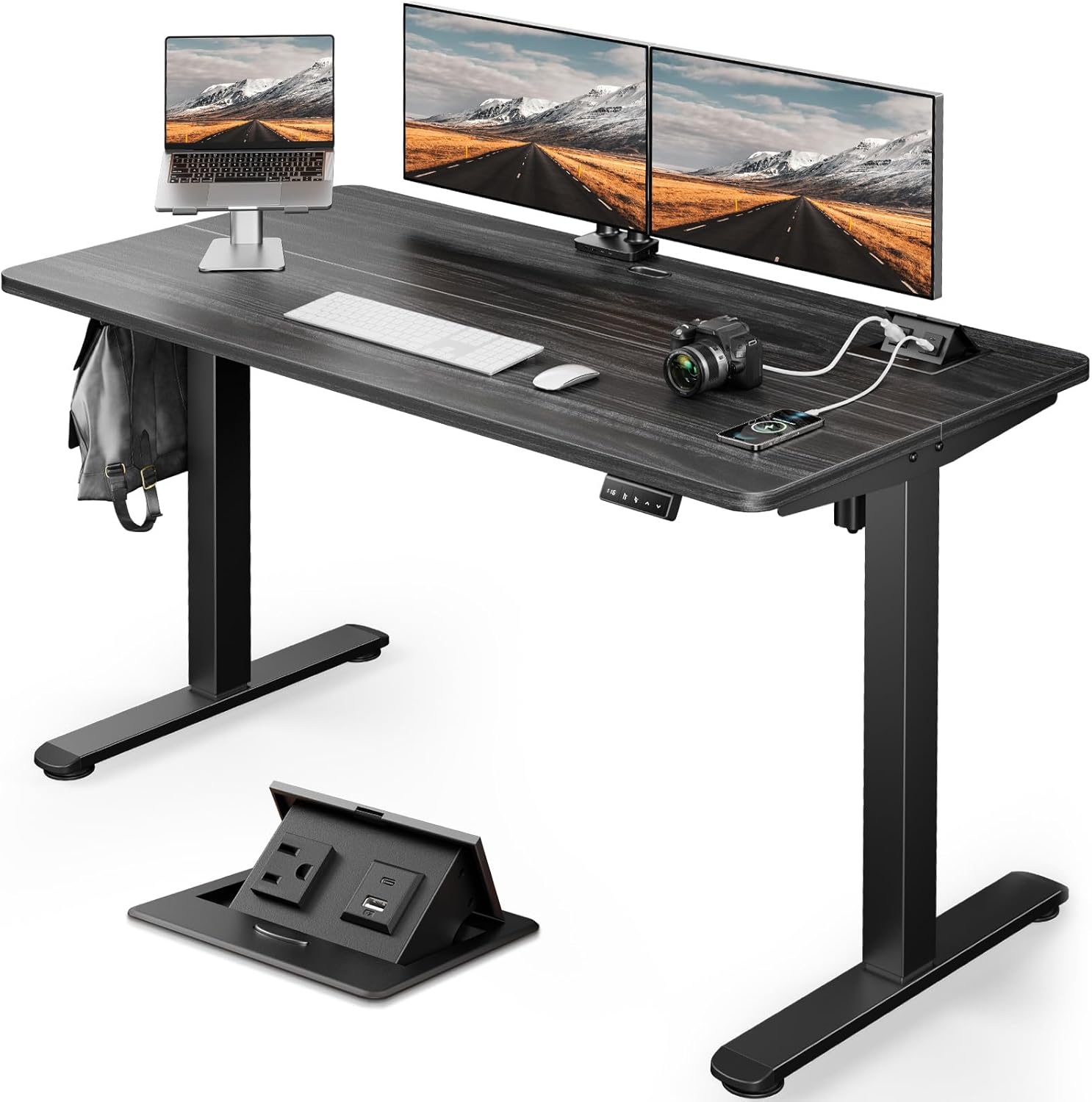
Figure 1: ErGear Electric Standing Desk with accessories, showcasing its integrated power hub and cable management.
El muntatge s'acabaview:
- Assembling the Leg Sections: Attach the leg columns to the foot supports. Ensure all screws are securely fastened.
Video 1: Standing Desk Installation Guide. This video demonstrates the step-by-step assembly process, including leg and frame attachment.
- Assembling the Desktop: The desktop may come in multiple pieces. Align and secure them according to the instructions.

Figure 2: Desk dimensions (55"D x 23.6"W x 28.3"H), important for space planning and assembly.
- Attaching the Frame to the Desktop: Carefully place the assembled leg sections onto the underside of the desktop and secure them with the provided hardware.
- Attaching the Transmission Rod: Connect the transmission rod between the two leg mechanisms to ensure synchronized height adjustment.
- Attaching the Controller and Storage Hook: Mount the control panel and the headphone hook to the designated areas on the underside of the desktop.


Figure 3: Details of the control panel for height adjustment and the convenient storage hook.
- Attaching the Cable Management Tray: Install the cable management tray to organize power strips and cables, reducing clutter.


Figure 4: The cable management tray helps keep your workspace tidy by concealing power strips and wires.
- Attaching the Power Outlet: Secure the integrated power outlet to the designated slot on the desktop.
Video 2: Integrated Power Hub Demonstration. This video highlights the convenience of the pop-up power hub with AC, USB-A, and USB-C outlets.

Figura 5: Mésview of the integrated pop-up power hub, storage hooks, and cable management tray.
- Installing the Cable Hole Cover: Place the cable hole cover into the desktop opening for a neat finish.
Instruccions de funcionament
Ajust d'alçada:
The ErGear Electric Standing Desk features step-less height adjustment and two custom memory buttons for personalized settings. The adjustable height range is 28.3 to 45.6 inches.
- Utilitza el Up i Avall arrows on the control panel to adjust the desk to your desired height.
- To save a height setting, adjust the desk to the desired height, then press the "M" button followed by one of the memory preset buttons ("1" or "2"). The display will confirm the setting is saved.
- Press the saved memory preset button ("1" or "2") to automatically move the desk to your pre-set height.

Figure 6: The control panel ensures simple height switching and includes a safety lock feature.
Multi-Function Power Socket:
The desk is equipped with an integrated pop-up power socket on the desktop, providing convenient access to power for your devices.
- It includes one AC outlet (1500W Max), one USB-A port (5V 1A), and one USB-C port (5V 1A).
- Press the button on the power hub to make it pop up for use. Push it down to conceal it when not in use.

Figure 7: The pop-up power hub provides easy access to charging ports directly on the desktop.
Sistema anticol·lisió:
The desk features an anti-collision system that automatically stops and slightly reverses the desk's movement if it encounters an obstacle during height adjustment. This prevents damage to the desk or objects in its path.

Figure 8: The anti-collision system ensures safety by detecting obstacles during desk movement.
Manteniment
To ensure the longevity and optimal performance of your ErGear Electric Standing Desk, please follow these care instructions:
- Do not expose the desk to direct sunlight for prolonged periods.
- Avoid storing the desk in a humid environment.
- Clean the desk surface with a soft, damp drap. Eviteu productes de neteja abrasius o productes químics agressius.
- Comproveu i premeu regularment els cargols solts per mantenir l'estabilitat.
Resolució de problemes
Si teniu algun problema amb el vostre escriptori elèctric ErGear, consulteu els següents consells habituals per a la resolució de problemes:
- L'escriptori no es mou: Check if the power cord is securely plugged into both the desk and the wall outlet. Ensure no cables are tangled or obstructing the motor mechanism.
- Moviment desigual: Verify that the desk is placed on a flat, stable surface. Check if all assembly screws are tightened evenly.
- El tauler de control no respon: Try unplugging the desk from the power outlet for 30 seconds, then plug it back in to reset the system.
- Soroll durant el funcionament: A slight motor sound is normal during height adjustment. Excessive or unusual noises may indicate a loose component; re-check assembly.
Si el problema persisteix després d'intentar aquests passos, poseu-vos en contacte amb l'atenció al client per obtenir més ajuda.
Especificacions
| Característica | Detall |
|---|---|
| Marca | ErGear |
| Número de model | EGESD26B |
| Dimensions del producte | 55 "P x 23.6" W x 28.3" H |
| Interval d'alçada ajustable | 28.3 - 45.6 polzades |
| Color | Negre |
| Tipus de material superior | Fusta d'enginyeria |
| Material base | Acer al carboni |
| Recomanació de pes màxim | 132 lliures |
| Característiques especials | Pop-up Integrated Power Socket, Anti-Collision System, One-Touch Lifting, High Memory, Outlet Tray |
| Presa de corrent | 1 AC outlet (1500W Max), 1 USB-A port (5V 1A), 1 USB-C port (5V 1A) |
| Muntatge requerit | Sí |
| Nombre recomanat de persones per a l'assemblea | 1 |
| Components inclosos | Headphone Hook, Pop-up Integrated Power Socket, Cable Management Tray |
Garantia i Suport
Your ErGear Electric Standing Desk comes with a manufacturer's warranty to cover potential defects and ensure your satisfaction.
- Tipus de garantia: 2 anys de garantia
- Manufacturer Warranty Type: 5 years warranty (Parts, Labor)
For any questions, technical assistance, or warranty claims, please contact ErGear Customer Support. You can find contact information on the ErGear official weblloc web o a través de la vostra plataforma de compra.