
Introducció
The HIKMICRO M15 Trail Camera is designed for remote monitoring and recording of wildlife or property. It features up to 10MP image resolution and 1080P video recording with audio. The camera utilizes 940nm invisible infrared LEDs for clear black and white imaging at night. It offers 4G cellular network connectivity for transmitting captured photos and videos to a mobile device, either in real-time or according to a user-defined schedule. The camera's settings can be managed via a dedicated application, which also provides status updates on power, network signal, ambient temperature, memory card capacity, data plan usage, and GPS location. Motion detection is achieved within a 45-degree angle and a range of 25 meters, with a rapid trigger speed of 0.5 seconds.
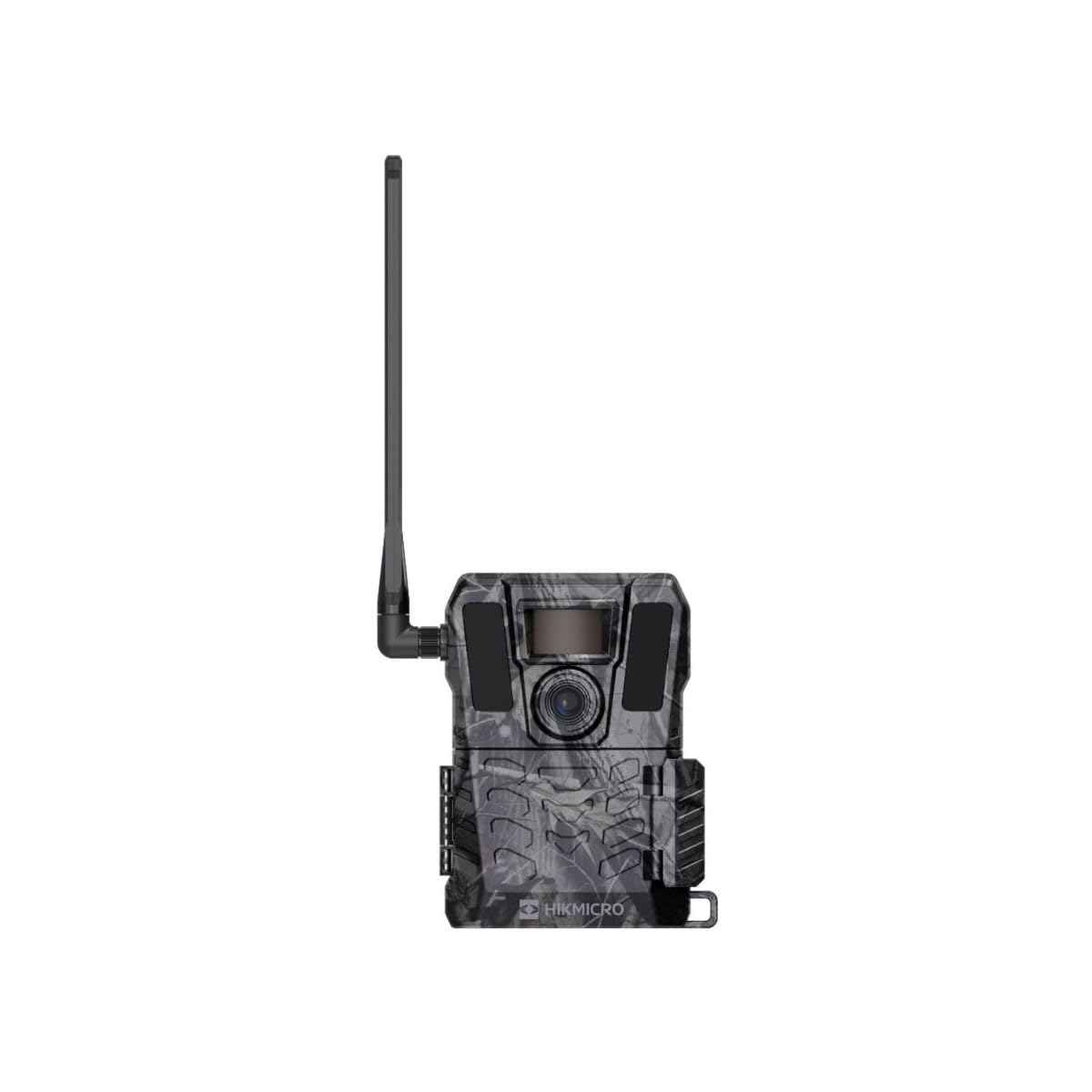
Figura 1: Frontal view of the HIKMICRO M15 Trail Camera.
Configuració
1. Unboxing i Inspecció Inicial
Carefully unpack all components. The package should include the HIKMICRO M15 Trail Camera and a user manual. Inspect the camera for any visible damage.
2. Instal·lació de la bateria
The M15 camera requires 12 AA batteries for optimal performance, though it can operate on 6. Open the battery compartment, typically located on the back or side of the camera. Insert the batteries, ensuring correct polarity (+/-). Rechargeable batteries are recommended for extended use.

Figura 2: posterior view of the camera, showing the battery compartment and mounting points.
3. Instal·lació de la targeta SIM i la targeta SD
For 4G connectivity, insert a compatible SIM card into the designated slot. Ensure the SIM card is activated and has a data plan. Insert an SD card (up to 64GB) into the memory card slot. The SD card is essential for storing captured images and videos.
4. Muntatge de la càmera
The camera can be mounted on a wall or used freestanding. Use the provided straps or mounting accessories to secure the camera in the desired location. Ensure the camera has a clear line of sight to the area you wish to monitor.
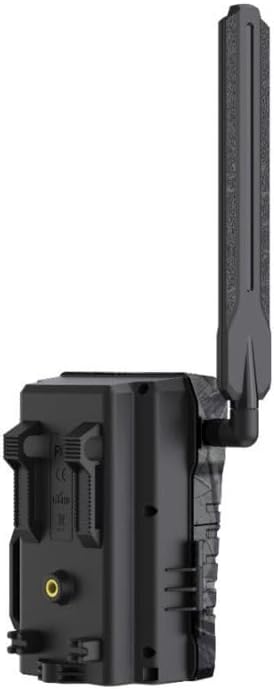
Figura 3: lateral view of the camera, highlighting the antenna for cellular connectivity.
5. App Download and Initial Connection
Download the official HIKMICRO app on your smartphone (compatible with iOS). Follow the in-app instructions to pair your camera. This typically involves scanning a QR code on the camera or entering its serial number. Once connected, you can configure camera settings and monitor its status.
Instruccions de funcionament
1. Encès / apagat
Locate the power switch on the camera. Slide it to the 'ON' position to power on the device. To power off, slide the switch to 'OFF'.
2. Configuring Settings via App
Use the HIKMICRO app to customize your camera's operation. You can set:
- Image and Video Resolution: Select desired quality up to 10MP for images and 1080P for videos.
- Transmission Schedule: Choose between real-time transmission or scheduled intervals for sending photos and videos to your phone via 4G.
- Sensibilitat de detecció: Adjust the motion sensor sensitivity to suit your environment.
- Modes de funcionament: Set the camera to capture photos, videos, or both upon motion detection.
3. Monitoring Camera Status
The app provides real-time information about your camera's status, including:
- Nivell de bateria
- 4G network signal strength
- Temperatura ambient
- Capacitat restant de la targeta de memòria
- Data plan usage
- Localització GPS
4. Viewing capturat media
Photos and videos transmitted to your phone can be viewed and managed within the HIKMICRO app. You can browse media by time and category. Media stored on the SD card can be accessed by removing the card and inserting it into a compatible reader.
5. Visió diürna i nocturna
During daylight hours, the camera captures vivid color images and videos. At night, the integrated 940nm invisible infrared LEDs enable the camera to capture clear black and white images and videos without disturbing wildlife.
Manteniment
- Substitució de la bateria: Regularly check the battery level via the app. Replace all batteries when they are low to ensure continuous operation.
- Gestió de la targeta SD: Periodically check the SD card capacity. Transfer important files to a computer and format the SD card to maintain optimal performance and free up space.
- Neteja: Gently clean the camera lens and housing with a soft, dry cloth. Avoid abrasive materials or harsh chemicals. Ensure the camera is powered off before cleaning.
- Protecció del medi ambient: While the camera is IP66 waterproof, prolonged exposure to extreme weather conditions (e.g., heavy storms, extreme temperatures) should be minimized if possible to extend its lifespan.
Resolució de problemes
| Problema | Causa possible | Solució |
|---|---|---|
| La càmera no s'encén. | Piles baixes o esgotades; instal·lació incorrecta de la bateria. | Canvieu les piles per unes de noves, assegurant-vos de la polaritat correcta. Comproveu si el compartiment de les piles està corrosiu. |
| No images/videos captured. | SD card full or faulty; incorrect settings; motion sensor obstructed or sensitivity too low. | Check SD card capacity and format if necessary. Verify camera settings via the app. Clear any obstructions from the sensor and increase sensitivity. |
| Images/videos not sending to app (4G connectivity issues). | Weak 4G signal; inactive SIM card; expired data plan; app configuration error. | Check camera's location for better signal reception. Verify SIM card activation and data plan status with your provider. Reconfigure app settings for transmission. Restart camera and app. |
| Mala qualitat d'imatge/vídeo. | Dirty lens; low light conditions (night vision limitations); incorrect resolution settings. | Clean the camera lens. Ensure appropriate resolution settings are selected in the app. Night vision captures in black and white, which is normal. |
| App cannot connect to camera. | Camera not powered on; Bluetooth/Wi-Fi disabled on phone; camera out of range; app malfunction. | Ensure camera is on. Enable Bluetooth/Wi-Fi on your phone. Bring phone closer to camera. Restart app and camera. Re-pair the camera if necessary. |
Especificacions tècniques
| Característica | Detall |
|---|---|
| Nom del model | HIKMICRO M15 |
| Resolució d'imatge | Fins a 10 MP |
| Resolució de vídeo | 1080p (with audio) |
| Velocitat de desencadenament | 0.5 segons |
| IR LED | 12 x 940nm Invisible IR LEDs |
| Gamma de visió nocturna | 25 metres |
| Interval de detecció | 25 meters (45-degree angle) |
| Camp de View | 82 graus |
| Connectivitat | 4G Cellular, Wi-Fi |
| Emmagatzematge | SD card, up to 64 GB |
| Font d'alimentació | 12 AA Batteries (12V DC, 9W) |
| Mètode de control | Smartphone App (iOS compatible) |
| Resistència a l'aigua | IP66 (impermeable) |
| Dimensions | 8.7 x 11.2 x 14.3 cm |
| Material | Metall |
| Ús recomanat | Hunting, Monitoring, Ornithology, Observation, Outdoor, Surveillance |
Informació de la garantia
The HIKMICRO M15 Trail Camera comes with a 2 any de garantia from the date of purchase. This warranty covers manufacturing defects and malfunctions under normal use. Please retain your proof of purchase for warranty claims. The warranty does not cover damage caused by misuse, accidents, unauthorized modifications, or improper maintenance.
Atenció al client
For further assistance, technical support, or warranty inquiries, please visit the official HIKMICRO website or contact their customer service department. Refer to the contact information provided on the HIKMICRO website or in the packaging for the most up-to-date support channels.
HIKMICRO Official Weblloc: www.hikmicrotech.com