
Della 048-OPAC-6H
Della 10000 BTU Portable Air Conditioner User Manual
Model: 048-OPAC-6H | Brand: Della
1. Informació important de seguretat
Please read this manual carefully before operating your portable air conditioner. Keep this manual for future reference. Always follow basic safety precautions to reduce the risk of fire, electric shock, or injury.
- Assegureu-vos que la unitat estigui col·locada sobre una superfície plana i estable per evitar que es bolqui.
- No feu servir la unitat amb un cable o un endoll danyats.
- No introduïu els dits ni objectes a l'entrada o sortida d'aire.
- Mantingueu la unitat allunyada de materials inflamables i flames obertes.
- Desendolleu sempre la unitat abans de netejar-la o fer qualsevol manteniment.
- Aquest aparell no està pensat per ser utilitzat per persones (inclosos nens) amb capacitats físiques, sensorials o mentals reduïdes, o amb manca d'experiència i coneixements, tret que hagin rebut la supervisió o instruccions sobre l'ús de l'aparell per una persona responsable de la seva seguretat.
2. Producte acabatview
The Della 10000 BTU Portable Air Conditioner is a versatile unit designed to provide cooling, heating, dehumidification, and fan functions for spaces up to 450 sq. ft. It features smart WiFi connectivity for convenient control via a mobile app, a remote control, and an intuitive soft-touch control panel.

Image: Della Portable Air Conditioner unit, remote control, and smartphone displaying the control app.
Key components include the main unit with integrated handle, exhaust hose, window installation kit, and remote control.

Image: Diagram showing the dimensions of the portable air conditioner: 12.2 inches (width) x 12.2 inches (depth) x 27.6 inches (height).
3. Configuració
3.1 Desembalatge
Carefully remove the unit and all accessories from the packaging. Retain the original packaging for future storage or transport. Allow the unit to stand upright for at least 24 hours before initial use to allow the refrigerant to settle.
3.2 Col·locació
Place the air conditioner on a firm, level surface in a location that allows for proper air circulation. Ensure there is at least 20 inches (50 cm) of space from walls or other objects to allow for adequate airflow around the unit.
3.3 Instal·lació del kit de finestra
The included window kit is designed for easy installation in both horizontal and vertical sliding windows. No drilling is required.

Image: Diagrams illustrating the installation of the window kit in both horizontal and vertical sliding windows, showing compatibility with window openings from 25.5 to 64.1 inches.
- Assemble the window slider kit by sliding the adjustable panels together to fit your window opening. The kit is compatible with window sizes from 25.5 to 64.1 inches.
- Secure the panels with the provided screws.
- Open the window and place the assembled window kit into the window frame. Extend the panels to fit snugly and close the window against the kit to secure it.
- Ensure the window kit is sealed properly to prevent air leakage. Use foam seals if necessary.
3.4 Connexió de la mànega d'escapament
- Attach the exhaust hose connector to one end of the exhaust hose.
- Connecteu l'adaptador del kit de finestra a l'altre extrem de la mànega d'escapament.
- Insert the exhaust hose connector into the exhaust outlet on the back of the air conditioner unit.
- Insert the window kit adapter into the opening on the window slider kit.
- Assegureu-vos que totes les connexions estiguin ben fixades per evitar que l'aire calent torni a entrar a l'habitació.
3.5 Connexió d'alimentació
Plug the power cord into a grounded 115V/60Hz electrical outlet. Do not use extension cords or power strips.
4. Instruccions de funcionament
4.1 Tauler de control
The unit features an intuitive soft-touch control panel on the top of the unit.
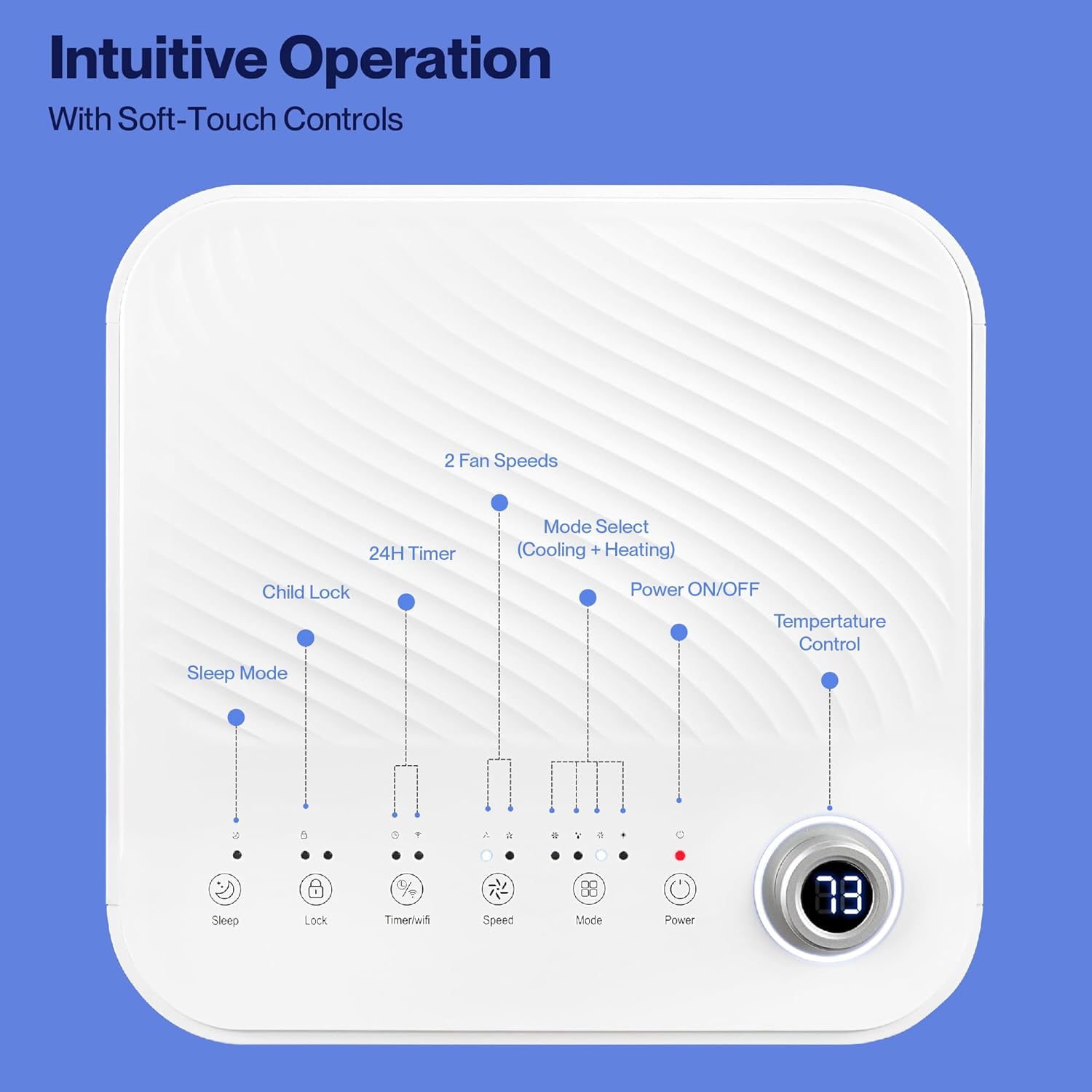
Image: Detailed diagram of the control panel with labels for each button: Sleep, Child Lock, Timer/WiFi, Fan Speed, Mode Select (Cooling + Heating), Power ON/OFF, and Temperature Control with digital display.
- Encès/apagat: Premeu per encendre o apagar la unitat.
- Selecció de mode: Cycle through Cooling, Heating, Dehumidification, Ventilation (Fan), and Sleep modes.
- Control de temperatura: Use the up/down arrows to adjust the desired temperature.
- Velocitat del ventilador: Select between 2 fan speeds (Low, High).
- Temporitzador: Configureu un temporitzador de 24 hores per al funcionament automàtic d'encesa/apagada.
- Bloqueig per a nens: Activates or deactivates the child lock function.
- Mode de repòs: Activates sleep mode for quieter operation and gradual temperature adjustment.
4.2 Control remot
The unit comes with a remote control for convenient operation from a distance. All functions available on the control panel can be accessed via the remote.
4.3 WiFi/Smart App Control
Control your Della Portable Air Conditioner from anywhere using the free DELLA+ app on your smartphone. The unit is compatible with Google Assistant and Amazon Alexa for voice control.

Image: A person relaxing on a couch, using a smartphone to control the air conditioner, with text indicating compatibility with Google Assistant and Amazon Alexa.
- Download the DELLA+ app from your smartphone's app store.
- Segueix les instruccions de l'aplicació per connectar l'aire condicionat a la xarxa Wi-Fi de casa.
- Once connected, you can control modes, temperature, fan speed, and set schedules remotely.
The app also supports Smart Geo Location, allowing the unit to automatically turn on or off based on your proximity to home.

Image: A smartphone screen showing a map with a car icon and a notification indicating the AC unit automatically turned on due to Smart Geo Location.
5. Manteniment
Regular maintenance ensures optimal performance and extends the lifespan of your unit. Always unplug the unit before cleaning.
5.1 Neteja del filtre d'aire
El filtre d'aire s'ha de netejar cada dues setmanes o amb més freqüència, depenent de l'ús i la qualitat de l'aire.
- Localitzeu el panell del filtre d'aire (normalment a la part posterior o lateral de la unitat).
- Traieu el filtre.
- Renteu el filtre amb aigua tèbia i sabó. Esbandiu-lo bé i deixeu-lo assecar completament a l'aire abans de tornar-lo a inserir.
5.2 Escorregut d'aigua
The unit has a self-evaporating system, but in high humidity conditions, water may accumulate. The "Water-full indicator" will illuminate when the water tank needs draining.
- Place a shallow pan or tray under the drain port (located at the bottom rear of the unit).
- Traieu el tap de drenatge.
- Allow all accumulated water to drain out.
- Substituïu el tap de drenatge de manera segura.
5.3 Emmagatzematge
Si emmagatzema la unitat durant un període prolongat:
- Escorre tota l'aigua acumulada.
- Netegeu el filtre d'aire.
- Feu funcionar la unitat en mode només de ventilador durant unes hores per assecar l'interior.
- Desendolla el cable d'alimentació i enrotlla'l amb cura.
- Guardeu la unitat en un lloc fresc i sec, preferiblement en el seu embalatge original.
6. Solució De Problemes
Consulteu aquesta secció per conèixer els problemes comuns i les seves solucions.
| Problema | Causa possible | Solució |
|---|---|---|
| La unitat no s'encén | No power; Power cord unplugged; Circuit breaker tripped; Water tank full | Check power outlet; Plug in power cord; Reset circuit breaker; Drain water tank |
| La unitat no refreda eficaçment | Air filter dirty; Exhaust hose not properly installed; Room too large; Doors/windows open; Temperature setting too high | Clean air filter; Ensure exhaust hose is sealed; Close doors/windows; Lower temperature setting |
| La unitat és sorollosa | Unit not on level surface; Air filter dirty; Obstruction in fan | Place unit on level surface; Clean air filter; Check for obstructions |
| Fuga d'aigua | Drain plug loose or missing; Unit tilted | Secure drain plug; Ensure unit is level |
| Problemes de connexió Wi-Fi | Incorrect WiFi password; Unit too far from router; Router issues | Verify password; Move unit closer to router; Restart router |
Si el problema persisteix després de provar aquestes solucions, poseu-vos en contacte amb l'atenció al client.
7. Especificacions
| Característica | Especificació |
|---|---|
| Número de model | 048-OPAC-6H |
| Capacitat de refrigeració | 10000 BTU |
| Àrea de cobertura | Fins a 450 metres quadrats. Ft. |
| Funcions | Cooling, Heating, Dehumidifier, Fan, Sleep Mode |
| Voltage | 115 Volts |
| Nivell de soroll | 54 dB |
| Refrigerant | R 410A |
| Dimensions (L x A x A) | 12.2 x 12.2 x 27.6 polzades |
| Material | Plàstic ABS |
| Característiques especials | Portable, Dehumidifier, WiFi Enabled, Remote Control, Built-in Handle, 24-hour timer, Child Lock |
8. Garantia i atenció al client
For warranty information or technical assistance, please refer to the warranty card included with your product or visit the official Della website. You may also contact Della customer support directly for further assistance with troubleshooting or parts replacement.
Ask a question about this manual
Ask about setup, troubleshooting, compatibility, parts, safety, or missing instructions. Manuals+ will review the question and use this page’s manual context to help answer it.