
1. Introducció
This manual provides detailed instructions for the installation, operation, and maintenance of the Supermicro AOC-SLG2-2TM2 RAID Adapter. The AOC-SLG2-2TM2 is a SATA M.2 carrier card designed to provide hardware RAID1 protection for two M.2 SATA3 SSDs, typically used for operating system support. This solution enhances OS reliability and performance in a space-saving form factor.
2. Característiques clau
- RAID1 SATA M.2 Carrier Card: Provides hardware RAID1 (mirroring) for data redundancy.
- Dual M.2 SATA3 Support: Equipped with two M-key connectors for two M.2 SATA3 SSDs.
- Adjustable Standoffs: Supports M.2 SSD lengths of 80mm and 42mm.
- Onboard LED Indicators: Features activity and status LEDs for each M.2 SSD.
- Àmplia compatibilitat amb SO: Supports Windows, Linux, and VMWare operating systems.
- Temperatura de funcionament: Designed to operate within 0°C to 55°C.
3. Configuració i instal·lació
Before proceeding with installation, ensure your system is powered off and disconnected from the power source. Wear an anti-static wrist strap to prevent electrostatic discharge (ESD) damage.
3.1 Contingut del paquet
Verifiqueu que tots els components siguin presents:
- Supermicro AOC-SLG2-2TM2 RAID Adapter
- M3 x 0.5mm pitch, 4.5mm length screws for M.2 SSDs
- Documentació (aquest manual)
3.2 Installing M.2 SSDs on the Adapter
- Locate the two M-key connectors on the AOC-SLG2-2TM2 adapter.
- Gently insert your M.2 SATA SSDs into the M-key connectors at a 30-degree angle. Ensure the notch on the SSD aligns with the key in the connector.
- Press the SSD down until it is parallel with the adapter board.
- Secure the M.2 SSDs using the provided M3 x 0.5mm pitch, 4.5mm length screws into the adjustable standoffs. Adjust the standoff position if necessary to match your SSD length (80mm or 42mm).
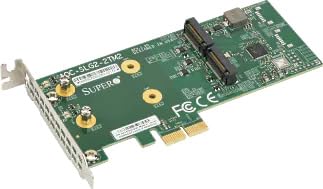
Figure 1: Supermicro AOC-SLG2-2TM2 RAID Adapter. This image shows the adapter board, highlighting the M.2 slots where SSDs are to be installed and secured with screws.
3.3 Installing the Adapter into a System
The AOC-SLG2-2TM2 is a carrier card, implying it connects to a motherboard via a standard interface, likely PCIe. Given it's for M.2 SATA SSDs and has a RAID controller, it typically connects to a PCIe slot for power and data. The specifications also list "Hardware Interface: SAS", which is common for PCIe-based storage controllers.
- Open your computer case and locate an available PCIe slot (typically x4 or x8, consult your motherboard manual for compatibility).
- Remove the corresponding expansion slot cover from the computer case.
- Align the AOC-SLG2-2TM2 adapter with the chosen PCIe slot and press down firmly until it is securely seated.
- Secure the adapter to the computer case with the retaining screw or clip.
- Tanqueu la carcassa de l'ordinador i torneu a connectar la font d'alimentació.
4. Funcionament
4.1 Initial Power On and BIOS/UEFI Configuration
- Power on your system. During boot, access your system's BIOS/UEFI setup (usually by pressing DEL, F2, or F10).
- Locate the storage or RAID configuration section. The AOC-SLG2-2TM2 should be detected as a RAID controller.
- Configure the RAID1 array using the controller's utility. Follow the on-screen instructions to create a mirrored volume from your two M.2 SATA SSDs.
- Save changes and exit BIOS/UEFI.
4.2 Instal·lació del sistema operatiu
Once the RAID1 array is configured, you can proceed with installing your operating system (Windows, Linux, or VMWare) onto the newly created RAID volume. Ensure you have the necessary drivers for the Supermicro RAID controller, which may need to be loaded during OS installation, especially for older operating systems.
4.3 Indicadors LED
The adapter features onboard activity and status LEDs for each M.2 SSD. Refer to the specific LED patterns for status indications (e.g., activity, error, rebuild status). Consult the full Supermicro documentation for detailed LED behavior.
5. Manteniment
- Eliminació de pols: Periodically inspect your computer's interior for dust accumulation. Use compressed air to gently clean the adapter and surrounding components to ensure proper airflow and prevent overheating.
- Actualitzacions de firmware: Comproveu el Supermicro website periodically for firmware updates for the AOC-SLG2-2TM2. Firmware updates can improve performance, stability, and add new features. Follow Supermicro's instructions carefully when performing firmware updates.
- Còpia de seguretat de dades: While RAID1 provides redundancy against a single drive failure, it is not a substitute for regular data backups. Always back up critical data to an external storage device.
- Condicions ambientals: Ensure the operating environment maintains temperatures within the specified range of 0°C to 55°C to prevent component degradation.
6. Solució De Problemes
| Problema | Causa possible | Solució |
|---|---|---|
| Adapter not detected by system. | Incorrectly seated in PCIe slot; incompatible PCIe slot; power issue. | Ensure the adapter is fully seated. Try a different PCIe slot. Verify system power supply is adequate. |
| M.2 SSDs not detected or RAID array fails to build. | M.2 SSDs not properly installed; incompatible M.2 SSDs (e.g., NVMe instead of SATA); faulty SSD. | Reseat M.2 SSDs. Verify SSDs are SATA M.2 type. Test SSDs individually if possible. Check BIOS/UEFI settings. |
| Operating system fails to boot from RAID array. | Missing RAID drivers during OS installation; incorrect boot order in BIOS/UEFI. | Ensure RAID drivers are loaded during OS installation. Set the RAID volume as the primary boot device in BIOS/UEFI. |
| Poor performance or intermittent issues. | Outdated firmware; overheating; driver conflicts. | Update adapter firmware. Ensure adequate system cooling. Update or reinstall RAID drivers. |
7. Especificacions
- Model: AOC-SLG2-2TM2
- Marca: Supermicro
- Interfície de maquinari: SAS (as per product specifications, for M.2 SATA SSDs)
- Connectors M.2: 2x M-key for SATA3 M.2 SSDs
- Supported M.2 Lengths: 80 mm, 42 mm
- Suport RAID: Hardware RAID1 (Mirroring)
- Suport del sistema operatiu: Windows, Linux, VMWare
- Temperatura de funcionament: 0 °C a 55 °C
- UPC/GTIN: 672042175383
8. Informació de la garantia
For detailed warranty information regarding the Supermicro AOC-SLG2-2TM2 RAID Adapter, please refer to the official Supermicro weblloc web o poseu-vos en contacte amb el vostre punt de compra. Els termes i condicions de la garantia poden variar segons la regió i el distribuïdor.
9. Suport tècnic
If you encounter issues that cannot be resolved using this manual, please visit the official Supermicro support website for drivers, firmware, FAQs, and contact information for technical assistance. Always provide your product model number (AOC-SLG2-2TM2) when seeking support.
Supermicro Official Weblloc: www.supermicro.com