
1. Introducció
The HOTONE Ampero Mini MP-50 is a compact multi-effects processor designed for guitar and bass. It integrates advanced amp modeling, IR cabinet simulation, and a wide range of effects into a portable unit. Featuring a responsive touchscreen, versatile I/O options, and USB audio interface capabilities, the Ampero Mini provides a comprehensive solution for musicians seeking high-quality tone and flexibility.

Figure 1: HOTONE Ampero Mini MP-50 Multi Effects Processor with included footswitch toppers.
2. Primers passos
2.1 Contingut del paquet
- HOTONE Ampero Mini MP-50 Unit
- Power Supply (9V DC, center negative)
- 10 PCS Additional Footswitch Toppers
- Cable USB
2.2 Dispositiu acabatview
Familiarize yourself with the main components and connections of the Ampero Mini.

Figura 2: Frontal view de la Ampero Mini with labeled components.
- Pantalla de visualització: 4-inch 800 x 480 color dynamic display touchscreen for navigation and parameter editing.
- Pedals: Two assignable footswitches with Halo LEDs for changing patches, activating/deactivating effects, or setting tap tempo.
- EXP/CTRL (FS 3/4): 1/4" TRS input for connecting an external expression pedal or footswitch controller.
- ENTRADA: 1/4" Mono input connection for electric or acoustic instruments.
- SORTIDA: Unbalanced 1/4" TRS stereo output connection for amplifiers or other equipment. A Y cable is required for stereo output (Tip=Left, Sleeve=Right).
- TELÈFONS: Sortida estèreo de 1/8" per connectar auriculars.
- AUX IN: 1/8" stereo input for connecting external devices (e.g., phone, MP3 player) for practice.
- Pom de volum: Ajusta el volum de sortida general.
- USB: USB 2.0 Type-C jack for connecting to a computer for software editing and USB audio.
- Connexió d'alimentació: Input for the 9V DC center negative power adapter.

Figure 3: Rear panel connections of the Ampero Mini.
3. Configuració
3.1 Connexió d'alimentació
Connect the provided 9V DC center negative power adapter to the 'DC 9V' input on the rear panel. Ensure the power supply meets the specified requirements (9V DC, 500mA Max) to prevent damage.
3.2 Instrument Connection
Connect your guitar or bass to the 1/4" TS 'INPUT' jack on the rear panel.
3.3 Connexió de sortida
- A un Amplifier/PA System: Connect the 1/4" TRS 'OUTPUT' jack to your amplifier or PA system. For stereo output, use a Y-cable to split the signal into left and right channels.
- Auriculars: Connect headphones to the 1/8" stereo 'PHONES' output for silent practice.
3.4 Entrada auxiliar
Connect an external audio source (e.g., smartphone, MP3 player) to the 1/8" stereo 'AUX IN' jack to play along with backing tracks.
3.5 Connexió USB
Connecteu el Ampero Mini to a computer or compatible mobile device using the USB 2.0 Type-C port. This enables USB audio streaming and access to the software editor for patch management and sound editing.

Figure 4: USB connectivity for mobile and computer.
4. Funcionament
4.1 Interfície d'usuari i navegació
El Ampero Mini features a 4-inch color dynamic display touchscreen for intuitive control. Tap on screen elements to select effects, edit parameters, and navigate menus. The footswitches allow for quick patch changes, effect toggling, and tap tempo functions.
4.2 Effects and Patches
The unit offers 199 effects and supports up to 9 simultaneous effect modules. It includes 198 patches (99 user-editable, 99 factory presets). The flexible signal chain allows for customization of effect order.

Figure 5: Stompbox Library interface on the Ampero Mini.
4.3 Looper i màquina de tambor
El Ampero Mini includes a built-in looper with up to 100 seconds of mono recording time (50 seconds stereo). It also features an internal drum machine with 100 rhythm patterns for practice and creative use.
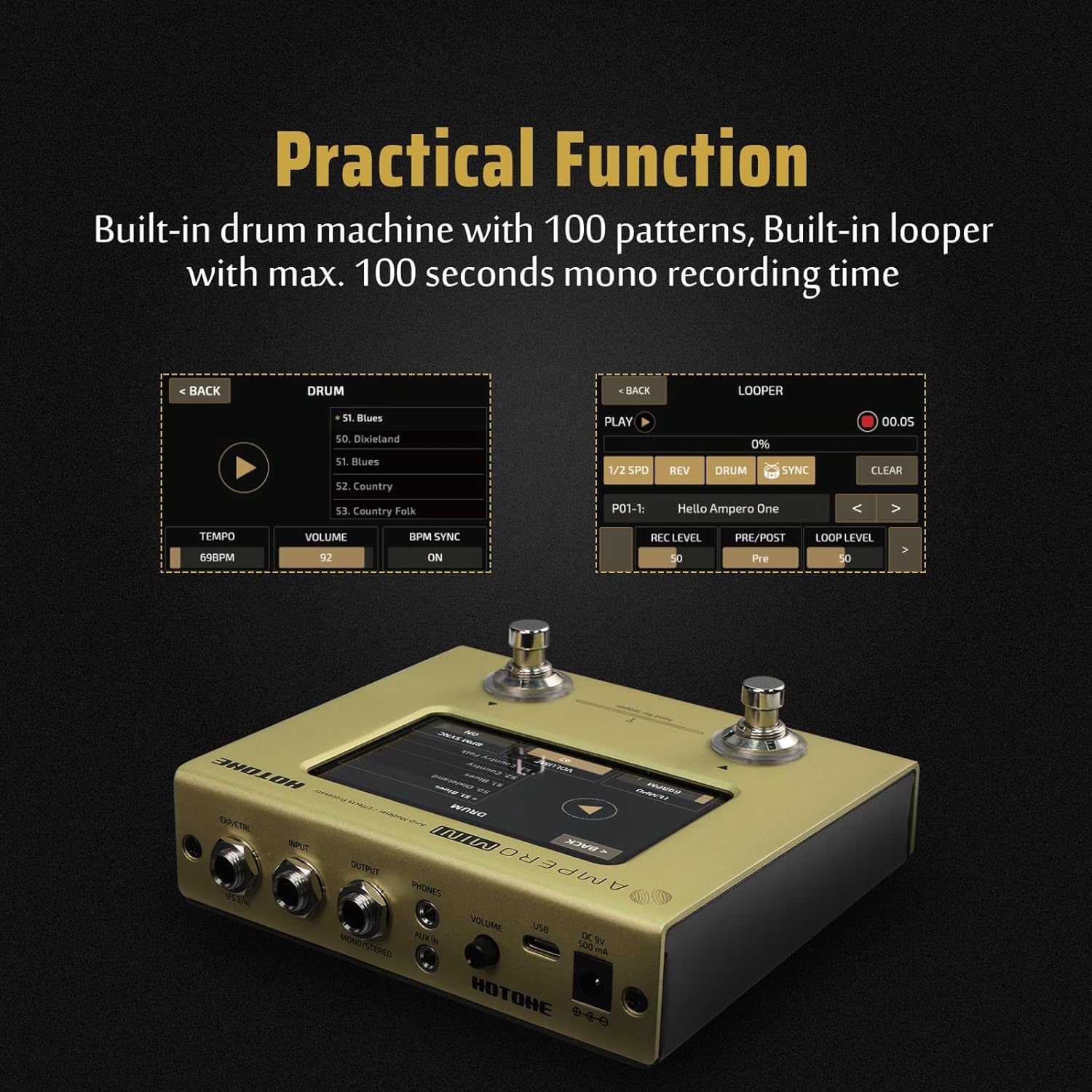
Figure 6: Drum Machine and Looper functions.
4.4 Software Editor
A free software editor is available for Mac and Windows computers. This software provides a visual interface for detailed sound editing, patch management, and firmware updates.
5. Manteniment
Per garantir la longevitat i el rendiment òptim del vostre Ampero Mini, follow these maintenance guidelines:
- Neteja: Feu servir un drap suau i sec per netejar la unitat. Eviteu productes de neteja o dissolvents abrasius.
- Emmagatzematge: Store the unit in a dry environment, away from direct sunlight, extreme temperatures, and high humidity.
- Manipulació: Eviteu deixar caure la unitat o sotmetre-la a impactes forts.
6. Solució De Problemes
Si teniu problemes amb el vostre Ampero Mini, refer to the following common troubleshooting steps:
- Sense energia: Ensure the power adapter is correctly connected and the power outlet is functional. Verify that the correct 9V DC center negative adapter is used.
- Sense sortida de so: Check all instrument and output cable connections. Verify the master volume knob is turned up. Ensure that effects or patches are not muted or bypassed.
- Tuner Sensitivity: The built-in tuner may require careful plucking and sustained notes for accurate detection. For highly precise tuning, an external tuner may be preferred.
- Sound Interruption During Patch Change: It is a characteristic of the device that sound may briefly cut out when switching between patches. This is normal operation and not a defect.
- Problemes de connexió USB: If the unit is not recognized by your computer, ensure the necessary drivers are installed. These can typically be found on the HOTONE official weblloc.
7. Especificacions
| Característica | Especificació |
|---|---|
| Digital Audio Signal Processing | 24 bits de profunditat, 44.1 kHz sampli taxa |
| Interval dinàmic | Max. 112dB (digital to analog) |
| Efectes | 199 |
| Mòduls d'efectes | Total of 9 simultaneous |
| Pedaços | 198 (99 user patches, 99 factory patches) |
| Looper Time | Mono 100 seconds, Stereo 50 seconds |
| Internal Drum Machine | 100 Patrons rítmics |
| Entrades | 1/4" TS Instrument jack, 1/8" Stereo Aux In, 1/4" TRS Expression Pedal input |
| Sortides | 1/4" TRS Unbalanced Stereo output, 1/8" Stereo headphones output |
| Input Impedance (Instrument) | 4.7 MΩ |
| Input Impedance (Aux In) | 10kΩ |
| Output Impedance (Output) | 1kΩ |
| Output Impedance (Headphones) | 22Ω |
| Pantalla | 4" 800 x 480 Color Dynamic Display Touch Screen |
| Port USB | USB 2.0 Type-C, supports USB Audio 2.0 |
| Impulse Response/IR processing | Admet mono WAV de 24 bits/44.1 kHz files, 1024 points |
| Requisits d'alimentació | 9V DC Center Negative |
| Consum actual | 500 mA màx |
| Dimensions | 134 mm (W) × 120 mm (D) × 49 mm (H) |
| Pes | 529 g (1.17 lliures) |
| Tipus de material | Alumini |
8. Garantia i Suport
For warranty information and technical support, please refer to the official HOTONE website or contact your authorized dealer. Additional protection plans may be available for purchase separately to extend coverage beyond the standard manufacturer's warranty.