
FERMAX 90b61eff-c290-484c-aba5-73e26c52e3da
FERMAX Duox Plus Veo 4.3" Monitor User Manual
Model: 90b61eff-c290-484c-aba5-73e26c52e3da
Introducció
Welcome to the user manual for your new FERMAX Duox Plus Veo 4.3" Monitor. This manual provides essential information for the proper installation, operation, and maintenance of your device. Please read this manual thoroughly before using the product to ensure safe and efficient operation.
Informació important de seguretat
- Seguretat elèctrica: Ensure all electrical connections are made by a qualified professional and comply with local electrical codes. Disconnect power before installation or maintenance.
- Condicions ambientals: Do not expose the monitor to extreme temperatures, humidity, or direct sunlight. Install in a dry, well-ventilated area.
- Manipulació: Handle the monitor with care to avoid damage to the screen or internal components.
- Neteja: Utilitzeu un drap suau i sec per netejar. No utilitzeu netejadors abrasius ni dissolvents.
- Eliminació: Dispose of the product and its components according to local electronic waste regulations.
Contingut del paquet
Si us plau, verifiqueu que tots els elements que s'enumeren a continuació estiguin inclosos al vostre paquet:
- FERMAX Duox Plus Veo 4.3" Monitor Unit
- Suport de muntatge
- Connection Cables (if applicable)
- Cargols i taps de paret
- Manual d'usuari (aquest document)
Característiques del producte
The FERMAX Duox Plus Veo 4.3" Monitor offers advanced features for your intercom system:
- 4.3-inch color display for clear video communication.
- Comunicació àudio mans lliures.
- Intuitive button interface for call answer, door release, and additional functions.
- Sleek, compact design suitable for modern interiors.
- Compatible with Duox Plus digital systems.
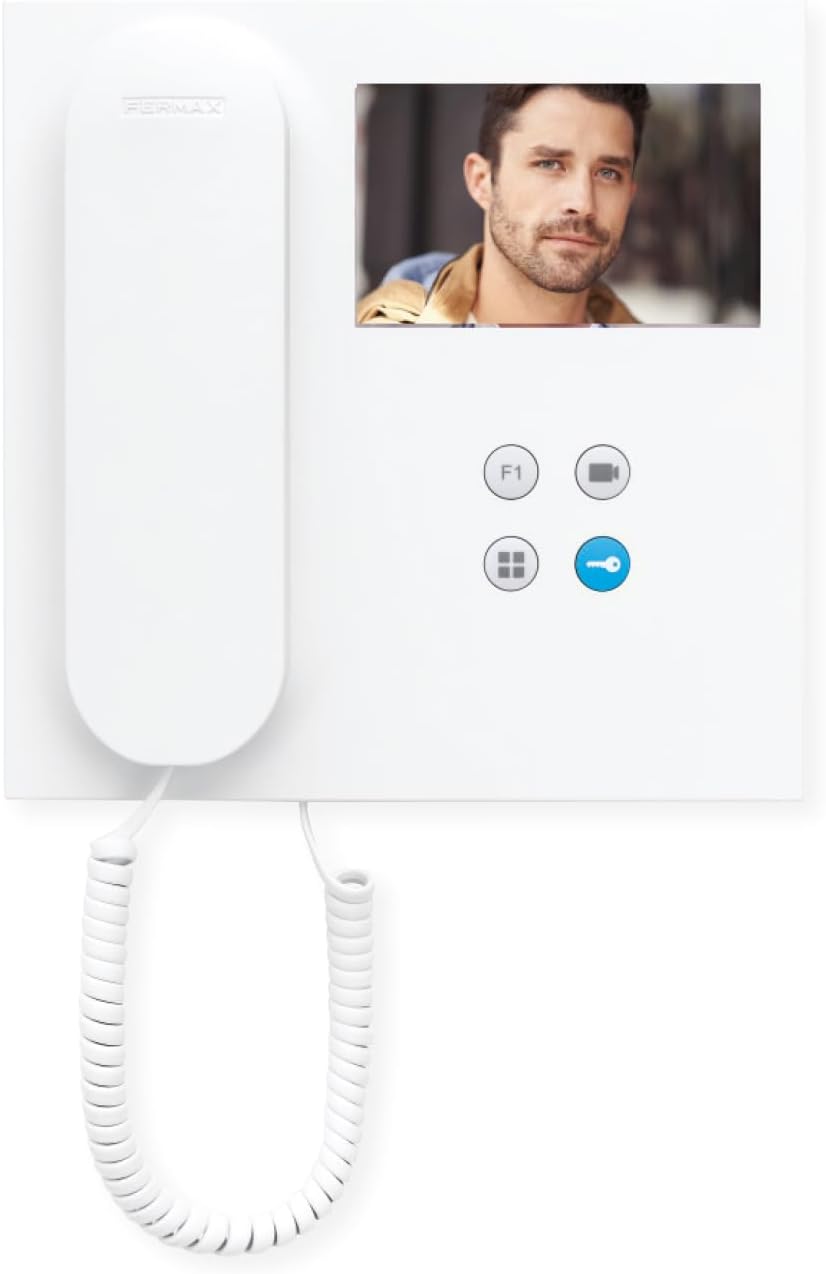
Imatge: Frontal view of the FERMAX Duox Plus Veo 4.3" Monitor, showing the display, handset, and control buttons.
Configuració i instal·lació
1. Muntatge del monitor
- Tria la ubicació: Select a suitable indoor location, away from direct heat sources or moisture.
- Marca els punts de perforació: Feu servir el suport de muntatge com a plantilla per marcar els punts de perforació a la paret.
- Forats: Drill holes at the marked points and insert wall plugs.
- Suport segur: Fixeu el suport de muntatge a la paret amb els cargols proporcionats.
2. Connexions de cablejat
Avís: Ensure power is disconnected before making any electrical connections. Refer to your system's wiring diagram for specific connections.
- Connect the Duox Plus bus wires (data and power) to the designated terminals on the monitor.
- Connect any additional wires for auxiliary functions (e.g., second door release, panic button) as per your system's requirements.
- Assegureu-vos que totes les connexions estiguin segures i aïllades correctament.
3. Connectar el monitor
- Carefully align the monitor with the mounting bracket.
- Slide the monitor onto the bracket until it clicks securely into place.
- Restaura l'alimentació al sistema.
Instruccions de funcionament
Recepció d'una trucada
- When a visitor calls from the outdoor panel, the monitor will ring and display the visitor's image.
- Per respondre la trucada, premeu el botó Botó de resposta (typically indicated by a phone icon).
- Per finalitzar la trucada, premeu el botó Botó de finalització de trucada (often the same button or a distinct hang-up icon).
Obrint la Porta
- During a call, or when monitoring the outdoor panel, press the Botó d'obertura de la porta (typically indicated by a key icon) to open the main entrance door.
Monitoring the Outdoor Panel
- A view the outdoor panel camera without an incoming call, press the Botó Monitor (often indicated by a camera icon). The display will show the live feed.
Ajust de la configuració
- Volum: Use the volume controls (if present, or via menu) to adjust the ringtone and conversation volume.
- Brillantor/Contrast: Access the monitor's menu (refer to specific button layout) to adjust display settings.
Manteniment
- Neteja: Feu servir un drap suau i sense borrissol per netejar suaument la pantalla iasing. Do not use liquid cleaners, aerosols, or abrasive materials.
- Inspecció: Periodically check all cables and connections for any signs of wear or damage.
- Actualitzacions de programari: Si escau, comproveu el fabricant website for any firmware updates for your Duox Plus system.
Resolució de problemes
| Problema | Causa possible | Solució |
|---|---|---|
| Cap imatge a la pantalla. | No power; loose connection; camera issue. | Check power supply. Ensure all cables are securely connected. Verify outdoor panel camera is functioning. |
| No audio during call. | Volume too low; faulty connection; microphone/speaker issue. | Increase volume. Check audio cable connections. Contact support if issue persists. |
| L'obertura de la porta no funciona. | Incorrect wiring; faulty lock mechanism; system error. | Verify wiring to the door strike. Test the lock mechanism independently. Consult system installer. |
| El monitor no sona. | Ringtone volume off; system not registered; faulty outdoor panel button. | Check ringtone volume. Ensure monitor is properly registered to the system. Test outdoor panel button. |
If the problem persists after attempting these solutions, please contact FERMAX technical support or your installer.
Especificacions tècniques
| Característica | Detall |
|---|---|
| Model | 90b61eff-c290-484c-aba5-73e26c52e3da |
| Mida de la pantalla | 4.3 polzades |
| Resolució | 800 x 600 |
| Relació d'aspecte | 4:3 |
| Relació de contrast de la imatge | 2000:1 |
| Superfície de la pantalla | brillant |
| Fabricant | FERMAX |
| Dimensions del paquet | 8.74 x 8.15 x 2.01 polzades |
Garantia i Suport
FERMAX products are designed for durability and reliability. For information regarding warranty terms and conditions, please refer to the warranty card included with your product or visit the official FERMAX weblloc.
For technical support, installation assistance, or service inquiries, please contact your local FERMAX distributor or visit the support section of the FERMAX weblloc:

Image: FERMAX brand logo with the slogan "Connectivity for All".
Ask a question about this manual
Ask about setup, troubleshooting, compatibility, parts, safety, or missing instructions. Manuals+ will review the question and use this page’s manual context to help answer it.