
Hoppstar Hoppstar Expert Yale
Hoppstar Expert Digital Camera User Manual
Model: Hoppstar Expert Yale | Brand: Hoppstar
1. Introducció
Welcome to the user manual for your Hoppstar Expert Digital Camera. This manual provides essential information on how to set up, operate, and maintain your camera, ensuring a fun and creative experience for young photographers. Please read this manual carefully before using the camera and keep it for future reference.
The Hoppstar Expert is designed specifically for children, offering a user-friendly interface, durable construction with interchangeable silicone covers, and a range of exciting features including a selfie camera, video recording, picture frames, photo filters, and face detection.
2. Informació de seguretat
- Aquest producte està pensat per a nens de 3 anys o més. Es recomana la supervisió d'un adult durant l'ús.
- No exposeu la càmera a l'aigua ni a una humitat excessiva.
- Avoid dropping the camera or subjecting it to strong impacts, even with the protective silicone cover.
- Keep small parts, such as memory cards, out of reach of very young children to prevent choking hazards.
- Use only the charging cable provided or a compatible USB charger.
- Do not attempt to disassemble or repair the camera yourself. Contact customer support if issues arise.
3. Contingut del paquet
Marqueu la casella per als elements següents:
- Hoppstar Expert Digital Camera
- Manual d'instruccions
- Cable de càrrega USB
- Lanyard/Strap
- Adaptador USB-C a USB-A
- USB-C to Micro-USB Adapter
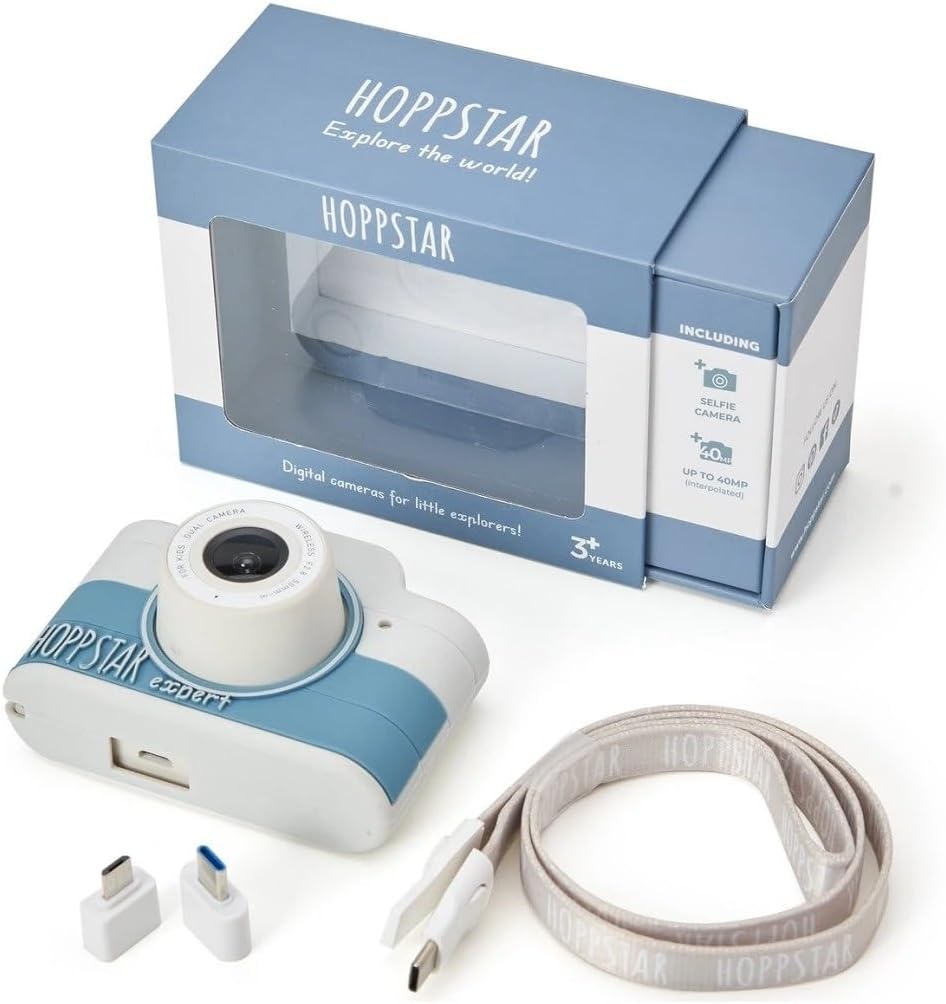
Image: Hoppstar Expert camera shown with its retail packaging, USB charging cable, lanyard, and two USB adapters.
4. Producte acabatview
Davant View

Image: The front of the Hoppstar Expert camera, featuring the main lens, flash, and the 'Hoppstar Expert' branding on the blue and white body.
- Lent principal: For taking standard photos and videos.
- Flash/Light: Proporciona il·luminació en condicions de poca llum.
- Micròfon: Captura àudio durant la gravació de vídeo.
posterior View

Image: The back of the Hoppstar Expert camera, displaying the LCD screen and the control buttons on either side.
- Pantalla LCD: Displays menus, live view, and playback.
- Càmera selfie: Located above the screen for self-portraits.
- Botons de control: Navigation, OK, Menu, and other function buttons.
5. Configuració
5.1 Càrrega de la càmera
Before first use, fully charge the camera's internal battery. Connect the provided USB charging cable to the camera's USB port and to a USB power source (e.g., computer, wall adapter). The charging indicator light will show the charging status and turn off when fully charged.
5.2 Inserció d'una targeta de memòria
The Hoppstar Expert comes with 16 GB of internal storage. If you wish to expand storage, locate the memory card slot (usually on the side or bottom) and insert a compatible microSD card (not included) until it clicks into place. Ensure the camera is powered off before inserting or removing the card.
5.3 Engegada/apagada
Press and hold the Power button (usually located on the top or side) for a few seconds to turn the camera on or off.
6. Instruccions de funcionament
6.1 Controls bàsics
- Botó D'acord: Confirma les seleccions als menús, fa fotos o inicia/atura la gravació de vídeo.
- Botons de navegació: Used to move through menu options (Up, Down, Left, Right).
- Botó de menú: Accesses the camera's settings and feature options.
- Botó de mode: Switches between photo, video, and playback modes.
6.2 Fer fotos
In photo mode, frame your shot using the LCD screen. Press the OK button to capture a photo. The camera supports both front and selfie cameras. To switch between cameras, navigate to the camera settings in the menu or use a dedicated button if available.
6.3 Gravació de vídeos
Switch to video mode. Press the OK button once to start recording and press it again to stop. Videos are saved to the internal memory or inserted memory card.
6.4 Using Creative Features
The Hoppstar Expert includes several creative features:
- Picture Frames: Apply fun borders to your photos. Access this feature through the camera's menu.
- Photo Filters: Change the look and feel of your photos with various color and effect filters.
- Detecció de cares: The camera can automatically detect faces in the frame, assisting with focus.
Explore these options within the camera's menu settings to enhance your photos and videos.
7. Manteniment
- Neteja: Use a soft, dry cloth to clean the camera body and screen. For the lens, use a specialized lens cleaning cloth. Do not use liquid cleaners.
- Funda de silicona: The interchangeable silicone cover can be removed and cleaned with mild soap and water if necessary. Ensure it is completely dry before reattaching.
- Cura de la bateria: To prolong battery life, avoid fully discharging the battery frequently. Charge the camera regularly, even if not in use for extended periods.
- Emmagatzematge: Guardeu la càmera en un lloc fresc i sec, allunyat de la llum solar directa i de temperatures extremes.
8. Solució De Problemes
La càmera no s'encén
- Assegureu-vos que la bateria estigui carregada. Connecteu la càmera a una font d'alimentació i torneu-ho a provar.
- Mantingueu premut el botó d'engegada durant un període més llarg (5-10 segons).
Poor Image/Video Quality
- Assegureu-vos que la lent estigui neta i sense taques ni pols.
- Check lighting conditions. Optimal results are achieved in well-lit environments.
- Ensure the camera is held steady during capture.
Camera Freezes/Unresponsive
- Try resetting the camera by pressing the reset button (if available, often a small pinhole) or by holding the Power button until it turns off and then restarting.
Cannot Save Photos/Videos
- Check if the internal memory or inserted memory card is full. Delete unnecessary files o inseriu una targeta nova.
- Ensure the memory card is properly inserted and not corrupted.
If you encounter issues not listed here or if troubleshooting steps do not resolve the problem, please contact Hoppstar customer support.
9. Especificacions
| Característica | Especificació |
|---|---|
| Nom de marca | Hoppstar |
| Nom del model | Hoppstar Expert Yale |
| Número de model | 76893 |
| Color | Yale |
| Dimensions del paquet | 14.3 x 8.7 x 5.1 cm |
| Velocitat de tir continu | 30 fps |
| Components incorporats | Camera + Instruction Manual |
| Any model | 2023 |
| Color de pel·lícula | Color |
| Tipus de control d'exposició | Automàtic |
| Tipus de persiana | Electrònica |
10. Garantia i Suport
The Hoppstar Expert Digital Camera comes with a standard manufacturer's warranty. Please refer to the warranty information provided with your purchase or visit the official Hoppstar weblloc web per obtenir més informació sobre els termes i condicions de la garantia.
For technical support, product inquiries, or warranty claims, please contact Hoppstar customer service through their official weblloc web o la informació de contacte que es proporciona a la documentació de compra.
Ask a question about this manual
Ask about setup, troubleshooting, compatibility, parts, safety, or missing instructions. Manuals+ will review the question and use this page’s manual context to help answer it.