
1. Introducció
This manual provides detailed instructions for the installation, operation, and maintenance of the Fanvil i16SV Video Intercom. The i16SV is an outdoor-rated SIP intercom system designed for secure entry and communication, featuring HD audio and video capabilities.
Please read this manual thoroughly before using the device to ensure proper functionality and safety.
2. Producte acabatview
2.1 Característiques clau
- Built-in HD camera with infrared night vision (H.264 codec).
- IP65 waterproof and dustproof rating for outdoor use.
- IK10 anti-collision rating with a robust die-cast aluminum frame.
- Anti-tamper alarm system, reporting to a control center if the cover is removed.
- HD voice quality with a built-in 3W speaker and Acoustic Echo Canceller (AEC).
- Supports 2 SIP lines for communication.
- Power over Ethernet (PoE) support for simplified installation.
2.2 Components del dispositiu
The Fanvil i16SV features a durable aluminum casing designed for outdoor environments. Key components include:
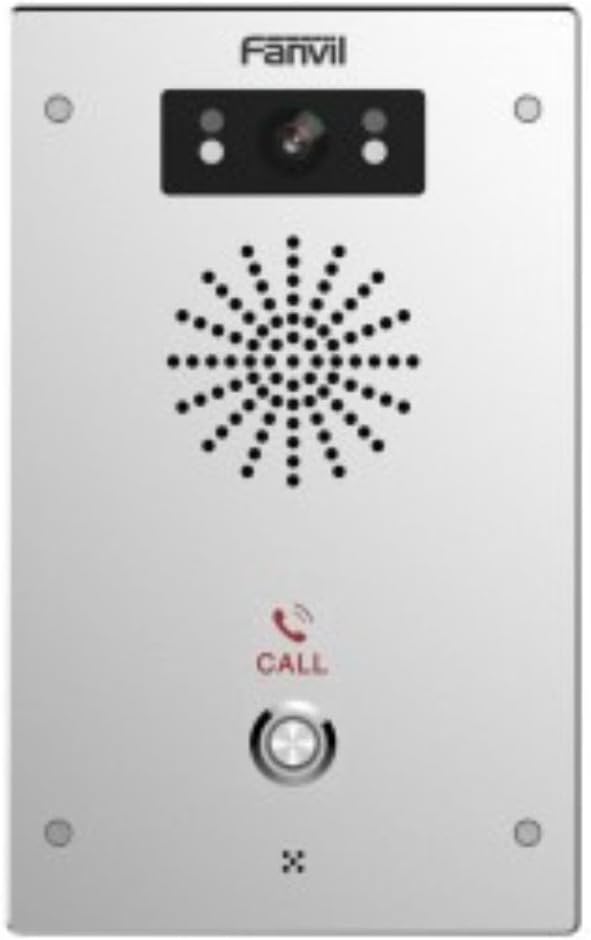
Figura 1: Frontal view of the Fanvil i16SV Video Intercom. The device features a central speaker grille, a camera module with infrared sensors at the top, and a prominent call button with a phone icon below the speaker. The Fanvil logo is visible at the top.
- Mòdul de càmera: Located at the top, includes the 1080p HD camera and infrared sensors for night vision.
- Reixa de l'altaveu: Central perforated area for audio output.
- Botó de trucada: A prominent, illuminated button for initiating calls.
- Micròfon: Integrated for two-way audio communication (not explicitly visible but implied by intercom function).
- Punts de muntatge: Four screw holes, one in each corner, for secure wall mounting.
3. Configuració
3.1 Instal·lació
- Selecció del lloc: Choose an outdoor location for wall mounting that provides clear visibility for the camera and is within reach of network and power connections. Ensure the location is suitable for an IP65/IK10 rated device.
- Muntatge: Securely attach the intercom to a wall using appropriate screws and anchors for the chosen surface. Refer to the included mounting template (if provided) for precise hole placement.
3.2 Wiring and Connectivity
- Alimentació per Ethernet (PoE): Connect a standard Ethernet cable from a PoE-enabled switch or injector to the intercom's Ethernet port. This provides both power and network connectivity.
- Alternative Power (Corded Electric): If PoE is not available, connect a compatible 12V DC power adapter (not included) to the device's power input.
- Connexió de xarxa: The device supports Wi-Fi connectivity. For initial setup or if Wi-Fi is not preferred, use a wired Ethernet connection.
3.3 Configuració inicial
The Fanvil i16SV operates as a VoIP system. Initial configuration typically involves:
- Configuració de la xarxa: Configure IP address, subnet mask, gateway, and DNS settings.
- Registre de compte SIP: Register the intercom with your SIP server (e.g., 3CX, Asterisk, Broadsoft). This involves entering SIP server address, user ID, password, and other SIP parameters.
- Configuració de vídeo i àudio: Adjust camera resolution (1080p/720p), frame rate, and audio volume as needed.
- Call Button Destination: Program the phone number or SIP URI that the call button will dial.
- Access Control Integration: If integrating with an access control system, configure the necessary relays or protocols.
Refer to the detailed administrator guide (available from Fanvil's website) for advanced configuration options.
4. Instruccions de funcionament
4.1 Fer una trucada
- To initiate a call, press the TRUCA button on the front panel of the intercom.
- The intercom will dial the pre-programmed destination (e.g., an indoor station, a phone number, or a softphone client).
- Once the call is answered, two-way audio communication will be established. If the receiving device supports video, the 1080p camera feed will also be transmitted.
4.2 Receiving a Call (Access Control)
When a call is initiated from the intercom, the receiving party can:
- Comunicar: Speak with the visitor via the intercom's HD audio system.
- View Vídeo: If using a video-enabled receiving device, view the live video feed from the intercom's camera.
- Grant Access: If configured, the receiving party can remotely unlock a connected door or gate by dialing a specific DTMF code or using a dedicated button on their device.
4.3 Visió nocturna
The i16SV automatically activates its infrared night vision in low-light conditions, ensuring clear video surveillance and communication even in complete darkness.
5. Manteniment
- Neteja: Regularly clean the exterior of the intercom with a soft, damp cloth. Do not use abrasive cleaners or solvents. Ensure the camera lens and speaker grille are free from dust and debris.
- Actualitzacions de firmware: Periodically check the Fanvil weblloc web per a actualitzacions de firmware. Mantenir el firmware actualitzat garanteix un rendiment i una seguretat òptims.
- Comprovació de la connexió: Periodically inspect all cable connections (Ethernet, power) for wear or damage, especially in outdoor environments.
- Anti-Tamper alarma: Ensure the anti-tamper alarm is functional and configured to report to the appropriate control center.
6. Solució De Problemes
| Problema | Causa possible | Solució |
|---|---|---|
| Sense energia al dispositiu. | Loose power connection, faulty PoE switch/injector, or power adapter. | Check all power connections. Verify PoE functionality or test the power adapter. |
| No es poden fer ni rebre trucades. | Network connectivity issue, incorrect SIP registration, or firewall blocking. | Verify network cable connection or Wi-Fi signal. Check SIP account settings and firewall rules. |
| Sense canal de vídeo. | Camera settings, network bandwidth, or receiving device incompatibility. | Ensure camera is enabled in settings. Check network bandwidth. Verify receiving device supports H.264 video. |
| Mala qualitat d'àudio. | Environmental noise, network latency, or speaker/microphone obstruction. | Ensure speaker and microphone are clear. Check network quality. Adjust audio settings. |
| Anti-tamper alarm triggers unexpectedly. | Loose mounting, physical impact, or sensor malfunction. | Ensure the device is securely mounted. Inspect for physical damage. Contact support if issues persist. |
For further assistance, consult the Fanvil i16SV administrator guide or contact Fanvil technical support.
7. Especificacions
| Característica | Detall |
|---|---|
| Model | i16SV |
| Marca | Fanvil |
| Ús interior/exterior | A l'aire lliure |
| Tecnologia de connectivitat | Wireless (Wi-Fi), Wired (Ethernet/PoE) |
| Font d'alimentació | Corded Electric, Power over Ethernet (PoE) |
| Tipus de controlador | Sistema VoIP |
| Tipus de muntatge | Muntatge de paret |
| Resolució de captura de vídeo | 1080p, 720p |
| Format de captura de vídeo | MP4 (H.264 codec) |
| Tecnologia de poca llum | Color nocturn (visió nocturna per infrarojos) |
| Classificació de protecció internacional | IP65 (resistent a l'aigua i a la pols) |
| Valoració de protecció contra impactes | IK10 (Anti-collision) |
| Material | Alumini |
| Wattage | 3 watts |
| Dimensions de l'article (L x A x A) | 7.68 x 4.72 x 1.57 polzades |
| Pes de l'article | 2.07 lliures |
| Dispositius compatibles | 3CX, Asterisk, Avaya, Broadsoft, Epygi, Huawei, Jabra gn, Metaswitch, NEC, New Rock, Open Vox, Phonism, Plantronics, Porta One, Senheiser, Yeastar, ZTE, Zycoo |
| UPC | 889837001882 |
8. Informació de seguretat
- Ensure all electrical connections are made by qualified personnel and comply with local electrical codes.
- No obriu el dispositiu casing unless instructed by Fanvil support, as this may void the warranty and expose you to electrical hazards.
- Avoid installing the device in locations with extreme temperatures, direct sunlight for prolonged periods, or excessive vibration.
- Mantingueu el dispositiu allunyat de camps electromagnètics forts.
- Use only manufacturer-approved accessories and power supplies.
9. Garantia i Suport
Information regarding the specific warranty terms for the Fanvil i16SV Video Intercom was not provided in the product data. Please refer to the official Fanvil website or contact your point of purchase for detailed warranty information.
For technical support, firmware downloads, and additional documentation, please visit the official Fanvil support weblloc o poseu-vos en contacte amb el seu departament d'atenció al client.
10. Vídeos oficials de productes
No official product videos from the seller were provided in the available product data for this manual.