
1. Introducció
This manual provides comprehensive instructions for the safe and effective operation, setup, and maintenance of your Docreate 8000W Handheld Spot Welder. Please read this manual thoroughly before using the device to ensure proper function and to prevent injury or damage.
2. Informació de seguretat
WARNING: Electrical tools can be dangerous if not handled properly. Always follow safety precautions.
- Utilitzeu l'equip de protecció individual (EPI) adequat, incloent-hi ulleres de seguretat, guants i roba protectora.
- Assegureu-vos que l'àrea de treball estigui ben ventilada i lliure de materials inflamables.
- Do not operate the spot welder in wet conditions or near liquids.
- Mantingueu els nens i el personal no autoritzat allunyats de la zona d'operació.
- Desconnecteu l'alimentació abans de realitzar qualsevol manteniment o ajust.
- Do not attempt to weld materials other than those specified (nickel strips, iron sheets, stainless steel sheets).
- Always ensure proper contact between the welding pens and the workpiece to avoid arcing or damage.
- The device should be fully charged before first use. Charge immediately if the display shows voltage per sota de 7.3V.
3. Contingut del paquet
Verifiqueu que tots els elements que s'enumeren a continuació siguin presents al vostre paquet:
- Docreate 8000W Handheld Spot Welder Unit
- Spot Welding Pens (integrated with cables)
- Interruptor de pedal
- Adaptador/carregador de corrent
- Nickel Strip Sample
- Manual d'usuari (aquest document)

Image 3.1: Contents of the Docreate 8000W Handheld Spot Welder package, including the main unit, welding pens, foot pedal, power adapter, and nickel strip.
4. Producte acabatview
The Docreate 8000W Handheld Spot Welder is designed for precise spot welding of various battery types and thin metal sheets. It features a compact design and adjustable power output.
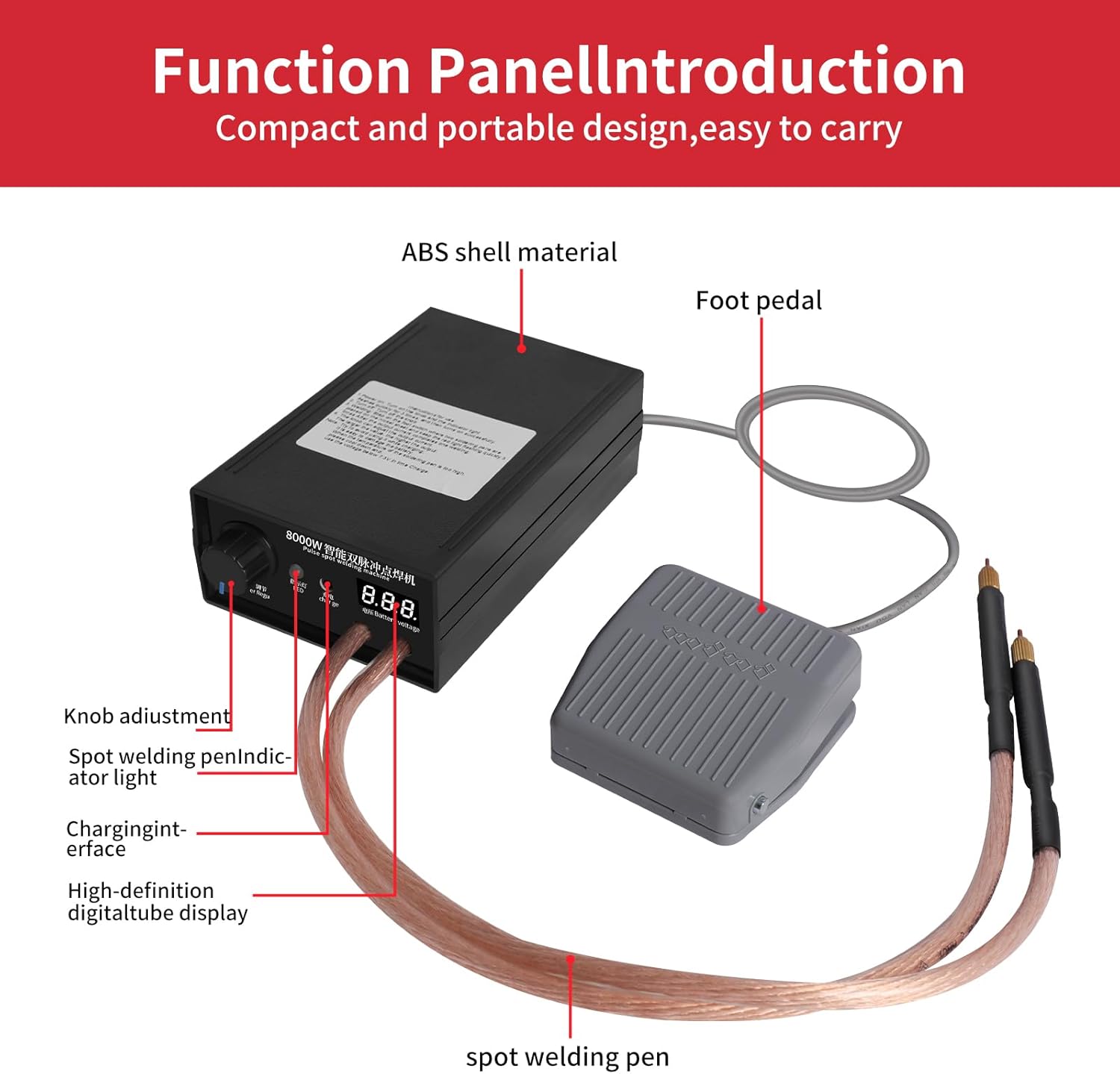
Image 4.1: Diagram illustrating the main components of the spot welder, including the ABS shell, foot pedal connection, knob adjustment, spot welding pen indicator, charging interface, and digital tube display.
Components clau:
- Unitat principal: Houses the control circuitry, battery, and display.
- Spot Welding Pens: Connected via flexible cables, these pens deliver the welding current to the workpiece. The pins are removable and replaceable.
- Interruptor de pedal: Activates the welding process, allowing for precise positioning of the pens.
- Botó d'ajust de potència: Controls the output power from 1 to 9 levels (0-800A).
- Pantalla digital: Shows the internal battery voltagi en temps real.
- Interfície de càrrega: For connecting the power adapter to recharge the internal battery.
5. Configuració
- Càrrec inicial: Before first use, fully charge the spot welder. Connect the power adapter to the charging interface on the unit and plug it into a suitable power outlet. The digital display will show the battery voltage. Charge until the voltage stabilizes at its maximum level.
- Connectar components: Ensure the spot welding pens are securely connected to the main unit. Connect the foot pedal switch to its designated port.
- Preparació de la zona de treball: Set up your work area on a stable, non-flammable surface. Ensure adequate lighting and ventilation. Keep all necessary materials (nickel strips, batteries, etc.) within reach.

Image 5.1: The spot welder connected to its power adapter for charging. Ensure the device is fully charged before operation.
6. Instruccions de funcionament
6.1 Encès/Apagat
The device typically powers on automatically when the knob is turned from the 'OFF' position. To power off, turn the knob fully counter-clockwise to the 'OFF' position.
6.2 Adjusting Welding Power
The spot welder features a 1-9 level knob adjustment for output power, ranging from 0-800A. Turn the knob clockwise to increase the output power. A higher setting is generally required for thicker nickel strips or stronger welds. Start with a lower setting and gradually increase as needed for your specific material.

Image 6.1: The power adjustment knob on the front panel of the spot welder. Rotate to select the desired welding power level.
6.3 Procés de soldadura
- Preparació de la peça de treball: Ensure the nickel strip and battery terminals (or other materials) are clean and free of oxidation.
- Position Pens: Place the two spot welding pens firmly onto the nickel strip, ensuring good contact with the material to be welded. The pens should be positioned close together but not touching each other.
- Iniciar la soldadura: While maintaining firm pressure on the pens, press and hold the foot pedal switch.
- Observar l'indicador: The red light on the unit will blink three times quickly, indicating the welding cycle is in progress. After approximately 0.5 seconds, the unit will output a current to complete the weld.
- Pedal d'alliberament: Release the foot pedal switch once the weld is complete.
- Inspeccionar la soldadura: Carefully inspect the welded joint for strength and appearance. Adjust the power setting if the weld is too weak or if it burns through the material.

Image 6.2: Proper placement of the spot welding pens on a nickel strip, ready for welding. The foot pedal is used to initiate the weld.
Tip for Beginners: La bateria voltage level displayed on the LCD screen is crucial. Ensure the voltage is above 7.3V for optimal welding performance. If it drops below this, recharge the unit.
7. Manteniment
- Neteja: Regularly clean the welding pens and the main unit with a dry, soft cloth. Ensure no metal dust or debris accumulates on the welding tips.
- Welding Pen Tips: The tips of the welding pens are consumable. If they become worn or pitted, they can be removed and replaced to maintain optimal welding performance.
- Emmagatzematge: Store the spot welder in a cool, dry place away from direct sunlight and moisture. Ensure the unit is powered off before storage.
- Cura de la bateria: To prolong battery life, avoid completely discharging the unit. Recharge when the voltage display indicates a low level (below 7.3V).
8. Solució De Problemes
| Problema | Causa possible | Solució |
|---|---|---|
| Soldadures febles o inconsistents | Vol de bateria baixatage, insufficient power setting, poor contact with workpiece, dirty welding tips. | Recharge the unit (if voltage is below 7.3V). Increase power setting. Ensure firm and clean contact. Clean or replace welding tips. |
| La unitat no s'encén | Battery fully discharged, power knob in 'OFF' position. | Connect to charger. Turn power knob clockwise to an active setting. |
| Welds burn through material | Configuració de potència massa alta. | Decrease the power setting using the adjustment knob. |
| Foot pedal unresponsive | Foot pedal not properly connected, faulty pedal. | Check foot pedal connection. If issue persists, contact support. |
9. Especificacions
- Model: SKU930645-US
- Potència de sortida: 8000 W (pic)
- Gruix de soldadura: 0.1mm - 0.3mm (Nickel Sheets)
- Corrent de sortida: 0-800A (Adjustable, 9 levels)
- Mida de la pantalla: 2.5 x 1 cm
- Soldering Pen Length: 350 mm (aproximadament 13.8 polzades)
- Dimensions de la unitat (LxWxH): 15 x 9.5 x 6 cm (aprox. 5.9 x 3.7 x 2.4 polzades)
- Pes de l'article: 1.9 lliures (aprox. 0.86 kg)
- Font d'alimentació: AC/DC (Internal rechargeable battery)
- Aplicacions: 18650 lithium battery packs, iron sheets, stainless steel sheets, 0.1-0.15mm nickel plated steel, 0.1mm pure nickel sheet.
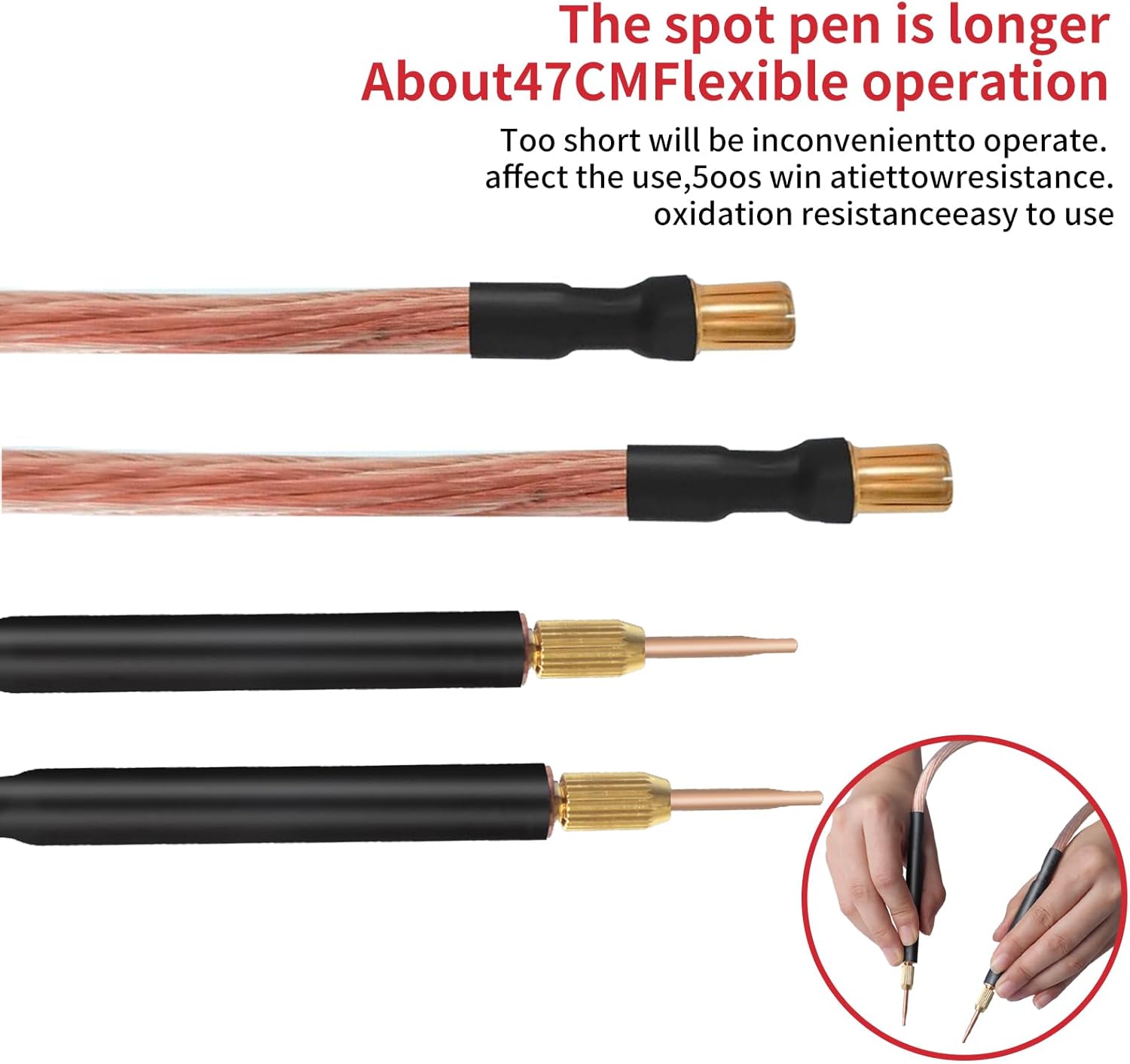
Image 9.1: Detailed dimensions for the spot welding pen cables and the welding pens themselves.
10. Garantia i Suport
For any questions or concerns regarding your Docreate 8000W Handheld Spot Welder, please contact the seller or manufacturer directly. Refer to your purchase documentation for specific warranty terms and contact information.
The manufacturer is Docreate.