
1. Introducció
L'UniFi Gateway Dream Wall (UDW) és una consola de sistema operatiu UniFi de nivell empresarial dissenyada per a implementacions muntades a la paret. Integra una passarel·la de seguretat d'alt rendiment, un controlador de xarxa UniFi i un commutador multiport amb capacitats PoE, proporcionant una solució completa per gestionar i protegir la vostra infraestructura de xarxa. Aquest manual proporciona informació essencial per a la configuració, el funcionament, el manteniment i la resolució de problemes adequats del vostre dispositiu UDW.
2. Informació de seguretat
Si us plau, llegiu, seguiu i guardeu aquestes instruccions. Presteu atenció a tots els avisos. Utilitzeu només els accessoris/adjunts especificats pel fabricant.
- No utilitzeu aquest producte prop de l'aigua.
- No desmunteu el producte. Envieu totes les tasques de manteniment a personal de servei qualificat.
- No obstruïu cap obertura de ventilació.
- Feu servir només la font d'alimentació proporcionada pel fabricant.
- Assegureu-vos una correcta connexió a terra per seguretat.
- Eviteu que el cable d'alimentació sigui trepitjat o pessigat.
3. Contingut del paquet
Verifiqueu que tots els elements que s'enumeren a continuació siguin presents al vostre paquet:
- UniFi Gateway Dream Wall (UDW)
- Cable d'alimentació (específic per a cada regió)
- Suport de muntatge a la paret
- Cargols de muntatge i ancoratges de paret
- Guia d'inici ràpid

Imatge: El dispositiu UniFi Gateway Dream Wall que es mostra amb el cable d'alimentació, el suport de paret i els accessoris de muntatge.
4. Producte acabatview
L'UDW presenta un disseny robust amb diversos ports i indicadors per a una gestió integral de la xarxa.

Imatge: Frontal view de l'UniFi Gateway Dream Wall, exposicióasinel seu elegant disseny blanc i la pantalla central.

Imatge: Lateral view de l'UniFi Gateway Dream Wall, destacant el seu prim profile quan està muntat.

Imatge: L'UniFi Gateway Dream Wall amb la coberta frontal oberta, que revela els components interns i la pantalla tàctil.
4.1 Tauler frontal
- Pantalla tàctil de 4.7 polzades: Proporciona estat en temps real, estadístiques de xarxa i permet la gestió bàsica de dispositius.
- Indicador LED: Indica l'estat del dispositiu (per exemple, arrencant, en línia, error).
4.2 Ports i connectors
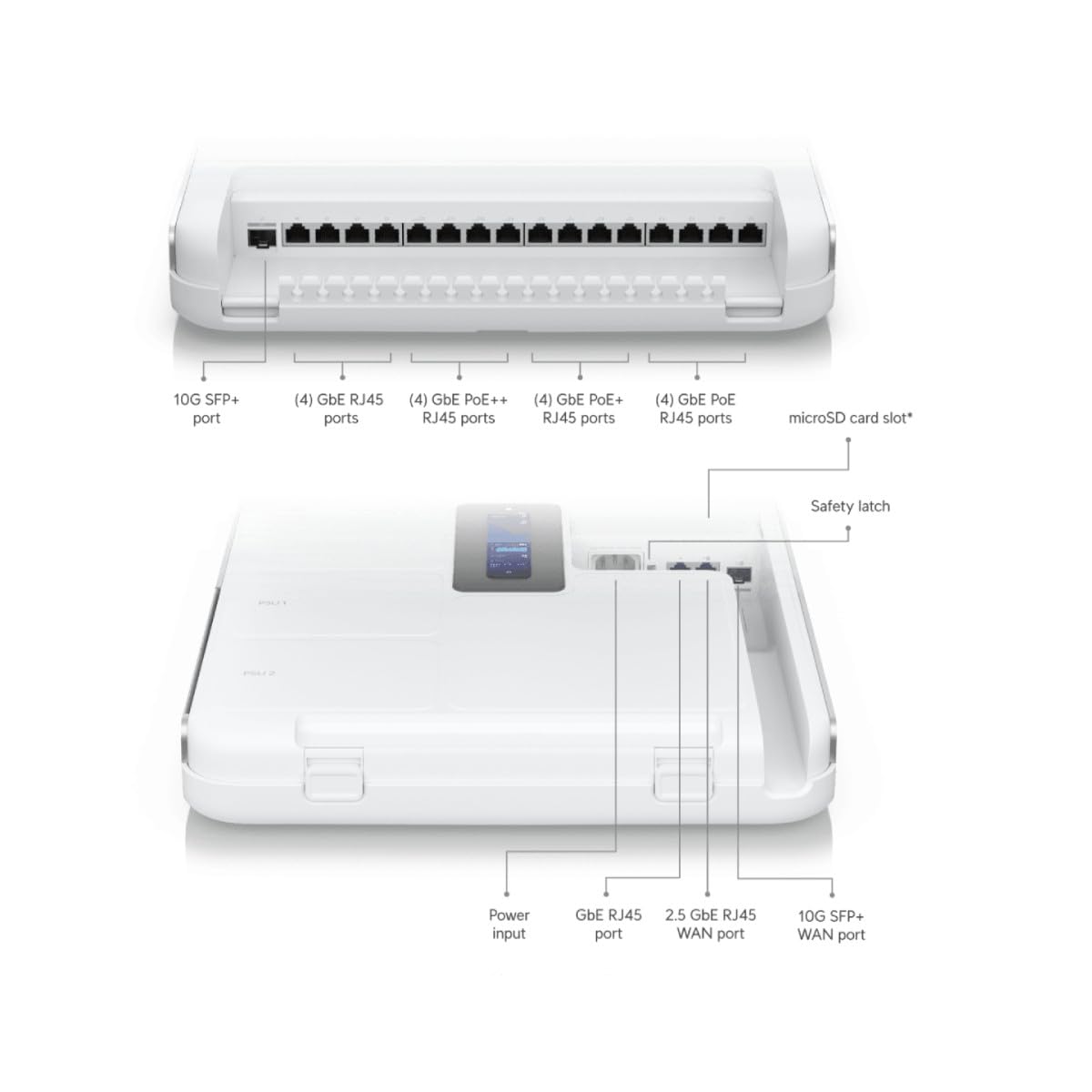
Imatge: Diagrama detallat que il·lustra els diversos ports i connectors de l'UniFi Gateway Dream Wall, incloent-hi les entrades SFP+, RJ45 i d'alimentació.
| Port/Funció | Descripció |
|---|---|
| Port 10G SFP+ | Enllaç ascendent/descendent de fibra d'alta velocitat. |
| (4) Ports GbE RJ45 | Ports Gigabit Ethernet per a connexions de xarxa generals. |
| (4) Ports GbE PoE++ RJ45 | Ports Gigabit Ethernet amb Power over Ethernet Plus Plus (802.3bt) per a dispositius d'alta potència. |
| (4) Ports GbE PoE+ RJ45 | Ports Gigabit Ethernet amb Power over Ethernet Plus (802.3at) per a dispositius PoE estàndard. |
| (4) Ports GbE PoE RJ45 | Ports Gigabit Ethernet amb Power over Ethernet (802.3af) per a dispositius PoE bàsics. |
| Ranura per a targetes microSD | Per a emmagatzematge addicional (per exemple, enregistraments UniFi Protect). |
| Entrada de potència | Es connecta al cable d'alimentació inclòs. |
| Port WAN RJ45 GbE | Port Gigabit Ethernet per a connexió de xarxa d'àrea extensa. |
| Port WAN RJ45 de 2.5 GbE | Port Ethernet Gigabit de 2.5 gigabits per a una connexió de xarxa d'àrea extensa d'alta velocitat. |
| Port WAN 10G SFP+ | Port SFP+ de 10 Gigabit per a connexió WAN de fibra d'alta velocitat. |
| Botó de restabliment | S'utilitza per al restabliment de fàbrica o el mode de recuperació. |
5. Configuració
5.1 Muntatge del dispositiu
- Trieu una ubicació adequada a la paret, assegurant una ventilació adequada i accés a endolls.
- Feu servir el suport de muntatge a la paret com a plantilla per marcar els punts de perforació.
- Perforeu forats pilot i inseriu ancoratges de paret si cal.
- Fixeu el suport de muntatge a la paret amb els cargols proporcionats.
- Alineeu amb cura l'UDW amb el suport i feu-lo lliscar fins que faci clic de manera segura.

Imatge: L'UniFi Gateway Dream Wall es mostra muntat a la paret, amb la tapa oberta per revelar l'estructura interna i els punts de muntatge.
5.2 Connexió de potència
Connecteu el cable d'alimentació inclòs al port d'entrada d'alimentació de l'UDW i després a una presa de corrent amb connexió a terra. El dispositiu s'engegarà automàticament.
5.3 Connexions de xarxa
Connecteu el mòdem o encaminador del vostre proveïdor de serveis d'Internet a un dels ports WAN (GbE RJ45 WAN, 2.5 GbE RJ45 WAN o 10G SFP+ WAN) de l'UDW. Connecteu els vostres dispositius de xarxa local (per exemple, ordinadors, commutadors, punts d'accés UniFi) als ports LAN disponibles (GbE RJ45, GbE PoE, GbE PoE+, GbE PoE++).

Imatge: Un diagrama de xarxa que il·lustra com l'UniFi Dream Wall s'integra en una xarxa, connectant-se a Internet, càmeres de seguretat, punts d'accés, sistemes telefònics i accés a portes.
5.4 Configuració inicial
L'UDW es pot configurar mitjançant l'aplicació mòbil UniFi o un web navegador.
- Ús de l'aplicació mòbil UniFi: Baixeu l'aplicació UniFi Network des de la botiga d'aplicacions mòbils. Assegureu-vos que el Bluetooth estigui habilitat al dispositiu mòbil. L'aplicació hauria de detectar l'UDW. Seguiu les instruccions que apareixen a la pantalla per completar la configuració, com ara assignar un nom al dispositiu, configurar el Wi-Fi i crear una contrasenya d'administrador.
- Utilitzant Web Navegador: Connecteu un ordinador directament a un dels ports LAN de l'UDW. Obriu un web navegador i navegueu fins a l'adreça IP predeterminada (normalment 192.168.1.1). Seguiu l'assistent de configuració per configurar la xarxa.
6. Funcionament
6.1 Accés a la interfície UniFi
Un cop configurat, podeu gestionar la vostra xarxa UDW i UniFi a través de la interfície del controlador de xarxa UniFi. Accediu-hi a través de l'aplicació mòbil UniFi o navegant fins a l'adreça IP de l'UDW en un web navegador des d'un dispositiu de la xarxa local.
6.2 Gestió de la xarxa
El controlador de xarxa UniFi proporciona un tauler de control centralitzat per gestionar tots els aspectes de la vostra xarxa, incloent-hi:
- Monitorització del rendiment de la xarxa i dels dispositius connectats.
- Configuració de VLAN i regles de tallafocs.
- Gestió de l'accés dels usuaris i de les xarxes de convidats.
- Adopció i gestió d'altres dispositius UniFi (per exemple, punts d'accés, commutadors).
6.3 Configuració Wi-Fi
L'UDW inclou funcions Wi-Fi 6 integrades. Podeu configurar xarxes Wi-Fi (SSID), paràmetres de seguretat i funcions sense fil avançades directament des del controlador de xarxa UniFi.
7. Manteniment
Un manteniment regular garanteix un rendiment òptim i una longevitat òptima del vostre UDW.
- Actualitzacions de firmware: Comproveu i instal·leu regularment les darreres actualitzacions de firmware a través del controlador de xarxa UniFi. Això us garanteix que disposeu de les darreres funcions, pegats de seguretat i correccions d'errors.
- Neteja: Mantingueu el dispositiu net i sense pols. Feu servir un drap suau i sec per netejar l'exterior. No utilitzeu netejadors líquids ni aerosols.
- Ventilació: Assegureu-vos que les obertures de ventilació no estiguin obstruïdes per evitar el sobreescalfament.
- Configuració de còpia de seguretat: Feu una còpia de seguretat periòdica de la configuració del controlador de xarxa UniFi en un lloc segur.
8. Solució De Problemes
Aquesta secció tracta problemes comuns que podeu trobar amb el vostre UDW.
- El dispositiu no s'encén: Assegureu-vos que el cable d'alimentació estigui connectat correctament tant a l'UDW com a una presa de corrent que funcioni. Verifiqueu que la presa de corrent tingui corrent.
- Missatge "Comprova la connexió" a la pantalla: Si l'UDW es queda encallat a la pantalla "Comprova la connexió" després de la inicialització, assegureu-vos que la connexió WAN estigui activa i connectada correctament. Si feu servir l'aplicació mòbil UniFi per a la configuració, assegureu-vos que el Bluetooth estigui habilitat i que l'aplicació pugui detectar el dispositiu. De vegades, pot ser necessari restablir les dades de fàbrica (vegeu més avall) si la configuració inicial falla repetidament.
- Sense accés a Internet: Verifiqueu que el vostre mòdem/servei d'Internet estigui actiu. Comproveu la connexió del port WAN a l'UDW. Assegureu-vos que la configuració de xarxa sigui correcta dins del controlador de xarxa UniFi.
- No es pot accedir a la interfície UniFi: Assegureu-vos que el dispositiu estigui connectat a la xarxa de l'UDW. Intenteu accedir a la interfície mitjançant l'adreça IP de l'UDW. Reinicieu l'UDW.
- Rendiment de xarxa lent: Comproveu si hi ha una alta utilització de la xarxa al controlador de xarxa UniFi. Assegureu-vos que el firmware estigui actualitzat. Verifiqueu la integritat del cable.
- Restabliment de fàbrica: Per restablir les dades de fàbrica, localitzeu el botó de restabliment (sovint un petit forat) al dispositiu. Amb l'UDW encès, utilitzeu un clip o un objecte prim similar per prémer i mantenir premut el botó de restabliment durant aproximadament 10-15 segons fins que el dispositiu es reiniciï. Això restablirà tots els paràmetres als valors predeterminats de fàbrica.
9. Especificacions
Especificacions tècniques clau per a l'UniFi Gateway Dream Wall (UDW):

Imatge: Una imatge interna view de l'UniFi Gateway Dream Wall amb les característiques i dimensions clau destacades, com ara SSD integrat, Wi-Fi 6, velocitat d'enrutament i fonts d'alimentació.
| Característica | Detall |
|---|---|
| Número de model | UDW |
| Dimensions (A x A x P) | 26.14 x 17.48 x 4.96 polzades (aprox. 664 x 444 x 126 mm) |
| Pes | 1.32 lliures (aprox. 0.6 kg) |
| Emmagatzematge integrat | SSD de 128 GB |
| Wi-Fi estàndard | Wi-Fi 6 (ràdio dual per a empreses) |
| Rendiment d'encaminament | Més de 3.5 Gbps |
| Font d'alimentació | Sistema d'alimentació redundant integrat |
| Mostra | Pantalla tàctil de 4.7" per a la gestió |
| Primer disponible | 6 d'agost de 2023 |
10. Informació de la garantia
Els productes Ubiquiti estan coberts per una garantia limitada. Per a conèixer els termes i condicions detallats de la garantia, consulteu la pàgina oficial d'Ubiquiti. weblloc web o la targeta de garantia inclosa amb el producte. Conserveu el comprovant de compra per a reclamacions de garantia.
11. Suport
Per obtenir assistència tècnica, documentació del producte i fòrums de la comunitat, visiteu el lloc web oficial d'assistència d'Ubiquiti. weblloc:
També podeu trobar recursos addicionals i contactar directament amb l'assistència a través de la interfície del controlador de xarxa UniFi o de l'aplicació mòbil UniFi.