
KRUX KRX0137
ENDORFY Krux Qara 60% Mechanical Keyboard User Manual
Model: KRX0137
Introducció
This manual provides comprehensive instructions for the setup, operation, maintenance, and troubleshooting of your ENDORFY Krux Qara 60% Mechanical Keyboard. Please read this manual thoroughly before using the product to ensure proper functionality and longevity.
Producte acabatview
The ENDORFY Krux Qara 60% is a compact mechanical gaming keyboard designed for performance and portability. It features Outemu Red Mechanical Switches, zone RGB backlighting, and a durable construction.
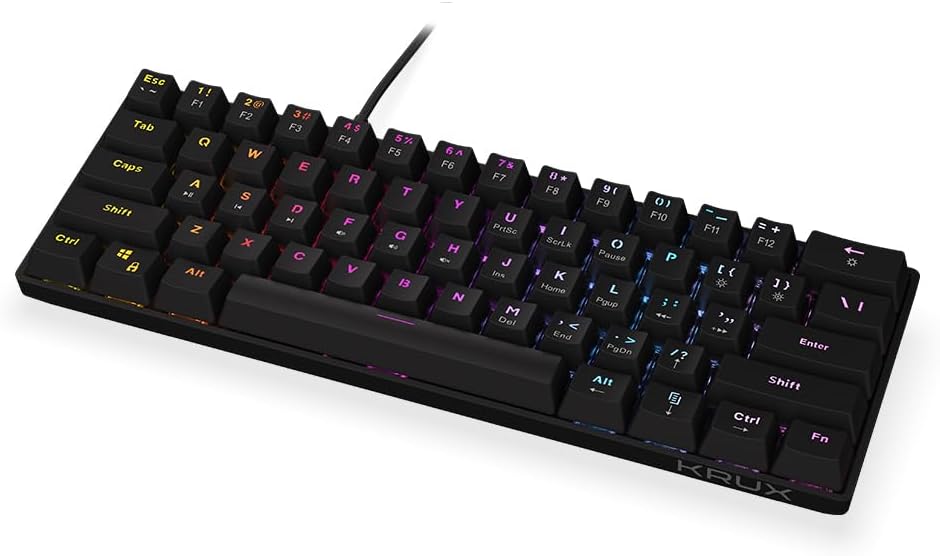
Figura 1: Davant view of the ENDORFY Krux Qara 60% Mechanical Keyboard, showcasing its compact 60% layout and vibrant RGB zone backlighting. The keyboard features black keycaps with white legends.

Figura 2: Top-down perspective of the keyboard, highlighting the keycap layout and the integrated USB-A cable connection point at the top center.

Figura 3: posterior view of the keyboard, showing the product label with model information (KRX0137) and certification marks. The two adjustable feet are visible in their folded position.
Contingut del paquet
Assegureu-vos que hi hagi tots els elements abans de continuar amb la configuració:
- ENDORFY Krux Qara 60% Mechanical Keyboard
- USB cable (integrated)
- Manual d'usuari (aquest document)
Configuració
- Desembalatge: Traieu amb cura el teclat i els seus accessoris de l'embalatge.
- Connexió: Connect the integrated USB-A cable from the keyboard to an available USB port on your computer (PC, Linux, Mac).
- Instal·lació del controlador: The keyboard is plug-and-play and typically does not require additional drivers for basic functionality. Your operating system should automatically recognize the device.
- Col·locació: Place the keyboard on a stable, flat surface. You may adjust the keyboard height using the foldable feet located on the underside for ergonomic comfort.

Figura 4: lateral view illustrating the keyboard's profile and the adjustable feet in their extended position, providing an elevated typing angle.
Instruccions de funcionament
Funcionalitat bàsica
The keyboard functions as a standard QWERTY input device. All alphanumeric keys, symbols, and basic modifiers (Shift, Ctrl, Alt) operate as expected.
Function Key Combinations (Fn Layer)
Due to its 60% compact layout, many standard keyboard functions are accessed via the Fn key in combination with other keys. The secondary functions are typically printed on the front or side of the keycaps.
- Fn + Number Row (F1-F12): Accesses F1 through F12 functions. For exampel, Fn + 1 for F1.
- Fn + P, [, ]: Multimedia controls (Play/Pause, Previous Track, Next Track).
- Fn + ;, ', /: Controls de volum (Silenciar, Baixar volum, Pujar volum).
- Fn + Maj dreta: Tecles de fletxa (amunt, avall, esquerra, dreta).
- Fn + M, <, >: Home, End, PgUp, PgDn.
- Fn + I, K, L: Insert, Home, Page Up.
- Fn + U, J, H: Print Screen, Scroll Lock, Pause Break.
Control de la llum de fons
The keyboard features zone RGB backlighting. Use the following combinations to control the lighting:
- Fn + \|: Cycle through backlight modes.
- Fn + Intro: Ajusteu la brillantor de la llum de fons.
- Fn + Right Ctrl: Canvia el color de la llum de fons.
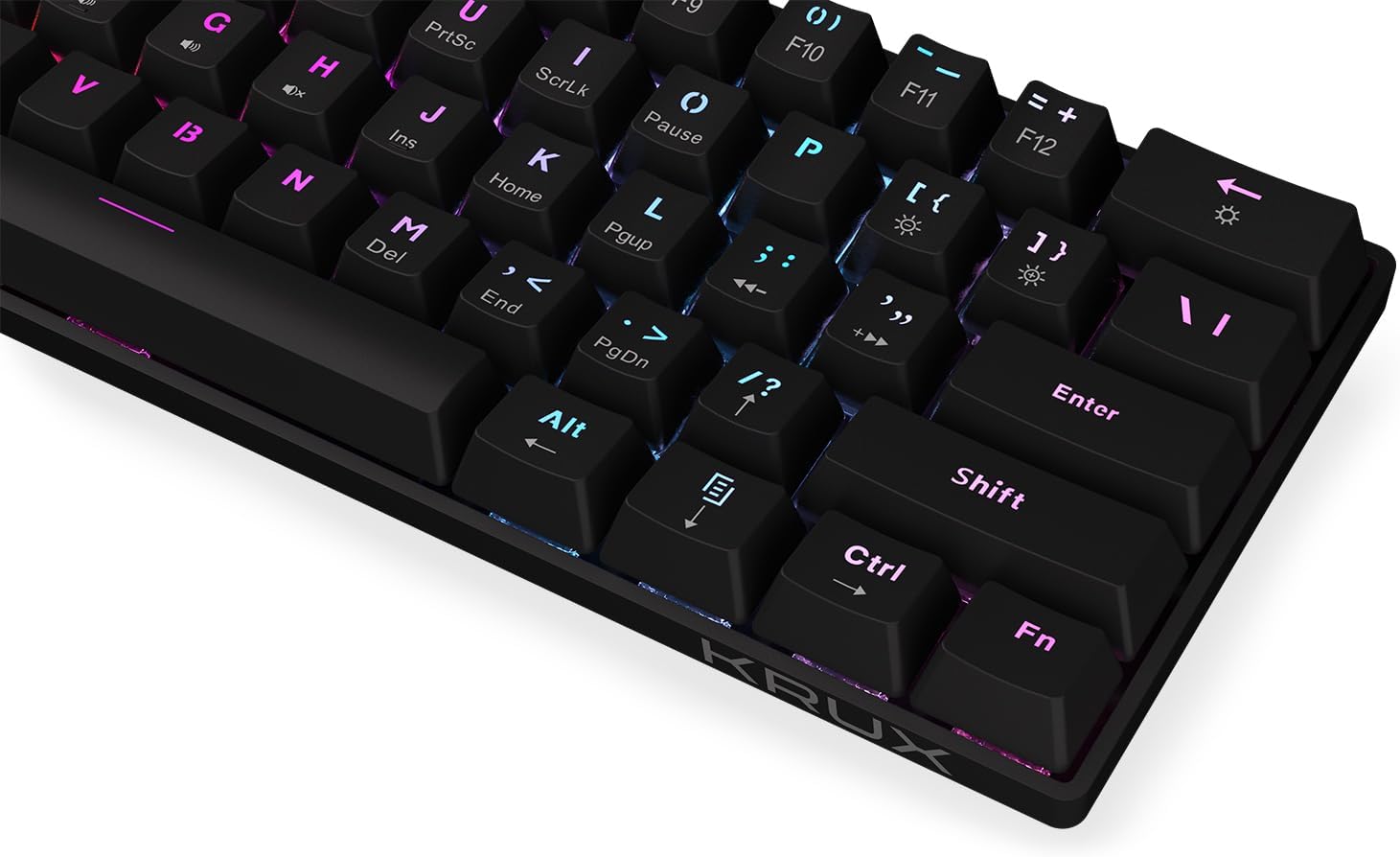
Figura 5: Un primer pla view of the keycaps, demonstrating the RGB backlighting effect and the secondary functions printed on the front of some keys.
Manteniment
Un manteniment regular ajuda a allargar la vida útil del teclat:
- Neteja: Use a soft, dry cloth to wipe the surface of the keyboard. For dust and debris between keycaps, use compressed air. Avoid liquid cleaners directly on the keyboard.
- Vessaments: In case of liquid spills, immediately disconnect the keyboard from your computer. Turn it upside down to drain liquid and allow it to dry completely before reconnecting. Do not use a hairdryer as excessive heat can damage components.
- Emmagatzematge: Guardeu el teclat en un lloc fresc i sec, allunyat de la llum solar directa i de temperatures extremes.
Resolució de problemes
| Problema | Causa possible | Solució |
|---|---|---|
| El teclat no respon | Connexió USB fluixa, port USB defectuós, error del sistema. | Assegureu-vos que el cable USB estigui connectat correctament. Proveu un port USB diferent. Reinicieu l'ordinador. |
| Les claus no es registren o s'escriuen dues vegades | Pols/restos sota la tapa de les tecles, mal funcionament de l'interruptor. | Use compressed air to clean around the affected key. If problem persists, contact support. |
| Backlight not working or inconsistent | Backlight setting, software glitch. | Premeu Fn + Intro to adjust brightness. Cycle through modes with Fn + \|. Restart computer. |
| Fn key combinations not working | Incorrect key combination, software conflict. | Refer to the "Operating Instructions" section for correct combinations. Ensure no conflicting software is running. |
Especificacions
- Model: KRX0137
- Tipus de teclat: 60% Mechanical Gaming Keyboard
- Interruptors: Outemu Red Mechanical Switches
- Il·luminació de fons: Zone RGB
- Connectivitat: USB-A per cable
- Dimensions: 29.1 x 10.1 x 3.9 cm (11.46 x 3.98 x 1.54 polzades)
- Pes: 506 g (1.11 lliures)
- Sistemes operatius compatibles: Windows 10, Mac OS X 10.12 Sierra, Linux
- Components inclosos: USB cable (integrated)
Garantia i Suport
For warranty information and technical support, please refer to the official KRUX weblloc web o poseu-vos en contacte amb el vostre distribuïdor local. Conserveu el comprovant de compra per a reclamacions de garantia.
Fabricant: Krux
Weblloc: www.krux.tech (Note: This is a placeholder link, please refer to the official manufacturer's website for accurate support information.)
Ask a question about this manual
Ask about setup, troubleshooting, compatibility, parts, safety, or missing instructions. Manuals+ will review the question and use this page’s manual context to help answer it.