
1. Introducció
The Celestron StarSense Explorer 150AZ is an app-enabled telescope designed to simplify stargazing. This instrument utilizes your smartphone to analyze the night sky and determine the telescope's real-time position, making celestial object location accessible for beginners. The StarSense Explorer app employs patented sky recognition technology and a Lost in Space Algorithm (LISA) for accurate guidance. By aligning your smartphone with the telescope optics, users can quickly begin exploring the night sky.
The telescope features a 150mm Newtonian reflector with highly reflective coatings, providing clear and detailed views of celestial bodies such as the Moon, planets like Jupiter and Saturn, and deep-sky objects including the Orion Nebula and Andromeda Galaxy. Its tabletop Dobsonian base is compact, lightweight, and designed for portability, offering a low-profile setup that can be convenient for various observers, including children.

Figure 1: The Celestron StarSense Explorer 150AZ Tabletop Dobsonian Telescope in its assembled state.
2. Configuració
2.1 Desembalatge i identificació de components
Carefully unpack all components from the box. Verify that all parts are present:
- Optical tube and base
- StarSense Explorer dock
- Cercador StarPointer
- 25mm eyepiece
- 10mm eyepiece
- Eyepiece rack, panning knob, and collimation cap

Figure 2: All components included with the Celestron StarSense Explorer 150AZ telescope, ready for assembly.
2.2 Instruccions de muntatge
- Connecteu el tub òptic a la base: Securely fasten the optical tube to the Dobsonian tabletop base. Ensure all connections are tight.
- Install the StarPointer Finderscope: Mount the red-dot finderscope onto its designated bracket on the optical tube.
- Attach the StarSense Explorer Smartphone Dock: Secure the smartphone dock to the telescope. This dock will hold your smartphone during observation.
- Inserir oculars: Begin with the lower magnification 25mm eyepiece for initial setup and wider field of view.
While assembly is generally straightforward, some users have noted that the provided screwdriver may not be optimal. Using a higher quality screwdriver can facilitate the process. Exercise care during assembly to prevent damage to components.
2.3 Compatibilitat amb telèfons intel·ligents
The StarSense Explorer app is compatible with most modern smartphones. It requires Android 12 or later, or iOS 18 or newer, including iPhone XR and subsequent models. Ensure your smartphone meets these requirements for optimal performance.
2.4 Optional Tripod Use
The telescope is designed for tabletop use. For observers preferring a standing position or requiring adjustable height, a dedicated Celestron tripod (sold separately) can be used. This tripod allows the tabletop Dobsonian to be raised to a comfortable height, typically extending from 24 inches to 41 inches.

Figure 3: The Celestron StarSense Explorer 150AZ telescope mounted on an optional tripod for adjustable viewalçada.
3. Funcionament
3.1 StarSense Explorer App Usage
The StarSense Explorer app is central to operating this telescope. Download and install the app from your smartphone's app store (Google Play or Apple App Store).

Figure 4: The StarSense Explorer app guides users with on-screen arrows to locate celestial objects.
- Dock Your Smartphone: Place your smartphone securely into the StarSense Explorer dock on the telescope.
- Inicieu l'aplicació: Open the StarSense Explorer app. The app will prompt you through an alignment process to synchronize your phone's camera with the telescope's view. Important: Use the camera function within the telescope app for alignment, not your phone's standard camera application.
- Sky Recognition Technology: The app uses patented technology to analyze star patterns and determine the telescope's exact position in real-time. This technology provides precise guidance to celestial objects.
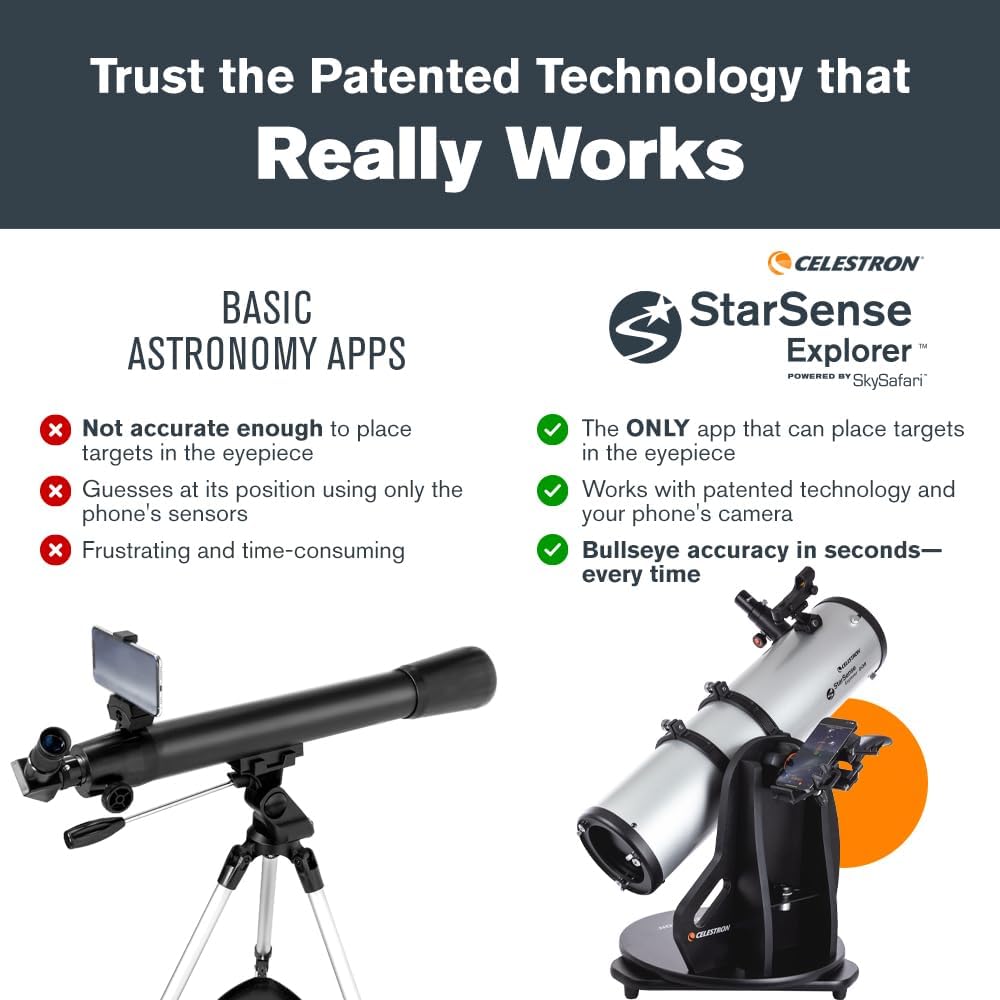
Figure 5: The StarSense Explorer app utilizes patented technology for accurate celestial object placement in the eyepiece, unlike basic astronomy apps.
3.2 Locating Celestial Objects
The app automatically generates a list of the best objects visible based on your current time and location. This feature, titled "Tonight's Best Targets," helps users identify planets, bright nebulae, galaxies, and star clusters.

Figure 6: The StarSense Explorer app displays a curated list of celestial objects recommended for viewing based on your location and time.
Select an object from the list. The app will display on-screen arrows guiding you to manually move the telescope. Continue adjusting the telescope's position until the bullseye indicator on your smartphone screen turns green. This indicates that the target object is centered and ready for viewing through the eyepiece.
3.3 Viewing Through the Eyepiece
Once the target is centered, look through the telescope's eyepiece. The telescope includes two eyepieces:
- 25mm Eyepiece: Provides 30x magnification, ideal for wide-field views and locating objects.
- 10mm Eyepiece: Provides 75x magnification, suitable for more detailed observations of planets and lunar features.
To change magnification, carefully remove the currently installed eyepiece and insert the desired one. Use the focuser knob to achieve a sharp image.

Figure 7: The included 25mm and 10mm eyepieces offer 30x and 75x magnification, respectively.
Video 1: Official video demonstrating the features and operation of the Celestron StarSense Explorer Tabletop Dobsonian telescope.
4. Manteniment
4.1 Cleaning the Optics
Dust and moisture can accumulate on the telescope's optical surfaces. To clean the primary mirror or eyepieces:
- Use a soft brush or compressed air to remove loose dust particles.
- For smudges or fingerprints, use a specialized optical cleaning solution and a microfiber cloth designed for optics. Apply the solution to the cloth, not directly to the lens.
- Wipe gently in a circular motion from the center outwards. Avoid excessive pressure.
- Never touch optical surfaces with bare hands.
4.2 Cures generals i emmagatzematge
- Store the telescope in a dry, dust-free environment when not in use.
- Keep the dust caps on the optical tube and eyepieces to protect them from dust and debris.
- Avoid exposing the telescope to extreme temperatures or sudden temperature changes, which can cause condensation.
- Periodically check all screws and fasteners to ensure they are secure.
5. Solució De Problemes
5.1 App Alignment Issues
If the StarSense Explorer app is not accurately aligning or locating objects:
- Ensure Correct Camera Usage: Verify that you are using the camera function integrated within the StarSense Explorer app for alignment, not your smartphone's native camera application.
- Check Smartphone Docking: Ensure your smartphone is securely seated and properly aligned within the StarSense Explorer dock.
- Recalibrar: Follow the in-app instructions to recalibrate the alignment between your phone and the telescope.
- Factors ambientals: Ensure you are observing under clear skies with sufficient visible stars for the app's sky recognition technology to function effectively. Light pollution can hinder performance.
5.2 Blurry or Unclear Views
If images appear blurry or out of focus:
- Ajustar el focus: Use the focuser knob to fine-tune the image. Turn it slowly in both directions until the image is sharp.
- Selecció d'oculars: Start with the 25mm eyepiece (lower magnification) to locate and focus on an object, then switch to the 10mm eyepiece for higher magnification if desired.
- Condicions atmosfèriques: Atmospheric turbulence (seeing conditions) can affect image clarity, especially for high-magnification views.
- Optics Cleanliness: Refer to the Maintenance section for cleaning instructions if the optics are dirty.
5.3 Difficulty Tracking Objects
The Dobsonian mount requires manual tracking. If objects drift out of view ràpidament:
- Moviment suau: Practice smooth, continuous movements with the altazimuth base to follow celestial objects as they move across the sky due to Earth's rotation.
- Estabilitat de la base: Ensure the telescope is placed on a stable, level surface to prevent unwanted movement or vibrations.
6. Especificacions
| Característica | Detall |
|---|---|
| Marca | Celestron |
| Nom del model | StarSense Explorer 150AZ |
| Número de model | 22482 |
| Disseny òptic | Reflector newtonià |
| Diàmetre de la lent objectiu | 150 mil·límetres (6 polzades) |
| Distància focal | 650 mil·límetres |
| Longitud del tub òptic | 723.9 mil·límetres |
| Oculars inclosos | 25mm (30x magnification), 10mm (75x magnification) Kellner eyepieces |
| Cercador | StarPointer™ red-dot finderscope |
| Muntatge del telescopi | Altazimuth Tabletop Dobsonian base |
| Tipus d'enfocament | Enfocament manual |
| Font d'alimentació | Manual Operation Without External Power Source |
| Revestiment | Alumini amb revestiment de SiO2 |
| Camp de View | 1.15 graus |
| Límit de Dawes | 1.03 Arc Sec |
| Surt el diàmetre de l’alumne | 6 mil·límetres |
| Dimensions del producte (P x A x A) | 19 "P x 19" W x 32.5" H |
| Pes de l'article | 25 lliures (11.33 kg) |
| Pes del tub òptic | 9 lliures (4.08 kg) |
| Pes base | 16 lliures (7.26 kg) |
| Dispositius compatibles | Smartphone (Android 12+, iOS 18+, iPhone XR+) |
| Accessoris inclosos | StarSense Explorer dock, Starry Night Educational Software, Collimation Cap |

Figure 8: Weight distribution of the Celestron StarSense Explorer 150AZ telescope components.
7. Garantia i assistència
7.1 Informació de la garantia
The Celestron StarSense Explorer 150AZ Telescope is covered by a Garantia limitada de dos anys. Aquesta garantia cobreix els defectes de materials i de mà d'obra en ús normal.
7.2 Atenció al client
For technical assistance, troubleshooting, or warranty claims, please contact Celestron's customer support. Unlimited support is available from our team of US-based experts. Refer to the official Celestron weblloc web per obtenir informació de contacte actualitzada i recursos de suport.